






Self-service kiosks have become a core part of modern retail, hospitality, and quick-service restaurants. Whether you’re ordering food, checking in at a hotel, or buying tickets, the experience is powered by a well-structured digital + hardware system.
In this article, we explain how kiosk works, break down the kiosk system workflow, and walk through the full self ordering system process from user interaction to backend order fulfillment.
Introduction: What Happens Inside a Self-Service Kiosk?
A self-service kiosk is more than just a touchscreen terminal. It is a complete ecosystem that combines:
- User interface (UI)
- Backend system (server + database)
- Payment processing system
- Order management system
Understanding how kiosk works requires looking at how these layers interact in real time. Companies like AONKIOSK design integrated systems that ensure fast, accurate, and seamless transactions.
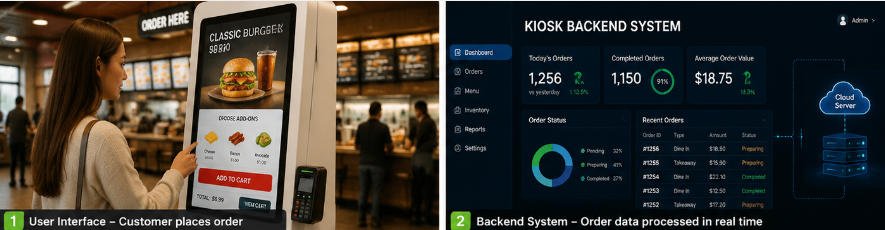
1. User Interface (Front-End Experience)
The user interface is the first and most visible part of the kiosk system workflow. It is where customers directly interact with the system.
Key Functions of the UI
- Product browsing (menu, items, services)
- Customization (size, add-ons, preferences)
- Order summary and confirmation
- Language selection and accessibility options
How it fits into “how kiosk works”
When analyzing how kiosk works, the UI is responsible for converting user intent into structured digital data. Every tap, selection, or swipe becomes part of the self ordering system process.
A well-designed UI improves:
- Order speed
- User satisfaction
- Reduction of human error
2. Backend System (Brain of the Kiosk)
The backend system is the core engine behind the kiosk system workflow. It processes all data sent from the user interface and communicates with multiple systems.
Core Components of Backend System
- Product database (menu items, pricing, availability)
- Business rules engine (discounts, combos, taxes)
- Order management system (OMS)
- Cloud server or local server integration
How it works in real time
Once a customer completes their selection:
- The UI sends order data to the backend
- The backend validates pricing and availability
- The system generates a unique order ID
- Order is sent to kitchen/POS/fulfillment system
This step is essential in understanding how kiosk works because it ensures accuracy and synchronization across all business operations.
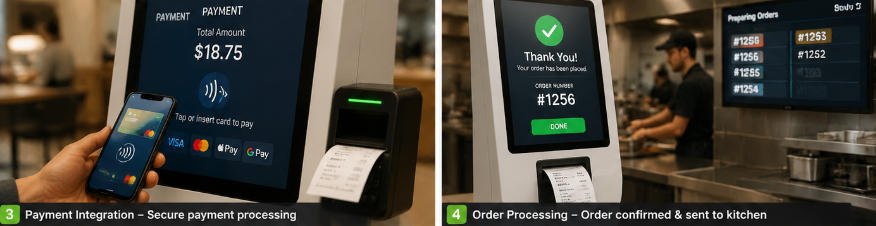
3. Payment Integration (Secure Transaction Layer)
Payment processing is one of the most critical stages in the self ordering system process.
Supported Payment Methods
- Credit/debit cards
- NFC / contactless payments
- Mobile wallets (Apple Pay, Google Pay, etc.)
- QR code payments (in some regions)
Payment Workflow in Kiosk System
- Customer selects “Pay Now”
- Payment gateway encrypts transaction data
- Bank or payment provider authorizes payment
- Confirmation is sent back to kiosk system
- Order status changes to “Paid”
Why it matters in kiosk system workflow
Without secure payment integration, the entire kiosk system workflow breaks. That’s why modern kiosk solutions prioritize PCI-compliant encryption and secure APIs.
4. Order Processing Flow (End-to-End System Workflow)
The order processing flow is the complete journey from user selection to order fulfillment. This is the most important part of understanding how kiosk works in real-world environments.
Step-by-Step Self Ordering System Process
Step 1: User Interaction
Customer interacts with the touchscreen UI and builds their order.
Step 2: Order Submission
The kiosk sends order data to the backend system.
Step 3: System Validation
Backend checks:
- Item availability
- Pricing rules
- Promotions or discounts
Step 4: Payment Processing
Customer completes payment through integrated gateway.
Step 5: Order Confirmation
System generates:
- Order number
- Receipt (digital or printed)
- Kitchen display notification
Step 6: Fulfillment
Order is sent to:
- Kitchen Display System (KDS)
- POS system
- Staff dashboard
Step 7: Completion
Customer receives order notification when ready.
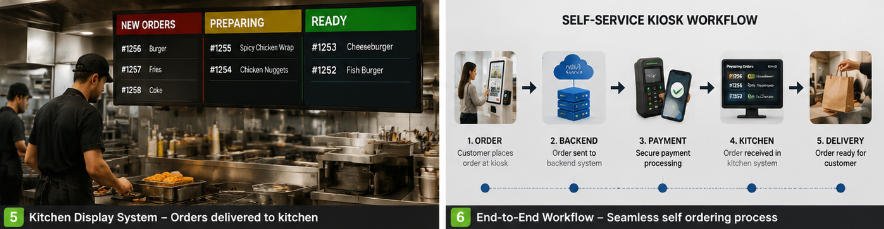
How the Full Kiosk System Workflow Connects
To fully understand how kiosk works, you need to see how all components are connected:
- UI captures customer input
- Backend processes logic and data
- Payment system handles transactions
- Order system distributes fulfillment tasks
This seamless integration defines the modern kiosk system workflow, ensuring speed, accuracy, and operational efficiency.
Why Businesses Use Self-Service Kiosks
The self ordering system process is widely adopted because it provides:
- Faster service speed
- Reduced labor costs
- Improved order accuracy
- Higher average order value
- Better customer experience
Restaurants, retail stores, hospitals, and transportation hubs all rely on kiosk systems to improve operational efficiency.
Conclusion
Understanding how kiosk works is essential for businesses planning to adopt automation. The complete kiosk system workflow includes user interaction, backend processing, secure payment integration, and efficient order fulfillment.
A well-designed self ordering system process ensures smooth communication between customers and business systems, ultimately improving both efficiency and profitability.
Modern manufacturers like AONKIOSK continue to innovate in this space, delivering integrated solutions that power the future of self-service technology.






