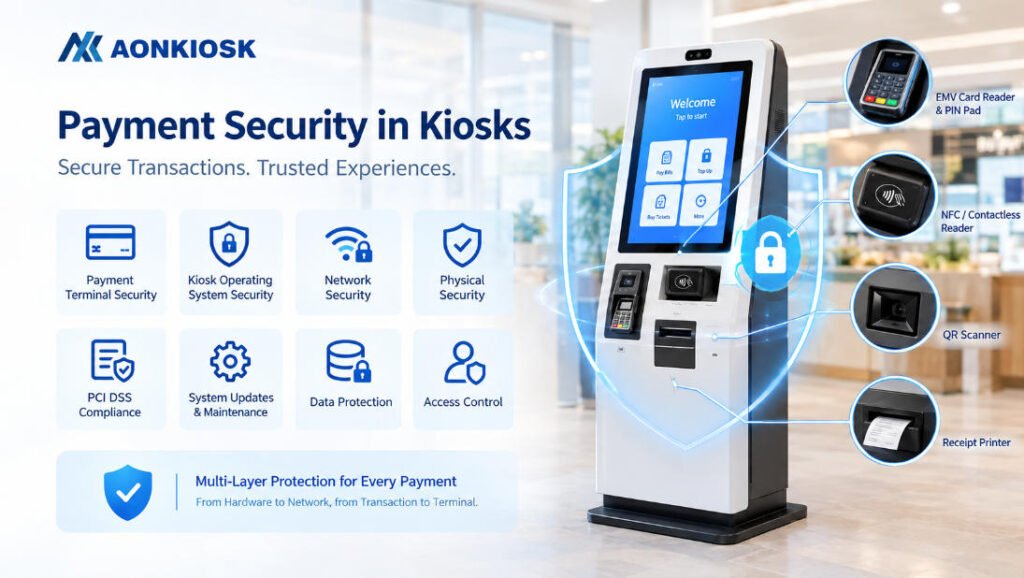
Payment security in a self-service kiosk is not determined by the card reader alone. A secure kiosk must protect the payment device, kiosk operating system, network connection, application layer, physical enclosure, and the handoff between the kiosk and the payment processor.
For operators, the practical goal is simple: minimize the amount of sensitive payment data handled by the kiosk, use appropriately approved payment hardware, restrict access to the kiosk, and keep the complete payment environment maintained throughout its service life.
AONKIOSK designs kiosk hardware around these integration requirements. Its retail and payment kiosk platforms can be configured with card readers, NFC/contactless modules, QR scanners, receipt printers, and other peripherals according to the target application. The exact security and compliance scope, however, depends on the selected payment device, software, processor, acquiring bank, deployment market, and system architecture.
What Payment Security Means in a Kiosk
A kiosk is different from a traditional staffed checkout because it is physically accessible to the public and may operate for long periods with limited supervision. Payment security therefore has two dimensions:
- Transaction security: protecting payment credentials and transaction data during card, NFC, QR, or wallet payments.
- Terminal security: preventing unauthorized physical or software access to the kiosk and its connected payment components.
A secure design should also consider the complete payment flow:
- Customer selects a product or service.
- The kiosk sends the transaction request to the payment application or terminal.
- The payment device communicates with the card, mobile wallet, processor, or acquiring environment.
- Authorization is returned to the application.
- The kiosk displays the result and optionally prints a receipt.
The kiosk should not unnecessarily collect, store, or expose sensitive card data during this process.
Choose the Payment Architecture First
Before selecting the kiosk enclosure or internal computer, define how payment will actually be processed. This is one of the most important steps in a secure kiosk project.
A common approach is to use a dedicated payment terminal supplied by a payment provider or processor. The terminal handles sensitive card interaction while the kiosk application manages the order, user interface, and transaction status.
This separation can reduce the amount of payment-sensitive information exposed to the general-purpose kiosk computer.
For card payments, the selected device may support EMV contact, contactless/NFC, PIN entry, or other local payment methods. EMV technology uses transaction-specific security mechanisms for chip-based payments, while contactless EMV supports NFC-enabled cards and mobile devices.
For QR and mobile payments, the security model depends on the payment platform and how the QR code is generated, scanned, validated, and linked to the transaction. A QR scanner itself is not a payment-security control; the application and payment backend determine how the transaction is authenticated and authorized.
[Internal Link → NFC & Card Reader Module for Self-Service Kiosks]
Do Not Treat PCI DSS as a Hardware Feature
PCI DSS is a standard for protecting payment account data. It applies to the relevant payment environment, not simply to the kiosk cabinet or one payment peripheral.
This distinction is important when specifying a kiosk.
A payment terminal may have appropriate approvals or certifications for its intended use, but that does not automatically make the complete kiosk deployment PCI DSS compliant. The overall cardholder-data environment, software, network, access controls, service procedures, and responsibilities between the merchant and third-party providers must be assessed.
For this reason, a kiosk manufacturer should avoid making blanket statements such as “this kiosk is PCI compliant” without defining the exact configuration and responsibility boundaries.
Instead, project documentation should identify:
- Payment terminal model and certification status
- Payment processor and gateway
- Whether card data enters the kiosk operating system
- Network architecture and segmentation
- Software responsibilities
- Remote-access method
- Physical access controls
- Logging and monitoring requirements
- Patch and update procedures
- Merchant, integrator, processor, and manufacturer responsibilities
[Internal Link → Retail & Payment Kiosks]
Protect the Kiosk Operating System
The kiosk computer is another security boundary. Even when payment processing is isolated in a dedicated terminal, the kiosk operating system still controls the user interface and communicates with payment-related software.
For Android or Windows kiosks, recommended controls include:
- Use a locked-down kiosk mode rather than a general desktop environment.
- Disable unnecessary applications, ports, services, and user accounts.
- Remove default passwords and test credentials before deployment.
- Restrict administrative access.
- Apply security updates through a controlled maintenance process.
- Prevent users from accessing system settings, file managers, command prompts, or other administrative tools.
- Use application allowlisting where appropriate.
- Encrypt sensitive local data when local storage is required.
- Maintain a controlled recovery image so compromised or damaged terminals can be restored consistently.
AONKIOSK supports Android and Windows configurations on different kiosk platforms. The final security configuration should be established with the software provider and system integrator before production deployment.
Secure Network Communication
Payment kiosks normally require network connectivity for payment authorization, cloud services, POS synchronization, software updates, monitoring, or remote support.
Use encrypted communication for connections carrying sensitive or authentication-related information. Network design should also separate kiosk traffic from unrelated systems where appropriate.
Practical controls include:
- Use secure Wi-Fi or Ethernet configuration.
- Protect network credentials and avoid hard-coded shared passwords.
- Restrict outbound and inbound traffic to required services.
- Use firewall or network security controls appropriate to the deployment.
- Avoid exposing administrative interfaces directly to the public internet.
- Use secure remote-support methods with individual accounts and controlled permissions.
- Monitor unusual connection attempts and repeated transaction failures.
- Document the network path between the kiosk, payment service, and backend systems.
For a multi-kiosk deployment, centralized monitoring and configuration management can make security maintenance more consistent than manually managing every terminal.
Physical Security Matters
A public kiosk is exposed to people who can touch the screen, reach the payment terminal, inspect external ports, and potentially attempt to manipulate cables or hardware.
The enclosure should therefore support physical security as part of the original design.
Important considerations include:
- Secure mounting of the payment terminal.
- Protected internal cable routing.
- Restricted access to the motherboard and storage.
- Lockable service doors or panels.
- Protection against unauthorized USB access.
- Clear visibility of the payment area.
- Tamper-resistant mounting where required by the selected payment device.
- Easy access for authorized maintenance without exposing sensitive components to the public.
Payment hardware should be installed according to the payment provider’s mechanical and security requirements. The card slot, contactless antenna area, PIN pad, display, and accessibility features should remain unobstructed.
[Internal Link → Kiosk Hardware Structure Overview]
AONKIOSK’s engineering process can accommodate payment terminals, NFC readers, QR scanners, printers, cameras, and other modules within customized kiosk structures. This is useful when the payment device has fixed mounting, cable, ventilation, or service-access requirements.
Operational Security After Deployment
Security does not end when the kiosk leaves the factory. A payment kiosk can remain in service for years, so maintenance procedures are part of the security model.
Operators should establish a repeatable checklist covering:
Daily or Routine Checks
- Inspect the payment terminal for visible damage or unusual attachments.
- Confirm that the payment interface operates normally.
- Check receipt printers and other peripherals.
- Review transaction or device alerts.
Periodic Maintenance
- Apply approved operating-system and application updates.
- Review administrator accounts and remote-access permissions.
- Verify network configuration.
- Check storage and system logs.
- Inspect physical locks, cables, and internal components during authorized service.
Incident Response
- Define what happens when a payment terminal appears to have been tampered with.
- Know which party must be contacted: merchant, payment processor, acquirer, integrator, or hardware support.
- Preserve relevant logs according to the organization’s incident procedure.
- Remove compromised equipment from service when required.
[Internal Link → Self-Service Kiosk FAQ]
Common Payment Security Mistakes
Several problems appear repeatedly in kiosk projects.
Using a General-Purpose Card Reader
An NFC identification reader is not automatically a secure payment terminal. Payment applications require appropriate payment functionality, certification, and integration.
Assuming Encryption Solves Everything
Encryption protects data in transit or at rest, but it does not replace access control, secure configuration, physical protection, patch management, or monitoring.
Storing Unnecessary Card Data
If the kiosk does not need sensitive payment information, the architecture should avoid collecting or retaining it.
Ignoring Physical Access
A well-secured backend cannot fully compensate for an exposed payment terminal, accessible USB ports, or unprotected service panels.
Leaving Security Decisions Until Production
Payment terminal dimensions, cable paths, mounting, power, network interfaces, and service access can affect the kiosk structure. These requirements should be defined during engineering.
Forgetting Responsibility Boundaries
A kiosk manufacturer, software provider, payment processor, and merchant may each control different parts of the payment environment. Those responsibilities should be documented before deployment.
Payment Security Checklist for Kiosk Projects
Before approving a payment kiosk for production, confirm:
- □ Payment device and payment method are clearly defined.
- □ The payment architecture minimizes sensitive data handled by the kiosk.
- □ Required payment certifications are confirmed for the target market.
- □ PCI DSS responsibilities and scope have been reviewed by the responsible parties.
- □ Kiosk operating system is locked down.
- □ Default credentials have been removed.
- □ Network communication is protected and appropriately segmented.
- □ Remote access is restricted and auditable.
- □ Payment hardware and internal components have appropriate physical protection.
- □ Software and security updates have a documented process.
- □ Tamper inspection and incident procedures are defined.
- □ Hardware, software, payment, and support responsibilities are documented.
How AONKIOSK Supports Secure Payment Kiosk Integration
AONKIOSK focuses on self-service kiosk hardware and OEM/ODM manufacturing. Its platforms can be configured around project-specific payment terminals, NFC readers, QR scanners, printers, cameras, computing platforms, and mounting requirements.
For example, the APK838 utility bill payment kiosk can be configured with an EMV card reader, encrypted PIN pad, QR scanner, contactless reader, and receipt printer. The final payment modules and compliance requirements are selected according to the payment platform, deployment region, and project specification.
The engineering process is equally important. Payment hardware affects the enclosure opening, mounting position, cable routing, power distribution, service access, and user interface. Defining these requirements early reduces integration problems during production.
[Internal Link → OEM & ODM Self-Service Kiosk Manufacturing]
For businesses planning a new payment kiosk, the most useful approach is to treat security as a system-design requirement rather than a single component. Select the payment architecture first, define the compliance scope, protect the kiosk operating environment, secure network communication, control physical access, and establish a maintenance process before deployment.
A well-designed kiosk should make secure payment processing part of the overall hardware and system architecture—not an afterthought added after the enclosure is finished.