






The shell of the self-service kiosk has special functions. It must work like industrial equipment, but also look like something suitable for use in restaurants, hotel lobbies, supermarkets, hospitals, or airports.
This combination makes the shell specifications more complex than simply choosing between “metal” and “plastic”.
Choosing the wrong material for the kiosk cabinet shell not only increases unnecessary weight, but also increases manufacturing costs, makes on-site maintenance difficult, or quickly ages in the expected environment. Wrong surface treatment methods will also cause many problems. A beautiful high-gloss surface may be very eye-catching in the renderings, but it will show fingerprints within minutes after it is put into use. Mainly based on coatings selected by color may perform poorly near edges, service doors, or installation points that are frequently exposed.
Therefore, for procurement teams, self-service kiosk solution providers, and product engineers, the shell should be selected from the operating environment rather than the appearance.
This guide discusses how to choose materials, sheet metal structures, coatings, textures, and surface treatment processes for commercial display kiosks. One and how these decisions affect manufacturing costs, durability, brand building, maintenance, and production consistency.
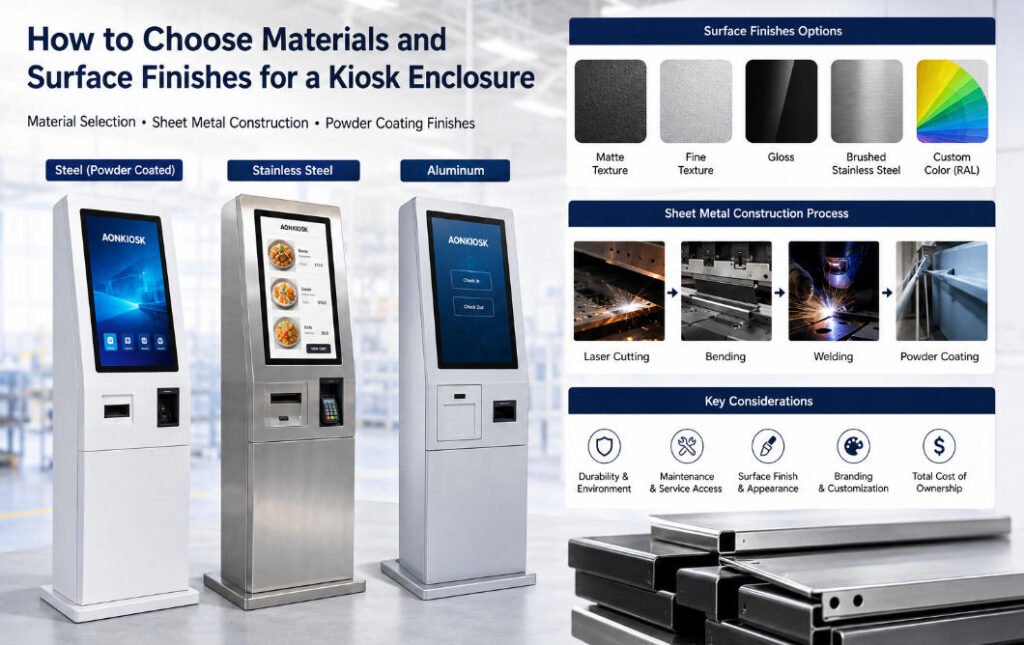
Start With the Operating Environment, Not the Material
There is no universally “best” kiosk enclosure material.
A touchscreen ordering terminal inside a climate-controlled restaurant has different requirements from a payment kiosk installed near a building entrance. A hospital information terminal may require frequent cleaning, while a retail kiosk may face constant customer contact and occasional trolley impact.
Before specifying the enclosure, document where the machine will actually operate.
Consider:
- Indoor, semi-outdoor, or outdoor installation
- Expected operating hours
- Temperature and humidity
- Exposure to rain or condensation
- Dust and airborne contaminants
- Cleaning frequency and cleaning chemicals
- Public accessibility
- Risk of accidental impact or vandalism
- Installation method
- Expected service life
- Branding and appearance requirements
This information should reach the mechanical engineering team before the enclosure drawing is finalized.
Material and finish are only two parts of enclosure performance. Door geometry, seams, ventilation openings, fasteners, gaskets, drainage, screen installation and access-panel design also affect how the cabinet survives real-world use.
Cold-Rolled Steel: The Practical Starting Point for Many Kiosks
For many commercial indoor terminals, cold-rolled steel is a logical starting point.
It is well suited to laser cutting, punching, bending, welding and other processes commonly used to manufacture a sheet metal kiosk. It also provides the structural rigidity required to support large displays, printers, payment devices and internal mounting frames.
Most importantly, steel gives engineers considerable freedom.
Internal brackets can be added where peripherals need support. Service doors can be reinforced around hinges and locks. Mounting plates can be modified during prototyping without redesigning an entire molded structure.
That flexibility matters because kiosk projects often change between the first drawing and the production version.
A payment terminal may move. A larger printer may be selected. Cable clearance may need another 10 mm. Ventilation requirements may change after thermal testing.
Sheet-metal construction makes these revisions relatively manageable.
Cold-rolled steel is therefore particularly suitable for:
- Restaurant self-ordering kiosks
- Retail payment terminals
- Hotel check-in kiosks
- Ticketing machines
- Information kiosks
- Indoor floor-standing terminals
Its main limitation is corrosion resistance. Bare steel should not be treated as a finished external surface. It normally requires an appropriate protective surface treatment.
That is one reason the combination of fabricated steel plus powder coating is so widely used in commercial kiosk manufacturing.
Stainless Steel: Use It Where the Environment Justifies It
Stainless steel is sometimes specified because buyers associate it with higher quality.
That can be the wrong reason to use it.
Stainless steel becomes more valuable when corrosion resistance, frequent cleaning, moisture exposure or a particular industrial appearance is genuinely important.
Potential applications include healthcare equipment, food-service environments, transportation installations and certain semi-outdoor projects.
It can also be left with a brushed finish where the visual design calls for exposed metal rather than a colored coating.
However, specifying stainless steel throughout an entire kiosk can increase both material and fabrication cost without providing a meaningful operational advantage.
A better solution is sometimes a mixed-material construction.
For example, a kiosk might use powder-coated steel for the primary cabinet while using stainless steel only for a frequently touched panel, base section, work surface or component exposed to harsher conditions.
The question should be:
Where does stainless steel solve a real engineering problem?
Not:
Would stainless steel make the specification sound more premium?
Aluminum: Useful When Weight Becomes a Design Constraint
Aluminum offers another option, particularly when enclosure weight matters.
This can be useful for wall-mounted terminals, transportable equipment or designs where reducing structural mass simplifies installation.
Aluminum also offers useful corrosion characteristics and can support high-quality decorative finishes.
The trade-off is that changing from steel to aluminum is not simply a material substitution. Mechanical properties, sheet thickness, fastening methods, welding processes and structural reinforcement may all need to be reconsidered.
For that reason, the material decision should ideally happen early in mechanical design.
Changing a completed steel enclosure drawing to aluminum shortly before production is not the same as changing its paint color.
For buyers comparing the broader characteristics of different cabinet materials, AONKIOSK’s Kiosk Enclosure Materials: Metal vs Steel Selection Guide provides additional technical background.
Material Thickness Is Part of the Structural Design
Material names receive a lot of attention in RFQs. Thickness often receives too little.
Two kiosks described as “powder-coated steel” can have very different structural behavior depending on sheet thickness, cabinet geometry and reinforcement.
However, specifying the thickest possible sheet everywhere is not good engineering either.
Increasing thickness adds:
- Material cost
- Product weight
- Shipping weight
- Fabrication difficulty in some areas
A well-designed sheet metal kiosk normally uses structure intelligently rather than relying entirely on heavy material.
Bends increase stiffness. Internal frames strengthen large cabinets. Reinforcement can be concentrated around the display, base, hinges, locks and peripheral mounting points. Less critical covers may use lighter construction.
This is why asking a supplier only for “steel thickness” provides an incomplete comparison.
A better evaluation looks at the complete mechanical design.
For floor-standing kiosks, pay particular attention to the connection between the upper cabinet and base. A large touchscreen creates leverage when the user pushes the display. The base plate, internal frame and floor anchors all contribute to stability.
The enclosure should be engineered as a structure—not a decorative metal box.
Why Powder Coating Is Common on Commercial Kiosks
For steel enclosures, powder coating provides a practical combination of protection, appearance and production repeatability.
In a typical powder coating kiosk manufacturing process, the metal components are fabricated and prepared before powder is electrostatically applied and cured to form a durable surface layer.
The result can provide consistent coverage across production batches while supporting a wide range of colors and textures.
That makes powder coating particularly useful for OEM projects where the kiosk enclosure has to combine industrial durability with a customer’s visual identity.
But “powder coated” is not a complete surface specification.
Procurement teams should still define:
- Color
- Gloss level
- Texture
- Surface preparation
- Areas that must not be coated
- Appearance acceptance criteria
- Sample approval requirements
These details become increasingly important when several hundred kiosks must visually match a prototype approved months earlier.
Matte, Gloss or Textured Finish?
Surface texture changes both appearance and maintenance behavior.
Matte and Fine-Texture Finishes
For many public-facing kiosks, a matte or fine-textured finish is forgiving.
It tends to make fingerprints, small scratches and minor sheet-metal imperfections less visually obvious than highly reflective surfaces.
That makes it practical for areas surrounding touchscreens, payment terminals and service interfaces.
High-Gloss Finishes
Gloss finishes can produce a polished appearance and may suit certain brand identities, but they deserve careful consideration.
Large glossy surfaces reflect surrounding lights and make fingerprints, cleaning marks and imperfections more visible.
A finish that looks excellent in a showroom photograph may require considerably more cleaning in a busy restaurant.
Coarse-Texture Finishes
A more pronounced texture can create a rugged industrial appearance and conceal minor surface variation.
However, heavy texture is not ideal everywhere. Branding graphics, labels, adhesive components and frequently cleaned surfaces may perform or appear better on smoother panels.
Finish selection should therefore involve both industrial design and maintenance considerations.
Color Selection Is Also a Manufacturing Decision
Brand guidelines often specify colors digitally—HEX, RGB or CMYK.
Metal coating does not work that way.
For kiosk production, physical coating references such as RAL colors are more useful when defining cabinet appearance. Even then, the finished impression can change depending on texture, gloss, lighting and adjacent materials.
A dark matte powder-coated panel beside black tempered glass, for example, may appear different even when both are described simply as “black.”
For brand-sensitive projects, approve a physical sample before mass production.
This becomes particularly important when the enclosure combines:
- Powder-coated steel
- Stainless steel
- Tempered glass
- Plastic bezels
- Payment terminals
- Printed logos
- LED elements
Trying to make five different materials look identical is often less successful than deliberately creating a controlled contrast between them.
Don’t Ignore the Edges, Openings and Service Areas
Enclosure discussions naturally focus on the large visible front panels.
Field failures often begin somewhere less noticeable.
Printer openings, payment terminal cut-outs, ventilation areas, door edges, lock locations and mounting holes experience repeated mechanical contact.
A receipt printer might be opened thousands of times during the product’s life. A maintenance technician may remove the same access panel every few months. Customers may continually place their hands beside the payment terminal.
Those areas deserve additional attention during mechanical design.
Ask:
- Will repeated service access damage the coating?
- Are sharp sheet-metal edges eliminated?
- Are hinges properly supported?
- Can technicians remove panels without scraping adjacent surfaces?
- Are fasteners exposed on customer-facing areas?
- Will water or cleaning liquid collect around openings?
- Can damaged exterior panels be replaced independently?
Good enclosure design considers what the kiosk will look like after three years—not just on the day it leaves the factory.
Outdoor Kiosks Require More Than a Better Paint Finish
One of the most expensive mistakes is taking an indoor enclosure and assuming that better coating turns it into an outdoor kiosk.
It does not.
Outdoor deployment changes the entire mechanical problem.
Rain ingress, condensation, UV exposure, temperature variation, solar heat, dust, sealing, ventilation and corrosion all have to be considered together.
Coating protects surfaces, but it cannot compensate for poorly designed door seals or water paths.
Similarly, using stainless steel does not automatically make the electronics inside an enclosure weatherproof.
If the application requires a defined IP or impact-resistance target, it should be engineered and verified at the enclosure level rather than inferred from the chosen material.
AONKIOSK’s published quality information includes enclosure sealing and mechanical-impact considerations for relevant kiosk configurations, illustrating why environmental protection needs to be approached as a complete mechanical system rather than simply a finish option.
Surface Finish Should Be Chosen Alongside Branding
A kiosk enclosure is often the largest physical representation of a company’s brand inside a store.
That does not mean every branding element should be permanently integrated into the coating.
Different branding methods provide different levels of flexibility.
A permanent logo may be applied through screen printing or another durable marking process. Replaceable vinyl graphics can be more practical when promotions change frequently. Dedicated graphic panels can allow a distributor or operator to rebrand equipment later without replacing the main enclosure.
This matters particularly for OEM manufacturers, distributors and software providers supplying the same hardware platform to several customers.
A neutral kiosk enclosure material and base finish combined with replaceable branding can sometimes create a much more scalable product architecture than manufacturing a completely different enclosure for every customer.
Through its OEM & ODM self-service kiosk manufacturing services, AONKIOSK supports customization of cabinet size, shape, material, color, surface finish, branding and internal hardware configuration.
Design for Maintenance Before Approving the Finish
One practical question often reveals whether an enclosure has been designed for commercial use:
How does a technician replace the printer?
If the answer requires removing the touchscreen, disconnecting unrelated modules or placing painted panels directly on the floor, the problem is not the surface coating. It is the enclosure architecture.
Maintenance design should influence the cabinet from the beginning.
Printers require paper access. Computers may eventually require replacement. Filters and ventilation areas need cleaning. Payment devices sometimes need servicing or upgrading.
A slightly larger maintenance door may add almost nothing to the bill of materials but save hours of field labor across a large deployment.
The same principle applies to exterior panels.
Where practical, high-risk cosmetic areas can be designed as independently replaceable components. A damaged front cover is much cheaper to ship than an entire welded cabinet.
Prototype the Actual Finish, Not Just the Shape
Early kiosk prototypes are sometimes fabricated primarily to confirm dimensions and peripheral installation.
Before mass production, the enclosure should also be evaluated as a finished commercial product.
Review the prototype under realistic lighting.
Touch it repeatedly.
Clean it.
Open every service door.
Load printer paper.
Insert and remove payment devices.
Stand at the same distance as a customer.
Inspect reflections around the display.
Check whether fingerprints become obvious.
Verify that panels align consistently after repeated opening.
These observations can expose problems that are invisible in CAD.
A production prototype should answer more than “Does everything fit?”
It should answer:
Can this material, finish and construction survive the way people will actually use the kiosk?
What to Put in a Kiosk Enclosure RFQ
Instead of asking a manufacturer simply to quote “a metal kiosk cabinet,” provide a structured enclosure specification.
At minimum, define:
Installation environment: Indoor, semi-outdoor or outdoor.
Kiosk format: Floor-standing, countertop, desktop or wall-mounted.
Approximate dimensions: Including screen size and orientation.
Peripheral list: Printer, scanner, payment terminal, camera, NFC reader and other devices.
Preferred material: If already determined—or allow the manufacturer to recommend one.
Structural requirements: Mounting method, stability, access control and security considerations.
Finish: Powder coating, brushed stainless steel or another approved treatment.
Color reference: Preferably with an appropriate physical or industrial color standard.
Texture and gloss: Matte, fine texture, gloss or another specified appearance.
Branding method: Logo, printed graphics, labels or replaceable panels.
Environment target: Cleaning, moisture, dust, temperature and impact requirements.
Service access: Components that must be reachable without major disassembly.
This gives the manufacturer enough information to engineer the enclosure around the application rather than merely quote sheet metal by weight.
Material Cost Is Only One Part of Enclosure Cost
When comparing kiosk quotations, buyers sometimes notice that two apparently similar steel cabinets have very different prices.
The raw material may explain only part of that difference.
Enclosure cost can also include:
- Laser cutting and punching
- Bending
- Welding
- Grinding and surface preparation
- Threaded inserts and hardware
- Internal mounting brackets
- Hinges and locks
- Powder coating
- Branding
- Assembly
- Inspection
- Low-volume setup cost
- Packaging
A kiosk with fewer visible fasteners, tighter panel gaps and easier maintenance may require substantially more fabrication work than a simple cabinet of the same dimensions.
For applications such as retail and payment kiosks, enclosure engineering also has to accommodate scanners, printers, payment devices and other customer-facing modules without compromising accessibility or structure.
That is why enclosure quotations should be compared according to engineering scope and construction—not kilogram price alone.
Final Selection Checklist
Before freezing your enclosure for production, verify five areas.
Environment: Is the selected material suitable for where the kiosk will actually operate?
Structure: Are material thickness, bends, frames, base design and reinforcement appropriate for the kiosk size and mounting method?
Finish: Have color, texture, gloss and surface preparation been defined clearly enough for repeatable production?
Maintenance: Can every important internal component be accessed without damaging finished surfaces or dismantling unrelated hardware?
Production consistency: Has a finished prototype or reference sample been approved before volume manufacturing?
If those five questions have clear answers, the material specification is probably moving in the right direction.
Conclusion
Choosing a kiosk enclosure material is not an isolated purchasing decision.
Cold-rolled steel may provide the best balance of structure, fabrication flexibility and cost for many indoor terminals. Stainless steel becomes valuable when corrosion resistance, frequent cleaning or exposed-metal aesthetics justify it. Aluminum can reduce weight where installation and product architecture demand it.
The surface finish then has to support that material in the actual operating environment.
For many commercial projects, a well-engineered sheet metal kiosk with an appropriate powder-coated finish provides an effective combination of durability, appearance, customization and production scalability. But even the best powder coating kiosk specification cannot compensate for weak structural design, inaccessible maintenance areas or unsuitable environmental engineering.
The most reliable approach is therefore to choose enclosure material, structure and finish together.
Define the operating environment first. Engineer the enclosure around the display and peripherals. Prototype the real construction. Evaluate maintenance access. Approve physical finish samples. Then release the design for production.
That process produces something more valuable than a kiosk that looks good in a product photo.
It produces an enclosure designed to remain functional—and presentable—through years of commercial use.






