A real-world government service application in Quezon City**
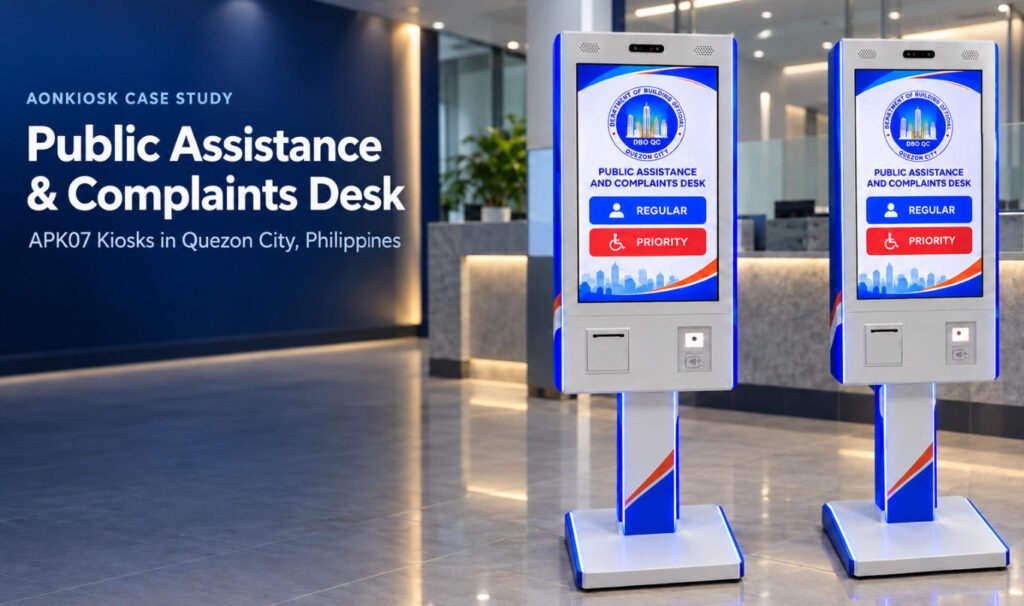
At a public service office in Quezon City, Philippines, two customized AONKIOSK APK07 kiosks display a simple starting point for visitors seeking assistance. The customer-supplied on-site photo shows the kiosks branded for the Department of the Building Official (DBO), with a Public Assistance and Complaints Desk interface offering Regular and Priority selections.
The project illustrates how a configurable self-service kiosk platform can be adapted beyond its standard commercial use. In this setting, the APK07 hardware supports a government-facing visitor interface, with cabinet graphics and on-screen content tailored to the local service environment.
The service setting
Government counters receive visitors with different needs, including general inquiries, requests for assistance, and complaints. A clear first step helps people identify the appropriate service path when they arrive.
For this project, the on-screen interface presents two prominent options: Regular and Priority. The large touch display, high-contrast buttons, and recognizable local branding make the entry point easy to identify in the office. The photo documents two freestanding units placed side by side in the customer-facing area.
The APK07 configuration shown on site
The supplied photo shows floor-standing APK07 kiosks with a portrait touch display, custom blue-and-white cabinet graphics, and the DBO Quezon City identity on screen. The lower front panel visibly includes a printer slot and a contactless-card symbol. Hardware specifications and the role of each peripheral should be confirmed against the project’s final configuration before publication.
| Visible project detail | What the photo supports |
|---|---|
| Deployment | Two floor-standing kiosks shown together at the site |
| Interface | Public Assistance and Complaints Desk screen |
| Visitor choices | Regular and Priority |
| Branding | Department of the Building Official, Quezon City |
| Cabinet | Customized blue-and-white graphics |
| Front modules | Printer opening and contactless-card marking visible |
The APK07 product family offers a configurable enclosure and optional modules. The public product page describes floor-standing, desktop, and wall-mounted formats, along with optional printer, scanner, NFC reader, and camera modules. The exact software workflow and connected systems for this government project have not been provided, so this case does not claim a specific queue-management platform, complaint database integration, or measured service outcome.
Why the design fits a public-facing desk
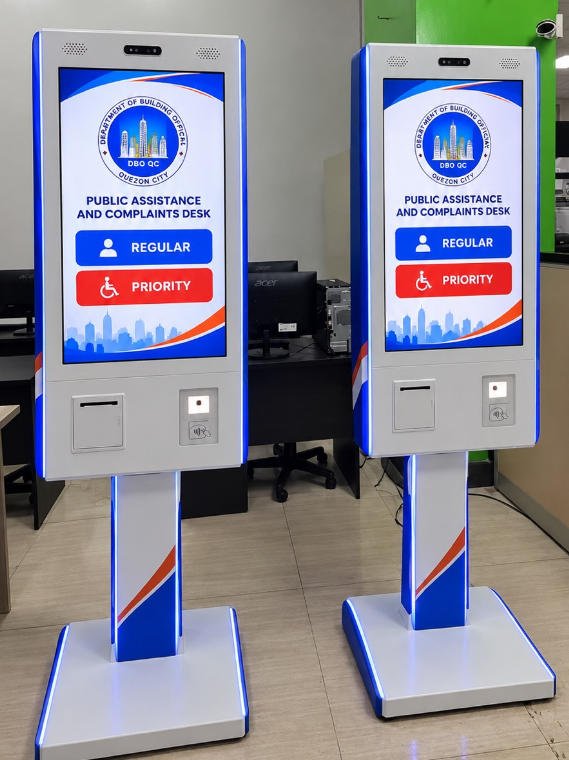
A clear first interaction. The interface places the two available paths directly on the main screen, so visitors can see where to begin.
Local identity. The DBO Quezon City seal and matching cabinet graphics make the units recognizable as part of the service area.
Configurable hardware. The APK07 platform can be specified with the display format, enclosure design, and peripherals required by the project.
A repeatable point of access. With two matching units, the office can present the same first-step interface at more than one kiosk position.
What this project demonstrates
The on-site image confirms a customized APK07 deployment for a Philippine government public-assistance setting. It shows the value of adapting a familiar kiosk form factor to the visual and operational requirements of a specific office. The case is presented as a documented installation example; transaction volumes, waiting-time changes, accessibility compliance, and software integrations have not been verified for publication.
Planning a similar government kiosk project?
AONKIOSK can discuss kiosk size, installation format, enclosure branding, peripheral selection, and the hardware interfaces needed for your application. Share your intended visitor journey and software requirements so the proposed configuration can be checked against the service workflow.
CTA button: Discuss Your Kiosk Project
CTA link: https://aonkiosk.com/contact-us/
Recommended page layout and images
- Hero: Use the supplied real-scene photo at full width or within a wide two-column hero. Keep both kiosks visible. Do not replace the government interface with a generated mockup.
- Project overview: Place the short introduction and a small fact panel beside a crop of the same photo showing the two screens.
- Configuration details: Use a close crop of one kiosk’s front modules only if the source resolution remains sharp; otherwise keep the original full photo.
- Closing CTA: Use a plain brand-color background or an existing product photo. A second invented deployment photo would weaken the credibility of this real case.
Editorial checks before publishing
- Confirm the customer permits public use of the supplied photo, department name, and logo in a commercial case study.
- Confirm whether the office should be named in the headline or only in the body.
- Confirm the exact peripheral configuration and whether the Regular/Priority selection prints queue tickets; the image alone does not establish the complete workflow.
- Add measured results only if the customer provides approved figures.
- Link the product mention to the existing APK07 product page. Its current restaurant-focused title may merit a more neutral product description if public-sector cases will be promoted heavily.
Source notes
- Customer-supplied on-site project photo (featured image in this folder).
- AONKIOSK APK07 product page for configurable format and optional modules.
- Quezon City Department of the Building Official for the official department name and public-service context.