






Dans le monde numérique d’aujourd’hui, l’automatisation transforme la manière dont les entreprises interagissent avec leurs clients. L’une des technologies les plus importantes qui pilotent cette transformation est le kiosque en libre-service. Mais beaucoup de personnes recherchent encore des réponses à des questions comme qu’est-ce qu’un kiosque en libre-service, signification de kiosque, ou système de kiosque expliqué.
Ce guide explique tout en termes simples, y compris la définition du kiosque interactif, son fonctionnement, ses domaines d’utilisation, et pourquoi il est important en 2026 et au-delà.
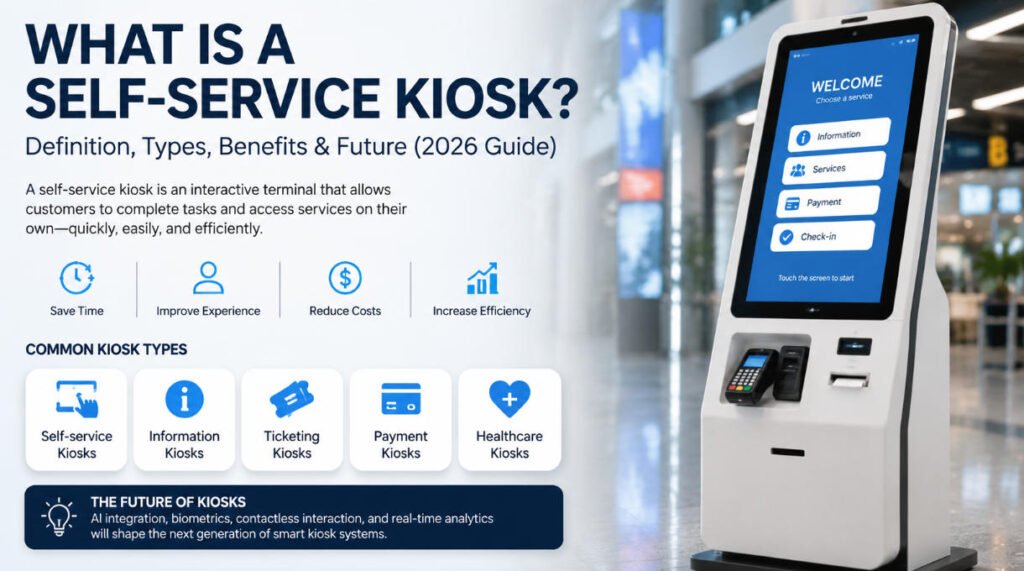
Qu’est-ce qu’un kiosque ?
Pour comprendre le concept d’un kiosque en libre-service, nous avons d’abord besoin d’une définition claire. signification de kiosque.
Un kiosque est un terminal numérique ou physique autonome de petite taille qui permet aux utilisateurs d’accéder à des informations ou d’effectuer des tâches sans assistance humaine directe. Traditionnellement, les kiosques étaient de simples bornes d’information. Aujourd’hui, les kiosques modernes sont des systèmes numériques interactifs connectés à des plateformes logicielles.
La définition du kiosque interactif
Le définition du kiosque interactif désigne un terminal informatisé doté d’une interface tactile qui permet aux utilisateurs d’effectuer des actions telles que :
- Effectuer des paiements
- S’enregistrer pour des vols ou des hôtels
- Commander de la nourriture
- L'impression de billets
- Accéder à des informations produits
Ainsi, lorsque les gens demandent qu’est-ce qu’un kiosque en libre-service, la réponse la plus simple est :
A kiosque en libre-service est un système de kiosque interactif qui permet aux clients d’effectuer des tâches de manière autonome, sans assistance du personnel.
Le système de kiosque expliqué moderne est essentiellement une combinaison de matériel (écran, imprimante, scanner, dispositif de paiement) et de logiciel (système d’exploitation, interface utilisateur, intégration backend).
Types de kiosques
Il existe plusieurs types de kiosques utilisés dans différents secteurs, et les comprendre aide à clarifier la portée signification de kiosque et les applications d’un kiosque en libre-service.
1. Kiosques en libre-service
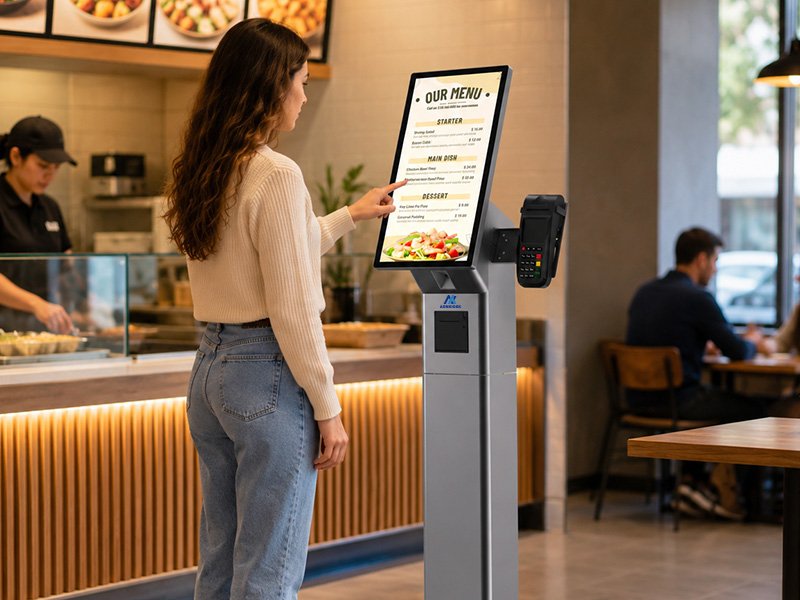
Ce sont les plus courants aujourd’hui. Un kiosque en libre-service permet aux clients d’effectuer des transactions par eux-mêmes. Les exemples incluent les kiosques de commande en restauration et les bornes d’enregistrement dans les aéroports.
2. Kiosques d’information
Utilisés principalement pour fournir des indications, des cartes ou des informations générales dans les centres commerciaux, les musées et les espaces publics.
3. Kiosques de billetterie
Ces kiosques permettent aux utilisateurs d’acheter ou d’imprimer des billets pour les transports, les événements ou les divertissements.
4. Kiosques de paiement
Utilisés dans le commerce de détail, les parkings et les services publics pour le paiement de factures et les transactions.
5. Kiosques de santé
Les hôpitaux utilisent des kiosques pour l’enregistrement des patients, l’inscription et la gestion des files d’attente.
Chaque type soutient le concept plus large d’un système de kiosque expliqué en tant que point de service numérique autonome conçu pour réduire la dépendance humaine.
Comment fonctionnent les kiosques en libre-service
Pour comprendre pleinement qu’est-ce qu’un kiosque en libre-service, nous devons examiner comment le système fonctionne réellement.
A kiosque en libre-service fonctionne généralement à travers quatre couches clés :
1. Interface utilisateur (UI)
L’interface tactile est l’endroit où les utilisateurs interagissent. Elle est conçue pour être simple, intuitive et rapide.
2. Composants matériels
La plupart des kiosques comprennent :
- Écran tactile
- Lecteur de carte ou terminal de paiement
- Scanner de code-barres/QR
- Imprimante (reçus, tickets)
- Caméra (pour la vérification dans certains systèmes)
Système logiciel
Le système de kiosque expliqué au niveau logiciel comprend :
- Système d'exploitation (Windows, Android, Linux)
- Application kiosque personnalisée
- Intégration backend avec les systèmes de PDV, CRM ou de gestion des stocks
Intégration cloud ou serveur
Les kiosques modernes synchronisent les données en temps réel avec les systèmes cloud pour les mises à jour, les paiements et les analyses.
Exemple de flux de travail :
- Le client s'approche du kiosque
- Sélectionne un service (par exemple, commander de la nourriture)
- Le système traite la saisie via l'interface utilisateur
- Le paiement est effectué
- Un reçu est imprimé ou une confirmation numérique est envoyée
C'est la base de chaque définition du kiosque interactif dans les applications réelles.
Secteurs utilisant des kiosques
L'adoption du kiosque en libre-service s'est étendue à presque tous les grands secteurs d'activité. Comprendre les applications réelles renforce également le signification de kiosque dans les entreprises modernes.
1. Commerce de détail
Les magasins de détail utilisent des kiosques pour :
- Le paiement en libre-service
- La recherche de produits
- La consultation des stocks
2. Restaurants et QSR (restaurants à service rapide)
Les kiosques de commande alimentaire réduisent les temps d'attente et augmentent la précision des commandes.
3. Transport
Les aéroports, les gares et les terminaux de bus utilisent des kiosques pour :
- L'enregistrement
- L'impression de billets
- Les cartes d'embarquement
4. Santé
Les hôpitaux utilisent des kiosques pour l'enregistrement des patients et la gestion des files d'attente.
5. Hôtellerie
Les hôtels utilisent des kiosques pour l'enregistrement et le départ autonomes.
6. Banque et finance
Les guichets automatiques et les kiosques bancaires offrent le retrait d'espèces, les dépôts et les services de compte.
Chaque secteur bénéficie du même principe fondamental du kiosque en libre-service: l'automatisation des processus orientés client.
Avantages des kiosques
La popularité croissante du kiosque en libre-service est motivée par des avantages commerciaux évidents.
1. Amélioration de l'expérience client
Les clients bénéficient d'un service plus rapide sans attendre dans de longues files.
2. Réduction des coûts opérationnels
Les entreprises peuvent réduire les coûts de personnel en automatisant les tâches répétitives.
3. Efficacité accrue
Un bien conçu système de kiosque expliqué permet aux entreprises de traiter plus de clients en moins de temps.
4. Précision accrue des commandes
Dans l'alimentation et le commerce de détail, les kiosques éliminent les erreurs humaines de commande.
5. Collecte de données et analyses
Les kiosques modernes suivent le comportement des utilisateurs, aidant les entreprises à optimiser leurs services.
6. Disponibilité 24/7
Contrairement au personnel, les bornes peuvent fonctionner en continu sans interruption.
Ces avantages expliquent pourquoi le signification de kiosque est passé de simples stands d'information à des systèmes complets d'automatisation des opérations commerciales.
L'avenir de la technologie des bornes
L'avenir du kiosque en libre-service est étroitement lié aux avancées en matière d'IA, d'IdO et de transformation numérique.
1. Bornes alimentées par l'IA
Les bornes futures utiliseront l'intelligence artificielle pour :
- Prédire les besoins des utilisateurs
- Proposer des recommandations personnalisées
- Améliorer les interactions avec les clients
2. Reconnaissance faciale et biométrie
Le définition du kiosque interactif s'étend pour inclure une vérification sécurisée de l'identité grâce à la reconnaissance faciale, au balayage d'empreintes digitales ou à l'authentification par QR code.
3. Interaction sans contact
Les bornes sans contact utilisant la commande vocale et la reconnaissance gestuelle deviennent de plus en plus courantes.
4. Intégration avec les appareils mobiles
Les bornes se synchroniseront de plus en plus avec les smartphones pour offrir des expériences hybrides fluides.
5. Analyses plus intelligentes
Les systèmes de bornes avancés fourniront des informations commerciales en temps réel et des analyses prédictives.
L'évolution du système de kiosque expliqué montre une tendance claire : des machines simples aux plateformes de services intelligentes.
Conclusion
Ainsi, qu’est-ce qu’un kiosque en libre-service en 2026 ?
A kiosque en libre-service est un système interactif avancé qui permet aux clients d'effectuer des tâches de manière autonome via une interface numérique. Comprendre le signification de kiosque, définition du kiosque interactif, et système de kiosque expliqué aide les entreprises et les utilisateurs à mesurer à quel point cette technologie est intégrée dans la vie quotidienne.
De la vente au détail aux soins de santé, les bornes transforment la prestation de services en améliorant la rapidité, la précision et la commodité. À mesure que l'IA et l'automatisation continuent d'évoluer, le rôle des bornes deviendra encore plus central dans l'écosystème numérique mondial.






