






レストラン業界が自動化を積極的に導入する中、適切な レストラン向けキオスクシステム の選択はこれまで以上に重要になっています。現代の顧客は、迅速な注文、多様な決済方法、直感的なインターフェース、そしてシームレスなデジタル体験を期待しています。一方、レストラン経営者は、人件費の削減、注文精度の向上、業務効率の改善、そして平均客単価の向上を実現するシステムを必要としています。.
しかし、すべてのキオスクソリューションが同等に優れているわけではありません。一部のシステムは基本的な注文機能のみに焦点を当てていますが、 最高のレストラン向けキオスク機能 は、ユーザーフレンドリーなデザインとエンタープライズレベルのハードウェア互換性、そしてバックエンド統合を兼ね備えています。.
At AONKIOSK, 当社は、レストラン、QSRチェーン、カフェ、フードコート、フランチャイズ事業者向けに、カスタマイズ可能なセルフサービスキオスクハードウェアの製造を専門としています。本ガイドでは、キオスクソリューションを導入する前にすべてのレストランが検討すべき重要な セルフオーダーシステム機能 について解説します。.
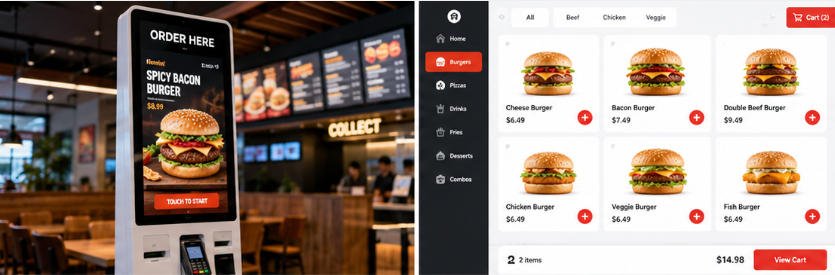
レストラン向けキオスク機能が重要な理由
レストラン向けキオスクは、単なるタッチスクリーンディスプレイではありません。注文プロセス全体を通じて顧客と直接対話するデジタル従業員として機能します。.
適切な機能セットは、レストランにとって以下のことを実現します:
- 人件費への依存度の低減
- ピーク時の注文処理の迅速化
- 注文ミスの最小化
- アップセルによる平均注文額の向上
- 顧客満足度の向上
- 日々の管理業務の簡素化
- 将来の事業拡大への対応
ハードウェア仕様のみに焦点を当てる企業は、ソフトウェア互換性、決済の柔軟性、バックエンド統合を見落としがちです。これらはすべて長期的なROIに直接影響を与えます。.
UIデザイン:優れたセルフオーダー体験の基盤
すべての レストラン向けキオスク機能, の中でも、ユーザーインターフェース(UI)デザインは顧客の導入率に最も大きな影響を与えます。.
顧客がインターフェースの操作に苦労する場合、注文プロセスを途中で放棄したり、スタッフの支援を求める可能性が高くなります。.
大型で応答性の高いタッチスクリーン
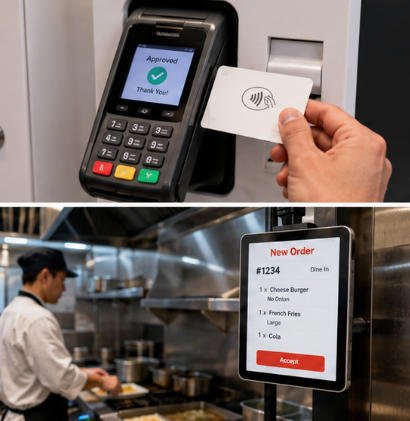
高品質なキオスクは以下を提供する必要があります:
- 高速なタッチ応答
- マルチタッチ対応
- 鮮明なグラフィック
- 屋内環境向けの高輝度
- 広い視野角
応答性の高いディスプレイは、注文速度を大幅に向上させます。.
シンプルなナビゲーション
最適なインターフェースは、最小限の学習で操作できるものです。.
優れたUIデザインには以下が含まれます:
- 大きなカテゴリボタン
- 明確な商品写真
- 見やすい価格表示
- 簡単なカスタマイズオプション
- チェックアウト時の進捗インジケーター
顧客はわずか数回のタップで注文を完了できる必要があります。.
多言語対応
観光地や多文化都市に所在するレストランは、多言語インターフェースから大きな恩恵を受けます。.
対応言語には一般的に以下が含まれます:
- 英語
- スペイン語
- 中国語
- フランス語
- ドイツ語
- 日本語
- 韓国語
これにより、アクセシビリティが向上し、コミュニケーションの障壁が軽減されます。.
アクセシビリティ機能
現代のレストラン向けキオスクは以下もサポートする必要があります:
- 調整可能なフォントサイズ
- 高コントラスト表示モード
- 車椅子利用者に配慮した画面高さ
- 音声ガイダンス(オプション)
- ADA準拠のハードウェアレイアウト
インクルーシブデザインは、より幅広い顧客層にとっての利便性を拡大します。.
柔軟な支払い方法
今日の顧客は、迅速かつ安全で便利な支払いオプションを期待しています。.
複数の支払い方法に対応することは、最も重要な要素の一つです。 セルフオーダーシステム機能.
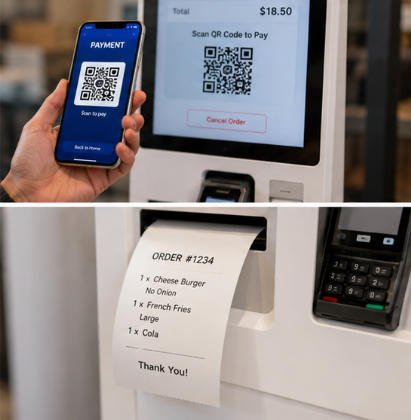
EMVチップカード決済
プロフェッショナルなレストラン用キオスクは、認定された決済端末を以下の機能とともにサポートする必要があります:
- チップカード
- PIN認証
- 接触型取引
これにより、安全な決済処理が保証されます。.
非接触決済
ますます多くの顧客が、以下のようなタップ決済方式を好んでいます:
- NFCカード
- モバイルウォレット
- スマートウォッチ
非接触決済は、取引時間を短縮しながら利便性を向上させます。.
QRコード決済
多くのレストランが現在、特に国際市場においてQRコード決済プラットフォームを導入しています。.
QR決済は以下を提供します:
- 迅速なチェックアウト
- ハードウェアの摩耗軽減
- 柔軟なモバイル決済体験
現金決済サポート
デジタル決済が多くの市場を支配していますが、一部のレストランでは依然として現金受け入れが必要です。.
オプションのハードウェアには以下が含まれます:
- 紙幣検証機
- 硬貨受入機
- 現金リサイクラー
- 釣銭払出機
レストランは、地域の顧客の好みに基づいて決済モジュールを選択できます。.
分割支払いオプション
高度なキオスクシステムは、以下もサポートする場合があります:
- ギフトカードの一部利用
- ロイヤルティポイントの利用
- クーポンの組み合わせ
- 1回の取引における複数の支払い方法
これらの機能は顧客の利便性を向上させ、再来店を促進します。.
インテリジェントなメニュー管理
レストランのメニューは頻繁に変更されます。.
効率的なメニュー管理は、スタッフの作業負荷を軽減しながら、顧客が常に正確な情報を確認できるようにします。.
動的なメニュー更新
管理者は以下を更新できる必要があります:
- 価格
- 商品画像
- 在庫状況
- コンボミール
- 季節限定プロモーション
キオスクのハードウェアを交換することなく。.
リアルタイムの在庫同期
在庫システムと統合された場合、キオスクは自動的に以下を実行できます:
- 売り切れ商品の非表示
- 在庫残量警告の表示
- 代替商品の推奨
これにより、顧客の失望を防ぎ、キッチンの効率を向上させます。.
商品のカスタマイズ
現代のレストランでは、顧客が食事をパーソナライズできることがよくあります。.
例としては以下が挙げられます:
- 追加チーズ
- 玉ねぎを除去する
- ソース選択
- 調理の好み
- ドリンクサイズ
- サイドメニュー
よく設計されたカスタマイズ画面は、注文ミスを削減します。.
コンボ食事の提案
スマートなメニュー管理により、以下のような自動レコメンドが可能になります:
フライドポテトを追加($2)
大型ドリンクにアップグレード
食事を完成させる
これらの自動提案により、平均注文額が大幅に増加します。.
スケジュールされたプロモーション
レストランは以下に基づいて異なるメニューを自動表示できます:
- 朝食
- 昼食
- 夕食
- ハッピーアワー
- 季節イベント
- ホリデープロモーション
これにより手動介入が削減され、マーケティングキャンペーンを支援します。.
シームレスなPOS統合
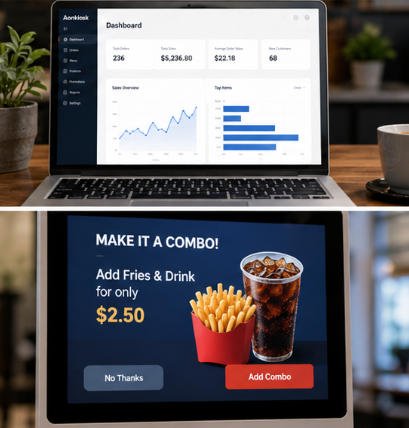
最も重要な要素の一つは レストラン向けキオスク機能 既存のPOSシステムとの円滑な統合です。.
適切な統合がない場合、レストランでは重複注文、在庫不一致、業務効率の低下が発生する可能性があります。.
自動注文送信
支払い後、注文は即座に以下へ送信されるべきです:
- POSシステム
- キッチンディスプレイシステム(KDS)
- キッチンプリンター
- 注文管理ソフトウェア
これにより手動での注文入力が不要になります。.
在庫同期
統合システムは以下を自動更新します:
- 在庫レベル
- 商品の在庫状況
- 日次売上レポート
これによりレストラン業務の同期が維持されます。.
ロイヤルティプログラム統合
顧客はデジタルロイヤルティ体験をますます期待しています。.
キオスクは以下をサポートする必要があります:
- メンバーシップログイン
- リワード交換
- デジタルクーポン
- 誕生日プロモーション
- パーソナライズされたレコメンデーション
これらの機能はリピート利用を促進します。.
オンライン注文対応
現代のレストラン運営では、以下を組み合わせることがよくあります:
- セルフオーダーキオスク
- モバイルオーダー
- オンラインデリバリー
- クリック&コレクト
- テーブルオーダー
統合されたバックエンドにより、すべてのチャネルで一貫した価格、在庫、顧客データが実現します。.
サードパーティシステム互換性
主要なキオスクハードウェアは、標準APIまたはミドルウェアを通じて、一般的なレストラン管理システムとの統合をサポートする必要があります。.
POSプロバイダーおよび決済プラットフォームとの互換性により、レストランは既存のテクノロジー投資を保護しながら、将来のアップグレードを簡素化できます。.
検討に値する追加機能
中核機能に加えて、プレミアムレストランキオスクシステムには、業務と顧客体験をさらに向上させる高度な機能が含まれる場合があります。.
AIベースの商品レコメンド
人工知能が顧客行動を分析し、補完的なメニュー項目を推奨することで、平均注文額を増加させます。.
顧客分析
レストラン経営者は以下を監視できます:
- 人気メニュー項目
- 注文動向
- ピーク運営時間帯
- 顧客の購買行動
これらの洞察は、より良い運営およびマーケティング上の意思決定を支援します。.
リモートデバイス管理
クラウドベースの管理プラットフォームにより、管理者は以下を行うことができます:
- キオスクの状態監視
- ソフトウェアアップデートのプッシュ
- メニューのリモート変更
- デバイスのトラブルシューティング
- システムステータスの追跡
これは特に、複数店舗を展開するレストランチェーンにとって価値が高いものです。.
デジタルサイネージ統合
顧客対応の合間には、キオスクは以下を表示できます:
- プロモーションビデオ
- 期間限定オファー
- ブランドメッセージ
- 季節キャンペーン
これにより、各キオスク導入の価値を最大限に引き出すことができます。.
モジュール式ハードウェア設計
レストランには独自の要件がしばしば存在します。モジュール式キオスクプラットフォームにより、企業は必要なコンポーネントのみを選択してハードウェアを構成できます。例:
- バーコードスキャナ
- レシートプリンター
- QRコードリーダー
- NFCモジュール
- カメラ
- カード発行機
- サーマルプリンター
- IDスキャナー(該当する場合の年齢確認用)
この柔軟性により、導入コストの削減と将来のアップグレード対応が可能になります。.
AONKIOSKレストラン用キオスクハードウェアを選ぶ理由
At AONKIOSK, は、世界中のOEMおよびODMプロジェクト向けに、セルフサービスキオスクハードウェアの設計と製造に特化しています。.
当社のソリューションは以下に対応しています:
- レストラン向けセルフ注文キオスク
- ファストフード注文端末
- スタンド型およびカウンター型キオスク
- 決済対応キオスク
- デュアルスクリーン構成
- カスタムブランディング
- 小ロットOEMカスタマイズ
- モジュール式周辺機器統合
- グローバル出荷および輸出サポート
固定製品を提供するのではなく、当社はレストランブランド、ソフトウェアプロバイダー、システムインテグレーターと緊密に連携し、運営要件に合わせたキオスクハードウェアを構築します。.
結論
適切な レストラン向けキオスク機能 を選択することは、効率的で将来を見据えたレストラン運営を構築するために不可欠です。高品質のセルフオーダーキオスクは、直感的なUIデザイン、柔軟な決済オプション、インテリジェントなメニュー管理、シームレスなPOS統合を兼ね備え、ビジネスの成長に合わせて拡張可能である必要があります。.
モジュール式アップグレードと幅広いソフトウェア互換性をサポートするハードウェアへの投資により、レストランは運営コストを削減し、顧客満足度を向上させ、長年にわたって投資収益率を最大化できます。.
新しいQSRコンセプトを立ち上げる場合でも、既存のレストランチェーンをアップグレードする場合でも、今日適切なキオスクプラットフォームを選択することで、明日のデジタルダイニング環境において競争力を維持できます。.






