






As restaurants continue to embrace automation, choosing the right restaurant kiosk system has become more important than ever. Modern customers expect fast ordering, multiple payment options, intuitive interfaces, and seamless digital experiences. Meanwhile, restaurant owners need systems that reduce labor costs, increase order accuracy, improve operational efficiency, and generate higher average ticket values.
However, not all kiosk solutions are created equal. While some systems focus only on basic ordering functions, the best restaurant kiosk features combine user-friendly design with enterprise-level hardware compatibility and backend integration.
At AONKIOSK, we specialize in manufacturing customizable self-service kiosk hardware for restaurants, QSR chains, cafés, food courts, and franchise operators. This guide explains the essential self ordering system functions every restaurant should consider before investing in a kiosk solution.
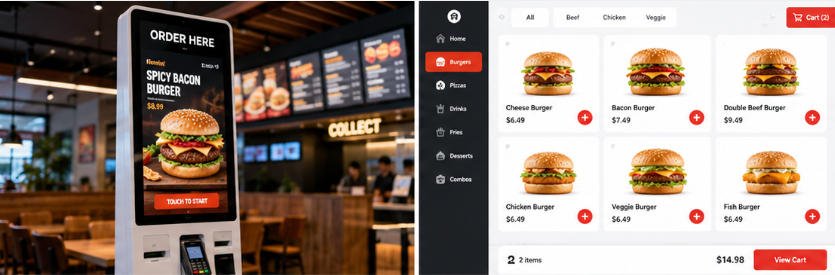
Why Restaurant Kiosk Features Matter
A restaurant kiosk is much more than a touchscreen display. It serves as a digital employee that interacts directly with customers throughout the ordering journey.
The right feature set helps restaurants:
- Reduce labor dependency
- Speed up ordering during peak hours
- Minimize ordering mistakes
- Increase average order value through upselling
- Improve customer satisfaction
- Simplify daily management
- Support future business expansion
Businesses that focus only on hardware specifications often overlook software compatibility, payment flexibility, and backend integration—all of which directly affect long-term ROI.
UI Design: The Foundation of Every Great Self-Ordering Experience
Among all restaurant kiosk features, user interface (UI) design has the biggest influence on customer adoption.
If customers struggle to navigate the interface, they are more likely to abandon the ordering process or seek staff assistance.
Large, Responsive Touchscreen
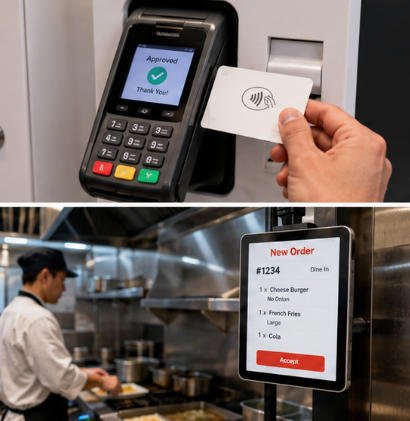
High-quality kiosks should offer:
- Fast touch response
- Multi-touch support
- Clear graphics
- High brightness for indoor environments
- Wide viewing angles
A responsive display significantly improves ordering speed.
Simple Navigation
The best interfaces require minimal learning.
Good UI design includes:
- Large category buttons
- Clear product photos
- Visible pricing
- Easy customization options
- Progress indicators during checkout
Customers should complete their orders in just a few taps.
Multi-Language Support
Restaurants located in tourist destinations or multicultural cities benefit greatly from multilingual interfaces.
Supported languages commonly include:
- English
- Spanish
- Chinese
- French
- German
- Japanese
- Korean
This improves accessibility while reducing communication barriers.
Accessibility Features
Modern restaurant kiosks should also support:
- Adjustable font sizes
- High-contrast display modes
- Wheelchair-friendly screen height
- Voice guidance (optional)
- ADA-compliant hardware layouts
Inclusive design expands usability for a wider customer base.
Flexible Payment Methods
Today’s customers expect fast, secure, and convenient payment options.
Supporting multiple payment methods is one of the most important self ordering system functions.
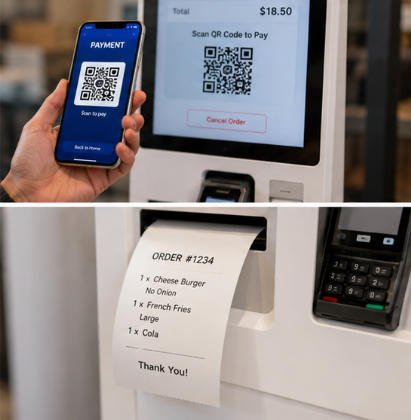
EMV Chip Card Payments
Professional restaurant kiosks should support certified payment terminals with:
- Chip cards
- PIN verification
- Contact transactions
This ensures secure payment processing.
Contactless Payments
Increasingly, customers prefer tap-to-pay methods such as:
- NFC cards
- Mobile wallets
- Smart watches
Contactless payments reduce transaction time while improving convenience.
QR Code Payments
Many restaurants now accept QR code payment platforms, particularly in international markets.
QR payments provide:
- Fast checkout
- Reduced hardware wear
- Flexible mobile payment experiences
Cash Payment Support
Although digital payments dominate many markets, some restaurants still require cash acceptance.
Optional hardware includes:
- Bill validators
- Coin acceptors
- Cash recyclers
- Change dispensers
Restaurants can select payment modules based on local customer preferences.
Split Payment Options
Advanced kiosk systems may also support:
- Partial gift card payments
- Loyalty point redemption
- Coupon combinations
- Multiple payment methods in one transaction
These features improve customer convenience and encourage repeat visits.
Intelligent Menu Management
A restaurant menu changes frequently.
Efficient menu management reduces staff workload while ensuring customers always see accurate information.
Dynamic Menu Updates
Managers should be able to update:
- Prices
- Product images
- Availability
- Combo meals
- Seasonal promotions
without replacing kiosk hardware.
Real-Time Inventory Sync
When integrated with inventory systems, kiosks can automatically:
- Hide sold-out items
- Display low-stock warnings
- Recommend alternative products
This prevents customer disappointment and improves kitchen efficiency.
Product Customization
Modern restaurants often allow customers to personalize meals.
Examples include:
- Extra cheese
- Remove onions
- Sauce selection
- Cooking preferences
- Drink size
- Side dishes
Well-designed customization screens reduce ordering errors.
Combo Meal Suggestions
Smart menu management enables automatic recommendations such as:
Add fries for $2
Upgrade to a large drink
Complete your meal
These automated suggestions significantly increase average order value.
Scheduled Promotions
Restaurants can automatically display different menus based on:
- Breakfast
- Lunch
- Dinner
- Happy hour
- Seasonal events
- Holiday promotions
This reduces manual intervention and supports marketing campaigns.
Seamless POS Integration
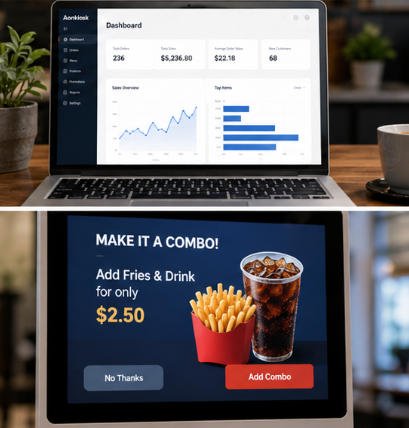
One of the most critical restaurant kiosk features is smooth integration with existing POS systems.
Without proper integration, restaurants may experience duplicate orders, inventory discrepancies, and operational inefficiencies.
Automatic Order Transmission
After payment, orders should be instantly transmitted to:
- POS system
- Kitchen Display System (KDS)
- Kitchen printers
- Order management software
This eliminates manual order entry.
Inventory Synchronization
Integrated systems automatically update:
- Inventory levels
- Product availability
- Daily sales reports
This keeps restaurant operations synchronized.
Loyalty Program Integration
Customers increasingly expect digital loyalty experiences.
Kiosks should support:
- Membership login
- Rewards redemption
- Digital coupons
- Birthday promotions
- Personalized recommendations
These features encourage repeat business.
Online Ordering Compatibility
Modern restaurant operations often combine:
- Self-ordering kiosks
- Mobile ordering
- Online delivery
- Click-and-collect
- Table ordering
A unified backend creates consistent pricing, inventory, and customer data across all channels.
Third-Party System Compatibility
Leading kiosk hardware should support integration with popular restaurant management systems through standard APIs or middleware.
Compatibility with POS providers and payment platforms helps restaurants protect existing technology investments while simplifying future upgrades.
Additional Features Worth Considering
Beyond the core functions, premium restaurant kiosk systems may include advanced capabilities that further improve operations and customer experience.
AI-Based Product Recommendations
Artificial intelligence analyzes customer behavior to recommend complementary menu items, increasing average order value.
Customer Analytics
Restaurant managers can monitor:
- Popular menu items
- Ordering trends
- Peak operating hours
- Customer purchasing behavior
These insights support better operational and marketing decisions.
Remote Device Management
Cloud-based management platforms allow administrators to:
- Monitor kiosk health
- Push software updates
- Change menus remotely
- Troubleshoot devices
- Track system status
This is especially valuable for multi-location restaurant chains.
Digital Signage Integration
When not actively serving customers, kiosks can display:
- Promotional videos
- Limited-time offers
- Brand messaging
- Seasonal campaigns
This maximizes the value of each kiosk installation.
Modular Hardware Design
Restaurants often have unique requirements. A modular kiosk platform allows businesses to configure hardware by selecting only the components they need, such as:
- Barcode scanners
- Receipt printers
- QR code readers
- NFC modules
- Cameras
- Card dispensers
- Thermal printers
- ID scanners (for age verification where applicable)
This flexibility helps reduce deployment costs while supporting future upgrades.
Why Choose AONKIOSK Restaurant Kiosk Hardware?
At AONKIOSK, we focus exclusively on designing and manufacturing self-service kiosk hardware for OEM and ODM projects worldwide.
Our solutions support:
- Restaurant self-ordering kiosks
- Fast-food ordering terminals
- Freestanding and countertop kiosks
- Payment-enabled kiosks
- Dual-screen configurations
- Custom branding
- Small-batch OEM customization
- Modular peripheral integration
- Global shipping and export support
Rather than offering fixed products, we work closely with restaurant brands, software providers, and system integrators to build kiosk hardware tailored to their operational requirements.
Conclusion
Selecting the right restaurant kiosk features is essential for building an efficient, future-ready restaurant operation. A high-quality self-ordering kiosk should combine intuitive UI design, flexible payment options, intelligent menu management, and seamless POS integration while remaining scalable as your business grows.
By investing in hardware that supports modular upgrades and broad software compatibility, restaurants can reduce operating costs, improve customer satisfaction, and maximize return on investment for years to come.
Whether you’re launching a new QSR concept or upgrading an existing restaurant chain, choosing the right kiosk platform today will help your business stay competitive in tomorrow’s digital dining landscape.






