Cashless payment has become one of the most common payment architectures used in modern self-service kiosks. Instead of accepting banknotes or coins, a cashless kiosk completes transactions electronically through credit and debit cards, EMV chip cards, contactless NFC payments, mobile wallets, QR codes, or other digital payment services.
For kiosk operators, however, the advantages of a cashless system go beyond giving customers another way to pay. Removing physical cash can simplify kiosk construction, reduce mechanical components, change maintenance requirements, improve transaction workflows, and make it easier to deploy compact unattended terminals.
At the same time, cashless is not automatically the correct choice for every project. Payment preferences, local regulations, customer demographics, transaction value, network availability, payment processing costs, and accessibility requirements should all be considered before selecting the final architecture.
This guide explains the main cashless system advantages, what hardware is required, where cashless kiosks work best, and what operators should evaluate before deployment.
1. What Is a Cashless Kiosk System?
A cashless kiosk is a self-service terminal that accepts electronic payments without processing physical banknotes or coins.
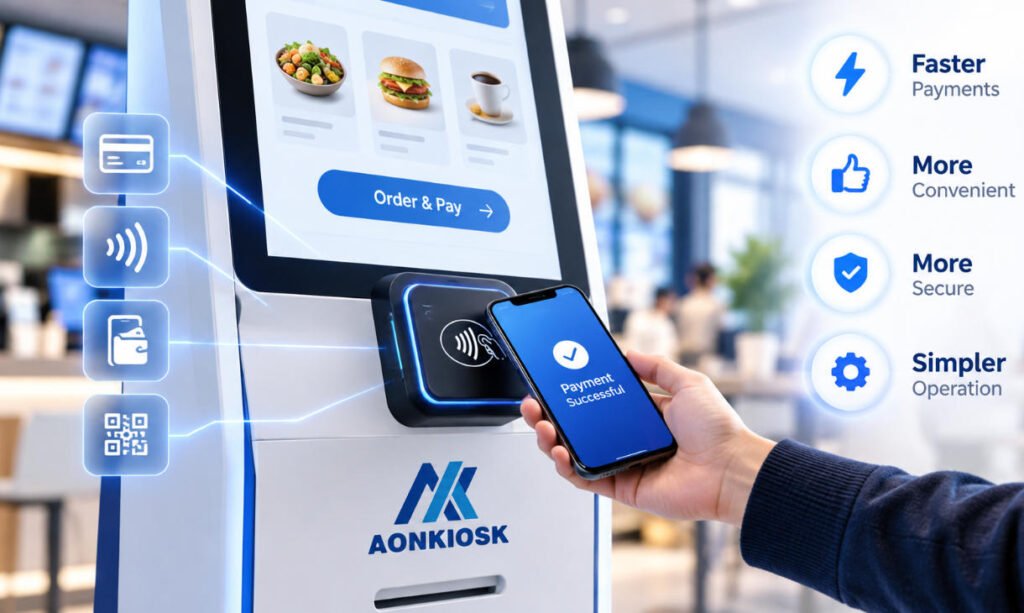
Depending on the payment infrastructure and target market, supported methods may include:
- Credit and debit cards
- EMV chip cards
- Contactless bank cards
- NFC mobile payments
- Apple Pay and Google Pay
- QR code payments
- Stored-value cards
- Membership cards
- Closed-loop payment systems
The exact configuration depends on the payment service provider, acquiring bank, region, kiosk software and selected payment terminal.
A typical self-service kiosk using a cashless architecture may combine a touchscreen, industrial computer, secure payment terminal, NFC/contactless interface, QR scanner, receipt printer and network connection.
Unlike a cash-enabled kiosk, it normally does not require bill validators, coin acceptors, cashboxes, hoppers, dispensers or cash-recycling mechanisms.
This difference has a significant effect on the entire kiosk design.
2. Simpler Kiosk Hardware Architecture
One of the most practical advantages of a cashless system is reduced hardware complexity.
Cash handling requires multiple mechanical components. A kiosk accepting banknotes or coins may need validators, secure storage boxes, change dispensers, denomination sensors and internal cash-routing mechanisms.
A cashless kiosk can eliminate most of these components.
This provides several engineering advantages:
- Fewer moving mechanical parts
- Less internal mounting hardware
- More space for computing and peripheral modules
- Easier cable management
- Simpler enclosure design
- Better service accessibility
- Lower mechanical failure exposure
The benefit becomes especially important when designing countertop or wall-mounted kiosks where internal space is limited.
Removing large cash-handling modules may allow a manufacturer to use a slimmer enclosure while still providing sufficient space for the payment terminal, printer, scanner and industrial computer.
3. Lower Cash-Handling Workload
Physical cash creates operational work that does not exist in a fully cashless system.
Someone must collect the money, count it, reconcile it with transaction records, replenish change when required, transport the cash and maintain appropriate security procedures.
With cashless transactions, much of this physical process disappears.
Operators no longer need to routinely:
- Empty bill and coin boxes
- Refill change dispensers
- Maintain a cash float
- Count cash collected from individual kiosks
- Transport physical currency between locations
- Investigate denomination shortages
- Manage jammed or rejected banknotes
This does not eliminate payment administration entirely. Electronic transactions still require settlement reconciliation, payment-provider reporting and exception handling.
However, the daily physical workload can be considerably simpler.
For companies deploying tens or hundreds of unattended terminals, reducing even a small amount of service work per kiosk can significantly simplify fleet operations.
4. Reduced Mechanical Maintenance
Payment terminals and barcode scanners are electronic devices, but cash-handling modules normally contain significantly more mechanical systems.
Banknotes must be pulled through rollers and sensors. Coins need to be identified, routed and stored. Recycling equipment must continuously manage denomination inventory.
These systems can require cleaning, calibration and physical maintenance.
Dust, worn rollers, damaged banknotes, foreign objects and incorrectly inserted currency may also cause problems.
A cashless system removes many of these potential failure points.
That does not mean cashless kiosks are maintenance-free. Payment terminals, printers, touchscreens, network hardware and computers still require monitoring and maintenance.
However, reducing mechanical complexity can make kiosk servicing more predictable.
5. Faster and More Consistent Payment Workflow
Electronic payment can provide a relatively consistent transaction process.
A typical cashless transaction follows a workflow such as:
- Customer confirms the order.
- Kiosk application sends the payment amount to the payment system.
- Customer presents a card, phone or QR payment method.
- The payment service requests authorization.
- The result is returned to the kiosk application.
- The kiosk confirms the transaction and issues a receipt or continues the service.
There is no requirement for the customer to insert several banknotes, wait for coin validation or collect multiple pieces of change.
Contactless payments can further reduce physical interaction with the payment device.
For high-throughput applications such as quick-service restaurants, supermarkets, transport terminals and event locations, even small improvements in transaction consistency can help keep customer queues moving.
6. Better Suitability for Compact Kiosk Designs
Space is often one of the most difficult constraints in kiosk engineering.
Cash modules occupy substantial internal volume and usually require additional clearance so technicians can remove or service them.
When these components are removed, more compact kiosk structures become possible.
This makes cashless systems particularly suitable for:
- Countertop ordering terminals
- Wall-mounted kiosks
- Compact retail checkout stations
- Hotel check-in kiosks
- Ticketing kiosks
- Membership terminals
- Corporate cafeteria kiosks
AONKIOSK Retail & Payment Kiosks can be configured with card, NFC, QR and related payment hardware according to the required transaction workflow.
The physical kiosk should nevertheless be designed around the selected payment device from the beginning rather than treating the payment terminal as an accessory added after enclosure development.
7. Support for Multiple Digital Payment Methods
A cashless kiosk does not necessarily mean a card-only kiosk.
Modern payment architectures can support several electronic methods through one terminal or a combination of modules.
For example, a project may support traditional EMV cards together with contactless bank cards and mobile wallets.
Another kiosk may combine a payment terminal with QR scanning for market-specific digital payment platforms.
This flexibility allows operators to support different customer preferences without integrating banknote and coin systems.
The distinction between an identification reader and a payment device is important, however. A general NFC reader should not automatically be treated as a secure bank-card payment terminal.
For projects involving contactless identification or payment integration, see the AONKIOSK guide to NFC & Card Reader Modules.
8. Reduced Physical Cash Security Risk
Cash stored inside an unattended kiosk can create an additional physical security concern.
A high-volume cash kiosk may contain a valuable amount of currency, particularly before scheduled collection.
Eliminating physical cash removes this specific risk and eliminates the need for large internal cashboxes, money collection procedures and cash transport from the kiosk.
However, cashless should not be confused with risk-free.
Electronic payment systems introduce different security requirements.
Operators still need to consider:
- Approved payment hardware
- Payment data encryption
- Secure network communication
- Device authentication
- Operating-system security
- Restricted administrative access
- Physical protection of the payment terminal
- Software updates
- Payment-provider requirements
- Transaction monitoring
Cashless systems therefore change the security model rather than eliminating security responsibilities.
A more detailed explanation is available in the AONKIOSK Payment Security in Kiosks guide.
9. Easier Multi-Location Operation
Cashless architecture can become increasingly valuable as the number of kiosks grows.
Imagine an operator managing fifty kiosks across different locations.
If every machine accepts cash, the company may need scheduled collection routes, secure cash transportation, local cash reconciliation and procedures for handling shortages or mechanical failures.
With electronic transactions, much of the payment information can instead be handled through centralized software and the payment provider’s reporting infrastructure.
Depending on the final software architecture, operators may be able to monitor:
- Successful transactions
- Failed transactions
- Payment-device connectivity
- Terminal status
- Transaction references
- Settlement information
- Device errors
Centralized monitoring does not eliminate on-site maintenance, but it can reduce the number of reasons technicians or employees must physically visit each kiosk.
10. Suitable for Unattended and 24/7 Environments
Many self-service kiosks are expected to operate with limited or no staff supervision.
Examples include hotel lobbies, transportation facilities, vending environments, automated retail locations and ticketing terminals.
Cash management becomes more complicated in these environments because the terminal may continue operating long after employees leave the location.
A cashless system avoids problems such as:
- Cashbox reaching capacity
- Change inventory running out
- Staff being unavailable to clear a cash jam
- Manual cash collection outside normal operating hours
The kiosk can still stop processing payments if the network, payment service or terminal fails, so appropriate error handling is required.
The application should clearly tell users when payment is unavailable rather than allowing them to complete an order that cannot be paid for.
11. Easier Cleaning and User Interaction
Cashless systems can also reduce the number of physical interfaces exposed on the kiosk exterior.
A cash-enabled machine may require separate openings for banknotes, coins and returned change.
A contactless cashless kiosk may only need an externally accessible payment terminal and possibly a scanner.
A simpler external interface can make the user workflow easier to understand and reduce areas where dust or foreign objects can enter the machine.
For public-facing kiosks, simplifying the number of interaction points can also reduce user errors.
The payment device should still be installed at a comfortable height, clearly visible and positioned so users understand when and where to tap, insert or scan.
12. When Cashless Systems Are Most Suitable
Cashless kiosks generally work best where customers already make most transactions electronically.
Common examples include:
Quick-Service Restaurants
Customers can order and pay at the kiosk using a card or mobile wallet without waiting for cashier assistance.
Retail and Self-Checkout
Customers scan products, confirm the basket and complete electronic payment through an integrated payment terminal.
Hotels
A check-in kiosk can collect deposits, room payments or additional service fees electronically.
Ticketing
Cinemas, attractions and transport operators can allow customers to purchase or collect tickets without managing cash inside the kiosk.
Corporate and Membership Facilities
Closed environments can use bank cards, membership accounts or stored-value payment systems.
Whether cashless is suitable should ultimately be determined by real customer behavior rather than technology alone.
13. Limitations of a Cashless System
The advantages of cashless payment should not hide its limitations.
A cashless kiosk depends heavily on the surrounding payment infrastructure.
Potential issues include:
Network dependency.
Many electronic payment transactions require connectivity with a processor or payment service.
Payment service fees.
Electronic transactions may include acquiring, gateway or transaction fees.
Payment terminal certification.
Payment hardware and software requirements vary by market, acquirer and payment provider.
Customer accessibility.
Some users may not have suitable cards, bank accounts or mobile payment services.
Regional payment preferences.
A payment method common in one market may have low adoption in another.
Legal requirements.
Some jurisdictions or deployment types may place requirements or restrictions on cashless-only businesses.
Before removing cash completely, operators should confirm local requirements and evaluate the percentage of their customers who still depend on physical currency.
For projects still deciding between payment architectures, see Cashless vs Cash Kiosk: Cash Acceptance & Recycling Guide.
14. What to Check Before Deploying a Cashless Kiosk
Before finalizing the hardware, confirm the complete payment workflow.
The project team should define:
- Target country and currency
- Accepted payment methods
- Payment processor or acquiring bank
- Required payment terminal model
- Card and NFC support
- QR payment requirements
- Operating system compatibility
- API or SDK availability
- Network connection method
- Receipt requirements
- Terminal mounting position
- Remote management requirements
- Recovery behavior after network interruption
- Payment cancellation and refund workflow
These decisions should be made before mass production.
Changing the payment terminal after the enclosure, mounting bracket and software interface are already finalized can create unnecessary redesign work.
15. Cashless Kiosk Troubleshooting Basics
If electronic payment stops working, the problem should be isolated systematically rather than immediately replacing the payment terminal.
Start by checking:
Payment Terminal Power
Confirm that the terminal is powered and has completed its normal startup process.
Network Connectivity
Verify whether the payment terminal or kiosk computer can reach the required payment service.
Kiosk Application
Check whether the correct transaction amount is being sent to the payment interface.
Device Communication
Confirm USB, serial, Ethernet or other communication connections between the kiosk system and payment hardware.
Payment Service
A terminal can be functioning correctly while the gateway, acquiring service or merchant configuration is unavailable.
Transaction Result Handling
Confirm that approved, declined, cancelled and timed-out transactions are correctly returned to the kiosk application.
If the error cannot be reproduced consistently, application and terminal logs should be reviewed before hardware is replaced.
Conclusion
The main advantage of a cashless system is not simply that customers can pay by card or smartphone.
For self-service kiosk projects, removing physical cash can simplify the enclosure, reduce mechanical components, decrease cash-handling work, support more compact hardware designs and make large unattended kiosk fleets easier to operate.
Cashless systems are particularly effective in environments where electronic payments are already the dominant customer preference.
However, they still depend on reliable payment hardware, network connectivity, payment processing infrastructure, secure software integration and appropriate maintenance procedures.
Before choosing a cashless architecture, evaluate the complete transaction environment: who will use the kiosk, which payment methods they expect, how the device will connect to the payment service, what happens during a network failure, and whether excluding cash creates operational, accessibility or regulatory problems.
The best payment architecture is not necessarily the one with the most technology. It is the configuration that reliably supports the actual transaction workflow while keeping the kiosk simple enough to operate and maintain throughout its service life.