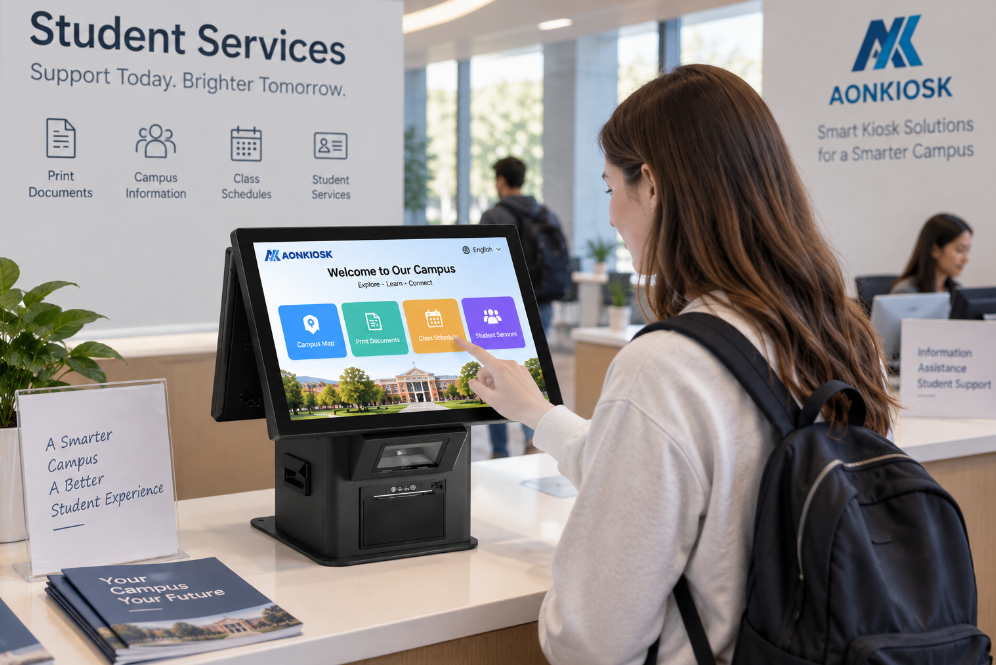
Un module de lecteur NFC et de carte permet à un kiosque en libre-service d'identifier les utilisateurs, de lire les justificatifs, de traiter les cartes de membre, de vérifier les droits d'accès, de récupérer les données de carte stockées ou d'initier des transactions de paiement sécurisées.
Cependant, le terme lecteur de carte peut désigner plusieurs dispositifs différents. Un lecteur d'identification NFC, un lecteur de carte à puce IC, un lecteur de piste magnétique et un terminal de paiement EMV n'offrent pas les mêmes fonctions ni le même niveau de sécurité.
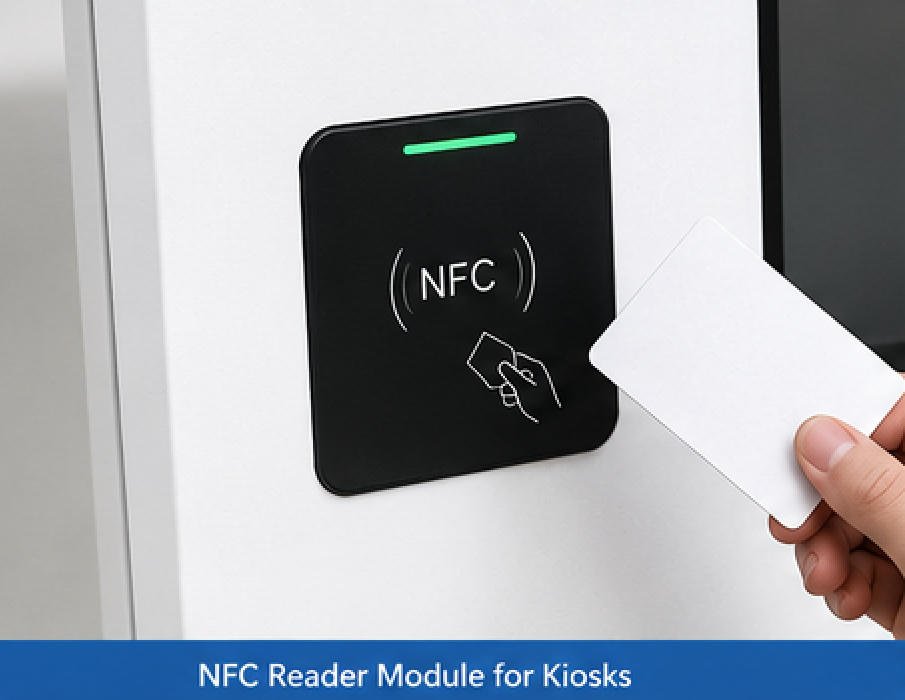
La sélection du module approprié nécessite donc une compréhension claire des éléments suivants :
- La carte ou le dispositif mobile présenté
- La technologie de lecture requise
- Le système d'exploitation et l'interface logicielle
- La question de savoir si des données de paiement seront traitées
- La position d'installation et la dégagement de l'antenne
- Les exigences de certification régionales
- Les besoins de maintenance et de remplacement
AONKIOSK intègre des lecteurs NFC, des lecteurs de cartes à puce, des terminaux de paiement, des distributeurs de cartes, des scanners de codes-barres, des imprimantes et d'autres périphériques dans des plateformes de kiosques en libre-service personnalisées. Ces modules peuvent être configurés pour des projets de commerce de détail, de restauration, d'hôtellerie, de santé, de billetterie, d'adhésion, de transport et de gestion des visiteurs.
Pour une vue plus large de la manière dont ces composants s'intègrent dans un terminal complet, consultez le guide AONKIOSK sur le principaux composants d'une borne libre-service.
1. Qu'est-ce qu'un module lecteur NFC ?
Un module lecteur NFC est un dispositif de communication sans fil à courte portée qui échange des données avec des cartes, des étiquettes, des smartphones, des montres, des bracelets et d'autres dispositifs compatibles NFC.
Les dispositifs NFC peuvent fonctionner en mode lecteur/scripteur, en mode émulation de carte et dans d'autres rôles de communication pris en charge. Dans une application typique de kiosque, le lecteur installé fonctionne normalement en mode lecteur/scripteur, tandis que la carte, l'étiquette ou le smartphone présente des données d'identification ou d'application.
Les applications NFC courantes pour kiosques comprennent :
- Identification de membre
- Reconnaissance du compte de fidélité
- Authentification des employés ou des visiteurs
- Identification des clients d'hôtel
- Lecture des justificatifs de contrôle d'accès
- Cartes de transport public
- Cartes de campus ou de bibliothèque
- Identification des patients
- Applications de cartes à valeur stockée
- Interaction avec le portefeuille mobile
- Initiation de paiement sans contact
- Lecture et écriture d'étiquettes NFC
Un module NFC ne prend pas automatiquement en charge toutes les applications énumérées ci-dessus. La compatibilité dépend du chipset du lecteur, des protocoles de radiofréquence, du micrologiciel, du pilote, du kit de développement logiciel, de la méthode de chiffrement et du type de carte.
2. Qu'est-ce qu'un module lecteur de carte ?
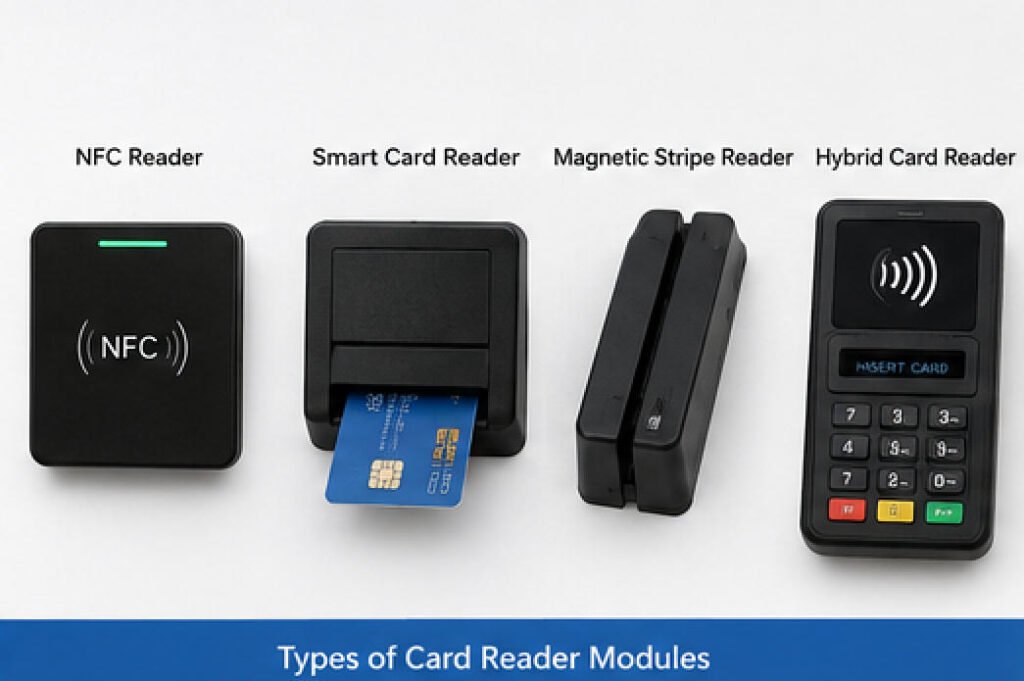
Un module lecteur de carte est une catégorie plus large de dispositif utilisé pour lire des informations à partir de cartes physiques. Selon le projet, le terme peut désigner une ou plusieurs des technologies suivantes.
2.1 Lecteur sans contact NFC ou RFID
Un lecteur sans contact communique avec une carte, une étiquette, un téléphone ou un dispositif portable sans nécessiter d'insertion physique.
Il peut être utilisé pour :
- Étiquettes NFC
- Badges d'employés
- Cartes de membre
- Cartes d'hôtel
- Cartes de transport
- Cartes de campus
- Justificatifs de contrôle d'accès
- Cartes bancaires sans contact, lorsqu'elles sont prises en charge par un terminal de paiement approuvé
Les familles de cartes et les fréquences exactes doivent être confirmées avant la sélection du module. “ Compatible RFID ” ou “ compatible NFC ” seul n'est pas une spécification suffisamment précise.
2.2 Lecteur de carte à puce IC à contact
Un lecteur de carte à puce à contact nécessite que l'utilisateur insère une carte à puce dans une fente. Les contacts métalliques à l'intérieur du lecteur se connectent à la puce de la carte.
Les utilisations typiques comprennent :
- Cartes de services gouvernementaux
- Cartes de santé
- Applications bancaires
- Cartes d'identité
- Cartes d'authentification de sécurité
- Systèmes de valeur stockée
De nombreux lecteurs de cartes à puce USB utilisent une interface compatible CCID, permettant à l'ordinateur hôte de communiquer avec des cartes à circuit intégré via une classe de périphérique USB standardisée.
2.3 Lecteur de carte à piste magnétique
Un lecteur de piste magnétique lit les données stockées dans la piste au dos d'une carte.
Les configurations courantes incluent :
- Lecteur à glissière
- Lecteur à insertion
- Lecteur de carte manuel
- Lecteur combiné piste magnétique et circuit intégré
La technologie à piste magnétique peut encore être utilisée pour les applications d'adhésion, d'hôtellerie, d'accès ou de paiement existantes. Toutefois, elle ne doit pas être sélectionnée pour un nouveau système sans confirmer les exigences de sécurité, régionales et de l'émetteur de la carte.
2.4 Lecteur de carte hybride
Un lecteur hybride peut combiner deux ou plusieurs méthodes de lecture, telles que :
- Piste magnétique + circuit intégré à contact
- Circuit intégré à contact + NFC
- Piste magnétique + circuit intégré à contact + sans contact
- Lecture de carte + saisie du code PIN
- Lecture de carte + traitement sécurisé des paiements
Les modules hybrides réduisent le nombre de dispositifs séparés dans le kiosque, mais nécessitent généralement plus d'espace d'installation, de câblage supplémentaire et une intégration logicielle plus étendue.
3. Lecteur NFC vs Terminal de paiement
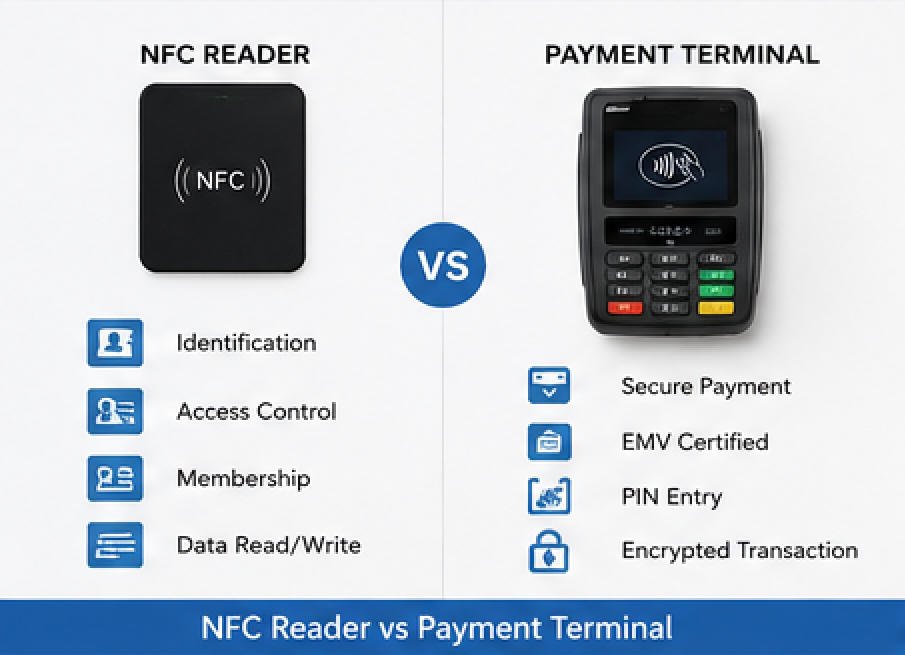
L'une des décisions d'intégration les plus importantes est de savoir si le kiosque doit uniquement identifier une carte ou doit accepter les paiements par carte bancaire.
Lecteur NFC général
Un lecteur NFC général peut lire :
- L'UID ou l'identifiant de la carte
- Identifiants de membre
- Les enregistrements de tags
- Les données de contrôle d'accès
- Les informations spécifiques à l'application
- Les données de carte à puce prises en charge
Il est généralement connecté directement à l'ordinateur du kiosque via USB, communication série ou une autre interface.
Un lecteur NFC général ne doit pas être considéré comme offrant une acceptation sécurisée des paiements par carte de crédit.
Terminal de paiement sécurisé
Un terminal de paiement est conçu pour gérer les transactions de paiement en présence de carte. Selon le terminal, il peut prendre en charge :
- Cartes bancaires sans contact
- Portefeuilles mobiles NFC
- Cartes à puce à contact
- Cartes à piste magnétique
- La saisie du code PIN
- Données de transaction chiffrées
- Communication avec l'acquéreur ou la passerelle de paiement
- Gestion à distance du terminal
La technologie EMV sans contact prend en charge les transactions effectuées avec des cartes à puce sans contact et des appareils mobiles compatibles NFC. Les tests EMV de niveau 1 concernent l'interface de communication entre l'instrument de paiement et le dispositif d'acceptation, tandis que les tests de niveau 2 évaluent le noyau de paiement qui traite les fonctions applicatives EMV.
Pour les projets de paiement, le terminal de paiement, la banque acquéreuse, le processeur, la passerelle, le logiciel et la région de déploiement doivent être évalués comme une solution complète.
Un dispositif de paiement approuvé PCI peut soutenir la conformité en matière de sécurité des paiements, mais l'installation d'un dispositif approuvé ne rend pas automatiquement le kiosque complet ou l'environnement marchand conforme à la norme PCI DSS. L'ensemble de l'environnement des données de titulaires de carte et l'architecture système doivent également être examinés.
AONKIOSK peut préparer l'enceinte, le support de montage, le chemin de câbles, la porte de service, l'ouverture du terminal et les connexions électriques pour les dispositifs de paiement spécifiés par le client. Explorez les Bornes de vente au détail et de paiement pour les configurations intégrées typiques.
4. Fonctions typiques d'un kiosque libre-service
Identification de l'utilisateur
L'utilisateur touche ou insère une carte, et le kiosque récupère un identifiant lié à un compte backend.
Exemples :
- Recherche de compte de fidélité
- Connexion employé
- L'enregistrement des visiteurs
- Enregistrement du patient
- Authentification de l'étudiant
- La vérification de l'adhésion
Autorisation d'accès
Le kiosque vérifie que le justificatif est valide avant d'autoriser l'accès à un service, une salle, un appareil, un document ou une transaction.
Récupération de compte ou de réservation
Une carte NFC ou une carte de membre peut être utilisée pour récupérer :
- Réservations hôtelières
- Profils clients
- Rendez-vous médicaux
- Réservations de billets
- Historiques de commandes
- Soldes de valeur stockée
Paiement par carte
Un terminal de paiement sécurisé communique avec le processeur de paiement pour autoriser une transaction par contact, sans contact ou par portefeuille mobile.
Encodage de carte
Certains projets nécessitent l'écriture de données sur une carte.
Exemples :
- Encodage de clé de chambre d'hôtel
- Activation de carte de membre
- Préparation de badge visiteur
- Mise à jour de carte à valeur stockée
- Émission de carte de stationnement
Un lecteur de carte n'inclut pas nécessairement une capacité d'encodage. Les spécifications en lecture seule et en lecture/écriture doivent être distinguées lors de l'acquisition.
Émission et collecte de cartes
Dans les projets hôteliers, visiteurs, adhésion, transport et stationnement, le lecteur peut fonctionner conjointement avec :
- Distributeur de cartes
- Encodeur de carte
- Collecteur de carte
- Recycleur de carte
- Compartiment de rejet de carte
Le logiciel doit coordonner la détection, l'encodage, la distribution, la vérification, la collecte et la gestion des erreurs des cartes.
5. Technologies de cartes et de communication prises en charge
Avant de choisir un module, créez une liste de compatibilité précise. Selon le matériel, un lecteur peut prendre en charge certaines technologies parmi les catégories suivantes :
- NFC-A
- NFC-B
- NFC-F
- Cartes compatibles ISO/IEC 14443
- Cartes compatibles ISO/IEC 15693
- Cartes compatibles MIFARE
- Cartes compatibles FeliCa
- Cartes à puce à contact
- Cartes à puce CPU
- Cartes à piste magnétique
- Justificatifs RFID spécifiques à l'application
- Cartes de paiement EMV à contact ou sans contact
Ne sélectionnez pas un lecteur uniquement sur la base de la fréquence de fonctionnement ou du type de connecteur. Deux lecteurs utilisant la même fréquence peuvent prendre en charge des protocoles, des familles de cartes, des fonctions de sécurité, des pilotes et des commandes logicielles différents.
Le cahier des charges du projet doit identifier :
- Le type exact de carte ou de justificatif
- L'exigence de distance de lecture
- Les données à récupérer ou à écrire
- La méthode de chiffrement ou d'authentification
- Système d'exploitation requis
- Interface de communication hôte
- API logicielle ou SDK
- Exigences de certification
- Volume de transactions attendu
- Les conditions environnementales
6. Interfaces matérielles
USB
L'USB est couramment utilisé car il est simple à intégrer avec les systèmes hôtes Windows, Android ou Linux.
Les modes de fonctionnement possibles incluent :
- USB HID
- Émulation de clavier USB
- Port COM virtuel USB
- USB CCID
- Protocole USB spécifique au fournisseur
L'équipe d'intégration ne doit pas supposer que chaque lecteur USB se comporte comme un clavier. La documentation relative aux pilotes et aux protocoles doit être confirmée.
RS-232
La communication série RS-232 est encore utilisée dans les projets de bornes industrielles car elle offre une communication prévisible et un contrôle de commandes simple.
Vérifier :
- Débit en bauds
- Bits de données
- Bits d'arrêt
- Parité
- Brochage du connecteur
- Méthode d'alimentation électrique
- Protocole de commande
UART ou TTL
Les systèmes Android et ARM embarqués peuvent se connecter à un lecteur via des interfaces UART ou TTL.
Le niveau de tension doit être confirmé. Une interface 3,3 V et une interface 5 V ne doivent pas être considérées comme interchangeables.
Ethernet
Les terminaux de paiement connectés au réseau peuvent communiquer directement avec un hôte de paiement ou un réseau local.
La conception de la borne doit prendre en compte :
- Sécurité réseau
- Configuration IP statique ou dynamique
- Règles de pare-feu
- Le cheminement des câbles
- Gestion à distance du terminal
- Le comportement hors ligne
- Récupération réseau
Connexion Bluetooth ou sans fil
Les lecteurs sans fil peuvent convenir à certaines applications portables ou de rénovation, mais les bornes commerciales fixes bénéficient généralement d'une connexion filaire car elle réduit les problèmes d'appairage, d'interférences, de batterie et de maintenance.
7. Compatibilité du système d'exploitation et des logiciels
Un lecteur de carte doit être compatible à la fois avec le système d'exploitation de la borne et le logiciel applicatif.
Windows
Confirmer :
- Versions Windows prises en charge
- Disponibilité des pilotes
- Compatibilité 32 bits ou 64 bits
- Configuration du port COM virtuel
- Bibliothèques SDK
- Autorisations de service
- Comportement d'énumération des périphériques
Android
Confirmer :
- Version Android
- Prise en charge de l'hôte USB
- Compatibilité du chipset
- Disponibilité du SDK ou de l'AAR
- Autorisations du port série
- Autorisations d'accès aux périphériques
- Architecture CPU prise en charge
- Nécessité d'un accès root
Linux
Confirmer :
- Exigences relatives au noyau et aux pilotes
- Prise en charge CCID ou série
- Dépendances de bibliothèques
- Autorisations des périphériques
- Règles Udev
- Architecture du SDK
- Compatibilité de distribution
Pour des conseils supplémentaires sur le choix de la plateforme informatique du kiosque, veuillez consulter l'explication AONKIOSK concernant le fonctionnement d'un kiosque.
8. Exigences d'intégration mécanique
Une intégration mécanique correcte est essentielle pour garantir des performances de lecture de carte stables.
Position du lecteur
Le lecteur doit être installé à un endroit où l'utilisateur peut facilement le voir et y accéder.
Les recommandations de conception incluent :
- Zone de tap ou d'insertion clairement visible
- Hauteur de fonctionnement confortable
- Symbole de carte ou instruction visible
- Aucune obstruction par l'écran tactile
- Espace suffisant pour les mains et les cartes
- Accessibilité pour les utilisateurs en fauteuil roulant
- Protection contre les chocs accidentels
Dégagement de l'antenne
Le métal placé directement autour ou devant une antenne NFC peut réduire les performances de communication.
Lors de la conception du boîtier :
- Suivre les recommandations de dégagement du fabricant du module
- Éviter de placer l'antenne derrière un acier épais
- Utiliser une fenêtre de lecture non métallique appropriée si nécessaire
- Éloigner les supports métalliques inutiles de l'antenne
- Tester avec le boîtier final plutôt que uniquement sur un établi ouvert
Le module peut fonctionner correctement à l'extérieur du kiosque mais présenter de mauvaises performances après installation si la position de l'antenne n'est pas validée.
Alignement de la fente pour carte
Pour les lecteurs à insertion :
- L'ouverture de la façade doit être alignée avec précision sur la fente du lecteur
- La carte doit s'insérer sans force excessive
- Les supports internes doivent empêcher tout mouvement
- Le chemin de la carte doit rester dégagé
- L'utilisateur doit disposer de suffisamment d'espace pour saisir et retirer la carte
Chemins de câbles
Les câbles du lecteur doivent être :
- Fixés pour éviter tout mouvement
- Protégés contre les bords métalliques tranchants
- Séparés des câbles d'alimentation à courant élevé lorsque cela est possible
- Suffisamment longs pour permettre l'accès lors de la maintenance
- Suffisamment courts pour éviter des problèmes de signal inutiles
- Clairement étiquetés lors de la production
Accès pour la maintenance
Le lecteur doit pouvoir être remplacé sans démonter l'ensemble du kiosque.
Une conception pratique peut inclure :
- Porte de service arrière
- Plaque de montage interne
- Support amovible
- Connecteurs accessibles
- Vis imperdables
- Étiquettes de câbles
- Trou de montage de rechange
La gamme de kiosques Service de fabrication de kiosques OEM et ODM comprend l'ingénierie du boîtier, le montage des périphériques, le cheminement des câbles, la conception thermique, l'assemblage et la planification de l'accès à la maintenance.
9. Conception d'interface utilisateur recommandée
La reconnaissance matérielle seule ne crée pas une bonne expérience utilisateur. Le logiciel du kiosque doit clairement expliquer ce que l'utilisateur doit faire.
Les instructions à l'écran recommandées incluent :
- “ Touchez votre carte sur le lecteur. ”
- “ Insérez votre carte, puce orientée vers le haut. ”
- “ Ne retirez pas votre carte. ”
- “ Traitement en cours — veuillez patienter. ”
- “ Retirez votre carte. ”
- “ Carte non reconnue. Veuillez réessayer. ”
- “ Utilisez un autre moyen de paiement. ”
- “ Transaction annulée. ”
- “ Veuillez contacter le personnel pour obtenir de l'aide. ”
La zone physique du lecteur doit également inclure des repères visuels reconnaissables, tels que :
- Symbole sans contact
- Graphique d'insertion de carte
- Indicateur d’état à LED
- Flèche directionnelle
- Étiquette d'instruction courte
- Marques de marques de paiement lorsque cela est officiellement autorisé
Évitez d'afficher “ Paiement réussi ” tant que l'application de paiement n'a pas reçu la confirmation finale du processeur de paiement.
10. Liste de contrôle d'installation et de mise en service
Avant le déploiement, vérifiez les éléments suivants.
Matériel
- Le modèle du lecteur correspond à la nomenclature approuvée
- La tension d'entrée et la consommation électrique sont correctes
- Le câble USB ou série est solidement connecté
- Le support de montage est sécurisé
- L'antenne NFC n'est pas bloquée par du métal
- La fente pour carte est alignée avec l'ouverture du boîtier
- La LED et le buzzer sont visibles ou audibles
- L'accès à la maintenance est disponible
Logiciel
- Le pilote correct est installé
- Le périphérique apparaît correctement dans le système d'exploitation
- Le numéro de port COM reste stable après redémarrage
- La bibliothèque SDK est compatible avec l'application
- Le type de carte est pris en charge
- Les commandes de lecture et d'écriture fonctionnent correctement
- Les comportements de délai d'attente et de nouvelle tentative sont configurés
- Les messages d'erreur sont conviviaux
- Les journaux n'exposent pas de données sensibles de carte
Paiement
- Le modèle de terminal est approuvé par l'acquéreur ou le processeur
- La configuration du commerçant est chargée
- La communication réseau est disponible
- La carte à contact est testée
- La carte sans contact est testée
- Le portefeuille mobile est testé
- La saisie du code PIN est testée le cas échéant
- Les flux d'annulation et de contre-passation sont testés
- Les informations du reçu sont correctes
- Le comportement hors ligne est défini
- Le règlement et la réconciliation sont vérifiés
Tests mécaniques et utilisateur
- Les utilisateurs peuvent localiser facilement le lecteur
- La position de la prise est évidente
- La carte peut être insérée et retirée sans difficulté
- La lecture fonctionne avec le boîtier final peint
- La lecture fonctionne après la fermeture de la porte de service
- Différentes positions de carte et de téléphone sont testées
- Les exigences d'accessibilité sont examinées
11. Problèmes courants et dépannage
Problème 1 : Le lecteur n'est pas détecté
Causes possibles :
- Câble USB ou série desserré
- Alimentation électrique insuffisante
- Pilote manquant
- Réglage incorrect du port COM
- Câble endommagé
- Port USB désactivé
- Système d'exploitation non pris en charge
- Défaillance matérielle du lecteur
Actions recommandées :
- Redémarrez le kiosque.
- Rebranchez le câble du lecteur.
- Testez un autre port USB ou série.
- Vérifiez le Gestionnaire de périphériques ou la liste des périphériques système.
- Confirmez le pilote requis.
- Vérifiez la tension au niveau du connecteur du lecteur.
- Testez le module sur un second ordinateur.
- Remplacez le câble avant de remplacer le lecteur.
Problème 2 : La distance de lecture NFC est trop courte
Causes possibles :
- Lecteur installé derrière du métal
- Antenne positionnée trop loin du panneau extérieur
- Capot avant trop épais
- Support métallique interférant avec l'antenne
- Lecteur fonctionnant avec une puissance insuffisante
- Type de carte doté d'une antenne petite ou faible
- Présence d'interférences électromagnétiques
Actions recommandées :
- Testez le lecteur à l'extérieur du boîtier.
- Comparez les performances sur banc ouvert et après installation.
- Rapprochez l'antenne de la surface de lecture.
- Ajoutez une fenêtre de lecture non métallique.
- Augmentez l'espace par rapport aux composants métalliques.
- Testez avec plusieurs cartes et smartphones.
- Suivez les directives d'antenne du fournisseur du module.
Problème 3 : Certaines cartes fonctionnent mais d'autres non
Causes possibles :
- Technologie de carte non prise en charge
- Hypothèse de fréquence incorrecte
- Chiffrement ou authentification de carte requis
- L'application ne lit que l'UID
- Le micrologiciel du lecteur ne prend pas en charge la carte
- Carte endommagée
- Le portefeuille mobile nécessite un terminal certifié pour les paiements
Actions recommandées :
- Identifiez le modèle exact de la carte et la norme correspondante.
- Vérifiez la compatibilité avec la liste du lecteur.
- Testez avec l'utilitaire de diagnostic du fabricant.
- Vérifiez si des clés ou une authentification sont requises.
- Mettez à jour le micrologiciel uniquement via une procédure approuvée.
- Utilisez un terminal de paiement sécurisé pour les paiements par carte bancaire.
Problème 4 : Le lecteur fonctionne sous Windows mais pas dans l’application kiosque
Causes possibles :
- L’application utilise le mauvais port COM
- La bibliothèque SDK est manquante
- Incompatibilité entre les bibliothèques 32 bits et 64 bits
- Un autre programme a verrouillé le port
- Mode de communication USB incorrect
- L’application ne dispose pas des autorisations nécessaires pour l’appareil
- Le format de commande ou le débit en bauds est incorrect
Actions recommandées :
- Fermez tous les utilitaires de test du lecteur.
- Confirmez le port COM actuel.
- Vérifiez l’architecture du SDK et de l’application.
- Examinez les journaux logiciels.
- Confirmez les paramètres de la liaison série.
- Testez une commande de lecture de base avec la démo du fournisseur.
- Réinstallez le package de pilotes approuvé.
Problème 5 : Le terminal de paiement affiche une erreur de communication
Causes possibles :
- Réseau indisponible
- Configuration du processeur de paiement incorrecte
- Profil marchand non activé
- Restriction DNS ou pare-feu
- Horloge du terminal incorrecte
- Service de l’application de paiement arrêté
- Câble Ethernet, USB ou série desserré
- Hôte acquéreur indisponible
Actions recommandées :
- Vérifiez la connexion réseau.
- Confirmez la date et l’heure du terminal.
- Redémarrez l’application de paiement.
- Vérifiez la configuration du processeur et du marchand.
- Testez la connexion hôte requise.
- Contactez le fournisseur de services de paiement si l’autorisation hôte échoue.
- Ne contournez pas les contrôles de sécurité du terminal.
Problème 6 : La carte est difficile à insérer ou à retirer
Causes possibles :
- Ouverture du cadre mal alignée
- Support du lecteur déplacé pendant le transport
- Présence de corps étrangers dans la fente de la carte
- Épaisseur du panneau avant incorrecte
- Mécanisme du lecteur endommagé
Actions recommandées :
- Mettez le kiosque hors tension.
- Inspectez la fente avec un éclairage adéquat.
- N’utilisez pas d’outils pointus à l’intérieur du lecteur.
- Vérifiez l’alignement du support et du cadre.
- Retirez la poussière à l’aide d’une méthode de maintenance approuvée.
- Remplacez le lecteur si le mécanisme est endommagé.
Problème 7 : Lectures en double
Causes possibles :
- La carte reste dans le champ de détection
- Le logiciel ne supprime pas les événements répétés (debounce)
- L’application démarre une nouvelle transaction avant le retrait de la carte
- Le lecteur signale en continu l’identifiant
Actions recommandées :
- Ajoutez une période de refroidissement logicielle.
- Exigez un événement de retrait de carte avant la lecture suivante.
- Verrouillez la session après une identification réussie.
- Ignorez les identifiants répétés au sein d’une même transaction.
- Affichez “ Retirer la carte ” avant de revenir à l’écran d’accueil.
12. Nettoyage et maintenance préventive
Lecteur sans contact
- Nettoyez la surface de lecture externe avec un chiffon doux
- Ne pulvérisez pas de liquide directement dans le kiosque
- N’utilisez pas de produits chimiques abrasifs
- Vérifiez l’usure des étiquettes et des symboles
- Inspectez le support de montage lors de l’entretien programmé
- Retestez la distance de lecture après une réparation de l’enceinte
Lecteur de carte à insertion
- Maintenez la fente exempte de poussière et de corps étrangers
- Utilisez uniquement des cartes de nettoyage approuvées pour le lecteur
- N’insérez pas d’outils métalliques
- Inspectez les contacts pliés ou l’usure mécanique
- Remplacez les lecteurs à forte usure en fonction du volume de transactions
- Conservez un module de rechange pour les déploiements critiques sans surveillance
Terminal de paiement
- Suivez les instructions de maintenance du fabricant du terminal de paiement
- Inspectez l’appareil pour détecter toute altération ou tout dommage inhabituel
- N’ouvrez pas le matériel de paiement sécurisé sans autorisation
- Maintenez les versions de firmware et de logiciels approuvées
- Enregistrez les numéros de série des terminaux et l’historique de remplacement
- Suivez la procédure de réponse aux incidents de l’acquéreur
13. Recommandations de sécurité
Pour les systèmes d’identification non liés au paiement :
- Stockez uniquement les données requises par l’application
- Évitez de vous fier à un UID lisible publiquement comme unique facteur de sécurité
- Utilisez des cartes authentifiées lorsque une sécurité renforcée est requise
- Chiffrez la communication avec les services backend
- Restreignez l’accès logiciel au lecteur
- Protégez les fichiers journaux
- Supprimez les clés de test et les identifiants par défaut
- Définissez des procédures pour les cartes perdues et révoquées
Pour les systèmes de paiement :
- Utilisez des dispositifs de paiement approuvés
- Suivez les exigences de l’acquéreur et du processeur
- Évitez d’acheminer des données de carte non chiffrées via l’application du kiosque
- Séparez les fonctions générales du kiosque du traitement sécurisé des paiements
- Protégez les identifiants réseau
- Contrôlez l’accès physique au terminal et aux câbles
- Surveillez les signes d’altération
- Appliquez les mises à jour de sécurité via des canaux approuvés
Les normes de sécurité PCI visent à protéger les informations de paiement tout au long du cycle de vie du paiement, mais les exigences applicables dépendent de l’environnement de paiement complet plutôt que d’un seul composant matériel.
14. Comment sélectionner le module approprié
Utilisez un lecteur NFC général lorsque le kiosque doit :
- Identifier un membre ou un employé
- Lire une étiquette NFC
- Récupérer un identifiant non lié au paiement
- Associer un identifiant de carte à un compte
- Prendre en charge une application personnalisée d’accès ou de fidélité
Utiliser un lecteur de carte à contact lorsque le kiosque doit :
- Lire les cartes à puce insérées
- Communiquer avec des cartes à puce gouvernementales, de santé, d'identité ou spécifiques à une application
- Prendre en charge une interface de carte à puce CCID ou spécifique à une application
Utiliser un lecteur hybride lorsque le projet doit prendre en charge :
- Plusieurs types de cartes héritées
- Cartes à contact et sans contact
- Migration entre anciens et nouveaux identifiants
- Plusieurs flux de travail d'identification
Utiliser un terminal de paiement sécurisé lorsque le kiosque doit :
- Accepter les cartes de crédit ou de débit
- Accepter les cartes bancaires sans contact
- Accepter les portefeuilles mobiles NFC
- Traiter les transactions EMV
- Capturer la saisie du code PIN
- Se connecter à une banque acquéreuse ou à un processeur de paiement
15. Informations requises pour l'intégration AONKIOSK
Pour intégrer un lecteur NFC ou de carte dans un kiosque personnalisé, fournir les informations suivantes :
- Marque et modèle du lecteur ou du terminal
- Fiche technique du produit
- Dessin mécanique
- Échantillon de l'appareil
- Types de cartes et d'identifiants
- Exigence de lecture seule ou lecture/écriture
- Application de paiement ou hors paiement
- L'interface de communication
- Exigence de tension d'entrée
- Le système d’exploitation
- Package de pilotes et SDK
- Hauteur d'installation requise
- Dimensions de l'ouverture du panneau avant
- Exigences de certification
- Pays de déploiement cible
- Quantité prévue
- Ratio de pièces de rechange requis
Lorsque le modèle final du lecteur n'a pas encore été sélectionné, AONKIOSK peut réserver une zone de montage modulaire, mais les découpes finales et les supports ne doivent être libérés qu'après vérification de l'échantillon physique et du dessin technique.
16. Approche d'intégration AONKIOSK
AONKIOSK traite le lecteur NFC et de carte comme faisant partie de l'architecture complète du kiosque plutôt que comme un accessoire isolé.
Le processus d'intégration peut inclure :
- Examen de l'application et des types de cartes
- Confirmation de la compatibilité des modules
- Planification de la position du lecteur
- Évaluation de l'antenne et des dégagements métalliques
- Conception de l'ouverture du boîtier
- Ingénierie du support interne
- Planification de l'alimentation et de la communication
- Le cheminement des câbles
- Confirmation de l'interface logicielle
- Assemblage du prototype
- Tests fonctionnels
- Tests d'utilisation par l'opérateur
- Examen de l'accès à la maintenance
- Validation de la production pilote
- Contrôle qualité en production de masse
En tant que fabricant sur mesure fabricant expérimenté de bornes en libre-service, AONKIOSK prend en charge les configurations de kiosques modulaires pouvant inclure des lecteurs NFC, des terminaux de paiement, des lecteurs de cartes à puce à contact, des distributeurs de cartes, des imprimantes, des scanners, des caméras et d'autres périphériques spécifiques au projet.
Foire aux questions
Un lecteur NFC normal peut-il accepter les paiements par carte de crédit ?
Pas nécessairement. Un lecteur NFC normal peut détecter ou communiquer avec certaines cartes, mais l'acceptation sécurisée des cartes bancaires nécessite normalement un terminal de paiement approuvé, un noyau de paiement, une intégration du processeur, une configuration marchande et une certification applicable.
Un seul lecteur peut-il prendre en charge les cartes de membre et les cartes bancaires ?
Certains terminaux intégrés peuvent prendre en charge plusieurs applications, mais l'identification des membres et le traitement des paiements doivent être traités comme des flux de travail logiciels et de sécurité distincts. La compatibilité doit être confirmée avec le fournisseur de l'appareil et le processeur de paiement.
Un lecteur NFC peut-il être installé derrière le panneau en acier du kiosque ?
L'installation directe derrière l'acier n'est généralement pas recommandée car le métal peut interférer avec le champ de l'antenne. Une fenêtre non métallique ou une structure de montage approuvée par le fabricant peut être requise.
Le lecteur fonctionne-t-il à la fois avec Android et Windows ?
Uniquement si le fabricant fournit des pilotes, SDK, bibliothèques ou interfaces standard compatibles pour les deux systèmes. La connectivité USB seule ne garantit pas la compatibilité applicative.
Pourquoi le lecteur NFC fonctionne-t-il avant l'assemblage mais échoue-t-il après l'installation ?
Le boîtier final peut modifier les performances de l'antenne. Les panneaux en acier, les supports internes, le câblage, l'épaisseur de la face avant et les composants électroniques à proximité peuvent affecter la lecture. Les tests doivent être effectués avec le kiosque entièrement assemblé.
AONKIOSK peut-il intégrer un terminal de paiement fourni par le client ?
Oui. Le boîtier et la structure interne peuvent être personnalisés autour d'un terminal spécifié par le client, sous réserve de réception de l'échantillon physique, du dessin technique, des exigences de montage, des informations de câblage et des exigences du processeur.
Le lecteur de carte peut-il encoder les cartes-clés d'hôtel ?
Uniquement si le lecteur ou l'encodeur sélectionné prend en charge la technologie de carte utilisée par l'hôtel et est compatible avec les systèmes de gestion immobilière et de serrure. Un module NFC en lecture seule ne peut pas encoder automatiquement les clés de chambre.
Quels tests doivent être effectués avant la production en série ?
Au minimum, tester la compatibilité des cartes, la détection du système d'exploitation, les commandes logicielles, la distance de lecture, le dégagement de l'antenne, l'alignement d'insertion, le flux de transaction, la récupération d'erreur, le redémarrage de l'alimentation, l'interruption réseau, l'accès au service et le fonctionnement sur une longue durée.
Conclusion
Un module NFC ou lecteur de carte peut fournir des fonctions d'identification, d'authentification, de contrôle d'accès, de récupération de compte, d'encodage de carte ou de paiement dans un kiosque en libre-service.
La solution correcte dépend de la technologie de carte réelle et de l'application. Un lecteur NFC général convient à de nombreuses tâches d'adhésion et d'identification, tandis que les lecteurs de cartes à puce de contact prennent en charge les cartes à puce insérées. Les applications de paiement sécurisées nécessitent un terminal de paiement dûment approuvé et une intégration complète du processeur.
Un déploiement fiable nécessite plus que la sélection d'un lecteur à partir d'une fiche technique. Le projet doit également traiter la compatibilité logicielle, le dégagement de l'antenne, l'alignement mécanique, le routage des câbles, la sécurité, les instructions utilisateur, la certification, l'accès à la maintenance et les tests complets du système.
En intégrant ces exigences dès la phase de conception du kiosque, AONKIOSK peut fournir une plateforme matérielle stable et maintenable pour les applications de vente au détail, d'hôtellerie, de santé, de transport, d'adhésion, de billetterie et de paiement sans personnel.