






A kiosque libre-service est bien plus qu’un simple écran tactile. Il s’agit d’une plateforme matérielle intégrée composée de plusieurs composants de qualité industrielle fonctionnant ensemble pour offrir des expériences en libre-service fiables, sécurisées et ininterrompues.
Comprendre le principaux composants d’un kiosque aide les entreprises à choisir le matériel approprié, à diagnostiquer les problèmes courants et à évaluer les options de personnalisation pour différents secteurs tels que la restauration, le commerce de détail, la santé, l’hôtellerie, les transports et les services gouvernementaux.
Cet article de base de connaissances explique chaque module matériel majeur utilisé dans les kiosques en libre-service modernes d’un point de vue technique. Contrairement à un article de blog, ce guide se concentre sur l’architecture du produit, les fonctions des composants, la compatibilité et les considérations de déploiement.
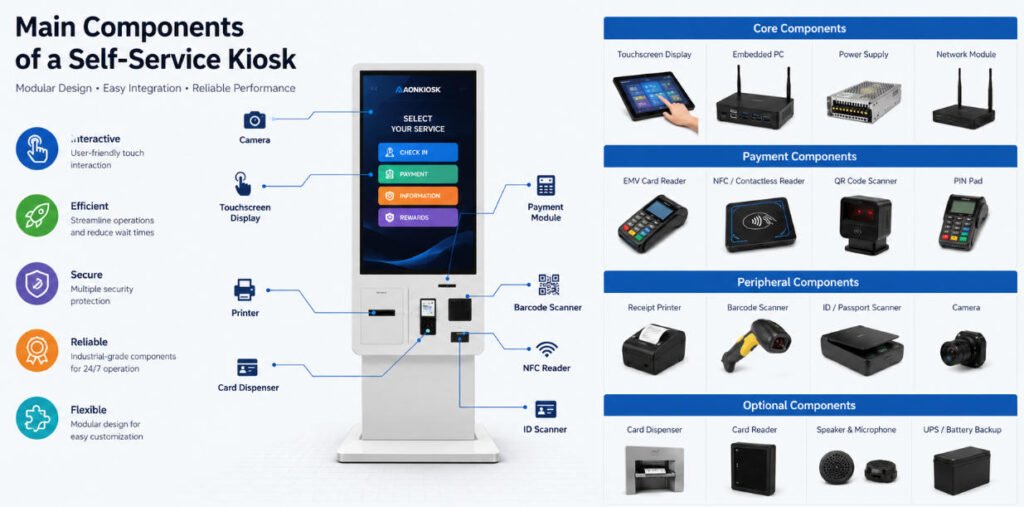
Quelle est la structure de base d’un kiosque ?
Un kiosque en libre-service typique se compose de quatre systèmes principaux :
- Boîtier industriel
- Système informatique
- Dispositifs d’interaction utilisateur
- Modules périphériques
Chaque composant remplit une fonction spécifique tout en communiquant via USB, série (RS232), LAN ou d’autres interfaces industrielles.
Armoire industrielle
│
├── Écran tactile
├── Ordinateur embarqué
├── Système d'exploitation
├── Alimentation électrique
├── Module réseau
│
├── Dispositifs de paiement
├── Imprimante
├── Scanner
├── Caméra
├── Lecteur de carte
├── Lecteur NFC
├── Scanner d'identité
└── Accessoires en option
1. Armoire industrielle (boîtier de kiosque)
Le boîtier constitue la base structurelle du kiosque et protège tous les composants électroniques internes.
Les matériaux typiques incluent :
- Acier laminé à froid
- Acier inoxydable
- Alliage d’aluminium
- Verre trempé
- Revêtement par poudre
Le boîtier détermine :
- Les dimensions globales
- La méthode de montage
- La conception du refroidissement
- Le cheminement des câbles
- Accessibilité pour la maintenance
- La sécurité physique
Les types d’installation courants incluent :
- Kiosques au sol
- Bornes murales
- Kiosques de bureau
- Terminaux de comptoir
- Kiosques extérieurs
Considérations de conception
Les armoires de kiosques industriels doivent offrir :
- Construction anti-vandalisme
- Un accès facile pour la maintenance
- La ventilation
- Protection contre la poussière
- Montage stable
- Gestion cachée des câbles
2. Écran tactile
L’écran est l’interface d’interaction principale entre les utilisateurs et le kiosque.
Les kiosques modernes utilisent généralement des panneaux LCD commerciaux combinés à la technologie tactile capacitive projetée (PCAP).
Les spécifications typiques incluent :
| Spécification | Plage typique |
|---|---|
| Taille de l'écran | 15,6″ – 43″ |
| Résolution | Full HD / 4K |
| Luminosité | 250–1500 nits |
| Points de contact | PCAP 10 points |
| Surface | Verre trempé |
Les écrans à haute luminosité sont recommandés pour les environnements extérieurs où la lumière directe du soleil peut réduire la visibilité.
3. Ordinateur industriel (PC embarqué)
L’ordinateur embarqué sert de centre de contrôle du kiosque.
Il traite :
- Les entrées utilisateur
- Transactions de paiement
- Communication réseau
- Périphériques
- Logiciel applicatif
- Synchronisation cloud
Les options matérielles typiques incluent :
- Intel® Celeron
- Intel® Core™ i3
- Intel® Core™ i5
- Intel® Core™ i7
- Plateformes basées sur ARM
Les options de mémoire vont généralement de :
- 4 Go
- 8 Go
- 16 Go
- 32 Go
Les options de stockage incluent :
- SSD
- SSD NVMe
- Stockage Flash Industriel
L'ordinateur doit prendre en charge un fonctionnement continu 24h/24 et 7j/7 avec des composants de qualité industrielle.
4. Contrôleur tactile
Le contrôleur tactile convertit les touches physiques des doigts en signaux numériques reconnus par le système d'exploitation.
Ses responsabilités incluent :
- Détection de position
- Reconnaissance multi-tactile
- Traitement des gestes
- Rejet de la paume
- Calibrage tactile
La plupart des bornes commerciales utilisent des contrôleurs tactiles PCAP connectés par USB, car ils offrent une grande durabilité, une réponse rapide et un entretien minimal.
5. Unité d'alimentation (PSU)
L'alimentation distribue une énergie électrique stable à chaque périphérique interne.
Une PSU de qualité fournit :
- Protection contre les surtensions
- Protection contre les courts-circuits
- Protection contre les surintensités
- Tension de sortie stable
- La pression et l’alignement du boîtier
Pour les déploiements critiques, une alimentation de qualité industrielle est recommandée.
Certaines bornes extérieures intègrent également :
- Batterie de secours UPS
- Protection contre les surtensions
- Surveillance de l'alimentation
6. Module de communication réseau
La plupart des applications de bornes nécessitent une connectivité cloud.
Les méthodes de communication courantes incluent :
- Ethernet (LAN)
- Wi-Fi
- 4G LTE
- 5G
- Bluetooth
Une connectivité fiable prend en charge :
- Surveillance à distance
- Les mises à jour logicielles
- Rapports cloud
- Le traitement des paiements
- Gestion des appareils
7. Imprimante de reçus
Les imprimantes de reçus restent l'un des périphériques de borne les plus courants.
Les utilisations typiques comprennent :
- Reçus de restaurant
- Tickets de file d'attente
- Bons hôteliers
- Tickets de stationnement
- Confirmations de paiement
Types d'imprimantes courants :
- Imprimante thermique (la plus courante)
- Imprimante d'étiquettes
- Imprimante de tickets
Spécifications importantes :
- Largeur du papier
- Coupeur automatique
- Vitesse d'impression
- Détection de niveau de papier faible
- Détection de bourrage papier
8. Scanner de codes-barres et QR Code
Les scanners permettent une identification et une récupération de données rapides.
Les applications incluent :
- Adhésion au programme de fidélité
- Coupons mobiles
- Billets numériques
- La recherche de produits
- Retrait de commande
- Entrée d'événement
Types de codes-barres pris en charge :
- Code-barres 1D
- QR Code
- PDF417
- Data Matrix
De nombreux scanners prennent en charge à la fois les versions imprimées et les écrans de téléphone mobile.
9. Module de paiement
Les modules de paiement transforment une borne en terminal de transaction en libre-service complet.
Les dispositifs de paiement pris en charge peuvent inclure :
- Lecteur de carte EMV
- Lecteur NFC sans contact
- Prise en charge du portefeuille mobile
- Scanner de paiement QR
- Clavier à code PIN
Les méthodes de paiement compatibles incluent souvent :
- Cartes de crédit
- Cartes de débit
- Apple Pay
- Google Pay
- Portefeuilles numériques régionaux
Le matériel de paiement doit être conforme aux exigences de sécurité PCI et EMV en vigueur.
10. Caméra
Les caméras intégrées prennent en charge la vérification d'identité et l'interaction visuelle.
Les applications courantes incluent :
- Reconnaissance faciale
- Assistance vidéo
- L'enregistrement des visiteurs
- La vérification d'identité
- Support à distance
Résolutions typiques :
- 720P
- 1080P
- 4K
Certaines applications utilisent des caméras IA pour l'analyse client ou la mesure d'occupation.
11. Scanner de pièces d'identité et de passeports
Les bornes des hôtels, aéroports, hôpitaux et administrations exigent fréquemment la numérisation de documents.
Les documents pris en charge comprennent :
- Cartes d'identité nationales
- Passeports
- Permis de conduire
- Titres de séjour
De nombreux scanners prennent en charge :
- Reconnaissance OCR
- Lecture MRZ
- Lecture RFID des passeports
12. Distributeur et lecteur de cartes
Certaines applications de bornes délivrent ou collectent des cartes physiques.
Les exemples typiques incluent :
- Cartes-clés d'hôtel
- Cartes de membre
- Badges visiteurs
- Cartes de stationnement
- Cartes cadeaux
Les fonctions peuvent inclure :
- Distribution de cartes
- Recyclage de cartes
- Collecte de cartes
- Encodage de cartes
- Lecture de piste magnétique
- Lecture RFID
13. Haut-parleur et microphone
Les dispositifs audio améliorent l'accessibilité et l'interaction utilisateur.
Les utilisations courantes incluent :
- Invites vocales
- Appels vidéo
- Support d'accessibilité
- Assistants vocaux IA
De nombreuses bornes publiques intègrent des microphones à réduction de bruit pour une meilleure communication.
14. Système de refroidissement
Un fonctionnement continu génère de la chaleur à l'intérieur de l'enceinte.
Les méthodes de refroidissement incluent :
Refroidissement passif
- Ouvertures de ventilation
- Dissipateurs thermiques
Avantages :
- Silencieux
- Faible maintenance
Refroidissement actif
- Ventilateurs industriels
- Circulation d'air
- Climatisation (bornes extérieures)
Les bornes extérieures peuvent également inclure des thermostats et des éléments chauffants pour les climats extrêmes.
15. Composants de sécurité
Les bornes commerciales nécessitent une protection à la fois physique et numérique.
Exemples :
- Serrures de coffret
- Interrupteurs anti-intrusion
- Vis de sécurité
- Modules TPM
- Protection par mot de passe BIOS
- SSD chiffré
- Démarrage sécurisé
Pour les bornes de paiement, des mesures de conformité supplémentaires peuvent être nécessaires en fonction du matériel de paiement et de l'environnement de déploiement.
Modules d'extension optionnels
Selon l'application, un kiosque peut intégrer des modules supplémentaires tels que :
- Lecteur d'empreintes digitales
- Tablette de signature
- Accepteur de pièces
- Validateur de billets
- Recycleur de billets
- Lecteur RFID
- Lecteur de passeport
- Lecteur NFC
- Détecteur de documents UV
- Caméra de reconnaissance faciale
- Périphériques PDV
- Indicateurs d'état LED
La conception modulaire des kiosques modernes permet aux entreprises de configurer uniquement le matériel requis pour leur flux de travail spécifique.
Comment les composants fonctionnent ensemble
Une transaction en libre-service typique suit la séquence suivante :
- L'utilisateur interagit avec l'écran tactile.
- L'ordinateur intégré traite la demande.
- Les périphériques optionnels (scanner, caméra, terminal de paiement, imprimante, etc.) capturent ou émettent les données selon les besoins.
- Les informations sont transmises de manière sécurisée sur le réseau vers les systèmes backend tels que PDV, ERP, PMS, CRM ou services cloud.
- Le kiosque finalise la transaction et fournit une confirmation, telle qu'un reçu imprimé, une notification numérique ou une carte distribuée.
Cette architecture modulaire permet d'entretenir ou de mettre à niveau chaque composant individuellement sans remplacer l'ensemble du kiosque.
Capacités d'intégration matérielle AONKIOSK
Chez AONKIOSK, Chaque plateforme de kiosque est conçue en tenant compte de l'intégration matérielle modulaire. Selon les exigences de votre projet, les kiosques peuvent être configurés avec une large gamme de composants commerciaux et industriels, notamment :
- Plateformes PC industrielles (Intel® ou ARM)
- Écrans tactiles PCAP multi-tailles
- Terminaux de paiement certifiés EMV
- Lecteurs de codes QR et de codes-barres
- Imprimantes thermiques de reçus
- Lecteurs de passeports et de cartes d'identité
- Modules RFID et NFC
- Caméras et dispositifs biométriques
- Distributeurs et collecteurs de cartes
- Connectivité 4G/5G, Wi-Fi et Ethernet
Cette approche flexible permet aux clients OEM et ODM de construire des kiosques spécifiques à leur application sans matériel superflu, améliorant ainsi la rentabilité tout en garantissant la maintenabilité et l'évolutivité à long terme.






