






Le Système de borne QSR AONKIOSK est une solution de commande en libre-service conçue pour les restaurants à service rapide, les chaînes de restauration rapide, les cafés, les aires de restauration et les établissements de vente à emporter. Elle permet aux clients de consulter les menus, de personnaliser leurs repas, de passer des commandes, d'effectuer des paiements sécurisés et de recevoir des confirmations de commande sans l'assistance du personnel.
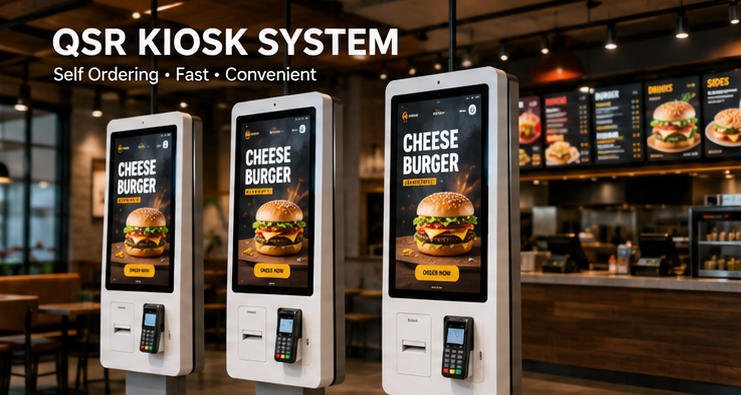
Qu'est-ce qu'un système de borne QSR ?
Un système de borne QSR (Quick Service Restaurant) est un terminal interactif à écran tactile qui permet aux clients d'effectuer de manière autonome :
- Parcourir les menus numériques
- Sélectionner des articles de nourriture et de boissons
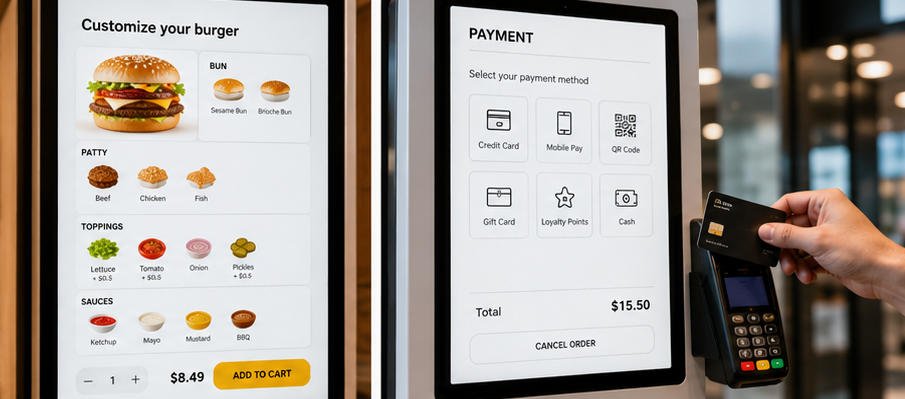
- Personnaliser les ingrédients
- Consulter les informations nutritionnelles
- Appliquer des promotions ou des coupons
- Effectuer les paiements
- Recevoir des numéros de commande
- Envoyer les commandes directement au POS ou au système d'affichage de cuisine (KDS)
Le système réduit le temps d'attente tout en améliorant la précision des commandes et l'efficacité du restaurant.
Applications typiques
La solution QSR AONKIOSK convient à :
- Restaurants de restauration rapide
- Les restaurants de burgers
- Les chaînes de pizzas
- Les cafés
- Les magasins de thé aux perles
- Les restaurants de poulet frit
- Les sandwicheries
- Aires de restauration
- Les magasins de desserts
- Les restaurants d'aéroport
- Concessions de stades
- Les cafétérias universitaires
- Les services de restauration hospitaliers
Composants du système
Une solution de borne QSR complète comprend généralement les composants suivants.
Matériel
- Écran tactile industriel (21,5″–32″)
- Panneau multi-touch capacitif
- PC industriel (plateforme Intel ou ARM)
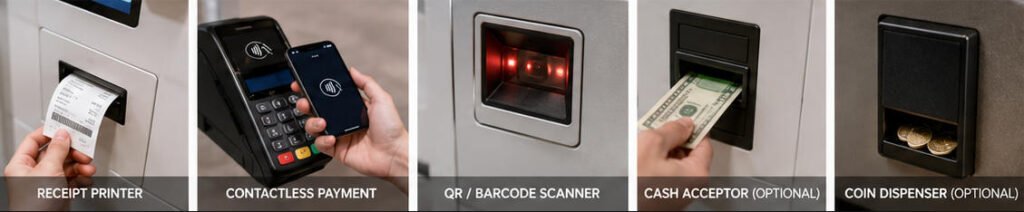
- Imprimante de reçus thermique
- Lecteur de code QR (en option)
- Lecteur de codes-barres (en option)
- Lecteur NFC/RFID
- Terminal de paiement sans contact
- Accepteur de billets (en option)
- Distributeur de pièces de monnaie (en option)
- Haut-parleur
- Caméra (en option)
- Connectivité Wi-Fi et Ethernet
- UPS (en option)
Logiciel
La plateforme logicielle comprend généralement :
- Application de commande en libre-service
- Gestion des menus
- Moteur de personnalisation des produits
- Gestion des commandes
- Intégration POS
- Intégration du système d'affichage en cuisine (KDS)
- Intégration de la passerelle de paiement
- Intégration du programme de fidélité client
- Gestion des campagnes promotionnelles
- Tableau de bord analytique
- Gestion à distance des appareils
Fonctions principales
Commande en libre-service
Les clients peuvent :
- Parcourir les catégories
- Visualiser les images des produits
- Lire les descriptions des produits
- Sélectionner les tailles de repas
- Ajouter des garnitures
- Retirer des ingrédients
- Choisir des menus combinés
- Ajouter des accompagnements
- Sélectionner des boissons
- Vérifier le panier
- Confirmer la commande
Personnalisation du menu
Le système prend en charge :
- Modificateurs multi-niveaux
- Sélections obligatoires
- Options supplémentaires facultatives
- Ajustements de quantité
- Instructions spéciales
- Avis d'allergies
- Informations nutritionnelles
Options de paiement
Selon les exigences régionales en matière de paiement, le kiosque peut prendre en charge :
- Cartes de crédit
- Cartes de débit
- Paiements NFC
- Apple Pay
- Google Pay
- Paiements par code QR
- Portefeuilles mobiles
- Cartes cadeaux
- Points de fidélité
- Paiement en espèces (facultatif)
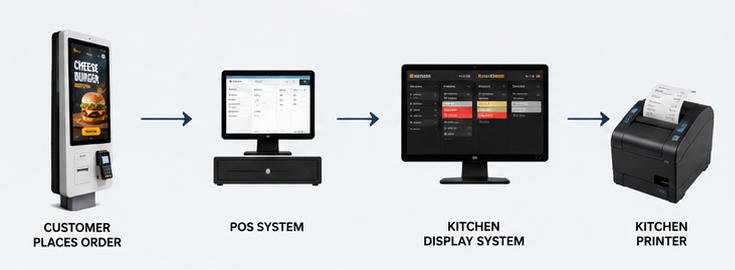
Intégration en cuisine
Les commandes peuvent être transmises automatiquement à :
- Système de point de vente (POS)
- Système d'affichage en cuisine (KDS)
- Imprimantes de cuisine
- Écrans de production
- Serveurs de gestion des commandes
Cela réduit les erreurs de saisie manuelle et améliore le flux de travail en cuisine.
Flux de travail utilisateur
Le processus de commande standard comprend :
- Écran d'accueil
- Sélection de la langue
- Parcourir le menu
- Sélectionner des produits
- Personnaliser les articles
- Vérifier le panier d'achat
- Appliquer des coupons ou des récompenses
- Choisir le mode de paiement
- Effectuer le paiement
- Recevoir un reçu ou une confirmation numérique
- La cuisine reçoit la commande
- Le client attend le retrait
Exigences d'installation
Alimentation électrique
Exigences typiques :
- CA 100–240 V
- 50/60 Hz
- Prise mise à la terre
- Protection contre les surtensions recommandée
Réseau
Recommandé :
- Ethernet filaire
- Sauvegarde Wi-Fi
- Connexion Internet stable
- Prise en charge VPN (facultatif)
Exigences d'espace
Prévoir un dégagement suffisant pour :
- Opération du client
- Accessibilité aux fauteuils roulants
- Maintenance de l'imprimante
- La ventilation
- Accès à l'alimentation électrique
Options d'intégration
La plateforme AONKIOSK peut s'intégrer à :
Systèmes de caisse (POS)
- Restaurant POS
- POS cloud
- Enterprise POS
- Franchise POS
Kitchen Systems
- Kitchen Display Systems
- Imprimantes de cuisine
- Order routing software
Payment Platforms
Integration depends on country and payment provider.
Typical supported devices include:
- Ingenico
- Verifone
- PAX
- Castles
- Stripe Terminal
- Adyen
- Worldpay
Plateformes de fidélité
Possible integrations include:
- les systèmes de fidélité
- CRM
- Cartes cadeaux
- Points programs
- Les coupons numériques
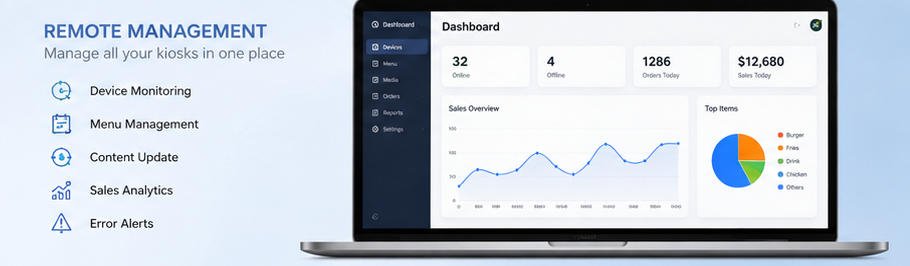
Gestion à distance
Administrators can remotely manage:
- Les mises à jour du menu
- Les prix
- Promotions
- Les mises à jour logicielles
- Device status
- Network status
- Printer status
- Error logs
- Usage statistics
This minimizes on-site maintenance and enables centralized management across multiple restaurant locations.
Security Features
The AONKIOSK QSR system supports:
- L'authentification des utilisateurs
- Secure payment communication
- Encrypted data transmission
- HTTPS communication
- Surveillance à distance
- Device lockdown mode
- Automatic logout
- Audit logs
Daily Maintenance
Recommended daily checks include:
- Clean touchscreen
- Verify printer paper
- Test payment terminal
- Check network connectivity
- Restart kiosk if necessary
- Confirm menu synchronization
- Review error logs
Troubleshooting Guide
Kiosk Cannot Connect to Network
Possible Causes
- Ethernet cable disconnected
- Wi-Fi unavailable
- Router offline
- Incorrect IP configuration
Solutions
- Vérifiez le câble réseau.
- Redémarrez le routeur ou le commutateur.
- Vérifiez les paramètres réseau.
- Testez la connectivité Internet.
- Contactez votre administrateur réseau si le problème persiste.
Terminal de paiement ne répond pas
Possible Causes
- Échec de la connexion USB
- Service de paiement indisponible
- Problème de micrologiciel du terminal
Solutions
- Reconnectez le dispositif de paiement.
- Redémarrez le kiosque.
- Vérifiez la connectivité de la passerelle de paiement.
- Vérifiez l'état du micrologiciel du terminal.
- Contactez le fournisseur de paiement si nécessaire.
L'imprimante de reçus n'imprime pas
Possible Causes
- Papier épuisé
- Couvercle de l'imprimante ouvert
- USB déconnecté
- Imprimante hors ligne
Solutions
- Rechargez le papier thermique.
- Fermez correctement le couvercle de l'imprimante.
- Vérifiez les connexions des câbles.
- Redémarrez l'imprimante.
- Vérifiez l'état de l'imprimante dans le logiciel du kiosque.
Les commandes n'apparaissent pas en cuisine
Possible Causes
- Échec de la connexion au POS
- KDS hors ligne
- L'interruption du réseau
- Erreur de communication API
Solutions
- Vérifiez la connectivité du POS.
- Vérifiez le fonctionnement du KDS.
- Testez la connexion réseau.
- Examinez les journaux système.
- Redémarrez les services d'intégration si nécessaire.
Performances système lentes
Possible Causes
- Mémoire insuffisante
- Fichiers image volumineux
- Latence réseau
- Processus en arrière-plan
Solutions
- Redémarrez le kiosque.
- Optimisez les images du menu.
- Mettez à jour le logiciel.
- Vérifiez l'espace de stockage disponible.
- Vérifiez les performances du réseau.
Bonnes pratiques
Pour des performances optimales :
- Maintenez le logiciel à jour.
- Sauvegardez régulièrement les fichiers de configuration.
- Surveillez les fournitures de l'imprimante.
- Testez les dispositifs de paiement quotidiennement.
- Nettoyez l'écran tactile avec des matériaux approuvés.
- Surveillez l'état du système via le portail de gestion à distance.
- Former le personnel aux procédures de dépannage de base.
Foire aux questions
Le kiosque peut-il prendre en charge plusieurs langues ?
Oui. Plusieurs packs linguistiques peuvent être configurés en fonction des exigences du projet.
Les clients peuvent-ils personnaliser leurs repas ?
Oui. Le système prend en charge les modificateurs configurables, les sélections d'ingrédients, les formules combinées et les suppléments optionnels.
Le kiosque prend-il en charge le paiement sans contact ?
Oui. La prise en charge dépend du terminal de paiement intégré et du prestataire de paiement régional.
Les menus peuvent-ils être mis à jour à distance ?
Oui. Les articles du menu, les prix, les images et les promotions peuvent être gérés à distance via la plateforme d'administration.
Le kiosque s'intègre-t-il aux systèmes de point de vente (POS) ?
Oui. L'intégration est disponible via des API, des intergiciels ou des interfaces personnalisées, selon le fournisseur du système POS.
Un administrateur peut-il gérer plusieurs kiosques ?
Oui. La gestion centralisée permet de surveiller et de mettre à jour plusieurs kiosques sur différents sites de restauration.
Spécifications techniques (Exemple)
| Composant | Spécification |
|---|---|
| Écran | Écran tactile capacitif Full HD de 21,5″ à 32″ |
| Système d’exploitation | Windows, Android, Linux (selon le projet) |
| Processeur | Plateforme Intel Core / ARM |
| Mémoire | 4 Go – 16 Go |
| Stockage | SSD 64 Go – 512 Go |
| Réseau | Ethernet, Wi-Fi |
| Imprimante | Imprimante thermique de reçus 80 mm |
| Scanner | Lecteur QR / code-barres en option |
| Paiement | Paiement EMV, NFC, sans contact, QR |
| Installation | Montage au sol / sur comptoir / mural |
Pourquoi choisir le système de kiosque QSR AONKIOSK ?
AONKIOSK développe des kiosques libre-service axés sur la fiabilité à long terme, l'intégration flexible et le déploiement en entreprise. Nos solutions QSR sont conçues pour les restaurants recherchant une commande en libre-service efficace tout en maintenant la compatibilité avec les systèmes POS, de paiement et de cuisine existants.
Les principaux avantages incluent :
- Matériel de qualité industrielle pour un fonctionnement continu
- Personnalisation matérielle flexible
- Intégration par API ouverte avec des plateformes tierces
- Interface utilisateur multilingue
- Gestion centralisée à distance
- Déploiement évolutif pour les magasins uniques ou les chaînes multi-sites
- Documentation technique complète et support après-vente
Qu'il soit déployé dans un café unique ou une chaîne de restaurants nationale, le Système de borne QSR AONKIOSK contribue à rationaliser la prise de commande, à réduire les besoins en main-d'œuvre, à améliorer la précision des commandes et à offrir une expérience de libre-service cohérente.






