






L'industrie de la restauration a connu une transformation numérique spectaculaire au cours de la dernière décennie. La hausse des coûts de main-d'œuvre, l'augmentation des attentes des clients et la demande de service plus rapide ont incité les restaurants à adopter des technologies d'automatisation. Parmi ces innovations, Système de borne QSR est devenue l'un des investissements les plus efficaces pour les restaurants modernes.
Des chaînes de restauration rapide mondiales aux marques régionales, la commande par borne en restauration rapide transforme la manière dont les clients passent commande, effectuent des paiements et interagissent avec les restaurants. Au lieu de faire la queue pour parler à un caissier, les clients peuvent parcourir les menus, personnaliser leurs repas, payer instantanément et recevoir des commandes précises avec une intervention minimale du personnel.
Ce guide explique ce qu'est un QSR, comment fonctionne Système de borne QSR une borne, ses avantages commerciaux, et pourquoi les grandes marques de restauration continuent d'investir dans la technologie de commande en libre-service.
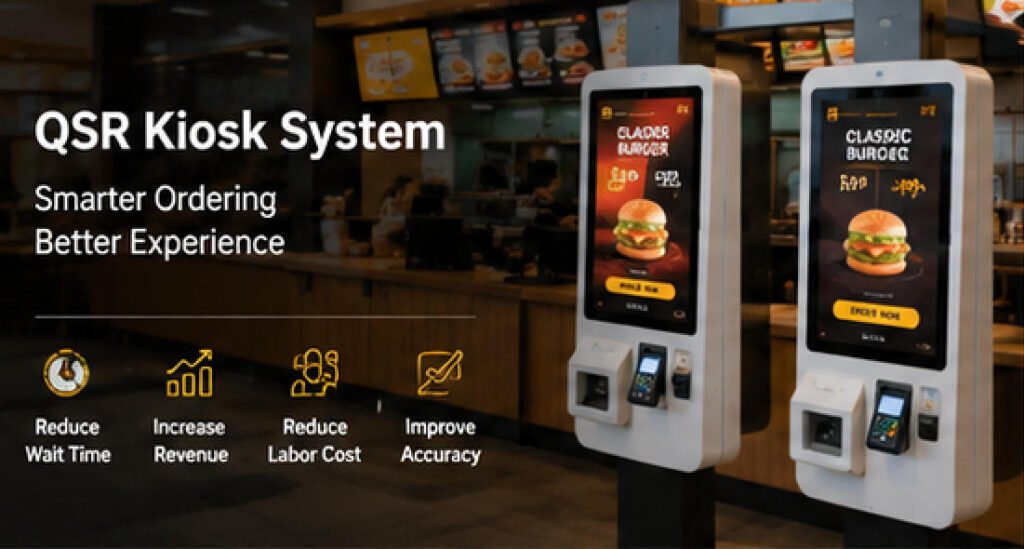
Qu'est-ce qu'un QSR ?
QSR signifie Quick Service Restaurant (restaurant à service rapide), un modèle de restauration conçu pour servir les clients aussi rapidement et efficacement que possible.
Contrairement aux restaurants à service complet, les QSR se concentrent sur :
- Une commande rapide
- Un service à table limité
- Des menus standardisés
- Un roulement élevé de la clientèle
- Des opérations de cuisine efficaces
Les établissements QSR typiques incluent :
- Les restaurants de burgers
- Les chaînes de poulet frit
- Les pizzerias
- Les cafés
- Les magasins de thé aux perles
- Les restaurants de sandwichs
- Les chaînes de boulangeries
Parce que la rapidité est essentielle, de nombreux QSR s'appuient désormais sur Système de borne QSR une borne pour rationaliser l'expérience de commande tout en réduisant la pression sur le personnel de caisse.
Pourquoi les restaurants QSR évoluent vers le libre-service
Les exploitants de restaurants sont confrontés à plusieurs défis persistants :
- Pénurie de main-d'œuvre
- L'augmentation des salaires minimums
- Les longues files d'attente aux heures de pointe
- Les erreurs de commande
- La demande des clients pour la commande numérique
- L'augmentation des coûts opérationnels
A la commande par borne en restauration rapide La solution par borne répond à ces problèmes en permettant aux clients d'effectuer le processus de commande de manière autonome.
Au lieu de remplacer complètement les employés, les bornes permettent au personnel de se concentrer sur :
- Préparation des aliments
- Exécution des commandes
- L'assistance client
- La gestion de la salle à manger
Cela permet une main-d'œuvre plus équilibrée et des opérations de restaurant plus fluides.
Comment fonctionne un système de borne QSR
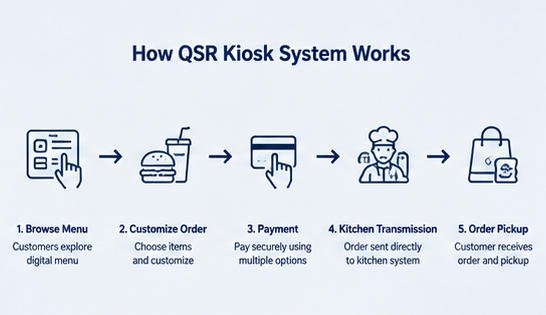
Une borne moderne Système de borne QSR intègre plusieurs composants matériels et logiciels en une plateforme de commande fluide.
Étape 1 : Le client parcourt le menu numérique
Les clients s'approchent de la borne et consultent un menu interactif avec :
- Les images des produits
- Les menus combinés
- Les prix
- Les informations nutritionnelles
- Offres promotionnelles
- Offres spéciales à durée limitée
La navigation tactile rend la consultation intuitive pour les clients de tous âges.
Étape 2 : Personnalisation du repas
Les clients peuvent personnaliser leurs commandes en sélectionnant des options telles que :
- Fromage supplémentaire
- Garnitures supplémentaires
- Taille de la boisson
- Des accompagnements
- Préférences de sauce
- Demandes liées aux allergies
Étant donné que les clients saisissent eux-mêmes leurs choix, la précision des commandes s’améliore considérablement par rapport à une commande verbale.
Étape 3 : Vente incitative intelligente
L’un des principaux avantages d’un Système de borne QSR est la vente incitative automatisée.
Le kiosque peut recommander intelligemment :
- Des portions plus grandes
- Mises à niveau de formules
- Des desserts
- Boissons
- Les promotions saisonnières
- Produits à durée limitée
Comme les recommandations sont visuelles et cohérentes, les clients sont plus susceptibles d’ajouter des articles supplémentaires.
De nombreux exploitants de restaurants signalent une augmentation de la valeur moyenne des commandes après l’installation de kiosques de commande libre-service.
Étape 4 : Paiement sécurisé
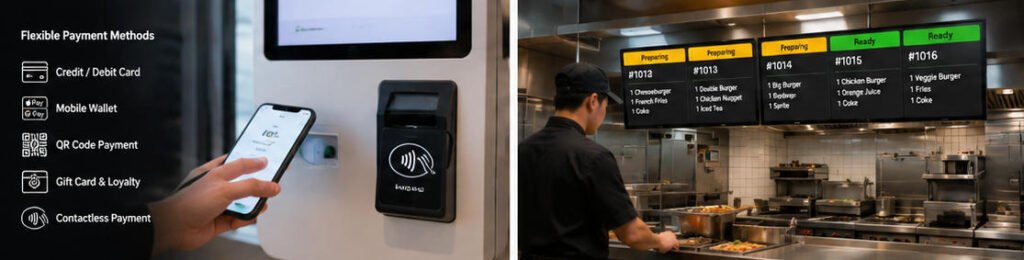
Les kiosques modernes prennent en charge plusieurs options de paiement, notamment :
- Cartes de crédit
- Cartes de débit
- Des paiements sans contact
- Portefeuilles mobiles
- Paiements par code QR
- Cartes cadeaux
- Comptes de fidélité
Le paiement est traité immédiatement via des terminaux de paiement intégrés.
Étape 5 : Transmission de la commande en cuisine
Une fois le paiement effectué, la commande est automatiquement transmise à :
- Système d'affichage en cuisine (KDS)
- Système de point de vente (POS)
- Imprimante de cuisine
- Logiciel de gestion des commandes
Le personnel de cuisine commence à préparer la commande sans nécessiter de saisie manuelle par un caissier.
Étape 6 : Retrait de la commande
Les clients reçoivent :
- Reçu imprimé
- Numéro de commande numérique
- Notification par SMS (optionnelle)
- Notification via application mobile (optionnelle)
Lorsque la nourriture est prête, les clients récupèrent leurs repas au comptoir de retrait.
L’ensemble du la commande par borne en restauration rapide processus minimise le temps d’attente tout en améliorant l’efficacité opérationnelle.
Avantages d’un système de kiosque QSR
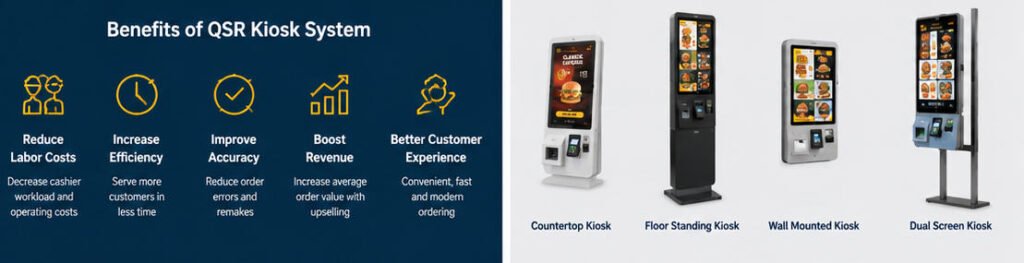
1. Réduire les coûts de main-d’œuvre
La main-d’œuvre représente l’une des dépenses d’exploitation les plus élevées pour les entreprises QSR.
A Système de borne QSR réduit la charge de travail des caissiers en permettant à un employé de superviser plusieurs kiosques au lieu de traiter manuellement chaque commande.
Les avantages incluent :
- Des besoins en personnel réduits
- Meilleure répartition des employés
- Réduction des heures supplémentaires
- Productivité améliorée
Les restaurants peuvent réorienter les employés vers des tâches de service client à plus forte valeur ajoutée.
2. Augmenter la précision des commandes
Les erreurs de communication sont l’une des principales causes de commandes incorrectes.
Les kiosques de commande libre-service éliminent les malentendus verbaux en permettant aux clients de confirmer chaque article avant le paiement.
Une précision améliorée signifie :
- Moins de refabrications
- Moins de gaspillage alimentaire
- Meilleure satisfaction client
- Réduction des demandes de remboursement
3. Service client plus rapide
Pendant les périodes d'affluence du déjeuner et du dîner, les longues files d'attente découragent souvent les clients potentiels.
Plusieurs bornes permettent à plusieurs clients de passer commande simultanément.
Les avantages incluent :
- Files d'attente plus courtes
- Une commande plus rapide
- Débit accru
- Capacité d'accueil supérieure
Les restaurants peuvent servir davantage de clients pendant les heures de pointe.
4. Panier moyen plus élevé
Contrairement aux caissiers qui peuvent oublier de recommander des articles supplémentaires, les bornes suggèrent systématiquement :
- Des améliorations de repas
- Des boissons premium
- Des desserts
- Des garnitures supplémentaires
- Des formules combinées
Les recommandations visuelles de produits encouragent les achats impulsifs et augmentent le montant moyen des transactions.
5. Meilleure expérience client
De nombreux clients préfèrent commander de manière autonome sans se sentir pressés.
Les bornes libre-service offrent :
- Une navigation facile dans le menu
- Options multilingues
- Des images de plats de haute qualité
- Des prix clairs
- Une personnalisation simple
- La commande sans contact
Le résultat est une expérience de restauration plus fluide et plus agréable.
6. Données commerciales précieuses
Chaque transaction fournit des informations précieuses sur le comportement des clients.
Les propriétaires de restaurants peuvent analyser :
- Articles de menu populaires
- Les heures de pointe de commande
- Les dépenses moyennes
- La performance des promotions
- Les préférences des clients
Ces informations favorisent des décisions commerciales plus judicieuses et l'optimisation des menus.
Composants matériels courants d'un système de borne QSR
Un fabricant professionnel Système de borne QSR comprend généralement :
| Composant | Objectif |
|---|---|
| Écran tactile | Interaction client |
| PC industriel | Exécution du logiciel de la borne |
| Terminal de paiement | Traitement des paiements |
| Scanner QR | Programme de fidélité et paiement mobile |
| Imprimante de reçus | Impression des reçus de commande |
| Lecteur NFC | Transactions sans contact |
| Caméra (en option) | Applications d'identification ou d'IA |
| Haut-parleurs | Invites vocales |
| Module réseau | Communication avec le point de vente (POS) |
| Coffret métallique | Enceinte commerciale durable |
Des fabricants comme AONKIOSK proposent également des options de personnalisation OEM et ODM, permettant aux restaurants et aux intégrateurs de systèmes de configurer les bornes en fonction de l'espace d'installation, des exigences de marque, des périphériques et des méthodes de paiement régionales.
Meilleurs secteurs pour la commande par borne en restauration rapide
Bien que conçu principalement pour les restaurants de restauration rapide, la commande par borne en restauration rapide est largement utilisé dans :
- Les chaînes de restauration rapide
- Les cafés
- Les magasins de thé aux perles
- Les restaurants de pizza
- Les sandwicheries
- Aires de restauration
- Les chaînes de boulangeries
- Concessions de stades
- Les restaurants d'aéroport
- Les cafétérias universitaires
Chaque entreprise bénéficie de temps d'attente réduits et d'une gestion des commandes plus efficace.
Exemple concret : le modèle de commande libre-service de McDonald's
L'un des exemples les plus reconnus d'un succès Système de borne QSR est le modèle de commande libre-service largement déployé par McDonald's.
Les clients, en général :
- Se dirigent vers le bornier.
- Parcourent l'intégralité du menu numérique.
- Personnalisent leurs burgers, boissons et accompagnements.
- Reçoivent des suggestions automatiques de mise à niveau de leur repas.
- Paient par carte ou portefeuille mobile.
- Reçoivent un numéro de commande.
- Attendent pendant que la cuisine prépare le repas.
- Récupèrent leur commande au comptoir de retrait ou optent pour le service à table lorsqu'il est disponible.
Cette approche réduit les files d'attente aux caisses, standardise le processus de commande et crée des expériences client cohérentes sur tous les points de vente. Inspirées par ce modèle, de nombreuses chaînes régionales et indépendantes ont introduit des la commande par borne en restauration rapide solutions similaires adaptées à leurs propres menus et flux de travail.
Choisir le bon système de bornes pour la restauration rapide (QSR)
Lors de l'évaluation d'une solution de borne, les restaurants doivent prendre en compte :
- La taille et la luminosité de l'écran
- Compatibilité des dispositifs de paiement
- Intégration POS
- L'intégration avec l'écran de cuisine
- Un matériel commercial durable
- Maintenance aisée
- La prise en charge multilingue
- Gestion à distance des appareils
- L'évolutivité future
- Les capacités de personnalisation OEM
La sélection d'un matériel fiable contribue à garantir un fonctionnement stable et des coûts de maintenance réduits sur l'ensemble du cycle de vie de la borne.
Tendances futures des systèmes de bornes QSR
À mesure que la technologie de la restauration évolue, les futurs systèmes de bornes QSR devraient inclure :
- Des recommandations de menu basées sur l'IA
- La commande assistée par la voix
- Des programmes de fidélité par reconnaissance faciale (là où cela est autorisé)
- La gestion à distance basée sur le cloud
- Synchronisation des stocks en temps réel
- Des promotions personnalisées
- Des tableaux de bord d'analyse intelligents
- L'intégration avec les écosystèmes de commande mobile
Ces avancées amélioreront encore le confort du client et l'efficacité opérationnelle.
Conclusion
Une borne moderne Système de borne QSR n'est plus simplement un écran de commande numérique — c'est devenu un outil stratégique pour améliorer l'efficacité des restaurants, réduire les coûts de main-d'œuvre, accroître la précision des commandes et générer des revenus plus élevés.
Alors que les attentes des clients continuent d'évoluer vers des expériences plus rapides et en libre-service, la commande par borne en restauration rapide offre aux restaurants une solution évolutive qui profite à la fois aux exploitants et aux clients. Qu'il soit déployé dans une chaîne mondiale de restauration rapide ou dans un café indépendant, un système de bornes bien conçu rationalise les opérations, soutient la croissance de l'entreprise et offre une expérience de restauration plus pratique.
Pour les marques de restauration, les franchisés et les intégrateurs de systèmes à la recherche d'un matériel de borne fiable, AONKIOSK fournit des solutions de bornes libre-service OEM et ODM personnalisables, conçues pour les environnements commerciaux exigeants, aidant les entreprises à bâtir des systèmes de commande efficaces et prêts pour l'avenir.






