






The food service industry has experienced a dramatic digital transformation over the past decade. Rising labor costs, increasing customer expectations, and the demand for faster service have encouraged restaurants to adopt automation technologies. Among these innovations, the QSR kiosk system has become one of the most effective investments for modern restaurants.
From global fast-food chains to regional restaurant brands, quick service kiosk ordering is changing how customers place orders, make payments, and interact with restaurants. Instead of waiting in line to speak with a cashier, customers can browse menus, customize meals, pay instantly, and receive accurate orders with minimal staff involvement.
This guide explains what a QSR is, how a QSR kiosk system works, its business advantages, and why leading restaurant brands continue investing in self-ordering technology.
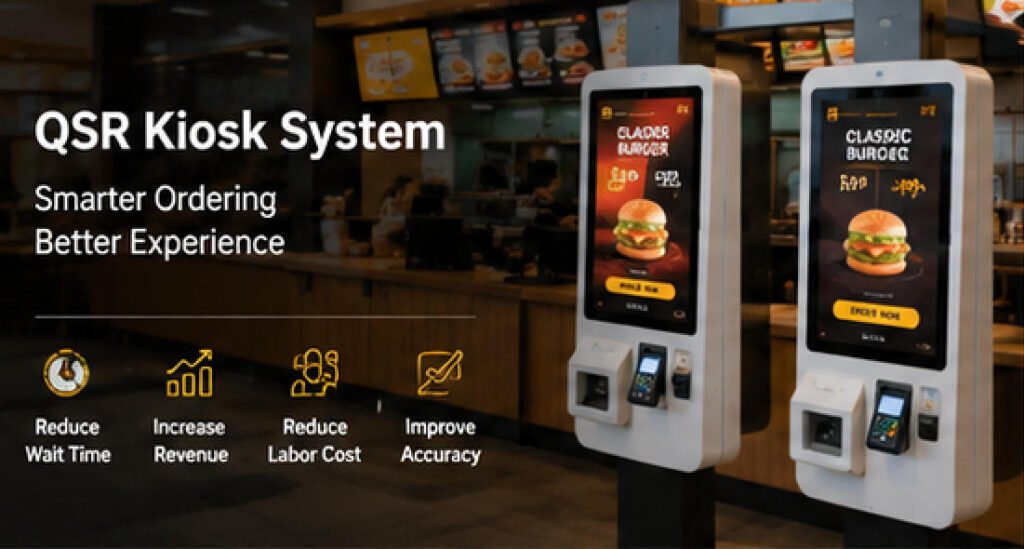
What is a QSR?
QSR stands for Quick Service Restaurant, a restaurant model designed to serve customers as quickly and efficiently as possible.
Unlike full-service restaurants, QSRs focus on:
- Fast ordering
- Limited table service
- Standardized menus
- High customer turnover
- Efficient kitchen operations
Typical QSR businesses include:
- Burger restaurants
- Fried chicken chains
- Pizza shops
- Coffee shops
- Bubble tea stores
- Sandwich restaurants
- Bakery chains
Because speed is essential, many QSRs now rely on a QSR kiosk system to streamline the ordering experience while reducing pressure on front-counter staff.
Why QSR Restaurants Are Moving Toward Self-Service
Restaurant operators face several ongoing challenges:
- Labor shortages
- Rising minimum wages
- Long queues during peak hours
- Order inaccuracies
- Customer demand for digital ordering
- Increasing operational costs
A quick service kiosk ordering solution addresses these issues by allowing customers to complete the ordering process independently.
Instead of replacing employees entirely, kiosks allow staff to focus on:
- Food preparation
- Order fulfillment
- Customer assistance
- Dining area management
This results in a more balanced workforce and smoother restaurant operations.
How a QSR Kiosk System Works
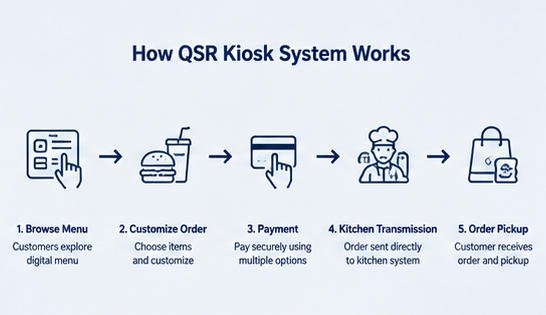
A modern QSR kiosk system integrates multiple hardware and software components into one seamless ordering platform.
Step 1: Customer Browses the Digital Menu
Customers approach the kiosk and view an interactive menu with:
- Product images
- Combo meals
- Pricing
- Nutrition information
- Promotional offers
- Limited-time specials
Touchscreen navigation makes browsing intuitive for customers of all ages.
Step 2: Meal Customization
Customers can personalize their orders by selecting options such as:
- Extra cheese
- Additional toppings
- Drink size
- Side dishes
- Sauce preferences
- Allergy requests
Because customers enter their own selections, order accuracy improves significantly compared with verbal ordering.
Step 3: Smart Upselling
One major advantage of a QSR kiosk system is automated upselling.
The kiosk can intelligently recommend:
- Larger meal sizes
- Combo upgrades
- Desserts
- Drinks
- Seasonal promotions
- Limited-time products
Since recommendations are visual and consistent, customers are more likely to add additional items.
Many restaurant operators report increased average order values after implementing self-ordering kiosks.
Step 4: Secure Payment
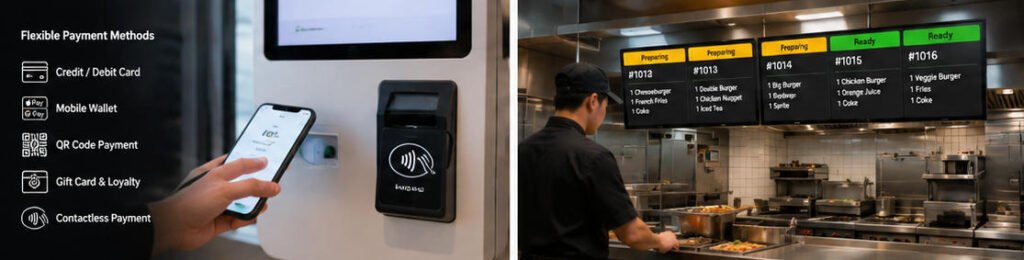
Modern kiosks support multiple payment options, including:
- Credit cards
- Debit cards
- Contactless payments
- Mobile wallets
- QR code payments
- Gift cards
- Loyalty accounts
Payment is processed immediately through integrated payment terminals.
Step 5: Kitchen Order Transmission
Once payment is complete, the order is automatically transmitted to:
- Kitchen Display System (KDS)
- POS system
- Kitchen printer
- Order management software
Kitchen staff begin preparing the order without requiring manual cashier input.
Step 6: Order Pickup
Customers receive:
- Printed receipt
- Digital order number
- SMS notification (optional)
- Mobile app notification (optional)
When food is ready, customers collect their meals from the pickup counter.
The entire quick service kiosk ordering process minimizes waiting time while improving operational efficiency.
Benefits of a QSR Kiosk System
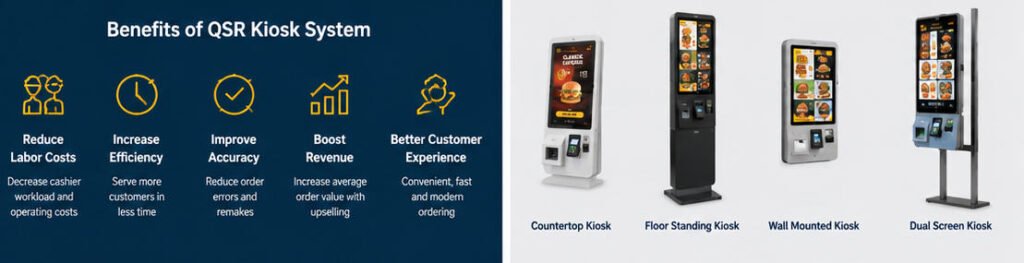
1. Reduce Labor Costs
Labor represents one of the highest operating expenses for QSR businesses.
A QSR kiosk system reduces cashier workload by allowing one employee to oversee multiple kiosks instead of manually processing every order.
Benefits include:
- Lower staffing requirements
- Better employee allocation
- Reduced overtime
- Improved productivity
Restaurants can redirect employees toward higher-value customer service tasks.
2. Increase Order Accuracy
Miscommunication is one of the leading causes of incorrect orders.
Self-ordering kiosks eliminate verbal misunderstandings by allowing customers to confirm every item before payment.
Improved accuracy means:
- Fewer remakes
- Lower food waste
- Better customer satisfaction
- Reduced refund requests
3. Faster Customer Service
During lunch and dinner rushes, long queues often discourage potential customers.
Multiple kiosks allow several customers to order simultaneously.
Benefits include:
- Shorter waiting lines
- Faster ordering
- Increased throughput
- Higher customer capacity
Restaurants can serve more guests during peak business hours.
4. Higher Average Order Value
Unlike cashiers who may forget to recommend additional items, kiosks consistently suggest:
- Meal upgrades
- Premium beverages
- Desserts
- Extra toppings
- Combo packages
Visual product recommendations encourage impulse purchases and increase average transaction values.
5. Better Customer Experience
Many customers prefer ordering independently without feeling rushed.
Self-service kiosks provide:
- Easy menu browsing
- Multiple language options
- High-quality food images
- Clear pricing
- Simple customization
- Contactless ordering
The result is a smoother, more enjoyable dining experience.
6. Valuable Business Data
Every transaction provides insights into customer behavior.
Restaurant owners can analyze:
- Popular menu items
- Peak ordering times
- Average spending
- Promotion performance
- Customer preferences
These insights support smarter business decisions and menu optimization.
Common Hardware Components of a QSR Kiosk System
A professional QSR kiosk system typically includes:
| Component | Purpose |
|---|---|
| Touchscreen Display | Customer interaction |
| Industrial PC | Runs kiosk software |
| Payment Terminal | Processes payments |
| QR Scanner | Loyalty and mobile payment |
| Receipt Printer | Prints order receipts |
| NFC Reader | Contactless transactions |
| Camera (Optional) | Identity or AI applications |
| Speakers | Voice prompts |
| Network Module | POS communication |
| Metal Cabinet | Durable commercial enclosure |
Manufacturers like AONKIOSK also offer OEM and ODM customization, allowing restaurants and system integrators to configure kiosks based on installation space, branding requirements, peripherals, and regional payment methods.
Best Industries for Quick Service Kiosk Ordering
Although designed primarily for fast-food restaurants, quick service kiosk ordering is widely used in:
- Fast-food chains
- Coffee shops
- Bubble tea stores
- Pizza restaurants
- Sandwich shops
- Food courts
- Bakery chains
- Stadium concessions
- Airport restaurants
- University cafeterias
Each business benefits from reduced waiting times and more efficient order management.
Real-World Example: The McDonald’s Self-Ordering Model
One of the most recognized examples of a successful QSR kiosk system is the self-ordering model widely deployed by McDonald’s.
Customers typically:
- Walk up to the kiosk.
- Browse the full digital menu.
- Customize burgers, drinks, and sides.
- Receive automatic meal upgrade suggestions.
- Pay using card or mobile wallet.
- Receive an order number.
- Wait while the kitchen prepares the meal.
- Collect food from the pickup counter or choose table service where available.
This approach reduces cashier queues, standardizes the ordering process, and creates consistent customer experiences across locations. Inspired by this model, many regional and independent restaurant chains have introduced similar quick service kiosk ordering solutions tailored to their own menus and workflows.
Choosing the Right QSR Kiosk System
When evaluating a kiosk solution, restaurants should consider:
- Screen size and brightness
- Payment device compatibility
- POS integration
- Kitchen display integration
- Durable commercial hardware
- Easy maintenance
- Multi-language support
- Remote device management
- Future scalability
- OEM customization capabilities
Selecting reliable hardware helps ensure stable operation and lower maintenance costs over the kiosk’s lifecycle.
Future Trends in QSR Kiosk Systems
As restaurant technology evolves, future QSR kiosk systems are expected to include:
- AI-powered menu recommendations
- Voice-assisted ordering
- Facial recognition loyalty programs (where permitted)
- Cloud-based remote management
- Real-time inventory synchronization
- Personalized promotions
- Smart analytics dashboards
- Integration with mobile ordering ecosystems
These advancements will further enhance customer convenience and operational efficiency.
Conclusion
A modern QSR kiosk system is no longer just a digital ordering screen—it has become a strategic tool for improving restaurant efficiency, reducing labor costs, increasing order accuracy, and driving higher revenue.
As customer expectations continue shifting toward faster, self-service experiences, quick service kiosk ordering offers restaurants a scalable solution that benefits both operators and guests. Whether deployed in a global fast-food chain or an independent café, a well-designed kiosk system streamlines operations, supports business growth, and delivers a more convenient dining experience.
For restaurant brands, franchise operators, and system integrators seeking reliable kiosk hardware, AONKIOSK provides customizable OEM and ODM self-service kiosk solutions designed for demanding commercial environments, helping businesses build efficient, future-ready ordering systems.






