






Understanding Different Self-Service Kiosk Types
Self-service kiosks are available in many configurations, each designed for a specific workflow and customer interaction. While they share similar hardware components—including touch displays, industrial computers, printers, scanners, and payment devices—their functionality varies depending on the application.
Understanding the different types of self-service kiosks helps businesses select the appropriate hardware platform, simplify deployment, and improve long-term operational efficiency.
This knowledge base article explains how self-service kiosks are commonly classified, where each type is used, and what hardware modules are typically required.
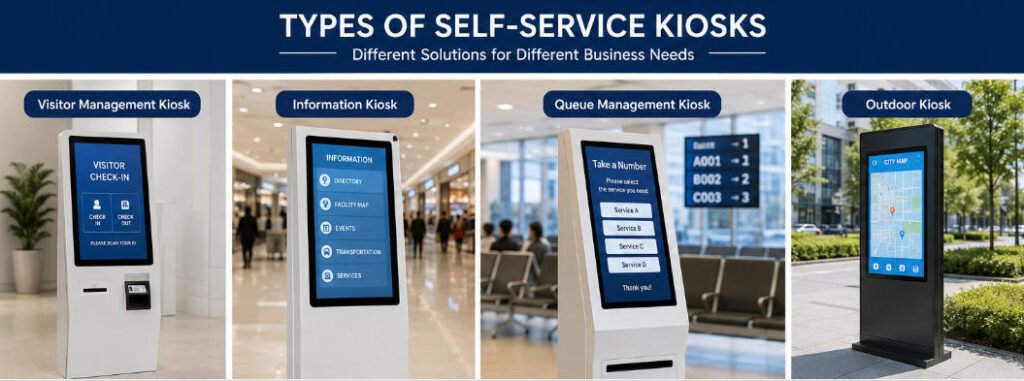
How Self-Service Kiosks Are Classified
Self-service kiosks can be categorized in several ways.
By Business Function
This is the most common classification method.
- Self-ordering kiosks
- Self-checkout kiosks
- Payment kiosks
- Ticketing kiosks
- Hotel check-in kiosks
- Visitor management kiosks
- Information kiosks
- Queue management kiosks
- Healthcare registration kiosks
- Wayfinding kiosks
Each type performs a different customer service workflow while using many of the same hardware technologies.
By Installation Method
Depending on available space and customer traffic, kiosks may be installed as:
- Floor-standing kiosks
- Wall-mounted kiosks
- Countertop kiosks
- Desktop terminals
- Outdoor kiosks
- Dual-sided kiosks
Installation style affects accessibility, maintenance, cable routing, and overall user experience.
By Operating Environment
Kiosks are also designed according to environmental requirements.
Indoor kiosks generally require:
- Standard LCD displays
- Commercial metal enclosures
- Controlled operating temperatures
Outdoor kiosks usually include:
- High-brightness displays
- Waterproof construction
- Dust protection
- Wide-temperature industrial components
- Anti-vandal design
- Sunlight-readable screens
Selecting indoor or outdoor hardware is one of the most important design decisions.
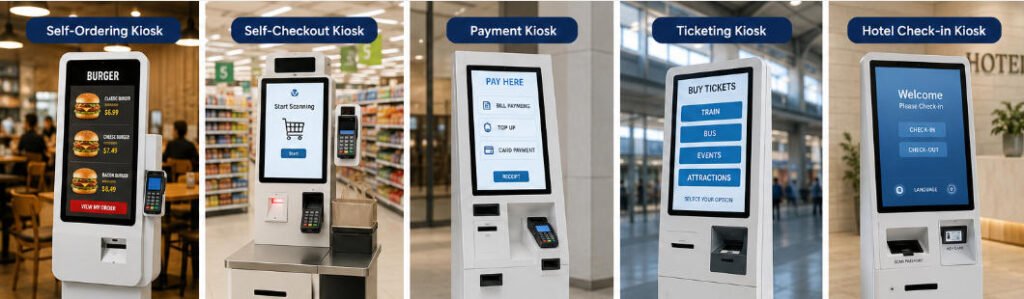
Common Types of Self-Service Kiosks
Self-Ordering Kiosk
Self-ordering kiosks allow customers to browse menus, customize products, place orders, and complete payment without staff assistance.
Typical applications include:
- Quick-service restaurants
- Coffee shops
- Bubble tea stores
- Food courts
- Stadium concessions
Common hardware modules:
- Touchscreen
- QR scanner
- NFC reader
- Receipt printer
- Payment terminal
- Speaker
- Camera (optional)
Primary objective:
Reduce waiting time while increasing order accuracy and average order value.
Self-Checkout Kiosk
Self-checkout kiosks enable customers to scan merchandise, pay independently, and receive receipts.
Typical industries include:
- Supermarkets
- Convenience stores
- Retail chains
- Pharmacies
- Bookstores
Additional hardware often includes:
- Barcode scanner
- Scale
- Cash payment module
- Security camera
- Anti-theft sensors
These systems help reduce checkout queues while allowing staff to focus on customer service.
Payment Kiosk
Payment kiosks process transactions for products or services.
Common use cases include:
- Utility bill payment
- Parking payment
- Government services
- Banking
- Hospital payments
Supported payment methods may include:
- Credit cards
- Debit cards
- NFC payment
- QR code payment
- Cash
- Coins
Some payment kiosks also integrate document printing and receipt generation.
Ticketing Kiosk
Ticketing kiosks automate ticket purchasing and collection.
Typical deployments include:
- Transportation
- Cinemas
- Museums
- Theme parks
- Event venues
Optional hardware:
- Passport scanner
- Barcode reader
- Thermal printer
- Card dispenser
Many ticketing systems also integrate online reservation platforms.
Hotel Self Check-in Kiosk
Hotel kiosks automate guest registration and room access.
Typical workflow:
- Reservation verification
- Identity verification
- Payment authorization
- Key card issuance
- Receipt printing
Additional hardware often includes:
- Passport scanner
- ID card reader
- Camera
- Signature pad
- Key card dispenser
These kiosks enable 24/7 hotel reception services.
Visitor Management Kiosk
Visitor kiosks automate visitor registration for offices, factories, campuses, and public buildings.
Typical functions:
- Visitor registration
- Badge printing
- ID verification
- Face capture
- QR code check-in
- Host notification
This improves security while reducing reception workload.
Information Kiosk
Information kiosks provide digital information without requiring staff assistance.
Common locations include:
- Shopping malls
- Hospitals
- Airports
- Universities
- Government buildings
Functions may include:
- Interactive maps
- Directory search
- Service information
- Digital signage
- QR code download
- Wayfinding
These kiosks typically do not require payment modules.
Queue Management Kiosk
Queue kiosks organize customer flow using ticket numbering systems.
Widely used in:
- Hospitals
- Banks
- Government offices
- Customer service centers
Typical modules:
- Ticket printer
- QR scanner
- Touchscreen
- Voice announcement integration
They help reduce waiting confusion while improving service efficiency.
Hardware Differences Between Kiosk Types
Although many kiosks appear similar externally, their internal hardware configuration varies considerably.
| Kiosk Type | Payment | Printer | Scanner | Card Dispenser | Camera |
|---|---|---|---|---|---|
| Self Ordering | Optional | Yes | Yes | No | Optional |
| Self Checkout | Yes | Yes | Yes | No | Yes |
| Payment | Yes | Yes | Optional | Optional | Optional |
| Ticketing | Optional | Yes | Yes | Optional | Optional |
| Hotel Check-in | Yes | Yes | Yes | Yes | Yes |
| Visitor Management | Optional | Badge Printer | Yes | Optional | Yes |
| Information | No | Optional | Optional | No | Optional |
| Queue Management | No | Ticket Printer | Optional | No | Optional |
Understanding these hardware differences simplifies product selection during system design.
Choosing the Right Kiosk Type
Before selecting a kiosk, evaluate the following questions:
- What business process will the kiosk automate?
- Is payment required?
- Will customer identity be verified?
- Are receipts or tickets printed?
- Is outdoor deployment required?
- Does the kiosk need to integrate with POS or ERP systems?
- What peripherals are required?
- How many users will access the kiosk daily?
Answering these questions helps determine the appropriate enclosure, display size, processor, peripherals, and mounting configuration.
Aonkiosk Custom Kiosk Solutions
At Aonkiosk, we manufacture self-service kiosks for a wide range of industries rather than offering one universal design.
Our engineering team supports:
- OEM kiosk manufacturing
- ODM hardware development
- Custom enclosure design
- Industrial touchscreen integration
- Payment module integration
- Barcode and QR scanner integration
- Printer installation
- Camera and biometric module integration
- Card dispensing systems
- Windows and Android platforms
Each project can be customized according to customer workflows, deployment environments, branding, and software requirements.
Frequently Asked Questions
Are all self-service kiosks built with the same hardware?
No. While many kiosks share common components such as touchscreens and industrial PCs, the required peripherals depend on the application’s workflow.
Which kiosk type requires the most hardware integration?
Hotel check-in kiosks and payment kiosks generally require the highest level of hardware integration because they combine identity verification, payment processing, printing, and card dispensing.
Can one kiosk perform multiple functions?
Yes. A modular kiosk can combine ordering, payment, ticket printing, membership registration, and information services within a single enclosure.
What is the difference between a self-ordering kiosk and a self-checkout kiosk?
A self-ordering kiosk creates a new order before payment, while a self-checkout kiosk scans existing merchandise selected by the customer.
Can kiosks be customized for different industries?
Yes. Aonkiosk provides OEM and ODM manufacturing services, allowing hardware configurations, dimensions, colors, branding, peripherals, and mounting methods to be customized for specific business requirements.






