






The self-service kiosks installed in the hotel lobby and the self-service kiosks outside the railway station may perform the same transaction operations, but the hardware equipment required to maintain their stable operation may be quite different.
This is why the decision should be made for indoor and outdoor self-service terminals before completing the drawings of the casing, the display, the computer, the payment device, the ventilation, or the production specifications.
For buyers, the problem is not just whether the outdoor kiosk needs thicker metal plates or waterproof cabinets. The influence of the outdoor environment will touch many aspects of the hardware system: sunlight will affect the choice of display, and temperature will affect the supply of computers and power; Rainwater will affect all openings on the shell; Even if there is no water entering the cabinet directly, condensation may still occur.
At the same time, over-engineering an indoor kiosk as though it were an outdoor unit can unnecessarily increase manufacturing cost, weight, shipping expense and maintenance complexity.
This guide explains the hardware differences that procurement teams, system integrators and kiosk solution providers should evaluate before requesting quotations.
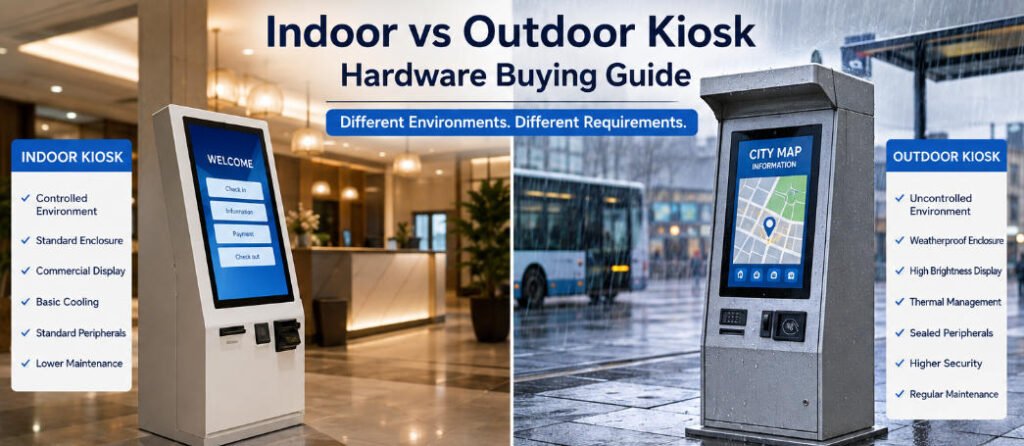
Indoor vs Outdoor Kiosk: Start With the Installation Environment
The first purchasing question should not be “What IP rating do you offer?”
It should be:
Where will the kiosk actually operate?
An indoor kiosk typically works in a relatively controlled environment such as:
- Shopping malls
- Restaurants
- Hotels
- Hospitals
- Airports
- Supermarkets
- Government service halls
- Indoor entertainment venues
Temperature, direct rainfall and solar exposure are normally controlled or limited.
An outdoor kiosk may face a combination of:
- Direct sunlight
- Rain
- Wind-driven water
- Dust
- Humidity
- Condensation
- High or low ambient temperatures
- UV exposure
- Salt air
- Insects
- Public vandalism
- Larger day-to-night temperature changes
There is also an important middle category: semi-outdoor installations.
A kiosk under a roof at a drive-through, railway platform, building entrance or covered parking area may never receive direct rainfall, but it can still experience humidity, dust, wind, high temperatures and condensation.
Therefore, purchasing hardware based only on the label “indoor” or “outdoor” is often insufficient.
The manufacturer needs the actual environmental conditions.
1. Enclosure Construction Is the First Major Difference
Most commercial indoor kiosks can use properly engineered powder-coated cold-rolled steel.
It provides good rigidity, accurate fabrication and considerable flexibility for mounting screens, printers, scanners, payment devices and computers. AONKIOSK’s guide to kiosk enclosure material explains why enclosure performance depends not only on sheet thickness but also on bends, reinforcement, welding, coating and structural design.
Outdoor construction requires additional considerations.
An outdoor kiosk enclosure may use:
- Coated carbon steel with enhanced corrosion protection
- Stainless steel
- Aluminum
- Multi-layer surface treatment systems
- Corrosion-resistant fasteners and hardware
However, choosing stainless steel does not automatically make a kiosk weatherproof.
Water can still enter through a poorly protected printer outlet, scanner window, door seam, ventilation opening or cable entry.
Good outdoor enclosure engineering therefore considers the entire water path.
Typical structural details include compression seals, door gaskets, drip edges, protected joints, waterproof cable glands, drainage paths and sealed component mounting.
The enclosure should prevent water from reaching sensitive electronics even when rain is driven toward the kiosk from an angle.
2. Understand What an IP Rated Kiosk Actually Means
The term IP rated kiosk is frequently used in quotations, but buyers should understand exactly what is being rated.
IP ratings are defined under IEC 60529 and classify the degree of protection provided by an enclosure against access, solid foreign objects and water ingress.
The two digits describe different types of protection.
For example, a supplier may propose IP54, IP55 or IP65 depending on the installation and enclosure architecture.
But a higher number should not automatically be treated as a better purchasing decision.
The required protection depends on exposure.
More importantly, ask whether the rating applies to:
- An individual display
- A component
- An empty enclosure
- A particular compartment
- Or the complete assembled kiosk configuration
This distinction matters enormously.
A display advertised as IP65 does not make the entire kiosk IP65.
Once a manufacturer adds a receipt printer, card reader, speaker opening, ventilation system, antenna or service door, the final enclosure configuration may behave differently.
An IP rated kiosk should therefore be evaluated as an assembled system rather than a collection of individually rated components.
For projects requiring formal certification, define the testing requirement during the quotation stage instead of after production tooling and enclosure construction have already been completed.
3. Outdoor Displays Need More Than a Waterproof Front
Display selection is one of the largest differences when comparing indoor vs outdoor kiosk hardware.
Standard indoor commercial displays may work perfectly in restaurants, hotels and shopping malls, where lighting is controlled.
Outdoors, brightness becomes critical.
Direct or indirect sunlight can make an ordinary LCD difficult to read even if the computer and touch panel continue functioning correctly.
Outdoor kiosks therefore often require high-brightness displays selected according to actual site exposure.
But maximum brightness alone is not the complete specification.
Buyers should also evaluate:
- Operating temperature
- Touch technology
- UV exposure
- Optical bonding where appropriate
- Anti-glare treatment
- Front sealing
- Screen orientation
- Solar heat load
- Automatic brightness adjustment
There is another issue that quotations often overlook: the LCD itself produces heat.
A high-brightness display operating in an enclosure already heated by sunlight can substantially increase internal temperature.
Display selection and thermal design therefore need to be evaluated together.
4. Thermal Management Becomes a System Engineering Problem
Many indoor kiosks can be cooled with relatively simple airflow management.
Fans, vents or passive convection may be sufficient when ambient temperatures remain stable.
Outdoor kiosks are more complicated.
Consider a dark-colored metal enclosure standing in direct summer sunlight. The ambient temperature may already be high, while solar radiation heats the cabinet further. Inside the kiosk, the LCD, industrial PC, power supply, payment terminal and printer are also producing heat.
Simply installing a larger fan may not solve the problem.
Ventilation openings can conflict with water and dust protection.
Outdoor thermal solutions may involve:
- Controlled filtered ventilation
- Heat exchangers
- Internal circulation fans
- Temperature-controlled fans
- Air conditioning in demanding applications
- Heaters for low-temperature environments
- Insulation
- Sun shields or canopies
- Carefully separated hot and cool zones
Thermal design also influences computer selection.
A high-performance processor that works comfortably in an air-conditioned room may become difficult to cool inside a sealed outdoor cabinet.
For that reason, the kiosk industrial PC should be selected together with the enclosure and expected operating temperature rather than as an independent purchasing item.
5. Condensation Can Be More Dangerous Than Rain
Rain is visible.
Condensation is not.
This makes condensation one of the easiest environmental risks to overlook when specifying an outdoor kiosk.
A sealed enclosure can still contain humid air. When temperature changes cause internal surfaces to fall below the dew point, moisture can form inside the cabinet.
This can affect:
- Mainboards
- Power supplies
- Connectors
- Displays
- Printers
- Metal components
- Wiring terminals
A good outdoor kiosk enclosure therefore needs a strategy for both external water and internal moisture.
Depending on the climate and architecture, this may include controlled ventilation, drainage, heaters, breathable membrane vents or other condensation-management measures.
Buyers should provide the manufacturer with the expected temperature and humidity range rather than simply requesting a “waterproof kiosk.”
6. Outdoor Peripherals Require Special Attention
The enclosure is often easier to protect than the devices that users need to access.
Receipt printers are a good example.
A printer needs a paper exit.
That opening can become a path for rain, wind, dust and vandalism.
The same problem occurs with:
- Barcode scanners
- Passport readers
- Card readers
- Speakers
- Microphones
- Cameras
- USB ports
- Keyboards
- Ticket dispensers
An outdoor peripheral should not simply be installed behind a hole cut into the enclosure.
The surrounding geometry must manage water while maintaining normal usability.
Sometimes the correct solution is a recessed mounting position. In other cases, a hood, drainage channel or protected access area may be required.
Every opening should therefore be reviewed during mechanical design.
7. Payment Terminal Integration Changes Outdoors
Payment kiosks create another layer of complexity.
A card terminal may need to remain accessible for contactless payment, chip cards and PIN entry while remaining protected from rain and tampering.
The mechanical design should consider:
- User reach
- Terminal operating temperature
- Water exposure
- Cable protection
- Anti-removal mounting
- Service replacement
- Contactless antenna position
- Future terminal changes
When payment hardware has not yet been finalized, designing a replaceable mounting plate can sometimes be more practical than machining the main enclosure around one terminal model.
For buyers comparing quotations, ask the manufacturer exactly how the payment device will be mounted and serviced rather than accepting “payment terminal supported” as a complete specification.
8. Corrosion Protection Depends on the Location
An outdoor kiosk installed in a dry inland city does not face the same corrosion risk as one installed near the ocean.
Salt-contaminated air can make coastal environments substantially more demanding.
Surface treatment should therefore be selected according to the actual environment.
For coated steel kiosks, buyers should discuss:
- Surface pretreatment
- Primer systems
- Powder coating
- Edge protection
- Weld treatment
- Coating thickness requirements
- Fastener material
Stainless steel or aluminum may be appropriate in some projects, but there is no universal “best outdoor material.”
Material, coating, sealing architecture and service life should be considered together.
9. Security Requirements Are Usually Higher Outdoors
Indoor kiosks often operate within monitored commercial premises.
Outdoor machines may remain unattended at night.
That changes the mechanical security requirement.
Design features may include:
- Concealed hinges
- Multi-point locks
- Reinforced doors
- Protected fasteners
- Anti-pry geometry
- Stronger base construction
- Secure anchoring points
- Protected payment hardware
A thicker sheet of metal alone does not guarantee better security.
Door geometry, hinge location, reinforcement and anchoring can have a greater impact on resistance to physical attack.
Publicly accessible outdoor kiosks should also avoid exposed cables, removable external screws and easily accessible power connections.
10. Outdoor Kiosks Need a Different Service Strategy
A machine can be environmentally resistant and still be expensive to operate if technicians cannot maintain it efficiently.
Serviceability should be planned before production.
Ask questions such as:
Can the printer be replaced without removing the display?
Can filters be cleaned easily?
Can the industrial PC be changed independently?
Can a technician access the kiosk safely in bad weather?
Can seals be replaced without rebuilding the door?
Are drainage channels accessible for cleaning?
Outdoor kiosk design frequently requires more components than an indoor kiosk, making logical internal layout even more important.
The most reliable design is not simply the most sealed enclosure. It is one that balances environmental protection with realistic maintenance.
11. Do Not Automatically Convert an Indoor Kiosk Into an Outdoor Model
One of the most common procurement shortcuts is selecting an existing indoor kiosk and asking the factory to “make it waterproof.”
That approach may work for minor semi-outdoor requirements, but it is often inappropriate for true outdoor deployment.
An existing indoor architecture may have:
- Open ventilation slots
- Large service-door gaps
- Unprotected printer openings
- Indoor-only displays
- Consumer-grade peripherals
- Inadequate drainage
- No solar-load consideration
Correcting all of these after the mechanical architecture has already been fixed can create compromises.
For serious outdoor projects, the environment should be considered from the earliest design stage.
AONKIOSK’s OEM/ODM kiosk manufacturing process covers enclosure structure, internal hardware layout, thermal management, peripheral integration, prototyping and small-batch production, allowing these requirements to be evaluated before the design is frozen.
Indoor vs Outdoor Kiosk Hardware Comparison
| Hardware Area | Indoor Kiosk | Outdoor Kiosk |
|---|---|---|
| Environment | Controlled | Variable and exposed |
| Enclosure | Standard commercial construction | Weather- and corrosion-focused construction |
| Display | Standard commercial brightness | Often high brightness / sunlight-readable |
| Water Protection | Usually limited requirement | Sealing and drainage required |
| Dust Protection | Moderate | Environment-dependent |
| Cooling | Fan or passive cooling often sufficient | Engineered thermal management |
| Heating | Rarely required | May be necessary in cold climates |
| Condensation Control | Usually limited | Important |
| Surface Treatment | Standard powder coating often sufficient | Enhanced corrosion protection may be required |
| Peripherals | Standard commercial devices | Exposure and sealing must be reviewed |
| Security | Controlled-site protection | Often stronger anti-tamper design |
| Maintenance | Indoor technician access | Weather-conscious service design |
| Testing | Functional and safety testing | Environmental verification may also be required |
What Information Should You Send to a Kiosk Manufacturer?
A useful RFQ should contain more than screen size and quantity.
For an indoor vs outdoor kiosk project, provide:
- Installation country and city
- Indoor, covered outdoor or fully exposed location
- Expected minimum and maximum temperatures
- Rain exposure
- Direct sunlight exposure
- Humidity conditions
- Coastal or corrosive environment information
- Required IP rating, if specified by the project
- Screen size and orientation
- Computer requirements
- Payment terminal model
- Printer and scanner models
- Required communication methods
- Mounting or anchoring method
- Expected operating hours
- Security requirements
- Desired service access
- Certification requirements
- Prototype quantity
- Expected production volume
The more accurately these conditions are defined, the less the supplier needs to make assumptions.
Final Buying Advice
The main difference between the hardware of indoor and outdoor self-service kiosk is not in a single component, but in the engineering correlation between all components. Outdoor self-service kiosk may require different housings, coatings, displays, computers, cooling systems, power architectures, peripheral device mounting methods, security structures, and maintenance strategies.
Self-service kiosks with IP protection levels are not automatically suitable for all outdoor projects. IP protection is aimed at specific intrusion conditions; It cannot solve the problems of readability, extreme temperature, condensation, corrosion, or destruction by itself. In view of this, the procurement team should avoid using “outdoor self-service kiosks” as a complete technical specification.
Describe the environment first.
Then allow the enclosure, thermal architecture, display, peripherals and protection level to be engineered around those conditions.
For AONKIOSK, this system-level approach is particularly relevant to custom hardware projects involving self-ordering, retail payment, hotel check-in, ticketing, information and other unattended applications. The objective should not be to build the most heavily protected kiosk possible, but to build the appropriate kiosk for the environment in which it will actually operate.
A well-specified indoor kiosk avoids unnecessary cost.
A well-engineered outdoor kiosk avoids unnecessary failure.
That distinction should guide the buying decision from the first RFQ to the final production unit.






