Adding coin payment to a self-service kiosk creates a different set of engineering problems from accepting banknotes.
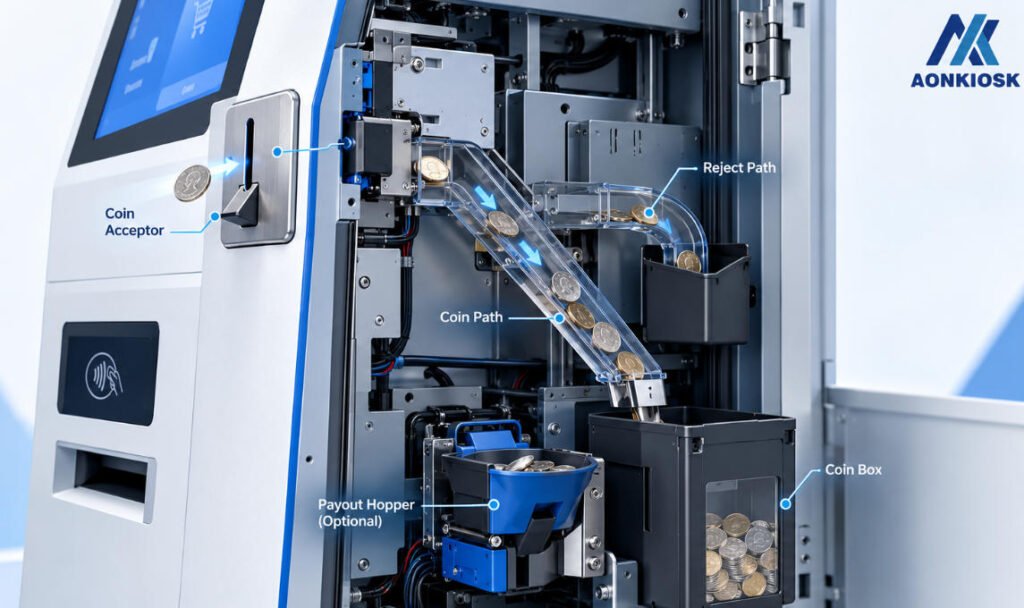
Coins are small, heavy, dirty and mechanically demanding. They need to enter the kiosk at the correct angle, pass through a validation mechanism, follow a controlled path and reach either a collection box, hopper, recycler or reject outlet without becoming trapped along the way.
For this reason, choosing a kiosk coin acceptor should not be reduced to one question:
Which currencies does it accept?
Currency support matters, but so do coin diameter, thickness, validation method, interface, insertion direction, mounting angle, collection capacity, service access and the way the rest of the kiosk handles accepted and rejected coins.
A coin acceptor that works perfectly on a test bench can still perform poorly after being installed inside an enclosure with the wrong angle or an unnecessarily complicated coin path.
This guide looks at the practical hardware and integration questions procurement teams should resolve before selecting a coin acceptor for a commercial self-service kiosk.
First Decide What the Kiosk Needs to Do With Coins
Before comparing coin acceptor models, map the complete coin journey.
A customer inserts a coin. What happens next?
For a simple payment kiosk, the workflow may be:
Insert → Validate → Accept → Drop into Coin Box
For another application:
Insert → Validate → Route by Denomination → Store in Hopper
And for a more sophisticated cash system:
Insert → Validate → Store by Denomination → Reuse for Change
These are very different architectures.
A basic coin acceptor may be sufficient for parking, ticketing or payment applications where coins are collected but never returned.
If the kiosk must dispense coins as change, additional hardware such as coin hoppers or payout modules may be required.
If accepted coins need to be reused for later payouts, the project moves toward a coin-recycling architecture.
Before requesting a quotation, define whether your system requires:
Acceptance only, acceptance + payout, or full coin recycling.
That decision determines almost everything that follows.
Coin Acceptor, Coin Hopper and Coin Recycler: Know the Difference
These terms are sometimes mixed together during early kiosk discussions.
They perform different jobs.
A coin acceptor identifies inserted coins and determines whether they should be accepted or rejected.
A coin hopper stores coins and dispenses them when instructed. It is normally used for payout rather than validation.
A coin recycler combines denomination management with storage and payout so accepted coins can potentially be reused as change.
A kiosk that needs to accept coins and return change may therefore contain several related modules rather than one component.
That matters because each module requires physical space, wiring, mounting and maintenance access.
Do not ask your manufacturer simply to “add coin payment.”
Describe what happens to the coin after it enters the machine.
1. Start With Currency and Coin Denominations
The first technical question is straightforward:
Which coins must the kiosk recognize?
List the exact currency and required denominations.
For example, simply specifying “EUR” is not enough if the application only needs to accept certain euro coins.
The required denomination set affects:
- Coin recognition
- Software configuration
- Collection capacity
- Change strategy
- Hopper requirements
- Recycler configuration
If the same kiosk will be deployed in multiple countries, determine whether the selected acceptor can be configured for those currencies or whether regional hardware variants are required.
Do not assume that physically similar coins can be handled by the same configuration.
Coin recognition is based on more than size alone.
2. Understand How the Acceptor Identifies a Coin
A commercial coin validator may evaluate several physical or electromagnetic characteristics when determining whether an inserted object is a valid coin.
Depending on the hardware, these can include properties related to:
- Diameter
- Thickness
- Material
- Electromagnetic response
- Weight or physical behavior
- Coin profile
The exact validation technology varies by manufacturer and model.
For a kiosk buyer, the important question is not necessarily how every sensor works internally.
The practical questions are:
Can the acceptor reliably distinguish valid coins from incorrect coins and common foreign objects?
and:
Is its validation performance suitable for the deployment environment?
A kiosk installed in a supervised indoor location may face a different misuse profile from an unattended machine in a public transportation or parking environment.
Select the hardware accordingly.
3. Coin Diameter and Thickness Affect the Entire Mechanical Path
Banknotes are flexible.
Coins are not.
Once a coin enters the kiosk, every part of the path needs enough clearance for the largest supported coin while still controlling smaller denominations.
That means coin dimensions matter beyond the acceptor itself.
They can affect:
- Entry slot
- Coin chute
- Routing channel
- Reject path
- Collection funnel
- Coin box
- Hopper inlet
A poorly designed transition between two parts can create a ledge where coins bounce, rotate or become trapped.
This is why coin handling should be evaluated as a complete mechanical path rather than only as a peripheral specification.
4. Pay Close Attention to Mounting Angle
One of the most important differences between coin and electronic payment hardware is the role of gravity.
Many coin-handling mechanisms rely on a defined physical orientation.
The mounting angle specified by the manufacturer should therefore be treated as an engineering requirement, not a suggestion.
Tilting the module simply because it fits the enclosure better may affect coin travel or rejection behavior.
Before approving the kiosk design, confirm:
- Required orientation
- Permitted mounting angle
- Entry direction
- Coin exit direction
- Reject direction
- Required clearance below the mechanism
If the acceptor depends on gravity to move coins through part of the path, the downstream chute must follow the same logic.
A beautiful enclosure cannot compensate for an unreliable coin path.
5. Design the Customer Coin Slot Carefully
The external coin slot is one of the smallest parts of the kiosk, but it strongly influences the payment experience.
It should be easy to identify and comfortable to use.
Consider:
Insertion direction. Does the customer push the coin horizontally, diagonally or downward?
Slot visibility. Is the opening obvious among the scanner, receipt printer and payment terminal?
Reach. Can users comfortably access it?
Guidance. Does the surrounding design communicate which coins are accepted?
Foreign-object resistance. Does the opening unnecessarily invite insertion of oversized objects?
The external slot and internal acceptor should be designed together.
Avoid creating a long uncontrolled passage between the customer-facing opening and the validation mechanism.
6. Keep the Coin Path as Simple as Practical
After validation, accepted coins need to travel somewhere.
A common mechanical temptation is to use a long chute to move coins around other internal components.
Every bend and transition introduces another opportunity for a coin to:
- Bounce
- Rotate
- Slow down
- Become trapped
- Strike a protruding screw or bracket
- Accumulate debris
Where possible, keep the path short and predictable.
If a chute is required, prototype it with the actual denominations rather than assuming that a 3D model proves the design.
A path that looks generous in CAD can behave differently when real coins enter at speed.
7. Design a Clear Reject Path
Not every inserted coin should be accepted.
The system may reject:
- Unsupported denominations
- Foreign currency
- Invalid objects
- Unrecognized coins
- Damaged coins
The customer needs to get these items back.
That means the reject path deserves as much attention as the accepted-coin path.
Ask:
Where does a rejected coin go?
Can the customer see it?
Can it be retrieved easily?
Could a returned coin remain hidden inside the chute?
Can another coin be inserted before the previous rejected coin is removed?
A poor reject design can make a perfectly functioning coin validator appear broken.
8. Do Not Confuse Coin Count With Coin Capacity
A coin box specification may look simple:
Capacity: X coins.
But different denominations have different diameters, thicknesses and weights.
A box that holds a large number of small coins may behave very differently when filled with larger denominations.
The denomination mix therefore matters.
A useful starting point is:
Daily coins collected = Daily transactions × Coin-payment rate × Average coins inserted per coin transaction
For example:
700 transactions/day
× 25% coin payment
× 2.5 coins per transaction
= approximately 438 coins per day
If the kiosk is serviced every two days, the theoretical volume already approaches 876 coins before adding any safety margin.
But count alone still does not answer the whole question.
You should also consider denomination mix, physical volume, peak-day demand and total weight.
This is why kiosk cash capacity should eventually be calculated from real transaction behavior rather than from nominal component capacity alone.
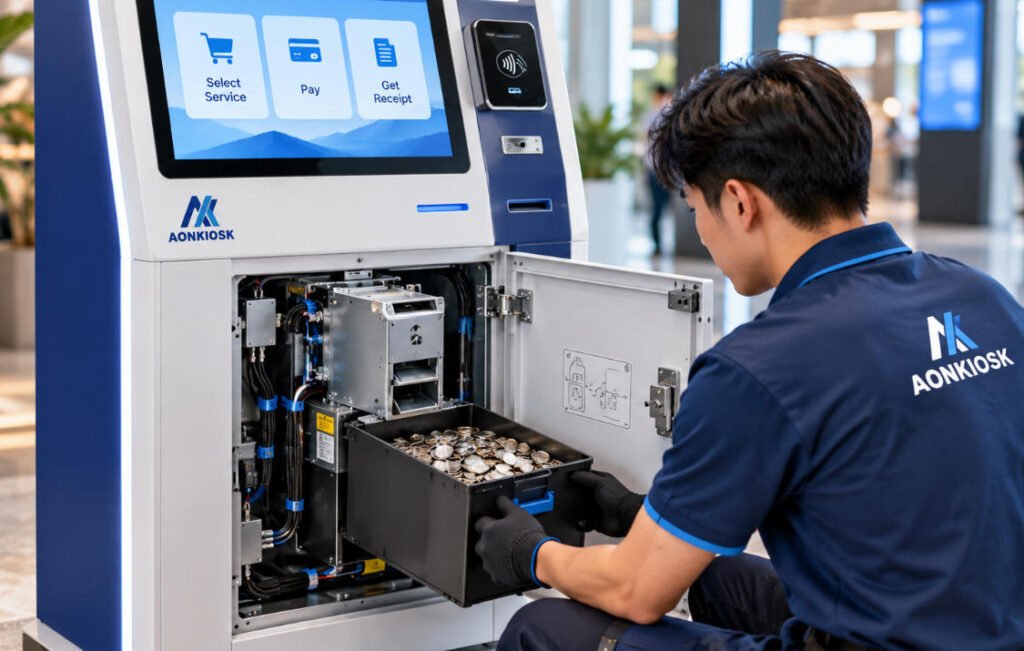
9. Coin Weight Can Become a Structural Issue
Coins become surprisingly heavy at scale.
A collection box holding hundreds or thousands of coins can add significant concentrated weight to the lower part of the kiosk.
This affects more than the coin box.
The engineering team should consider:
- Box support
- Internal frame strength
- Drawer or rail loading
- Door loading
- Collection procedure
- Kiosk shipping weight
- Technician handling
Fortunately, placing coin storage low in a floor-standing kiosk can also contribute to a lower center of gravity.
But the supporting structure still needs to carry the load safely.
Do not mount a high-capacity coin container to a thin decorative panel simply because the empty box is light.
Design for the full operating weight.
10. Make Coin Collection Easy
Imagine a kiosk that processes coins continuously for years.
How many times will staff remove the coin box?
Potentially thousands.
A small inconvenience during prototype testing can therefore become a major operational frustration.
Check whether staff can:
- Unlock the appropriate service area.
- Reach the coin box directly.
- Remove it without disturbing cables.
- Carry it safely when full.
- Reinstall it correctly.
- Confirm that the kiosk is ready to operate again.
If the collection box is behind the industrial PC, underneath loose cables or blocked by the printer, redesign the internal layout.
Serviceability is part of the product.
11. Plan for Dirt and Foreign Objects
Coins circulate through pockets, vending machines, cash registers, vehicles and public environments.
They bring dust and debris with them.
Users may also insert objects that are not coins.
Depending on the installation, this can include washers, tokens or other small metal objects.
The kiosk design should therefore consider:
- Cleaning access
- Debris accumulation
- Removable chutes
- Access to the validator
- Foreign-object recovery
- Drainage or environmental protection where relevant
Do not design the coin path as a permanently sealed structure unless the selected hardware and operating environment genuinely support that approach.
Maintenance access is more valuable than a few millimeters of saved enclosure space.
12. Verify the Communication Interface
Like a bill validator, the kiosk coin acceptor needs to communicate with the host system.
Depending on the selected device, this may involve interfaces or protocols such as serial communication, USB, MDB or manufacturer-specific implementations.
The exact interface should be confirmed from the selected hardware documentation.
The kiosk application may need to receive events such as:
Coin inserted → denomination recognized → accepted
or:
Coin inserted → rejected
For a more complex system, software may also need information about:
- Accumulated payment value
- Hopper status
- Payout status
- Device errors
- Coin shortages
- Full collection conditions
Hardware and software teams should therefore agree on the exact model before application integration is finalized.
13. Check Operating-System and SDK Compatibility
Do not assume that a coin acceptor will work with a kiosk simply because the electrical connection exists.
Confirm compatibility with the host platform.
For a Windows, Android or Linux kiosk, evaluate:
- Driver availability
- SDK/API
- Protocol documentation
- Sample code where available
- Supported communication interfaces
- Firmware/configuration utilities
- Error reporting
If a software company is developing the kiosk application while another supplier is manufacturing the enclosure, both teams should review the same peripheral documentation.
Otherwise, it is possible to build a kiosk in which the coin acceptor fits mechanically but cannot be integrated into the intended software stack without additional development.
14. Coin Acceptance and Coin Payout Should Be Designed Together
If the kiosk only accepts coins, the downstream architecture can remain relatively simple.
Once change is required, the problem changes.
Suppose a customer needs to pay $6.50 and inserts $10.
The kiosk may need to return $3.50.
That payout could require several combinations of notes and coins.
The application needs to know what denominations are available, while the hardware needs enough inventory to make the payout.
If coin hoppers are used, the project should define:
- Which denominations are stored
- Hopper capacity
- Minimum reserve
- Refill procedure
- Empty/near-empty behavior
- Payout failure behavior
Do not choose the coin acceptor independently and postpone payout planning until later.
Both sides are part of the same cash workflow.
15. Know When a Coin Recycler Is More Appropriate
A coin recycler becomes relevant when the kiosk needs to reuse accepted coins as future change.
This can be valuable in high-cash environments because incoming coins can help replenish payout inventory.
However, recycling also introduces more complexity.
The system may need to track:
- Denomination inventory
- Recycler capacity
- Payout availability
- Overflow
- Minimum denomination levels
- Jam states
- Reconciliation
The enclosure may also become substantially larger.
If the kiosk handles both banknotes and coins, the project may combine a banknote recycler with a separate coin-recycling system.
This is why our cash recycler integration guide recommends defining the complete cash architecture before the enclosure is finalized.
Do not design banknote handling first and assume the coin system can simply occupy the remaining space.
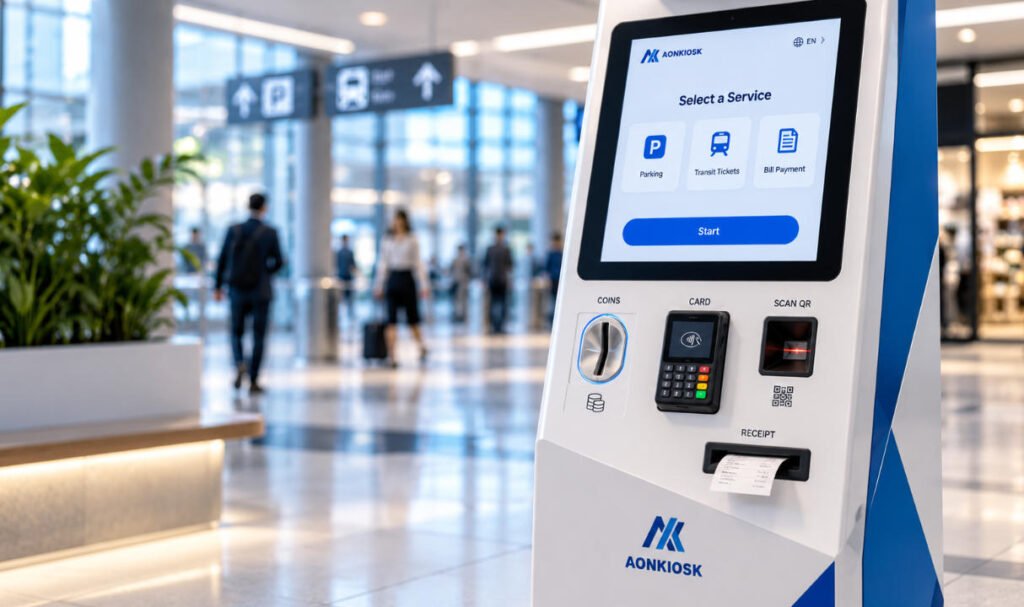
16. Consider the Entire Payment Zone
A commercial payment kiosk may contain all of the following:
- Card terminal
- NFC reader
- QR scanner
- Bill validator
- Coin acceptor
- Coin return
- Receipt printer
That is a lot of customer-facing hardware competing for a relatively small area.
The interface should make the workflow visually obvious.
Customers should not confuse:
Coin return with coin insertion
or:
Receipt outlet with banknote inlet
Spacing, labeling and physical form can help differentiate each interaction.
AONKIOSK’s Retail & Payment Kiosks are designed around configurable payment and peripheral layouts, including card, QR, NFC and optional cash acceptance modules.
For custom cash projects, this flexibility is important because the payment zone should be designed as one system rather than as a collection of independently mounted devices.
17. Separate Customer Access From Service Access
Customers need access to only a few parts of the coin system:
Insertion + Reject/Return
Technicians need considerably more:
Validator + Chute + Collection Box + Hopper/Recycler + Cables
These two access requirements should remain separate.
The public should not be able to reach the internal coin path through the front opening.
At the same time, technicians should not need to remove the touchscreen or unrelated electronics simply to clear a coin jam.
A practical internal layout may place the coin system behind a dedicated locked service area with direct access to the main maintenance points.
18. Test the Real Coin Path Before Mass Production
Coin integration is one area where physical prototyping matters enormously.
Do not approve the design based only on a CAD model.
During prototype testing, use real coins from the deployment market.
Test:
Every supported denomination.
Confirm reliable acceptance.
Unsupported coins.
Verify rejection.
Repeated insertion.
Run enough cycles to reveal intermittent mechanical issues.
Fast insertion.
Customers will not always insert coins carefully.
Reject return.
Confirm that rejected coins reliably reach the customer.
Collection-box filling.
Check the system as capacity increases.
Coin-box removal.
Test it at realistic operating weight.
Jam recovery.
Have a technician actually clear a simulated blockage.
Power interruption.
Check what happens during an active transaction.
Communication failure.
Verify how the application responds when the coin acceptor becomes unavailable.
The objective is to validate the entire coin-handling system—not merely the validator.
AONKIOSK’s OEM & ODM kiosk manufacturing service includes mechanical engineering, internal layout, maintenance design, cable management, peripheral compatibility, prototype development and functional verification. Those capabilities are particularly relevant when a kiosk contains mechanically demanding payment hardware.
19. Ask Who Is Responsible for Each Part of the Integration
Coin-payment projects may involve several suppliers.
The kiosk manufacturer may build the enclosure.
The coin-device manufacturer supplies the validator or recycler.
A software company develops the application.
A system integrator commissions the complete machine.
An operator maintains it in the field.
Before production, define responsibility for:
Mechanical integration — mounting, chute and coin-box design.
Electrical integration — power and communication wiring.
Software integration — protocol, SDK and payment logic.
Cash configuration — supported denominations and payout rules.
Testing — real-currency validation.
Field maintenance — jams, cleaning and component replacement.
Clear ownership prevents a common project problem: discovering during commissioning that every supplier assumed someone else was responsible for a critical part of the cash system.
20. What to Send Your Kiosk Manufacturer
If you have already selected a coin acceptor, provide the manufacturer with:
- Brand
- Exact model
- Datasheet
- Mechanical drawing
- 3D model if available
- Currency
- Accepted denominations
- Interface
- Power requirements
- Mounting orientation
- SDK/protocol documentation
- Coin-box requirements
- Hopper/recycler requirements
- Physical sample if possible
Also provide your expected transaction profile.
For example:
EUR coin acceptance; €0.50, €1 and €2 denominations; approximately 180 coin transactions per day; acceptance only; no coin change; collection every two days; Windows-based kiosk.
That is much more useful than:
“Add a coin acceptor.”
If the hardware has not yet been selected, provide the functional requirements first and keep the mechanical design flexible until the exact component is confirmed.
A Practical Coin Acceptor Selection Checklist
Before approving a kiosk coin acceptor, confirm all of the following:
- Target currency and denominations
- Coin dimensions supported
- Validation capability
- Mounting orientation
- Coin insertion direction
- Accepted-coin exit path
- Reject path
- Coin-box capacity
- Full-load coin weight
- Communication interface
- OS and SDK compatibility
- Power requirements
- Cleaning access
- Jam-clearing access
- Collection procedure
- Hopper requirements
- Change requirements
- Recycler requirements
- Software error handling
- Prototype testing with real coins
If several of these remain unknown, the enclosure probably should not enter production yet.
Final Thoughts
Choosing a kiosk coin acceptor is not just a peripheral-purchasing decision.
It is a cash-flow, mechanical-design and maintenance decision.
The acceptor needs to recognize the correct currency, but the rest of the kiosk must also guide accepted and rejected coins reliably. The collection system needs enough capacity. The structure needs to support the full coin weight. Technicians need practical access for cleaning and jam recovery. And the application needs to understand what the hardware is doing.
If change is required, the project becomes more complex again because coin payout and denomination inventory enter the equation.
For custom projects, AONKIOSK can develop kiosk structures around specified third-party peripherals through its OEM/ODM self-service kiosk manufacturing process, which includes internal-layout engineering, peripheral compatibility, prototyping and production.
The best time to solve these problems is before the enclosure drawings are frozen—not after the first production kiosks are assembled.
Frequently Asked Questions
What is a coin acceptor in a self-service kiosk?
A coin acceptor is a hardware module that receives inserted coins, evaluates whether they meet the configured acceptance criteria, identifies accepted denominations and routes accepted or rejected coins through the appropriate path.
What is the difference between a coin acceptor and a coin hopper?
A coin acceptor is primarily used to validate incoming coins. A coin hopper stores and dispenses coins for payout. A kiosk that accepts coins and returns change may require both functions.
Is a coin recycler the same as a coin acceptor?
No. A basic coin acceptor validates incoming coins. A coin recycler can manage stored denominations and reuse suitable accepted coins for future payouts, which requires more complex hardware and software integration.
How should I calculate coin-box capacity?
Start with daily transactions, the percentage using coins and the average number of coins inserted per transaction. Then consider denomination mix, service interval, peak-day volume, physical box capacity and a suitable operating margin.
Can a coin acceptor work with Windows or Android kiosks?
Potentially, but compatibility depends on the exact model, communication protocol, driver and SDK. Confirm support for the intended host platform before finalizing the kiosk hardware.
Why does mounting angle matter for a coin acceptor?
Coin-handling mechanisms can depend on gravity and a specified physical orientation. Installing a module outside the manufacturer’s permitted orientation can affect how coins travel through the mechanism.
Can AONKIOSK integrate a customer-specified coin acceptor?
For custom OEM/ODM projects, third-party peripherals can be evaluated for mechanical and electrical integration based on their technical documentation and project requirements. Providing the exact model, drawings, interface documentation and preferably a physical sample makes prototype development more reliable.
Should coin and banknote hardware be designed at the same time?
Yes, particularly when the kiosk accepts both or provides change. Coin and banknote modules compete for internal space and service access, so designing the complete cash-handling architecture early reduces the risk of enclosure redesign.