A reliable power supply is essential for the stable operation of a self-service kiosk. It provides electricity to the touchscreen, industrial computer, payment terminal, receipt printer, scanner, network equipment, and other integrated components.
An incorrectly sized or poorly installed power supply can cause unexpected shutdowns, touchscreen instability, printer failures, damaged electronics, and interrupted transactions.
Unlike ordinary desktop computers, commercial kiosks often operate continuously in unattended environments. Their power systems must support different electrical loads, withstand expected operating conditions, and allow safe maintenance.
This technical guide explains the power supply requirements for self-service kiosks, including input voltage, DC output, power consumption, power supply sizing, electrical protection, installation considerations, and common troubleshooting procedures.
Understanding the Kiosk Power Supply System
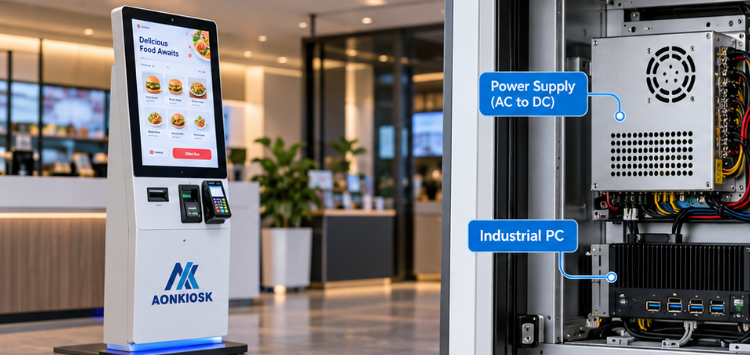
A self-service kiosk power system receives electricity from an external source and distributes the appropriate voltage and current to individual hardware components.
Most AC-powered kiosks use an internal AC-to-DC power supply, although some compact terminals operate through an external power adapter.
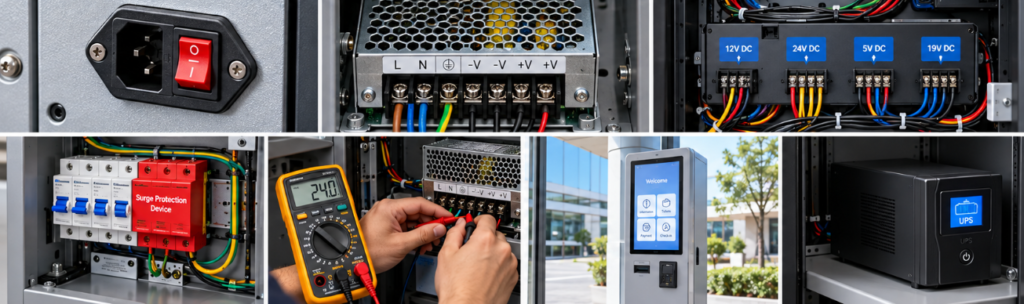
A typical kiosk electrical architecture includes:
- AC power inlet and protective grounding
- Main power switch or disconnect device
- Fuse or circuit breaker
- Surge protection and EMI filtering, where required
- AC-to-DC power supply unit (PSU)
- DC power distribution terminals
- Individual power connections for internal devices
- Optional UPS or backup power system
Different components may require separate operating voltages. An industrial computer might operate at 12V or 19V DC, while a receipt printer could require 24V DC.
The power distribution design must therefore match the requirements of each component rather than supplying one voltage to all devices.
For a broader explanation of how electrical components fit into the enclosure, computing system, and peripherals, refer to the Kiosk Hardware Structure Overview.
AC Input Voltage Requirements
The first consideration when selecting a kiosk power supply is the electrical voltage available at the installation site.
Commercial kiosks are commonly designed for regional AC power systems.
| Region | Common nominal AC voltage | Frequency |
|---|---|---|
| North America | 120V | 60Hz |
| Most European countries | 230V | 50Hz |
| United Kingdom | 230V | 50Hz |
| China | 220V | 50Hz |
| Japan | 100V | 50/60Hz |
| Australia | 230V | 50Hz |
These are typical supply values rather than universal specifications for every location.
Many industrial power supplies support a wide input range, such as 100–240V AC, 50/60Hz. However, wide-range input compatibility must be verified against the actual PSU label and complete kiosk specification.
Some power supplies operate only within a restricted voltage range or require manual voltage selection.
Important Input Specifications
Before installation, confirm:
- Rated AC input voltage and frequency
- Maximum input current
- Required circuit protection
- Power connector or terminal type
- Protective earth requirements
- Permitted voltage fluctuations
- Local electrical standards
Technical note: A PSU accepting 100–240V AC does not automatically mean that the entire kiosk supports every electrical system. Any separately powered components must also be compatible.
DC Output Voltage and Current Requirements
After AC power enters the kiosk, one or more power supplies convert it into regulated DC output.
Common DC voltage rails include:
| DC output | Typical applications |
|---|---|
| 5V DC | USB devices, small control boards, selected scanners |
| 12V DC | Embedded computers, controllers, fans, some displays |
| 19V DC | Selected mini PCs and industrial computers |
| 24V DC | Thermal printers, industrial peripherals, selected displays |
| 48V DC | Certain specialized industrial modules and PoE systems |
These voltage values are examples. Actual requirements vary by manufacturer and hardware configuration.
Voltage Compatibility
The output voltage must remain within the connected device’s specified input tolerance.
For example, a device rated for 12V DC should not be connected directly to a 24V DC supply unless an appropriate regulator or converter is installed.
Incorrect voltage can cause immediate component damage.
Current Capacity
A power supply must deliver sufficient current for all connected loads, including temporary peak demand.
The basic calculation is:
P=V X I
Where:
- P = Power consumption in watts (W)
- V = Voltage in volts (V)
- I = Current in amperes (A)
For example, a 24V printer drawing 3A requires:
24V X 3A=72W
This is the electrical input power at that operating point, not necessarily the printer’s maximum demand. Printer specifications should be checked for peak current during printing and paper cutting.
Multiple output rails also require individual current-capacity checks.
How to Calculate Kiosk Power Consumption
Power consumption depends on the screen size, computer configuration, peripheral selection, and operating environment.
A simple information kiosk generally requires less power than a fully equipped payment or document-printing kiosk.
Example Power Budget
The following calculation illustrates a hypothetical indoor self-ordering kiosk.
| Component | Estimated design load |
|---|---|
| Touchscreen display | 45W |
| Industrial computer | 35W |
| Thermal receipt printer | 72W |
| Payment terminal | 12W |
| Barcode scanner | 5W |
| Cooling fans | 8W |
| Network module | 6W |
| Total | 183W |
Illustrative engineering values only, not measured AONKIOSK product specifications. Individual component figures represent assumed design loads that must be checked against actual datasheets and operating conditions.
Adding Power Supply Headroom
A power supply should not be selected solely by matching the calculated load.
Additional capacity helps accommodate operating variations, component aging, and possible future upgrades.
A common preliminary design allowance is 20–30% above the calculated load, provided that actual peak and continuous ratings are properly accounted for.
For example:
183W X 1.25=228.75W
A 250W rated DC power supply could be a candidate if all devices share a compatible output arrangement and the supply meets the required continuous output, peak-load, temperature-derating, and protection specifications.
Where components require different voltages, each rail or individual PSU must be sized separately.
Important: The calculated 183W is not necessarily the kiosk’s maximum AC input power. PSU conversion losses, power factor, inrush current, and other AC-powered loads must also be considered.
For multi-peripheral configurations, such as the APK07 Restaurant Self Ordering Kiosk, the final power budget depends on which optional payment, printing, scanning, and communication modules are installed.
Selecting the Right Power Supply Unit
A commercial kiosk power supply should be selected according to electrical compatibility, operating conditions, reliability, and maintenance requirements.
Continuous Power Rating
For kiosks operating 24 hours a day, the PSU must support continuous operation at the expected internal cabinet temperature.
A unit rated at 250W under laboratory conditions may provide less allowable output at elevated ambient temperatures.
Always review the manufacturer’s derating curve.
Conversion Efficiency
Higher efficiency reduces electrical losses and unwanted heat generation.
For example, a PSU delivering 200W DC at 90% efficiency draws approximately 222W AC under the assumed operating condition.
The remaining approximately 22W becomes conversion loss, largely dissipated as heat.
Actual efficiency depends on load, input voltage, temperature, and PSU design.
Electrical Protection
Relevant PSU protection features include:
- Overvoltage protection (OVP)
- Overcurrent protection (OCP)
- Short-circuit protection (SCP)
- Overtemperature protection (OTP)
- Overload protection (OLP), where specified
Protection features should be verified from the manufacturer’s technical documentation. Their presence does not eliminate the need for external circuit protection or correct installation.
Environmental Compatibility
Power supplies installed inside compact kiosks may experience restricted airflow and elevated temperatures.
Selection criteria should include operating temperature, humidity, ventilation, vibration, mounting orientation, and enclosure clearance.
A fanless PSU may be suitable for a low-power indoor kiosk, while higher-load systems may require forced-air cooling or additional thermal management.
Power Supply Requirements for Outdoor Kiosks
Outdoor kiosks require additional electrical protection because power quality, moisture exposure, temperature fluctuations, and lightning-related surges can affect equipment reliability.
The electrical system must be designed together with the enclosure and environmental control system.
Key Outdoor Power Requirements
Surge Protection
An appropriately selected surge protection device (SPD) helps limit transient overvoltages entering the kiosk through the power supply.
SPD selection and installation should consider the site’s electrical distribution system, grounding arrangement, exposure, and applicable local standards.
Waterproof Cable Entry
Power cables entering an outdoor enclosure must pass through suitable cable glands, conduit fittings, or sealed entry systems.
The installation must preserve the enclosure’s intended ingress protection rating.
Temperature Management
Outdoor kiosks may require additional electrical loads, including:
- Cabinet heaters
- Anti-condensation heaters
- Cooling fans
- Heat exchangers
- Air-conditioning systems
- High-brightness display backlights
These loads must be included in the overall electrical design.
For a detailed explanation of environmental protection, temperature control, and outdoor installation, see Outdoor Kiosk Requirements.
UPS and Backup Power Requirements
An uninterruptible power supply (UPS) can protect kiosk operation during brief power interruptions or provide sufficient time for a controlled shutdown.
Not every kiosk requires a UPS. Its value depends on the application, expected power quality, and consequences of an unexpected shutdown.
When Is a UPS Recommended?
Backup power is particularly useful for:
- Payment kiosks processing transactions
- Ticketing machines connected to central systems
- Hotel check-in kiosks
- Remote unattended kiosks
- Applications requiring controlled data shutdown
UPS Capacity Calculation
UPS selection depends on the kiosk’s actual AC input consumption, load characteristics, and desired backup duration.
For example, a kiosk consuming 200W AC requires approximately 33.3Wh of output energy for 10 minutes of operation:

This is the theoretical energy delivered to the load. The battery system must provide additional capacity to account for conversion losses, battery aging, operating temperature, and discharge limitations.
UPS apparent-power rating (VA), real-power rating (W), and manufacturer runtime curves must also be checked.
A UPS rated at 600VA does not necessarily provide 600W of usable output.
For payment applications, the UPS should support defined shutdown behavior and transaction recovery procedures. Backup power alone does not guarantee uninterrupted network or payment processing.
Electrical Installation and Grounding
Correct electrical installation is essential for protecting both users and internal equipment.
Kiosk wiring should be planned before final assembly or on-site installation.
Protective Grounding
Metal kiosk enclosures generally require protective earthing as specified by their electrical safety design.
Protective earth connections should provide a reliable fault-current path and should not depend on removable painted panels or unreliable mechanical contact.
Ground continuity must be verified using an appropriate inspection and test procedure.
Protective earth and DC signal ground are not necessarily interchangeable. Their connection must follow the approved electrical design.
Circuit Protection
Depending on the electrical architecture and local requirements, a kiosk may incorporate:
- Input fuses
- Circuit breakers
- Residual-current protection
- Branch-circuit protection
- Internal overcurrent protection
- Accessible disconnect arrangements
Protection devices must be selected according to conductor size, fault-current conditions, and equipment ratings.
Cable Routing
AC power wiring should be separated from low-voltage signal cables where necessary to reduce interference and protect service personnel.
Cable installations should prevent contact with:
- Sharp enclosure edges
- Moving door hinges
- Printer cutters
- Cooling fans
- High-temperature components
- Unprotected mechanical joints
For wall-installed equipment, cable-entry location and maintenance accessibility are particularly important. The Wall-Mounted Kiosk Structure Guide explains the mechanical and electrical considerations associated with concealed wiring and mounting arrangements.
Safety requirement: AC mains wiring, protective grounding, and internal electrical repairs should be performed by qualified personnel. Disconnect and verify isolation before servicing energized-power sections. Capacitors may retain hazardous energy after disconnection.
Common Kiosk Power Supply Problems and Troubleshooting
Electrical problems may appear as complete kiosk shutdowns, intermittent restarts, display failures, or individual peripheral malfunctions.
The table below summarizes common symptoms and recommended diagnostic actions.
| Problem | Possible cause | Recommended action |
|---|---|---|
| Kiosk does not power on | No AC input, tripped breaker, damaged PSU | Check supply availability and protection devices; qualified personnel inspect PSU |
| Random shutdowns | Overload, overheating, input interruption | Review power logs, load conditions, and ventilation |
| Display flickering | Unstable supply or display power connection | Check connectors and voltage stability |
| Printer restarts during printing | Insufficient peak current | Verify printer peak requirements and PSU capacity |
| USB devices disconnect | Power fluctuations or USB current limits | Check USB power budget and connections |
| UPS alarm | Overload, low battery, or UPS fault | Check load, battery condition, and alarm code |
| Power supply overheating | Poor airflow, high load, or thermal derating | Inspect cooling and operating temperature |
Step-by-Step Troubleshooting Procedure
Step 1: Identify the Failure Scope
Determine whether the entire kiosk is affected or only one component.
A complete shutdown suggests an upstream power problem, while a single malfunctioning peripheral may indicate a local power connection or device failure.
Step 2: Check the External Power Source
Verify the availability of mains power using safe, approved testing procedures.
Inspect accessible plugs, power switches, and circuit-breaker status without opening energized electrical compartments.
Step 3: Inspect Internal Power Connections
After safely isolating power, authorized service personnel should inspect connectors, terminal blocks, wiring, and visible signs of overheating.
Step 4: Verify PSU Output
Qualified personnel can measure DC output under appropriate loading conditions using calibrated equipment and suitable safety precautions.
Measurements should be compared with the specified operating-voltage tolerance.
Step 5: Evaluate Peak Loads
Reproduce the fault under controlled conditions, such as during receipt printing or other high-current operations.
A PSU that performs normally at idle may still fail under peak demand.
Step 6: Confirm System Stability
After the fault is corrected, test startup, normal operation, maximum expected peripheral activity, and shutdown behavior.
Repeated PSU failures should prompt a review of the complete electrical design rather than repeated replacement of the same component.
Power Requirements for High-Load Kiosk Configurations
Power requirements can change substantially when a kiosk integrates printers, dispensers, cash-handling equipment, or additional environmental controls.
An information-only terminal with a screen and embedded computer may have relatively predictable consumption.
However, a multifunction terminal can produce substantial short-term peak loads.
For example, the APK26 32-Inch A4 Printing & Information Kiosk supports configurations involving document printing, thermal printing, scanning, and other optional modules. Such configurations require individual electrical assessment, particularly when a laser printer is installed.
A laser printer may have significant warm-up and fusing demands that differ from the requirements of a thermal receipt printer.
Where a printer uses a dedicated AC input, its electrical requirements must be included in the total branch-circuit and UPS calculations, even if it does not share the kiosk’s DC power supply.
Never select the overall kiosk power rating based only on display size or computer specifications.
Power Supply Inspection and Preventive Maintenance
Regular inspection helps identify problems before they cause equipment downtime.
Maintenance should follow the kiosk’s approved service procedures and the component manufacturers’ recommendations.
Recommended inspection areas include:
- Power connectors and terminal security
- Cable insulation and strain relief
- Signs of overheating or discoloration
- Ventilation openings and cooling fans
- Abnormal PSU noise or odor
- UPS battery status, if installed
- Recorded shutdown and restart events
- Power consumption after hardware modifications
Maintenance intervals should reflect operating hours, environmental conditions, and equipment criticality rather than relying on one universal schedule.
Any replacement PSU must match the required electrical output, protection characteristics, mechanical mounting, cooling requirements, and applicable safety approvals.
Power Supply Requirements Checklist
Before approving a kiosk configuration or beginning installation, verify the following items.
| Requirement | Verification |
|---|---|
| AC input | Compatible with installation-site voltage and frequency |
| Total power consumption | Calculated for installed hardware |
| Peak load | Includes printers and other high-current components |
| PSU continuous rating | Sufficient at operating temperature |
| DC output | Voltage and current compatible with each device |
| Circuit protection | Appropriate for electrical design |
| Grounding | Protective earth and bonding verified |
| Surge protection | Evaluated according to site conditions |
| Cable routing | Proper protection and mechanical clearance |
| Thermal management | Validated under expected loading |
| UPS | Sized according to required runtime, if applicable |
| Electrical compliance | Reviewed for destination market |
| Documentation | Wiring diagram, PSU specifications, and service instructions available |
The final electrical specification should be based on the actual production hardware rather than estimated values alone.
AONKIOSK Power Supply Configuration and Technical Support
AONKIOSK develops configurable self-service kiosk hardware for restaurant ordering, payment, check-in, ticketing, and information applications.
Power supply requirements are evaluated according to the selected display, computing platform, peripheral devices, installation environment, and destination market.
For projects involving customized electrical configurations, the relevant technical information should include:
- Target country and installation voltage
- Complete kiosk hardware configuration
- Peripheral models and power specifications
- Required operating temperature
- Expected daily operating hours
- Backup power requirements
- Relevant electrical compliance requirements
This information allows the electrical architecture, PSU capacity, internal wiring, protection devices, and maintenance access to be assessed before production.
A properly designed kiosk power supply system must deliver stable voltage, sufficient continuous and peak power, appropriate electrical protection, and reliable operation under the intended installation conditions.
Power planning should begin with the actual hardware configuration and include electrical calculations, component compatibility checks, thermal considerations, and commissioning tests.
For commercial self-service kiosks, power supply selection is not simply a matter of choosing a wattage rating. It is part of the complete electrical and mechanical engineering process that supports safe installation, dependable operation, and straightforward maintenance.