






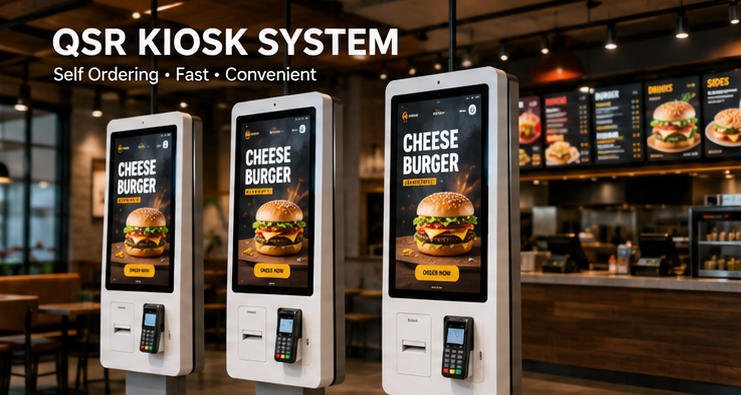
The AONKIOSK QSR Kiosk System is a self-service ordering solution designed for quick service restaurants, fast food chains, cafés, food courts, and take-away businesses. It enables customers to browse menus, customize meals, place orders, complete secure payments, and receive order confirmations without staff assistance.
What Is a QSR Kiosk System?
A QSR (Quick Service Restaurant) Kiosk System is an interactive touchscreen terminal that allows customers to independently:
- Browse digital menus
- Select food and beverage items
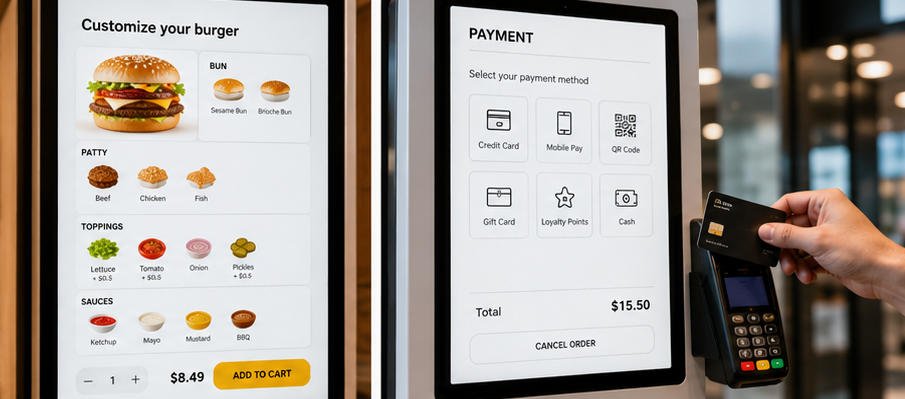
- Customize ingredients
- View nutritional information
- Apply promotions or coupons
- Complete payments
- Receive order numbers
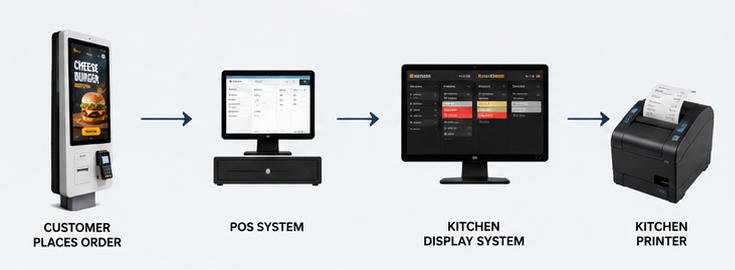
- Send orders directly to POS or Kitchen Display System (KDS)
The system reduces waiting time while improving ordering accuracy and restaurant efficiency.
Typical Applications
The AONKIOSK QSR solution is suitable for:
- Fast food restaurants
- Burger restaurants
- Pizza chains
- Coffee shops
- Bubble tea stores
- Fried chicken restaurants
- Sandwich shops
- Food courts
- Dessert shops
- Airport restaurants
- Stadium concessions
- University cafeterias
- Hospital dining services
System Components
A complete QSR kiosk solution typically includes the following components.
Hardware
- Industrial touchscreen display (21.5″–32″)
- Capacitive multi-touch panel
- Industrial PC (Intel or ARM platform)
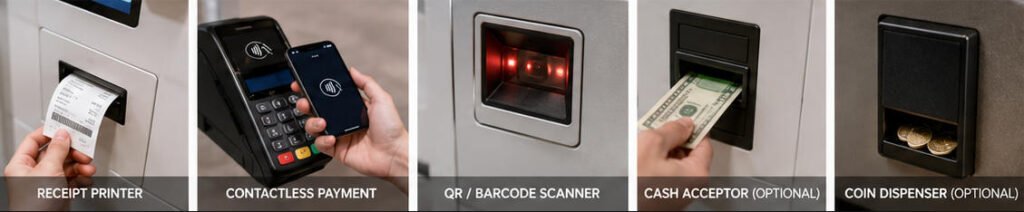
- Thermal receipt printer
- QR code scanner (optional)
- Barcode scanner (optional)
- NFC/RFID reader
- Contactless payment terminal
- Cash acceptor (optional)
- Coin dispenser (optional)
- Speaker
- Camera (optional)
- Wi-Fi and Ethernet connectivity
- UPS (optional)
Software
The software platform typically includes:
- Self-ordering application
- Menu management
- Product customization engine
- Order management
- POS integration
- Kitchen Display System (KDS) integration
- Payment gateway integration
- Customer loyalty integration
- Promotional campaign management
- Analytics dashboard
- Remote device management
Core Functions
Self Ordering
Customers can:
- Browse categories
- View product images
- Read product descriptions
- Select meal sizes
- Add toppings
- Remove ingredients
- Choose combo meals
- Add side dishes
- Select beverages
- Review cart
- Confirm order
Menu Customization
The system supports:
- Multi-level modifiers
- Required selections
- Optional add-ons
- Quantity adjustments
- Special instructions
- Allergy notices
- Nutritional information
Payment Options
Depending on regional payment requirements, the kiosk may support:
- Credit cards
- Debit cards
- NFC payments
- Apple Pay
- Google Pay
- QR code payments
- Mobile wallets
- Gift cards
- Loyalty points
- Cash payment (optional)
Kitchen Integration
Orders can be automatically transmitted to:
- POS system
- Kitchen Display System (KDS)
- Kitchen printers
- Production monitors
- Order management servers
This reduces manual input errors and improves kitchen workflow.
User Workflow
The standard ordering process consists of:
- Welcome screen
- Language selection
- Browse menu
- Select products
- Customize items
- Review shopping cart
- Apply coupons or rewards
- Choose payment method
- Complete payment
- Receive receipt or digital confirmation
- Kitchen receives order
- Customer waits for pickup
Installation Requirements
Power
Typical requirements:
- AC 100–240V
- 50/60Hz
- Grounded outlet
- Surge protection recommended
Network
Recommended:
- Wired Ethernet
- Wi-Fi backup
- Stable Internet connection
- VPN support (optional)
Space Requirements
Allow sufficient clearance for:
- Customer operation
- Wheelchair accessibility
- Printer maintenance
- Ventilation
- Power access
Integration Options
The AONKIOSK platform can integrate with:
POS Systems
- Restaurant POS
- Cloud POS
- Enterprise POS
- Franchise POS
Kitchen Systems
- Kitchen Display Systems
- Kitchen printers
- Order routing software
Payment Platforms
Integration depends on country and payment provider.
Typical supported devices include:
- Ingenico
- Verifone
- PAX
- Castles
- Stripe Terminal
- Adyen
- Worldpay
Loyalty Platforms
Possible integrations include:
- Membership systems
- CRM
- Gift cards
- Points programs
- Digital coupons
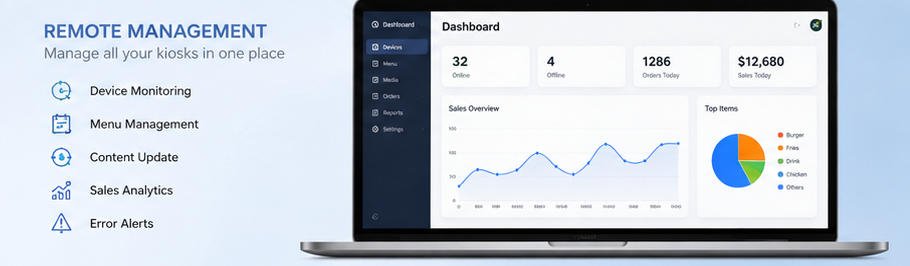
Remote Management
Administrators can remotely manage:
- Menu updates
- Pricing
- Promotions
- Software updates
- Device status
- Network status
- Printer status
- Error logs
- Usage statistics
This minimizes on-site maintenance and enables centralized management across multiple restaurant locations.
Security Features
The AONKIOSK QSR system supports:
- User authentication
- Secure payment communication
- Encrypted data transmission
- HTTPS communication
- Remote monitoring
- Device lockdown mode
- Automatic logout
- Audit logs
Daily Maintenance
Recommended daily checks include:
- Clean touchscreen
- Verify printer paper
- Test payment terminal
- Check network connectivity
- Restart kiosk if necessary
- Confirm menu synchronization
- Review error logs
Troubleshooting Guide
Kiosk Cannot Connect to Network
Possible Causes
- Ethernet cable disconnected
- Wi-Fi unavailable
- Router offline
- Incorrect IP configuration
Solutions
- Check network cable.
- Restart the router or switch.
- Verify network settings.
- Test Internet connectivity.
- Contact your network administrator if the issue persists.
Payment Terminal Not Responding
Possible Causes
- USB connection failure
- Payment service unavailable
- Terminal firmware issue
Solutions
- Reconnect the payment device.
- Restart the kiosk.
- Verify payment gateway connectivity.
- Check terminal firmware status.
- Contact the payment provider if required.
Receipt Printer Does Not Print
Possible Causes
- Paper depleted
- Printer cover open
- USB disconnected
- Printer offline
Solutions
- Reload thermal paper.
- Close the printer cover securely.
- Check cable connections.
- Restart the printer.
- Verify printer status in the kiosk software.
Orders Not Appearing in Kitchen
Possible Causes
- POS connection failure
- KDS offline
- Network interruption
- API communication error
Solutions
- Check POS connectivity.
- Verify KDS operation.
- Test network connection.
- Review system logs.
- Restart integration services if necessary.
Slow System Performance
Possible Causes
- Insufficient memory
- Large image files
- Network latency
- Background processes
Solutions
- Restart the kiosk.
- Optimize menu images.
- Update software.
- Check available storage.
- Verify network performance.
Best Practices
For optimal performance:
- Keep software up to date.
- Regularly back up configuration files.
- Monitor printer supplies.
- Test payment devices daily.
- Clean the touchscreen using approved materials.
- Monitor system health through the remote management portal.
- Train staff on basic troubleshooting procedures.
Frequently Asked Questions
Can the kiosk support multiple languages?
Yes. Multiple language packs can be configured based on project requirements.
Can customers customize meals?
Yes. The system supports configurable modifiers, ingredient selections, combo meals, and optional add-ons.
Does the kiosk support contactless payment?
Yes. Support depends on the integrated payment terminal and regional payment provider.
Can menus be updated remotely?
Yes. Menu items, pricing, images, and promotions can be managed remotely through the administration platform.
Does the kiosk integrate with POS systems?
Yes. Integration is available through APIs, middleware, or customized interfaces, depending on the POS vendor.
Can one administrator manage multiple kiosks?
Yes. Centralized management enables monitoring and updating multiple kiosks across different restaurant locations.
Technical Specifications (Example)
| Component | Specification |
|---|---|
| Display | 21.5″–32″ Full HD Capacitive Touch |
| Operating System | Windows, Android, Linux (project-dependent) |
| CPU | Intel Core / ARM Platform |
| Memory | 4GB–16GB |
| Storage | 64GB–512GB SSD |
| Network | Ethernet, Wi-Fi |
| Printer | 80mm Thermal Receipt Printer |
| Scanner | Optional QR/Barcode Scanner |
| Payment | EMV, NFC, Contactless, QR Payment |
| Installation | Floor Standing / Countertop / Wall Mounted |
Why Choose AONKIOSK QSR Kiosk System?
AONKIOSK develops self-service kiosks with a focus on long-term reliability, flexible integration, and enterprise deployment. Our QSR solutions are designed for restaurants seeking efficient customer self-ordering while maintaining compatibility with existing POS, payment, and kitchen systems.
Key advantages include:
- Industrial-grade hardware for continuous operation
- Flexible hardware customization
- Open API integration with third-party platforms
- Multi-language user interface
- Centralized remote management
- Scalable deployment for single stores or multi-site chains
- Comprehensive technical documentation and after-sales support
Whether deployed in a single café or a nationwide restaurant chain, the AONKIOSK QSR Kiosk System helps streamline ordering, reduce labor demands, improve order accuracy, and deliver a consistent self-service experience.






