






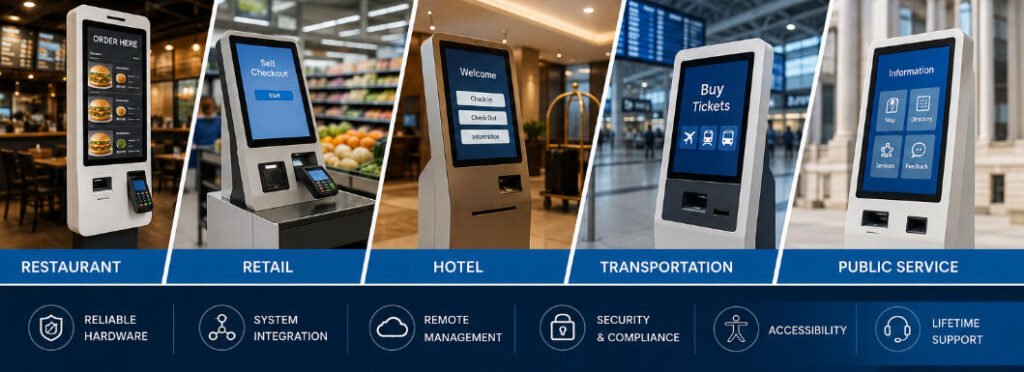
The global kiosk market continues to expand as organizations replace selected staff-assisted processes with digital self-service workflows. Restaurants use kiosks for ordering and payment, retailers use them for checkout and customer services, hotels deploy them for check-in, and public facilities use them for registration, ticketing, navigation and information access.
However, kiosk market growth should not be understood only as an increase in the number of terminals being installed. The market is also changing technically. Modern kiosks are becoming more modular, more connected to backend platforms and more closely integrated with payment, identity, inventory and operational management systems.
This knowledge-base guide explains the major kiosk market growth trends, how they affect kiosk hardware and system architecture, and what businesses should evaluate before planning a deployment.

What Does Kiosk Market Growth Mean?
Kiosk market growth generally refers to increases in:
- The number of organizations adopting self-service technology
- The number of kiosks deployed at each location
- The range of industries using kiosk systems
- The number of tasks completed through self-service
- Demand for customized hardware and peripheral integration
- Investment in kiosk software, cloud management and data services
- Replacement of older kiosk hardware with newer connected systems
Market growth does not mean that every industry requires the same kiosk configuration. A restaurant ordering terminal, supermarket self-checkout machine and hotel check-in kiosk may all use a touchscreen computer, but their operational workflows and hardware modules are different.
Businesses should therefore interpret market trends according to their own service process rather than selecting a kiosk only because a particular product category is growing.
1. Self-Service Is Expanding Beyond Basic Transactions
Early kiosks were commonly designed for a single task, such as printing a ticket or displaying information. Current systems increasingly support multiple stages of a customer journey.
A restaurant kiosk may allow a customer to:
- Select a language
- Browse a digital menu
- Customize products
- Apply a membership discount
- Complete payment
- Print or display an order number
- Send the order to the POS or kitchen system
A hotel kiosk may combine reservation lookup, identity verification, payment, registration and room-card dispensing in one workflow.
This shift from single-function terminals to integrated service platforms is an important source of kiosk market growth. Organizations are not only purchasing more devices; they are assigning more operational responsibilities to each device.
For a broader explanation of kiosk components and system operation, users can visit the AONKIOSK self-service kiosk knowledge base.
2. Labor Availability and Service Capacity Are Driving Adoption
Many kiosk projects are introduced to address a service-capacity problem rather than to remove employees completely.
Common operational problems include:
- Long queues during peak periods
- Repetitive tasks occupying trained employees
- Difficulty maintaining consistent service across multiple locations
- Limited counter space
- Demand for extended or 24-hour service
- Seasonal changes in customer volume
- Multilingual service requirements
A kiosk can process routine interactions while employees focus on exceptions, customer assistance, fulfillment and other tasks that require human judgment.
For example, a quick-service restaurant may use several ordering kiosks during peak periods while keeping staff available for food preparation and customer support. A hotel may use a check-in kiosk at night while maintaining remote or on-site assistance for guests who cannot complete the automated workflow.
The practical goal is usually not “staff versus kiosk.” It is to determine which tasks are predictable enough to automate and which tasks should remain staff-assisted.
3. Restaurant Self-Ordering Remains a Major Growth Segment
Restaurants and quick-service businesses are among the most visible users of self-service kiosks.
Growth in this segment is supported by several operational requirements:
- Faster ordering during busy periods
- Consistent presentation of menu items
- Support for modifiers, combinations and add-ons
- Integration with POS and kitchen display systems
- Multiple payment methods
- Loyalty and coupon integration
- Multilingual ordering
- Reduced dependence on a single ordering counter
The kiosk hardware normally includes a commercial touchscreen, embedded computer, payment-terminal mounting area, receipt printer and barcode or QR-code scanner. Optional components may include cameras, NFC readers, cash-acceptance modules and accessibility devices.
Businesses evaluating this application can review the available restaurant self-ordering kiosk solutions and compare floor-standing, countertop and wall-mounted configurations.
Technical planning questions
Before selecting a restaurant kiosk, confirm:
- Whether the kiosk software connects directly to the existing POS
- Whether menu prices and availability update automatically
- Whether orders are sent to a kitchen display system or printer
- Whether the payment terminal is provided by the kiosk supplier or payment provider
- Whether the printer supports the required paper width
- Whether the enclosure provides access for paper replacement
- Whether the kiosk must support cash
- Whether the installation location has power and network access
A kiosk should not be ordered only according to display size. The complete workflow and peripheral list should be confirmed first.
4. Retail Kiosks Are Evolving into Modular Checkout Platforms
Retail kiosk growth includes self-checkout, product inquiry, membership registration, bill payment, returns, price checking and assisted selling.
A retail self-checkout configuration may require:
- Product barcode scanner
- Payment terminal
- Receipt printer
- Customer-facing display
- Bagging area
- Weighing scale
- Security camera
- Cash recycler
- Coin dispenser
- RFID reader
Not every retail project requires all these modules. A card-only convenience-store checkout terminal may be much simpler than a supermarket self-checkout system that accepts cash and verifies item weight.
The growing range of retail applications is increasing demand for modular kiosk structures. A modular enclosure allows scanners, printers, payment devices and other components to be changed without redesigning the entire terminal.
Organizations planning a retail deployment can examine AONKIOSK’s retail and payment kiosk configurations to understand common integration options.
Common retail integration problems
Retail kiosk projects frequently encounter difficulties when hardware selection begins before software and operational requirements are finalized.
Typical problems include:
- The selected scanner cannot read the required barcode type
- The payment-terminal opening does not match the final payment device
- The POS software cannot communicate with the scale
- The receipt printer driver is not supported by the operating system
- The enclosure does not provide enough space for cash-handling modules
- Store staff cannot easily access consumable components
- Network interruptions prevent transactions from completing
- Product and pricing databases are not synchronized
These risks can be reduced by preparing an interface and peripheral specification before manufacturing begins.
5. Hotel, Transportation and Ticketing Applications Are Expanding
Check-in and ticketing kiosks are growing because they can combine multiple administrative steps into a structured workflow.
Depending on the application, these kiosks may support:
- Reservation or booking lookup
- Passport or ID-card scanning
- Identity verification
- Payment collection
- Document signing
- Ticket or boarding-pass printing
- Room-card or access-card dispensing
- Queue-number printing
- Wayfinding and service information
These systems usually require closer coordination between the kiosk manufacturer, software developer and the organization operating the service.
For example, a hotel check-in kiosk may need to communicate with the property management system, payment gateway, identity-verification service and door-lock platform. A ticketing kiosk may need to retrieve live availability, reserve inventory and issue a printed or digital ticket.
The physical kiosk is therefore only one part of the complete system.
6. Cloud Connectivity and Remote Management Are Becoming Standard
As kiosk fleets grow, on-site maintenance becomes expensive. This is increasing demand for remote device management.
A remote management platform may provide:
- Device online and offline status
- CPU, memory and storage monitoring
- Application health checks
- Remote restart
- Software deployment
- Configuration updates
- Log collection
- Printer and peripheral alerts
- Transaction-status monitoring
- Screenshot or remote-control functions
- Security-policy enforcement
Remote management does not eliminate the need for local maintenance. Paper replacement, physical cleaning and damaged-component replacement still require on-site work. However, remote monitoring can help technical teams identify the likely cause of a problem before dispatching a technician.
Recommended alert categories
A kiosk fleet should distinguish between:
Critical alerts
- Device offline
- Payment service unavailable
- Application not responding
- Operating-system failure
- Storage full
Operational alerts
- Printer paper low
- Card dispenser low
- Scanner disconnected
- Cash module approaching capacity
Maintenance alerts
- High device temperature
- Repeated application restart
- Touchscreen calibration issue
- Unusual network latency
Clear alert classification helps support teams respond according to business impact.
7. AI Is Changing Kiosk Functions, but Not Every Kiosk Needs AI
Artificial intelligence is increasingly discussed in relation to kiosk market growth. Possible applications include:
- Voice interaction
- Natural-language assistance
- Product recommendations
- Computer-vision checkout
- Queue analysis
- Fraud or anomaly detection
- Document recognition
- Predictive maintenance
- Usage-pattern analysis
- Personalized interfaces
AI can improve a kiosk when it solves a specific workflow problem. It should not be added only because it is a market trend.
Before introducing an AI function, businesses should evaluate:
- What data the system collects
- Whether user consent is required
- Where data is processed and stored
- Whether the AI result affects a payment or identity decision
- How inaccurate results are handled
- Whether a non-AI fallback workflow is available
- Whether the kiosk hardware has sufficient processing capacity
For many applications, a well-designed fixed workflow remains faster and easier to maintain than a complex AI interface.
8. Contactless Interaction and Digital Payments Continue to Influence Design
Digital payment behavior has increased demand for payment-terminal integration, QR scanning and NFC functions.
A kiosk may support:
- Credit and debit cards
- Contactless bank cards
- Mobile wallets
- QR-code payments
- Membership QR codes
- Prepaid cards
- Cash
- Mixed payment methods
Payment support depends on the payment provider, acquiring bank, software integration and local regulations. Installing a card reader in the enclosure does not automatically make the complete kiosk payment compliant.
The project team should verify:
- Who supplies the payment terminal
- Who provides the payment application
- Whether the device is attended or unattended certified
- How the terminal communicates with the kiosk application
- Whether the transaction can recover after a network interruption
- Whether refunds and reversals are supported
- Who handles payment-related technical support
The kiosk manufacturer can prepare the mechanical mounting, cable routing and internal power connections, but payment certification usually involves additional parties.
9. Accessibility Is Becoming a Core Product Requirement
Kiosk accessibility should be considered during the initial design stage rather than added after installation.
Accessibility-related features may include:
- Reachable touch controls
- Appropriate screen height and angle
- High-contrast interface modes
- Adjustable text size
- Audio guidance
- Headphone connection
- Tactile controls
- Braille labels
- Physical navigation keypad
- Screen-reader compatibility
- Clear floor space for wheelchair users
- Alternative staff-assisted service
The required configuration depends on the country, installation environment and applicable accessibility rules.
A large screen alone does not make a kiosk accessible. Hardware dimensions, interface design, mounting height and the complete user journey must be evaluated together.
10. Customized OEM and ODM Hardware Is Growing in Importance
Standard kiosk models are suitable when the required workflow matches an existing configuration. Customized hardware becomes necessary when a project has special requirements involving:
- Brand appearance
- Installation dimensions
- Display size
- Wall, floor or countertop installation
- Peripheral selection
- Ventilation
- Cable routing
- Outdoor protection
- Security locks
- Service access
- Transportation and packaging
A professional kiosk project should move through a controlled engineering process:
- Requirement collection
- Workflow confirmation
- Peripheral selection
- Mechanical layout
- Drawing approval
- Prototype production
- Software and peripheral testing
- Pilot deployment
- Design correction
- Batch production
AONKIOSK provides custom self-service kiosk hardware and system-integration support for multiple application categories. More information about its manufacturing and solution capabilities is available on the AONKIOSK self-service kiosk manufacturer homepage.
11. Market Growth Is Increasing the Importance of Quality Control
As kiosks are deployed in more demanding environments, reliability becomes more important than visual appearance alone.
A kiosk used in a high-traffic location may operate for long periods and may be exposed to:
- Repeated touchscreen use
- Printer vibration
- Dust
- Heat
- Unstable power
- Accidental impact
- Network interruptions
- Frequent door opening for maintenance
- Improper shutdown
- Peripheral disconnection
A suitable quality-control process should cover incoming components, in-process assembly, final function testing and outgoing inspection. Testing should include the actual peripheral combination wherever possible.
Important checks include:
- Touchscreen response
- Display stability
- CPU and storage performance
- Printer operation
- Scanner reading
- Payment-device communication
- Camera function
- Network connectivity
- Internal temperature
- Grounding
- Lock and door alignment
- Cable security
- Packaging protection
For large deployments, buyers should request a sample or pilot unit before batch production.
12. How to Evaluate Kiosk Market Reports
Published kiosk market forecasts often use different definitions.
One report may include only interactive self-service terminals, while another may also include vending machines, digital signage, ATMs, software subscriptions or service revenue. Geographic coverage and forecast periods may also differ.
Before using a market figure, check:
- What types of kiosks are included
- Whether the figure covers hardware only
- Whether software and services are included
- Which industries are measured
- Which countries are included
- The base year of the estimate
- The forecast period
- Whether revenue or installed units are being measured
- Whether the report explains its research method
For this reason, businesses should not use one market-size figure as the primary justification for a kiosk project.
A better approach is to combine external market information with internal operational data such as:
- Customer volume
- Average queue time
- Transaction duration
- Labor availability
- Number of abandoned transactions
- Error rates
- Peak-hour demand
- Payment-method usage
- Support costs
- Expected equipment lifetime
Readers can follow the AONKIOSK kiosk industry news center for additional application and regional market analysis.
13. How Market Trends Affect Kiosk Procurement
Kiosk growth is creating more product options, but it can also make selection more complicated.
Before requesting a quotation, prepare the following information:
Application
Define exactly what the user must complete at the kiosk.
Software responsibility
Confirm whether the application is supplied by the buyer, kiosk provider or third-party software company.
Operating system
Specify Windows, Android, Linux or another required platform.
Display
Confirm screen size, orientation, brightness, resolution and touch technology.
Peripheral list
Identify every scanner, printer, payment device, camera, reader, dispenser or cash module.
Integration interfaces
Confirm USB, serial, Ethernet, Bluetooth, GPIO or API requirements.
Installation environment
Specify indoor or outdoor use, operating temperature, humidity, lighting and expected traffic.
Network
Confirm wired Ethernet, Wi-Fi, cellular connectivity or offline operation.
Maintenance
Determine how paper, cards and other consumables will be replaced.
Compliance
Identify electrical, radio, payment, accessibility and environmental requirements for the destination market.
Deployment quantity
Separate prototype, pilot and production quantities.
A detailed requirement document helps prevent quotation differences caused by suppliers making different assumptions.
14. Troubleshooting Problems Associated with Rapid Deployment
Fast market expansion can lead organizations to deploy kiosks before support processes are ready.
Problem: Users abandon the workflow
Possible causes:
- Too many steps
- Unclear instructions
- Slow response
- Unsupported payment method
- Poor interface localization
Recommended action:
Review session logs, observe real users and simplify the workflow before adding more hardware.
Problem: Printer failures occur frequently
Possible causes:
- Incorrect paper
- Paper installed incorrectly
- Cutter obstruction
- Driver issue
- Printer overheating
- Inadequate maintenance access
Recommended action:
Verify printer status through the operating system, test with approved paper and inspect the cutter and sensor area.
Problem: Payment succeeds but the order is not created
Possible causes:
- Payment and order systems are not using the same transaction state
- Network interruption
- Timeout
- Missing callback
- Duplicate transaction protection
Recommended action:
Check payment logs, application logs and backend order records using the same transaction identifier.
Problem: The kiosk frequently goes offline
Possible causes:
- Weak Wi-Fi
- Cable damage
- Router configuration
- IP conflict
- Power-management setting
- Application crash
Recommended action:
Test the physical network connection first, then review operating-system and application logs.
Problem: Touch input is inaccurate
Possible causes:
- Calibration error
- Loose cable
- Damaged touch surface
- Incorrect display scaling
- Unsupported driver
Recommended action:
Restart the touch controller, verify display scaling and run the manufacturer’s calibration utility.
15. Practical Outlook for the Kiosk Market
The kiosk market is likely to continue developing toward connected, modular and application-specific systems.
The most important long-term trends are not limited to increasing shipment volumes. They include:
- Broader use of self-service across industries
- Deeper integration with operational software
- More modular hardware
- Remote fleet management
- Wider digital-payment support
- Greater accessibility requirements
- Increased use of data and AI
- Stronger security and privacy controls
- More demand for customized OEM and ODM manufacturing
- Greater emphasis on lifecycle support
Businesses should respond to these trends by selecting kiosks according to workflow requirements, integration readiness and total cost of ownership—not only display size or initial hardware price.
Conclusion
Kiosk market growth reflects a wider transition toward automated, connected and user-operated service systems.
Restaurants, retailers, hotels, transportation operators and public-service organizations are adopting kiosks to increase service capacity, reduce queues, standardize routine processes and extend service availability. At the same time, kiosks are becoming technically more complex because they must connect with payment platforms, POS systems, inventory databases, identity services and remote management tools.
A successful deployment begins with a clearly defined workflow. Hardware, software, payment, networking, accessibility and maintenance requirements should be confirmed before manufacturing.
The right kiosk is not necessarily the model with the largest display or the greatest number of modules. It is the system that reliably supports the required user journey, integrates with the existing business platform and can be maintained throughout its operating lifecycle.






