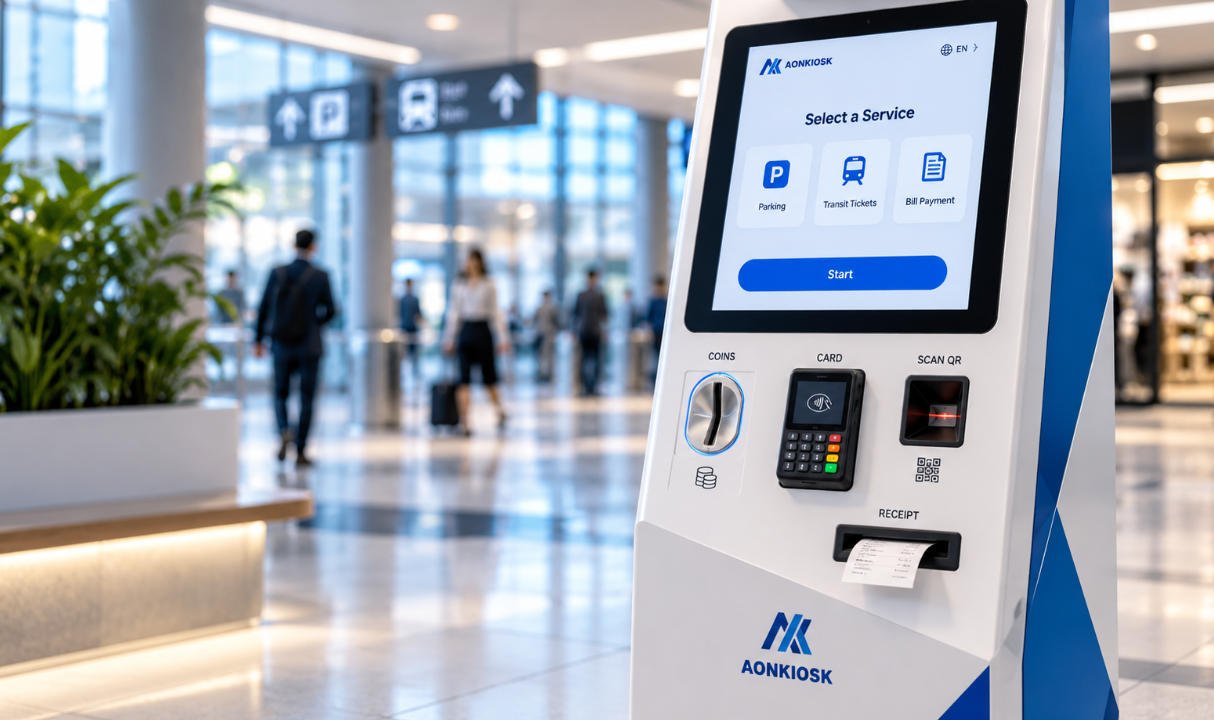
The enclosure is the mechanical foundation of a self-service kiosk. It supports the touchscreen, computer, printer, scanner, payment terminal, power system, cables, locks, and mounting structure while protecting those components from impact, dust, unauthorized access, and environmental exposure.
However, enclosure material descriptions are often unclear. A specification may say that a kiosk has a “metal enclosure,” while another refers to “steel construction.” These terms are not directly comparable because metal is a broad material category, while steel is one specific type of metal.
For most commercial self-service terminals, the practical comparison is not simply metal versus steel. The real selection normally involves:
- Cold-rolled carbon steel
- Galvanized steel
- Stainless steel
- Aluminum alloy
- Mixed-material construction
- Steel combined with tempered glass or engineering plastics
Each material has different implications for strength, weight, corrosion resistance, fabrication, surface finishing, maintenance, transportation, and total project cost.
This guide explains how kiosk enclosure materials should be evaluated and how to choose a suitable construction for indoor, semi-outdoor, and outdoor installations.
1. What Does “Metal Kiosk Enclosure” Mean?
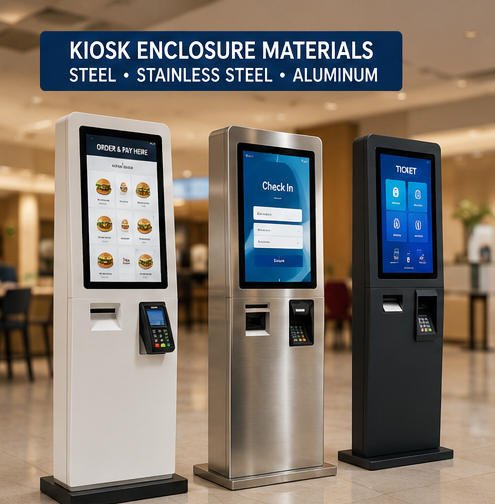
A metal kiosk enclosure is a cabinet or chassis made primarily from metallic sheet, plate, profiles, or cast components.
The term does not identify the exact material grade. A supplier describing a kiosk as “metal” may be referring to:
- Mild or carbon steel
- Cold-rolled steel sheet
- Galvanized steel
- Stainless steel
- Aluminum
- Zinc-coated steel
- A combination of several metals
Therefore, “metal enclosure” should not be treated as a complete engineering specification.
A useful kiosk specification should state:
- Base material
- Material grade, where required
- Sheet thickness
- Surface treatment
- Coating type and thickness
- Fastener material
- Environmental protection requirement
- Relevant impact, corrosion, or ingress test requirements
The material must also be evaluated as part of the complete kiosk hardware structure. A strong outer cabinet alone does not guarantee a reliable terminal if the screen frame, internal brackets, hinges, locks, base plate, cable entries, or service doors are poorly designed.
2. Is Steel Different from Metal?
Steel is a metal alloy made mainly from iron and carbon, with other elements added or controlled to achieve specific mechanical and corrosion properties.
All steel enclosures are metal enclosures, but not all metal enclosures are steel.
In kiosk manufacturing, steel is commonly selected because it provides:
- Good structural strength
- Predictable sheet-metal fabrication
- Reliable welding and bending
- Broad material availability
- Stable mounting for heavy peripherals
- Cost-effective production
- Compatibility with powder coating
- Good resistance to everyday impact
Steel is particularly suitable for floor-standing kiosks containing receipt printers, payment terminals, industrial PCs, card dispensers, cash modules, large touchscreens, or other components that create concentrated loads.
Aluminum is also a metal, but it behaves differently. It is lighter and naturally more corrosion-resistant, while typically requiring different decisions regarding wall thickness, fastening, welding, surface treatment, and structural reinforcement.
The correct comparison is therefore usually steel versus aluminum, or carbon steel versus stainless steel, rather than the general phrase “metal versus steel.”
3. Cold-Rolled Steel for Indoor Kiosks
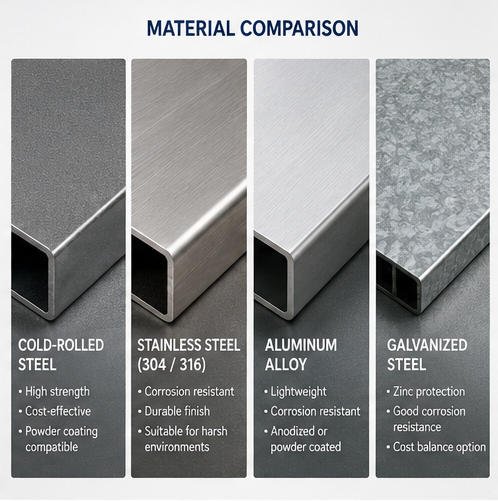
Cold-rolled steel is one of the most commonly used materials for indoor commercial kiosk cabinets.
It offers a smooth surface, good dimensional consistency, and suitable forming characteristics for laser cutting, punching, bending, welding, grinding, and powder coating.
Typical applications
Cold-rolled steel is often used for:
- Restaurant self-ordering kiosks
- Retail payment terminals
- Hotel check-in kiosks
- Indoor ticketing machines
- Queue management terminals
- Hospital registration kiosks
- Information kiosks
- Wall-mounted service terminals
Its relatively high stiffness allows engineers to produce rigid doors, display frames, internal mounting plates, bases, and peripheral brackets without making the enclosure excessively bulky.
Advantages
Structural rigidity
Steel panels resist flexing when correctly supported. This is important around touchscreens, printers, payment devices, locks, and service doors.
Fabrication flexibility
The material can be cut and formed into complex shapes using established sheet-metal manufacturing processes.
Stable equipment mounting
Heavy components can be secured to reinforced steel brackets or internal mounting plates.
Surface-finish compatibility
Powder coating provides a durable decorative finish and allows the kiosk to match customer branding or specified RAL colors.
Cost efficiency
For many indoor projects, powder-coated cold-rolled steel offers a practical balance between strength, appearance, and production cost.
Limitations
Unprotected carbon steel can corrode when exposed to moisture, condensation, cleaning chemicals, scratches, or salt-contaminated air.
The quality of the completed enclosure therefore depends heavily on:
- Pretreatment before coating
- Powder-coating coverage
- Edge and weld finishing
- Drainage and sealing
- Fastener selection
- Protection of cutouts and threaded holes
- Repair of damaged coatings
Cold-rolled steel should not automatically be specified for an exposed outdoor kiosk without an appropriate corrosion-control and environmental-protection strategy.
4. Stainless Steel for Harsh or Hygiene-Sensitive Environments
Stainless steel contains alloying elements that improve corrosion resistance. It is commonly considered for outdoor, coastal, food-service, healthcare, industrial, and high-cleaning-frequency applications.
However, stainless steel is not completely immune to staining or corrosion. Performance depends on the grade, surface condition, fabrication process, contamination control, cleaning method, and actual environment.
Common grades
304 stainless steel
Grade 304 is widely used for commercial equipment and provides good corrosion resistance in many indoor and moderate outdoor environments.
It may be suitable for:
- Food-service equipment
- Hospital kiosks
- Indoor kiosks exposed to frequent cleaning
- Sheltered outdoor terminals
- Humid commercial locations
316 stainless steel
Grade 316 contains molybdenum and generally provides improved resistance in chloride-containing environments.
It may be considered for:
- Coastal locations
- Marine-influenced air
- Areas exposed to de-icing salts
- Certain industrial environments
- Projects with more demanding corrosion requirements
Material grade selection should be based on the actual exposure, not on the assumption that the highest-cost grade is always necessary.
Advantages
- Good corrosion resistance
- Durable exposed surfaces
- Suitable for repeated cleaning
- Strong and rigid construction
- Premium industrial appearance
- Reduced dependence on decorative coating
- Suitable for some hygiene-sensitive locations
Limitations
- Higher material cost
- Higher fabrication cost
- More demanding welding and finishing
- Visible fingerprints on some finishes
- Potential surface contamination during fabrication
- Greater weight than aluminum
- Possible cosmetic variation between batches or finishing methods
Stainless steel should be fabricated using controlled processes. Contact with carbon-steel grinding dust, tools, worktables, or particles can contaminate the surface and later create rust-colored staining.
5. Aluminum Enclosures
Aluminum is frequently used when low weight, corrosion resistance, portability, or a specific industrial appearance is important.
It may be selected for:
- Countertop kiosks
- Portable terminals
- Wall-mounted kiosks
- Slim information displays
- Lightweight check-in units
- Modular equipment frames
- Applications with transportation-weight restrictions
Advantages
Lower weight
Aluminum has a much lower density than steel. Reducing enclosure weight can simplify handling, wall mounting, shipping, and field installation.
Natural corrosion resistance
Aluminum forms a protective oxide layer. With suitable alloy selection and finishing, it can perform well in many indoor and outdoor environments.
Finishing options
Aluminum can be anodized, powder coated, brushed, polished, or combined with decorative profiles.
Thermal conductivity
It transfers heat more readily than steel. This can be useful in certain heat-spreading designs, although material conductivity alone does not replace correct airflow and thermal engineering.
Limitations
Aluminum is not automatically stronger or better than steel.
For equivalent geometry, an aluminum panel generally has lower stiffness than a steel panel. The design may require:
- Increased material thickness
- Folded edges
- Extruded reinforcement
- Ribs or internal frames
- Additional mounting brackets
- Specialized fasteners
- Isolation from dissimilar metals
Aluminum is also more susceptible to denting in some public-access applications. Threaded connections may require inserts or reinforced mounting points when components will be removed repeatedly.
Galvanic corrosion must be considered where aluminum contacts stainless steel, carbon steel, copper, or other dissimilar metals in the presence of moisture.
6. Galvanized Steel
Galvanized steel has a zinc-based protective layer that helps reduce corrosion of the underlying steel.
It can provide an intermediate option between standard cold-rolled steel and stainless steel, particularly for internal structures, semi-outdoor equipment, or projects requiring improved corrosion protection at a controlled cost.
Possible uses include:
- Internal mounting panels
- Structural frames
- Bases and plinths
- Semi-outdoor cabinets
- Ventilation components
- Protected equipment compartments
The zinc coating can be damaged during cutting, welding, grinding, or forming. Fabrication methods and post-processing must therefore be considered during design.
Galvanized steel should not be described as maintenance-free or equivalent to stainless steel. Its suitability depends on coating type, coating mass, cut-edge protection, exposure conditions, and the complete enclosure design.
7. Steel vs Aluminum Comparison
| Selection Factor | Carbon Steel | Stainless Steel | Aluminum |
|---|---|---|---|
| Structural stiffness | High | High | Lower for equivalent geometry |
| Weight | High | High | Low |
| Material cost | Usually lower | Higher | Medium to high |
| Indoor corrosion resistance | Good when coated | Very good | Very good |
| Harsh outdoor resistance | Requires engineered protection | Grade-dependent and generally strong | Alloy and finish dependent |
| Welding and fabrication | Widely available | More controlled processing required | Specialized processes may be required |
| Powder coating | Common | Optional | Common |
| Dent resistance | Generally good | Generally good | Design-dependent |
| Mounting heavy hardware | Very suitable | Very suitable | May require reinforcement |
| Decorative appearance | Coating-dependent | Brushed or polished appearance available | Anodized or coated finishes available |
| Portability | Less suitable | Less suitable | Highly suitable |
| Typical kiosk use | Most indoor kiosks | Harsh, hygienic, or premium applications | Lightweight and wall-mounted units |
This table provides general guidance only. Final performance depends on alloy, grade, thickness, geometry, reinforcements, joins, coatings, hardware, installation method, and environmental exposure.
8. Material Thickness Is Not the Only Strength Factor
A common purchasing mistake is to compare kiosk quality only by sheet thickness.
Thickness matters, but enclosure strength also depends on:
- Material grade
- Panel dimensions
- Number and position of bends
- Folded-edge geometry
- Internal ribs
- Weld locations
- Bracket design
- Door size
- Hinge placement
- Locking points
- Base structure
- Screen mounting method
- Peripheral weight distribution
- Anchoring method
A thinner panel with properly engineered folds and reinforcements may perform better than a thicker flat panel with insufficient support.
Excessively thick material can also create disadvantages:
- Increased kiosk weight
- Higher shipping cost
- More difficult installation
- Greater material consumption
- Higher fabrication cost
- Increased door load on hinges
- Reduced service convenience
The enclosure should therefore be designed around real mechanical loads rather than an arbitrary thickness target.
9. Surface Treatments and Coatings
The base material and surface treatment must be selected together.
Powder coating
Powder coating is commonly used on carbon steel and aluminum kiosk cabinets. It provides color, texture, abrasion resistance, and an additional corrosion barrier.
A reliable coating process normally requires:
- Cleaning and degreasing
- Surface pretreatment
- Controlled powder application
- Proper curing
- Visual and thickness inspection
- Adhesion verification where required
Coating quality around corners, seams, welds, cutouts, ventilation holes, and hidden surfaces is especially important.
Anodizing
Anodizing creates a controlled oxide layer on aluminum. It can improve surface hardness and corrosion resistance while providing a metallic appearance.
Anodized finishes may show visible variation because of alloy composition, extrusion direction, surface preparation, and batch processing.
Brushed stainless steel
Brushed stainless steel provides a clean industrial appearance and can make minor scratches less noticeable than a mirror-polished finish.
The grain direction should be controlled across visible panels. Cleaning products must be compatible with the selected finish.
Zinc-rich or protective primers
Outdoor carbon-steel enclosures may use zinc-rich primers, electrophoretic coating, multi-layer paint systems, or other corrosion-protection processes before the final topcoat.
The coating system should be defined according to the expected environment and required service life.
10. Material Selection for Outdoor Kiosks
An outdoor enclosure cannot be made reliable through material selection alone.
A stainless-steel cabinet can still allow water entry through an unsealed printer slot. A coated steel cabinet can still corrode around damaged edges. An aluminum enclosure can still suffer galvanic corrosion around incompatible fasteners.
Outdoor design must address the entire system, including:
- Door gaskets
- Compression latches
- Drip edges
- Water channels
- Sealed display mounting
- Protected ventilation
- Waterproof cable glands
- Corrosion-resistant fasteners
- Raised internal electronics
- Printer and scanner openings
- Condensation control
- Drainage
- UV-resistant external parts
- Heating or cooling
- Grounding and bonding
The required IP rating applies to the tested configuration, not simply to the enclosure material. Peripheral openings, antennas, speakers, fans, vents, locks, cable entries, and service doors can all affect ingress protection.
For exposed installations, review the complete outdoor kiosk requirements before confirming material, coating, sealing, thermal control, and component layout.
11. Material Selection by Application
Restaurant self-ordering kiosk
Powder-coated cold-rolled steel is commonly suitable for indoor restaurant use because it provides good rigidity, supports payment and printing peripherals, and allows flexible branding.
Stainless steel may be selected near food-preparation areas or where cleaning requirements are more demanding.
Retail payment kiosk
Retail terminals often require rigid steel construction because barcode scanners, payment devices, printers, bagging modules, or shelving can introduce concentrated loads.
See AONKIOSK’s retail and payment kiosk configurations for examples of integrated transaction hardware.
Hotel check-in kiosk
Cold-rolled steel, stainless steel, aluminum, glass, and decorative panels may be combined to balance appearance, service access, and support for passport readers, card dispensers, printers, and payment terminals.
Ticketing kiosk
Ticketing terminals in transportation or event environments may experience high daily traffic and repeated user contact. Stable floor anchoring, reinforced printer areas, secure service doors, and impact-resistant construction are usually more important than decorative material descriptions.
Relevant deployment structures can be reviewed in the ticketing kiosk product category.
Information and wayfinding kiosk
Large display kiosks may use a steel internal frame with aluminum profiles, coated panels, tempered glass, or decorative cladding.
The material system must control screen movement, vibration, center of gravity, cable routing, and maintenance access.
Accessible kiosk
Accessible designs may require lower user-interface positions, open knee clearance, extended controls, adjustable screens, or specialized mounting structures. These geometric requirements affect structural loading and reinforcement.
Material choice should therefore be coordinated with the complete accessible kiosk solution rather than decided separately.
12. Common Enclosure Problems and Troubleshooting
Rust appears around edges or holes
Possible causes include:
- Coating damage
- Poor pretreatment
- Exposed cut edges
- Water retention
- Carbon-steel contamination
- Incorrect fasteners
- Condensation
- Cleaning-chemical exposure
Corrective action should include identifying the moisture source, removing corrosion, restoring the protective finish, and correcting the design condition that allowed repeated exposure.
Door alignment changes over time
Check:
- Hinge wear
- Fastener loosening
- Door-panel flexing
- Excessive component weight mounted on the door
- Cabinet distortion
- Uneven flooring
- Incorrect anchoring
- Shipping damage
Do not solve persistent misalignment only by adjusting the lock. The structural cause should be identified.
Kiosk vibrates during touchscreen use
Inspect:
- Base dimensions
- Floor anchors
- Center of gravity
- Screen-arm stiffness
- Internal frame reinforcement
- Adjustable feet
- Loose fasteners
- Unsupported large panels
Increasing sheet thickness is only one possible solution. Reinforcing the load path is often more effective.
Powder coating chips near service areas
Frequent metal-to-metal contact, insufficient clearance, sharp edges, poor adhesion, or unsuitable coating thickness may be responsible.
Review door stops, hinge movement, lock engagement, removable panels, and technician access paths.
Aluminum parts show white corrosion or staining
Possible causes include moisture retention, chemical exposure, damaged finish, incompatible cleaning agents, or contact with dissimilar metals.
Inspect joints, fasteners, drainage, isolation washers, and surface treatment.
13. Information to Provide to a Kiosk Manufacturer
Before selecting the enclosure material, prepare a technical requirement list containing:
- Indoor, semi-outdoor, or outdoor installation
- Temperature and humidity range
- Rain, dust, salt, chemical, and UV exposure
- Expected operating hours
- Public access and vandalism risk
- Screen size and mounting direction
- Complete peripheral list
- Weight of internal components
- Floor, wall, counter, or mobile mounting
- Required IP or IK rating
- Cleaning and disinfection method
- Branding and color requirements
- Maximum kiosk weight
- Shipping and installation limitations
- Maintenance-door location
- Expected service life
- Required certifications
- Production quantity
The enclosure material should be confirmed after the internal devices and maintenance method are known. The computer, printer, scanner, power supply, payment terminal, and cables all affect the required cabinet dimensions and load distribution.
For a complete component review, refer to Main Components of a Self-Service Kiosk and the guide to selecting an industrial PC for a kiosk.
14. AONKIOSK Enclosure Engineering Approach
AONKIOSK develops custom self-service kiosk hardware for ordering, payment, check-in, ticketing, information, wayfinding, healthcare, and public-service applications.
Depending on project requirements, an enclosure can be engineered using cold-rolled steel, stainless steel, aluminum, tempered glass, coated panels, and application-specific internal brackets.
The development process may include:
- Requirement analysis
- Industrial design
- Material and finish selection
- Internal component layout
- Sheet-metal engineering
- Thermal and ventilation planning
- Cable-management design
- Door and lock design
- Prototype manufacturing
- Peripheral installation
- Functional verification
- Structural optimization
- Batch assembly and quality inspection
AONKIOSK focuses on complete kiosk hardware rather than isolated sheet-metal fabrication. This allows enclosure decisions to be coordinated with the touchscreen, computing platform, payment devices, printers, scanners, power system, mounting structure, and maintenance requirements.
Projects requiring a custom cabinet, prototype, pilot batch, or production-ready terminal can review AONKIOSK’s OEM and ODM kiosk manufacturing services.
Conclusion
“Metal” and “steel” should not be used as interchangeable kiosk specifications.
Metal is a broad category that includes steel, stainless steel, aluminum, and other alloys. Steel is usually the most practical material for rigid, cost-effective indoor kiosk construction. Stainless steel is suitable where corrosion resistance, frequent cleaning, or environmental durability is a priority. Aluminum is useful when low weight, portability, wall mounting, or a particular surface appearance is required.
The best enclosure cannot be selected from material name alone. Engineers must also evaluate:
- Material grade
- Sheet thickness
- Structural geometry
- Reinforcement
- Surface treatment
- Environmental sealing
- Fasteners
- Peripheral loads
- Installation method
- Maintenance access
- Transportation
- Expected service life
For most projects, the correct approach is to define the complete operating environment and hardware configuration first, then engineer the enclosure material, structure, and finish around those requirements.