






Comprendre les différents types de bornes libre-service
Les bornes libre-service sont disponibles dans de nombreuses configurations, chacune étant conçue pour un flux de travail et une interaction client spécifiques. Bien qu'elles partagent des composants matériels similaires — notamment des écrans tactiles, des ordinateurs industriels, des imprimantes, des scanners et des dispositifs de paiement — leur fonctionnalité varie selon l'application.
Comprendre les différents types de bornes libre-service aide les entreprises à sélectionner la plateforme matérielle appropriée, à simplifier le déploiement et à améliorer l'efficacité opérationnelle à long terme.
Cet article de base de connaissances explique comment les bornes libre-service sont généralement classées, où chaque type est utilisé et quels modules matériels sont généralement requis.
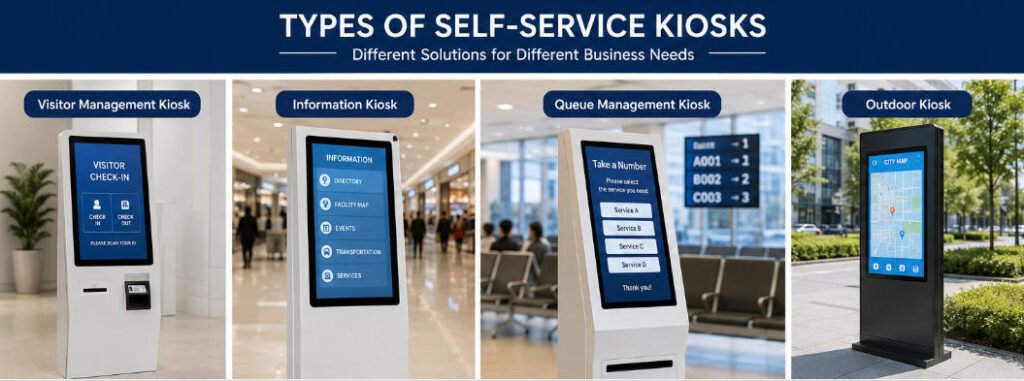
Comment les bornes libre-service sont classées
Les bornes libre-service peuvent être catégorisées de plusieurs manières.
Par fonction commerciale
Il s'agit de la méthode de classification la plus courante.
- Bornes de commande en libre-service
- Bornes de paiement libre-service
- Bornes de paiement
- Bornes de billetterie
- Bornes d’enregistrement hôtelier
- Bornes de gestion des visiteurs
- Kiosques d’information
- Bornes de gestion des files d'attente
- Bornes d'enregistrement des soins de santé
- Bornes d'orientation
Chaque type exécute un flux de travail de service client différent tout en utilisant de nombreuses technologies matérielles identiques.
Par méthode d'installation
Selon l'espace disponible et le flux de clientèle, les bornes peuvent être installées comme :
- Kiosques au sol
- Bornes murales
- Kiosques de comptoir
- Terminaux de bureau
- Kiosques extérieurs
- Bornes double face
Le style d'installation affecte l'accessibilité, la maintenance, le cheminement des câbles et l'expérience utilisateur globale.
Par environnement d'exploitation
Les bornes sont également conçues en fonction des exigences environnementales.
Les bornes intérieures nécessitent généralement :
- Écrans LCD standard
- Boîtiers métalliques commerciaux
- Températures de fonctionnement contrôlées
Les bornes extérieures comprennent généralement :
- Écrans à haute luminosité
- Construction étanche
- Protection contre la poussière
- Composants industriels à large plage de température
- Conception anti-vandalisme
- Écrans lisibles en plein soleil
La sélection du matériel intérieur ou extérieur est l'une des décisions de conception les plus importantes.
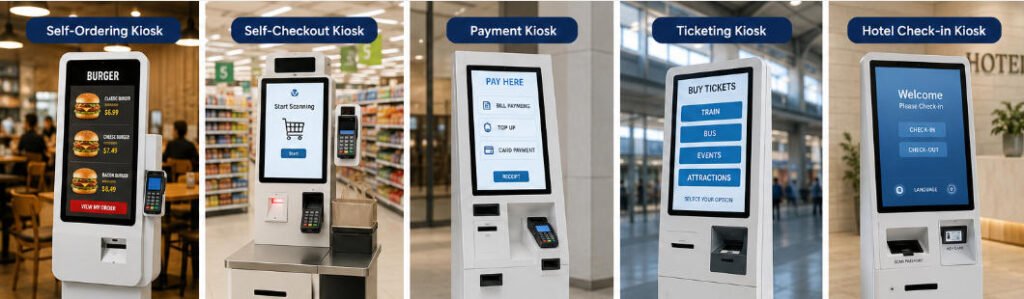
Types courants de bornes libre-service
Borne de commande en libre-service
Bornes de commande en libre-service permettent aux clients de parcourir les menus, de personnaliser les produits, de passer des commandes et d'effectuer le paiement sans l'assistance du personnel.
Les applications typiques incluent :
- Les restaurants de restauration rapide
- Les cafés
- Les magasins de thé aux perles
- Aires de restauration
- Concessions de stades
Modules matériels courants :
- Écran tactile
- Scanner QR
- Lecteur NFC
- Imprimante de reçus
- Terminal de paiement
- Haut-parleur
- Caméra (en option)
Objectif principal :
Réduire le temps d'attente tout en augmentant la précision des commandes et la valeur moyenne des commandes.
Borne de libre-service de paiement
Les bornes de libre-service de paiement permettent aux clients de scanner les marchandises, de payer de manière autonome et de recevoir des reçus.
Les secteurs typiques incluent :
- Supermarchés
- Magasins de proximité
- Chaînes de vente au détail
- Pharmacies
- Librairies
Le matériel supplémentaire comprend souvent :
- Scanner de codes-barres
- Balance
- Module de paiement en espèces
- Caméra de sécurité
- Capteurs antivol
Ces systèmes aident à réduire les files d'attente aux caisses tout en permettant au personnel de se concentrer sur le service client.
Borne de paiement
Les bornes de paiement traitent les transactions pour des produits ou services.
Les cas d'utilisation courants incluent :
- Le paiement de factures de services publics
- Paiement de stationnement
- Les services gouvernementaux
- Opérations bancaires
- Paiements hospitaliers
Les méthodes de paiement prises en charge peuvent inclure :
- Cartes de crédit
- Cartes de débit
- Paiement NFC
- Paiement par code QR
- Espèces
- Pièces de monnaie
Certaines bornes de paiement intègrent également l'impression de documents et la génération de reçus.
Borne de Ticketing
Les bornes de billetterie automatisent l'achat et la collecte des billets.
Les déploiements typiques incluent :
- Transports
- Cinémas
- Musées
- Parcs d'attractions
- Lieux d'événements
Matériel optionnel :
- Scanner de passeport
- Lecteur de codes-barres
- Imprimante thermique
- Distributeur de cartes
De nombreux systèmes de billetterie intègrent également des plateformes de réservation en ligne.
Kiosque d'auto-enregistrement hôtelier
Les bornes hôtelières automatisent l'enregistrement des clients et l'accès aux chambres.
Flux de travail typique :
- Vérification de la réservation
- Vérification d’identité
- Autorisation de paiement
- Émission de carte-clé
- L’impression de reçus
Le matériel supplémentaire comprend souvent :
- Scanner de passeport
- Lecteur de carte d'identité
- Caméra
- Tablette de signature
- Distributeur de cartes-clés
Ces bornes permettent des services de réception hôtelière 24h/24 et 7j/7.
Borne de gestion des visiteurs
Les bornes pour visiteurs automatisent l'enregistrement des visiteurs dans les bureaux, usines, campus et bâtiments publics.
Fonctions typiques :
- L'enregistrement des visiteurs
- Impression de badges
- La vérification d'identité
- Capture de visage
- L'enregistrement par code QR
- Notification à l'hôte
Cela améliore la sécurité tout en réduisant la charge de travail de la réception.
Borne d'information
Les bornes d'information fournissent des informations numériques sans nécessiter l'assistance du personnel.
Les emplacements courants incluent :
- Centres commerciaux
- Hôpitaux
- Aéroports
- Universités
- Bâtiments gouvernementaux
Les fonctions peuvent inclure :
- Les cartes interactives
- Recherche d'annuaire
- Informations sur les services
- Affichage numérique
- Téléchargement par code QR
- Orientation directionnelle
Ces bornes ne nécessitent généralement pas de modules de paiement.
Borne de gestion de file d'attente
Les bornes de file d'attente organisent le flux des clients à l'aide de systèmes de tickets numérotés.
Largement utilisées dans :
- Hôpitaux
- Banques
- Bureaux gouvernementaux
- Centres de service client
Modules typiques :
- Imprimante de tickets
- Scanner QR
- Écran tactile
- Intégration des annonces vocales
Ils contribuent à réduire la confusion liée à l'attente tout en améliorant l'efficacité du service.
Différences matérielles entre les types de bornes
Bien que de nombreuses bornes semblent similaires à l'extérieur, leur configuration matérielle interne varie considérablement.
| Type de borne | Paiement | Imprimante | Scanner | Distributeur de cartes | Caméra |
|---|---|---|---|---|---|
| Commande en libre-service | En option | Oui | Oui | Non | En option |
| Libre-service de paiement | Oui | Oui | Oui | Non | Oui |
| Paiement | Oui | Oui | En option | En option | En option |
| Billetterie | En option | Oui | Oui | En option | En option |
| Enregistrement à l'hôtel | Oui | Oui | Oui | Oui | Oui |
| Gestion des visiteurs | En option | Imprimante de badges | Oui | En option | Oui |
| Information | Non | En option | En option | Non | En option |
| Gestion des files d'attente | Non | Imprimante de tickets | En option | Non | En option |
Comprendre ces différences matérielles simplifie la sélection des produits lors de la conception du système.
Choix du type de borne adapté
Avant de sélectionner une borne, évaluez les questions suivantes :
- Quel processus métier la borne automatisera-t-elle ?
- Un paiement est-il requis ?
- L'identité du client sera-t-elle vérifiée ?
- Des reçus ou des tickets sont-ils imprimés ?
- Un déploiement en extérieur est-il requis ?
- La borne doit-elle s'intégrer aux systèmes POS ou ERP ?
- Quels périphériques sont requis ?
- Combien d'utilisateurs accéderont à la borne quotidiennement ?
Répondre à ces questions permet de déterminer le boîtier, la taille de l'écran, le processeur, les périphériques et la configuration de montage appropriés.
Solutions de bornes personnalisées Aonkiosk
Chez Aonkiosk, nous fabriquons des bornes en libre-service pour un large éventail de secteurs plutôt que de proposer un design universel.
Notre équipe d'ingénierie prend en charge :
- Fabrication de bornes OEM
- Développement matériel ODM
- La conception de boîtiers personnalisés
- Intégration d'écrans tactiles industriels
- L’intégration du module de paiement
- Intégration de lecteurs de codes-barres et QR
- Installation d'imprimantes
- Intégration de caméras et de modules biométriques
- Systèmes de distribution de cartes
- Plateformes Windows et Android
Chaque projet peut être personnalisé en fonction des flux de travail, des environnements de déploiement, de l'image de marque et des exigences logicielles du client.
Foire aux questions
Toutes les bornes en libre-service sont-elles équipées du même matériel ?
Non. Bien que de nombreuses bornes partagent des composants courants tels que les écrans tactiles et les PC industriels, les périphériques requis dépendent du flux de travail de l'application.
Quel type de borne nécessite le plus d'intégration matérielle ?
Les bornes d'enregistrement hôtelier et les bornes de paiement nécessitent généralement le niveau d'intégration matérielle le plus élevé, car elles combinent vérification d'identité, traitement des paiements, impression et distribution de cartes.
Une borne peut-elle remplir plusieurs fonctions ?
Oui. Une borne modulaire peut combiner commande, paiement, impression de tickets, inscription à un programme de fidélité et services d'information dans un seul boîtier.
Quelle est la différence entre une borne de commande en libre-service et une borne de paiement en libre-service ?
Une borne de commande en libre-service crée une nouvelle commande avant le paiement, tandis qu'une borne de paiement en libre-service scanne les marchandises existantes sélectionnées par le client.
Les bornes peuvent-elles être personnalisées pour différents secteurs ?
Oui. Aonkiosk fournit des services de fabrication OEM et ODM, permettant de personnaliser les configurations matérielles, les dimensions, les couleurs, l'image de marque, les périphériques et les méthodes de montage en fonction des exigences commerciales spécifiques.






