






Les supermarchés évoluent dans un environnement où la rapidité d'encaissement, la disponibilité de la main-d'œuvre, la précision des transactions et le confort client affectent directement les performances quotidiennes. En soirée, le week-end, lors d'opérations promotionnelles et pendant les périodes de fêtes, même un magasin bien géré peut connaître de longues files d'attente et des caisses saturées.
Les bornes de libre-service offrent aux supermarchés un moyen supplémentaire de traiter les transactions. Les clients peuvent scanner leurs produits, vérifier leur panier, appliquer les remises éligibles, effectuer leur paiement et recevoir leur ticket de caisse avec une assistance limitée du personnel.
Toutefois, la valeur du libre-service ne consiste pas simplement à remplacer une caisse traditionnelle par un écran tactile. Le plus important avantages des bornes libre-service en supermarché réside dans la création d'un environnement d'encaissement plus flexible dans lequel clients, employés, équipements matériels et systèmes de gestion du commerce de détail fonctionnent ensemble de manière efficace.
En tant que fabricant spécialisé de matériel de kiosque en libre-service, AONKIOSK développe des plateformes de bornes personnalisables pour les supermarchés, les magasins de proximité, les chaînes de distribution, les fournisseurs de logiciels et les intégrateurs de systèmes. Ces plateformes peuvent prendre en charge les lecteurs de codes-barres, les terminaux de paiement, les modules de pesée, les imprimantes de tickets, les caméras et autres périphériques de vente au détail requis par le logiciel d'encaissement du client.
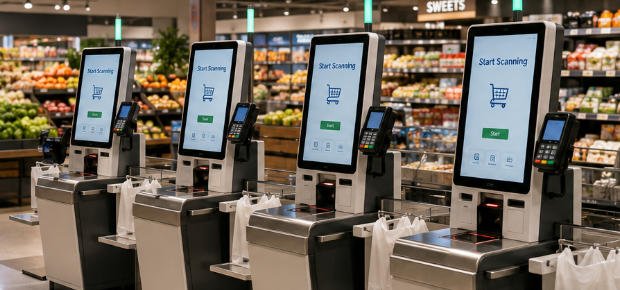
Qu'est-ce qu'une borne de libre-service en supermarché ?
Une borne de libre-service en supermarché est un terminal exploité par le client, conçu pour prendre en charge tout ou partie du processus d'encaissement en magasin.
Une transaction type suit le flux de travail suivant :
- L'acheteur initie la transaction sur l'écran tactile.
- Les produits sont scannés à l'aide d'un lecteur de codes-barres.
- Les produits frais peuvent être identifiés et pesés.
- Les prix, quantités, remises et avantages de fidélité sont affichés.
- Le client confirme son panier.
- Le paiement est effectué par carte, code QR, NFC, portefeuille mobile, espèces ou tout autre moyen pris en charge.
- Un ticket de caisse imprimé ou numérique est émis.
- Les informations de transaction sont synchronisées avec les systèmes de point de vente, de stock, de paiement et de fidélité du détaillant.
La configuration matérielle de base comprend généralement :
- Écran tactile commercial
- PC industriel ou plateforme informatique Android
- Lecteur de codes-barres 1D/2D
- EMV支付终端
- Lecteur NFC ou de paiement sans contact
- Imprimante de reçus thermique
- Balance de pesée des produits
- Caméra de sécurité
- Voyant d'état
- Modules optionnels d'acceptation et de recyclage des espèces
- Coffret métallique robuste
Une machine de libre-service est plus spécialisée qu'une borne polyvalente car elle doit prendre en charge le scan des produits, le traitement des paiements, la vérification du panier, la synchronisation des prix, la génération de tickets et les processus de prévention des pertes. Une comparaison technique détaillée est disponible dans le guide de la base de connaissances AONKIOSK, Borne polyvalente vs machine de libre-service.
1. Files d'attente plus courtes
L'un des avantages les plus visibles des bornes de supermarché est la possibilité de répartir les clients sur un plus grand nombre de points d'encaissement.
Un caissier traditionnel ne peut normalement gérer qu'une seule file d'attente à la fois. Dans une zone de libre-service, un employé peut superviser plusieurs terminaux exploités par les clients, selon la réglementation locale, les procédures du magasin, la taille du panier et la complexité des transactions.
Cette configuration peut augmenter la capacité d'encaissement sans nécessiter un caissier dédié pour chaque file.
Les bornes de libre-service sont particulièrement utiles pendant :
- Les périodes de courses après le travail
- Les week-ends
- Les périodes de fêtes
- Les campagnes promotionnelles
- Les pics de l'heure du déjeuner
- Les périodes de fermeture du magasin
- Les augmentations imprévues de fréquentation
Plutôt que de forcer chaque acheteur à faire la même file avec un caissier, les supermarchés peuvent orienter les clients ayant des paniers plus petits ou plus simples vers les terminaux de libre-service. Cela réduit la pression sur les caisses traditionnelles et offre aux clients davantage de moyens de finaliser leurs achats.
Les améliorations réelles du temps d'attente dépendent de la disponibilité des bornes, de la conception de l'interface, de la familiarité des clients, de la rapidité des paiements, de la composition du panier et de la vitesse à laquelle les employés résolvent les exceptions. Pour cette raison, les supermarchés doivent évaluer les performances en fonction des conditions réelles du magasin plutôt que de supposer que l'installation de terminaux supplémentaires éliminera automatiquement les files d'attente.
2. Débit client plus élevé aux heures de pointe
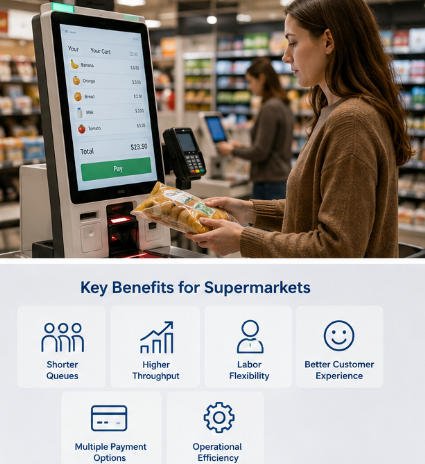
La capacité d'encaissement est limitée par le nombre de transactions qu'un magasin peut réaliser sur une période donnée. Lorsque les caisses deviennent congestionnées, les clients peuvent retarder leurs achats, abandonner leur panier ou choisir un autre magasin à l'avenir.
Un système de bornes de supermarché correctement planifié peut améliorer le débit en permettant à plusieurs acheteurs de scanner et de payer simultanément.
Cela est particulièrement efficace pour les clients achetant :
- Des produits d'épicerie emballés
- Des boissons
- Des articles ménagers courants
- Produits de soins personnels
- Articles de commodité
- Petites quantités de produits frais
- Paniers de voie express
Le libre-service ne traite pas toujours chaque transaction individuelle plus rapidement qu’un caissier expérimenté. Les clients peuvent scanner plus lentement, avoir besoin d’aide pour identifier les produits, ou déclencher une demande de vérification d’âge. L’avantage opérationnel provient du traitement en parallèle : plusieurs clients peuvent effectuer leurs transactions simultanément.
Pour les supermarchés, cette capacité supplémentaire peut être plus précieuse que de se concentrer uniquement sur la vitesse d’une transaction individuelle.
3. Réduction de la pression sur le personnel de caisse
La disponibilité de la main-d’œuvre reste un problème opérationnel majeur pour de nombreux détaillants. Les supermarchés doivent couvrir de longues heures d’ouverture, des volumes de clients variables, les pauses des employés, les absences, les pics saisonniers et les tâches répétitives en zone de caisse.
Les bornes de libre-service réduisent la dépendance à l’affectation d’un employé à chaque caisse active. Au lieu de cela, les employés peuvent superviser plusieurs terminaux et assister les clients en cas d’exceptions.
Cela ne signifie pas que les bornes de supermarché éliminent le besoin de personnel. Les employés restent importants pour :
- L’approbation des produits à restriction d’âge
- L’assistance à la recherche de produits
- La vérification des coupons
- Exceptions de paiement
- La supervision de la sécurité
- Support d'accessibilité
- L’éducation des clients
- Le dépannage des équipements
- Le réapprovisionnement en espèces
- Le remplacement du papier reçu
L’avantage pratique réside dans la flexibilité de la main-d’œuvre. Pendant les périodes plus calmes, moins de caisses conventionnelles peuvent être nécessaires. Pendant les périodes de pointe, les supermarchés peuvent activer des bornes supplémentaires sans ouvrir le même nombre de comptoirs de caisse entièrement dotés en personnel.
Les employés peuvent également être réaffectés à des tâches nécessitant davantage de jugement ou de service personnalisé, telles que le réassortiment, la préparation des commandes en ligne, le soutien client, les opérations de produits frais et la gestion des stocks.
4. Meilleure utilisation de l’espace de caisse
L’espace au sol est très précieux dans un supermarché. Les postes de caisse traditionnels nécessitent souvent un long comptoir, un tapis roulant, une zone employé, des séparateurs de produits, un tiroir-caisse et une zone d’emballage.
Selon la configuration, plusieurs bornes de libre-service compactes peuvent s’intégrer dans une zone qui accueillerait autrement moins de caisses conventionnelles.
Cela peut aider les supermarchés à :
- Augmenter le nombre de points de caisse disponibles
- Ajouter une capacité de caisse express
- Améliorer la circulation des flux près des sorties du magasin
- Créer des zones séparées pour les petits et grands paniers
- Adapter la zone de caisse à différents agencements de magasin
- Soutenir les formats urbains compacts d’épicerie
- Introduire le libre-service sans reconstruire entièrement la zone de caisse
Les économies d’espace ne sont pas automatiques. Les systèmes pour grands paniers nécessitent toujours des zones d’emballage adéquates, un accès aux chariots, des plateformes de pesée, une visibilité pour les employés et des voies de circulation accessibles.
Avant le déploiement, les détaillants doivent étudier les mouvements des clients, la taille des paniers, les positions des entrées et sorties, l’accès aux fauteuils roulants, les itinéraires d’urgence et les exigences de prévention des pertes.
AONKIOSK peut personnaliser les dimensions des armoires, l’orientation de l’écran, la structure de montage, la disposition des périphériques et l’accès de maintenance grâce à ses services de fabrication de bornes libre-service OEM et ODM.
5. Plus de contrôle pour les clients
De nombreux acheteurs apprécient de pouvoir effectuer leur passage en caisse à leur propre rythme.
Une borne de libre-service permet aux clients de :
- Scanner les produits dans l’ordre de leur choix
- Visualiser les prix avant le paiement
- Vérifier les quantités
- Examiner les remises
- Sélectionner un mode de paiement
- Utiliser les avantages de fidélité
- Choisir des reçus imprimés ou numériques
- Emballer leurs achats selon leurs préférences personnelles
Ce sentiment de contrôle est particulièrement utile pour les clients qui n’ont que quelques produits ou qui préfèrent une interaction minimale lors d’un achat courant.
Une interface bien conçue peut également fournir un retour visuel clair tout au long de la transaction. Les noms de produits, quantités, prix, promotions, statut de paiement et options de reçu peuvent être présentés de manière cohérente.
Cependant, le contrôle du client ne doit pas devenir une source de frustration. Les interfaces doivent utiliser un texte lisible, des instructions simples, des boutons clairs, une navigation logique et des options d’assistance visibles. La borne doit également permettre de corriger facilement les quantités, de retirer un article scanné par erreur, de revenir à l’écran précédent ou de demander l’aide du personnel.
6. Options de paiement flexibles
Le support des paiements numériques est un autre avantage important des bornes de supermarché.
Selon le marché cible et la configuration du projet, un terminal de libre-service peut prendre en charge :
- Cartes de crédit et de débit
- Paiements par puce EMV
- Cartes sans contact NFC
- Portefeuilles mobiles
- Paiements par code QR
- Les paiements liés à l'adhésion
- Cartes cadeaux
- Cartes de valeur du magasin
- Acceptation des espèces
- La monnaie en pièces et en billets
Proposer plusieurs options de paiement aide les supermarchés à servir une clientèle plus large et à s'adapter aux habitudes de paiement locales.
L'intégration des paiements doit être planifiée avec soin. La structure du terminal doit accueillir le dispositif de paiement sélectionné, assurer un acheminement sécurisé des câbles, permettre un accès pratique pour le client et faciliter la maintenance ou le remplacement futur.
La gamme de kiosques Kiosques de vente au détail et de paiement Peut être configuré autour de terminaux de paiement tiers, de scanners, d'imprimantes, de lecteurs NFC et d'autres périphériques commerciaux. Le détaillant ou le fournisseur de solutions reste responsable du logiciel de paiement, de la certification, des relations d'acquisition et des exigences de conformité applicables au marché de déploiement.
7. Des flux de caisse plus cohérents
Les performances des caissiers peuvent varier selon l'expérience, la formation, la charge de travail et la fatigue. Un kiosque présente à chaque client le même processus guidé.
Un flux de travail standardisé peut aider les supermarchés à maintenir une cohérence dans :
- Scan de produits
- La confirmation des quantités
- L'identification de fidélité
- La saisie des coupons
- La sélection du paiement
- La génération des reçus
- Les invites client
- Les messages promotionnels
La cohérence peut également simplifier la formation des employés. Au lieu d'apprendre à chaque employé à exploiter une caisse complète, les magasins peuvent former des assistants à surveiller la zone de libre-service, à résoudre les exceptions courantes et à accompagner les clients.
Le niveau final de précision dépend toujours de la qualité du logiciel, de la synchronisation des bases de données, des performances du scanner, de l'étalonnage de la balance, de la fiabilité des paiements et du comportement des clients. Un matériel fiable ne constitue donc qu'une partie d'un système de caisse complet pour supermarché.
8. Amélioration de l'engagement promotionnel et de fidélité
Un kiosque de libre-service est également un point de contact client numérique.
Lorsqu'il est intégré au logiciel du supermarché et à la plateforme de fidélité, l'écran peut afficher :
- Les tarifs membres
- Les soldes de points de fidélité
- Les rappels de coupons
- Les remises éligibles
- L'inscription aux reçus numériques
- Les invites d'adhésion au magasin
- Les suggestions de produits pertinents
- Campagnes saisonnières
- Les enquêtes de satisfaction client
Ces fonctions peuvent améliorer la participation aux programmes de fidélité et rendre les promotions plus visibles à l'étape finale du parcours d'achat.
Le contenu promotionnel doit rester utile plutôt que perturbateur. Trop de fenêtres contextuelles ou d'écrans inutiles peuvent ralentir le passage en caisse et réduire la satisfaction client. Les supermarchés doivent privilégier l'achèvement de la transaction et n'utiliser que des offres pertinentes et faciles à comprendre.
9. Prise en charge des opérations prolongées et sans personnel
Les kiosques de libre-service peuvent contribuer à prolonger les heures d'ouverture, en particulier dans les petites épiceries, les marchés de quartier, les campus, les immeubles de bureaux, les hôtels, les hubs de transport et autres environnements contrôlés.
Dans un magasin hybride, une équipe réduite peut superviser la caisse pendant que les kiosques traitent les transactions courantes. Dans les emplacements plus automatisés, les terminaux de libre-service peuvent fonctionner aux côtés de :
- Systèmes d'entrée contrôlée
- Surveillance à distance
- Étiquettes électroniques de rayon
- Caméras intelligentes
- Systèmes RFID
- Plateformes de gestion des stocks
- Authentification mobile
- Contrôle d'accès numérique
La transition vers le commerce de détail sans personnel nécessite plus que l'installation d'un kiosque. La connectivité Internet fiable, les paiements sécurisés, la synchronisation des stocks, le support client, le diagnostic à distance, la sécurité physique et la conformité réglementaire doivent tous être pris en compte.
Les lecteurs souhaitant explorer ce développement peuvent en apprendre davantage dans Bornes libre-service pour le commerce de détail : comment le self-checkout évolue vers un commerce entièrement sans personnel.
10. Meilleure évolutivité pour les détaillants multi-magasins
Les chaînes de supermarchés ont besoin de solutions pouvant être déployées de manière cohérente dans différents magasins tout en répondant aux exigences locales.
Une plateforme de kiosque modulaire peut aider à standardiser :
- Les tailles d'écran
- Les systèmes informatiques
- Les positions des scanners
- L'accès à l'imprimante
- Le montage des terminaux de paiement
- Gestion interne des câbles
- Procédures de maintenance
- Image de marque
- Les pièces de rechange
- La formation des employés
Parallèlement, différentes configurations peuvent être créées pour divers formats de magasins. Un grand hypermarché peut nécessiter une borne de libre-service complète avec balance d'emballage et recycleur de monnaie, tandis qu'un magasin de proximité compact peut nécessiter un terminal plus petit acceptant uniquement les cartes.
AONKIOSK prend en charge la fabrication de prototypes, la production pilote, les projets en petites séries et la production en volume. Cela permet aux détaillants et aux fournisseurs de solutions de tester une configuration matérielle sélectionnée dans un nombre limité de magasins avant d'étendre le déploiement.
11. Intégration avec les systèmes de point de vente, d'inventaire et de fidélité
Une borne de libre-service ne peut pas fonctionner comme un dispositif isolé. Elle doit communiquer avec l'écosystème technologique existant du détaillant.
Les intégrations courantes incluent :
- Le logiciel de caisse (POS)
- Bases de données de produits et de tarification
- Gestion des stocks
- Les moteurs de promotion
- Les programmes de fidélité
- Passerelles de paiement
- Systèmes fiscaux
- Plateformes de reçus
- Gestion à distance des appareils
- Systèmes de prévention des pertes
Par exemple, lorsqu'un client scanne un produit, la borne doit récupérer la description correcte, le prix, la catégorie fiscale et les règles promotionnelles. Après le paiement, le système doit enregistrer la vente, mettre à jour l'inventaire, émettre le reçu et appliquer les récompenses de fidélité.
AONKIOSK se concentre sur la fabrication et l'intégration du matériel de borne plutôt que sur le développement du logiciel de caisse du détaillant. Cette structure convient aux entreprises de POS, aux développeurs de logiciels, aux fournisseurs de paiement et aux intégrateurs de systèmes de vente au détail qui disposent déjà de leur propre plateforme applicative et ont besoin de matériel prêt à déployer.
12. Données opérationnelles utiles
Les bornes de libre-service connectées peuvent générer des informations qui aident les détaillants à évaluer les performances du front-end.
Selon la plateforme logicielle, les magasins peuvent être en mesure de suivre :
- Nombre de transactions effectuées
- Durée moyenne de passage en caisse
- Utilisation des modes de paiement
- Disponibilité des bornes
- Demandes d'assistance
- Articles annulés
- Printer status
- Erreurs de scanner
- Échecs de paiement
- Périodes de pointe des transactions
Ces informations peuvent aider la direction à identifier les problèmes récurrents et à optimiser les horaires du personnel, l'emplacement des bornes, la conception de l'interface et les routines de maintenance.
Les données doivent être collectées et gérées conformément aux exigences applicables en matière de confidentialité, de paiement et de cybersécurité.
Défis que les supermarchés doivent relever
Une évaluation crédible des avantages des bornes de supermarché doit également reconnaître les limites.
Assistance à la clientèle
Certains clients peuvent ne pas être familiarisés avec le libre-service ou préférer l'assistance d'un caissier. Un modèle hybride qui maintient des caisses avec personnel est généralement plus inclusif.
Produits soumis à restriction d'âge
L'alcool, le tabac, les médicaments et autres produits restreints peuvent nécessiter une vérification par un employé, selon les lois locales.
Produits frais
Les produits sans code-barres nécessitent une recherche ou un processus de reconnaissance du produit. L'interface doit rendre la sélection des articles simple et précise.
Prévention des pertes
Un scan incorrect, la substitution de codes-barres, des articles manqués et le vol intentionnel nécessitent des contrôles appropriés. Ceux-ci peuvent inclure des caméras, des balances d'emballage, une supervision par le personnel, des vérifications de reçus ou une intégration avec la plateforme de sécurité du détaillant.
Accessibilité
La hauteur du terminal, l'angle de l'écran, la portée d'atteinte, la taille du texte, le support audio, les commandes physiques et l'accès en fauteuil roulant doivent être pris en compte lors de la conception du matériel.
Fiabilité de l'équipement
Les imprimantes, scanners, balances, terminaux de paiement et modules de monnaie nécessitent une inspection et une maintenance régulières. Les composants doivent être accessibles au personnel de service autorisé sans que la borne soit facile à ouvrir par les clients.
Dépendance au logiciel et au réseau
Le processus de caisse repose sur des connexions stables aux systèmes de POS, de produits, d'inventaire et de paiement. Des procédures hors ligne et des flux de récupération doivent être planifiés avant le déploiement.
Comment sélectionner une borne de libre-service pour supermarché
Avant de choisir une configuration de borne, les détaillants doivent définir le modèle opérationnel prévu.
Les questions importantes incluent :
- Les bornes serviront-elles les petits paniers, les grands paniers, ou les deux ?
- Quelles méthodes de paiement doivent être prises en charge ?
- L'acceptation d'espèces est-elle nécessaire ?
- Les clients devront-ils peser les produits frais ?
- Quelles plateformes de POS et d'inventaire seront connectées ?
- Des cartes de fidélité, coupons ou cartes cadeaux sont-ils requis ?
- Quels dispositifs de prévention des pertes seront intégrés ?
- Quel espace est disponible ?
- Quelles exigences d'accessibilité s'appliquent ?
- Qui assurera la maintenance du matériel ?
- Le projet débutera-t-il par un déploiement pilote ?
- La même conception peut-elle être adaptée à différents formats de magasins ?
Répondre à ces questions avant la fabrication réduit les modifications inutiles et permet d'aligner le matériel du kiosque sur le flux de caisse réel.
Pourquoi choisir AONKIOSK ?
AONKIOSK est spécialisé dans la conception, l'ingénierie, l'intégration et la fabrication de matériel de kiosques libre-service.
Pour les projets de supermarchés et de commerce de détail, les capacités disponibles incluent :
- Conception personnalisée d'enceintes métalliques
- Intégration d'écrans tactiles industriels
- Intégration de lecteurs de codes-barres et QR
- Le montage des terminaux de paiement
- Intégration d'imprimantes de reçus
- Support de module de pesage
- Intégration de caméras et de capteurs
- Adaptation de module de paiement en espèces
- Personnalisation de la marque et des finitions de surface
- La gestion thermique
- Le cheminement des câbles
- Conception d'accès pour la maintenance
- Développement de prototypes
- Production pilote en petits lots
- Fabrication évolutive
Étant donné que chaque projet de supermarché présente des exigences différentes en matière de logiciel, de paiement, de sécurité et d'agencement du magasin, AONKIOSK développe le matériel en fonction des modules sélectionnés par le client et de son flux de travail opérationnel, plutôt que d'imposer une configuration standard unique à chaque projet.
Conclusion
Le plus important avantages des bornes libre-service en supermarché inclut des files d'attente plus courtes, une capacité de caisse accrue, une meilleure flexibilité du personnel, une utilisation optimisée de l'espace au sol, davantage d'options de paiement et un contrôle accru pour le client.
Cependant, un déploiement réussi de caisse libre-service nécessite plus qu'un simple matériel à écran tactile. Les supermarchés doivent également prendre en compte l'intégration logicielle, l'accessibilité, l'assistance client, la prévention des pertes, la maintenance des équipements, la conformité des paiements et les besoins des acheteurs qui préfèrent encore les caisses avec personnel.
L'approche la plus efficace est souvent un modèle hybride. Les kiosques libre-service gèrent les transactions courantes et la demande aux heures de pointe, tandis que des employés formés fournissent une assistance et gèrent les achats plus complexes.
Grâce à un matériel modulaire, des périphériques soigneusement planifiés et une intégration système fiable, les kiosques libre-service peuvent devenir un élément pratique de la stratégie d'automatisation du commerce de détail à long terme d'un supermarché.






