






1. Aperçu (Définition au niveau système)
Dans les environnements d'automatisation commerciale, les systèmes de bornes libre-service (Kiosk Systems) et Systèmes de caisse (POS) sont deux sous-systèmes transactionnels essentiels conçus pour différents modèles d'interaction au sein d'un flux de travail de vente au détail ou de service.
- A Système de kiosque est un terminal en libre-service opéré par le client
- A Système POS est un système de contrôle des transactions opéré par le personnel
Dans les architectures modernes, les deux systèmes se connectent généralement à une couche de services backend partagée, permettant une gestion unifiée des commandes, des paiements et des données.
Chez Aonkiosk, le matériel des bornes est conçu pour s'intégrer aux écosystèmes POS dominants via des API, des intergiciels ou des systèmes de routage de commandes basés sur le cloud.
2. Classification des systèmes (Modèle de couches fonctionnelles)
D'un point de vue architectural :
2.1 Système de borne libre-service (Nœud frontal en libre-service)
Une borne est classée comme :
- Terminal d'interaction homme-machine (IHM)
- Dispositif frontal de capture de commandes
- Unité d'initiation automatique des paiements
Elle fonctionne selon un modèle de saisie piloté par le client (CDI – Customer Driven Interface).
2.2 Système POS (Nœud de contrôle des transactions)
Un POS est classé comme :
- Contrôleur de transactions opéré par le personnel
- Système de validation et de modification des commandes
- Terminal de gestion opérationnelle
Elle fonctionne selon un modèle de saisie piloté par le personnel (SDI – Staff Driven Interface).
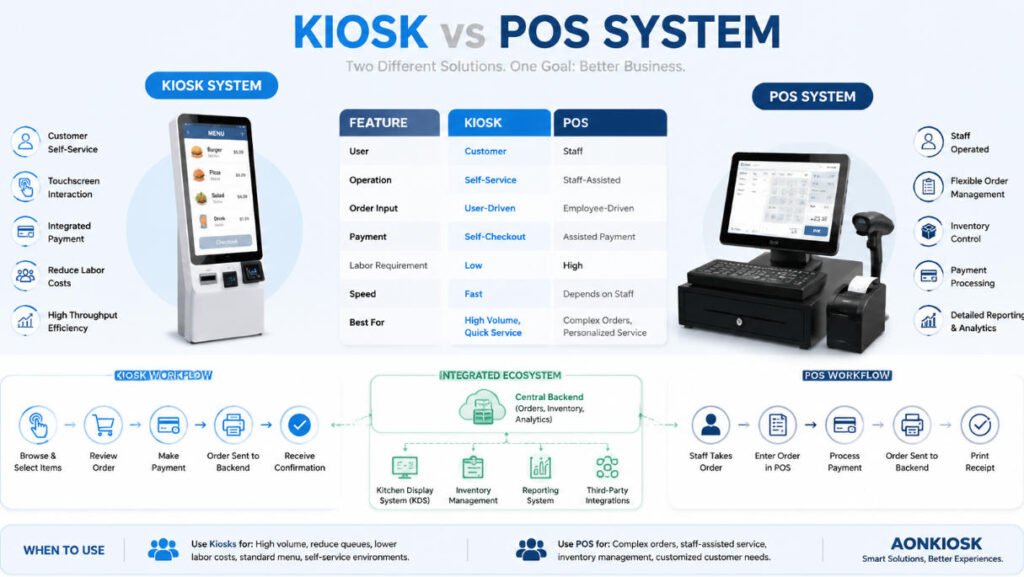
3. Différence fonctionnelle essentielle (Modèle de comportement système)
| Couche système | Système de kiosque | Système POS |
|---|---|---|
| Mode d'interaction | Libre-service client | Opération assistée par le personnel |
| Création de commande | Générée par l'utilisateur | Générée par le personnel |
| Déclenchement du paiement | Initié par l'utilisateur | Assisté par le personnel ou manuel |
| Objectif principal | Réduire la file d'attente et la charge de travail | Contrôler l'exactitude des transactions |
| Gestion des erreurs | Flux de correction utilisateur | Flux de correction personnel |
| Source de saisie des données | Interface utilisateur frontale | Opérateur backend |
4. Comparaison de l'ingénierie des flux de travail
4.1 Flux de travail centré sur le POS (Modèle traditionnel)
Ce modèle suit un processus linéaire opéré par l'humain:
- Le client formule sa demande verbalement
- Le personnel saisit la commande dans le système POS
- Le système calcule le montant total
- Le paiement est traité via le terminal POS
- La commande est transmise au backend/KDS
- Un reçu est généré
Caractéristique clé : Goulot d'étranglement dépendant du facteur humain à l'étape de saisie des commandes
4.2 Flux de travail centré sur le kiosque (modèle en libre-service)
Ce modèle suit un Flux automatisé piloté par l'utilisateur:
- Le client interagit avec l'interface utilisateur du kiosque
- La sélection des produits est effectuée de manière autonome
- Le système effectue un calcul automatique des prix
- Le paiement est exécuté via une passerelle intégrée
- La commande est transmise au système backend (POS/KDS/ERP)
- Une confirmation numérique ou imprimée est générée
Caractéristique clé : Le goulot d'étranglement de la saisie des commandes est éliminé
5. Modèle d'intégration de l'architecture système (norme Aonkiosk)
Dans un déploiement en entreprise, le kiosque et le POS ne sont pas des systèmes indépendants — ils fonctionnent comme partie d'une architecture unifiée :
5.1 Couche frontale
- Terminal kiosque (interface client)
- Terminal POS (interface personnel)
5.2 Couche d'intégration
- API de routage des commandes
- Interface de passerelle de paiement
- Service de synchronisation middleware
5.3 Couche backend
- Système de gestion des commandes (OMS)
- Système d'inventaire
- Système d'analyse et de reporting
- Couche d'intégration ERP/CRM
6. Logique de flux de données (modèle de transaction unifié)
Les deux systèmes convergent finalement vers un pipeline de données unique :
Entrée Kiosque → Passerelle API → Système de gestion des commandes → Système cuisine/service
Entrée POS → Passerelle API → Système de gestion des commandes → Système cuisine/service
Principe clé :
La différence ne réside pas dans le backend, mais dans la couche d'origine de la saisie des données
7. Scénarios de déploiement (logique de sélection du système)
7.1 Lorsque le kiosque est le système principal
- Environnements à forte affluence de clients
- Optimisation des coûts de main-d'œuvre requise
- La réduction des files d'attente est un KPI critique
- Catalogue de produits standardisé
- Environnements de service rapide (QSR, commerce de détail, transport)
7.2 Lorsque le POS est le système principal
- Personnalisation complexe des commandes requise
- Modèle de service guidé par le personnel
- Environnements d'hospitalité à forte interaction
- Opérations à forte intensité d'inventaire interne
- Besoin fréquent de dérogation manuelle
7.3 Architecture hybride (norme recommandée)
La plupart des déploiements en entreprise utilisent :
POS + Kiosk + Backend unifié
Avantages :
- Redondance dans le traitement des transactions
- Répartition de la charge entre le personnel et le libre-service
- Meilleure évolutivité en période de pointe
- Réduction du risque de goulot d'étranglement opérationnel
8. Considérations techniques d'intégration
8.1 Compatibilité des API
Les systèmes de kiosque doivent prendre en charge :
- Communication RESTful API / JSON
- Mappage des protocoles du fournisseur POS
- Points de terminaison de synchronisation des commandes
8.2 Intégration du système de paiement
Modèles pris en charge :
- Paiement par carte (EMV/NFC)
- Paiement QR (Alipay / WeChat Pay / portefeuilles locaux)
- Intégration de passerelle de paiement tokenisée
8.3 Synchronisation en temps réel
Exigence critique :
- L'état des commandes doit être synchronisé avec une latence < 1 à 3 secondes
- Mécanisme de récupération après panne requis (file d'attente de relance)
9. Dépannage opérationnel (Référence de support)
Problème 1 : Écart de commande entre le kiosque et le POS
Cause :
- Désynchronisation de l'API
- Délai du middleware
- Échec de la gestion des requêtes en double
Résolution :
- Vérifier la logique de mappage des identifiants de commande
- Valider les journaux API
- Activer le mécanisme de file d'attente de relance
Problème 2 : Paiement réussi au kiosque mais POS non mis à jour
Cause :
- Échec du webhook de paiement
- L'interruption du réseau
Résolution :
- Vérifier l'URL de rappel de la passerelle de paiement
- Vérifier les paramètres de pare-feu ou de délai d'expiration du serveur
Problème 3 : Le POS remplace incorrectement les commandes du kiosque
Cause :
- Conflit de rôles dans les autorisations système
Résolution :
- Définir les règles de hiérarchie système (remplacement POS vs verrouillage kiosque)
- Activer la journalisation d'audit
10. Principe de conception système (Norme d'ingénierie Aonkiosk)
Le principe de conception correct est :
POS = Couche de contrôle
Kiosque = Couche d'interaction
Backend = Source de vérité
Cette séparation garantit :
- La stabilité du système
- La cohérence des données
- Une architecture évolutive
- Une capacité de commande multicanal






