






Retail checkout is no longer limited to a row of staffed counters. Supermarkets, convenience stores, pharmacies, specialty shops, and other retail businesses are increasingly combining traditional cashier lanes with self-service technology.
This shift has created an important operational question: Which is better when comparing a kiosk vs cashier system?
The answer depends on transaction complexity, customer demographics, store traffic, staffing conditions, payment methods, loss-prevention requirements, and the level of service customers expect.
A self checkout kiosk can increase checkout capacity and reduce repetitive cashier workloads, while a manual checkout lane provides direct assistance and greater flexibility for complicated transactions. For many retailers, the strongest approach is not choosing one exclusively, but developing a balanced checkout environment in which kiosks and employees support different customer needs.
This guide provides a practical self checkout vs manual checkout comparison to help retailers, software companies, and system integrators choose an appropriate checkout model.
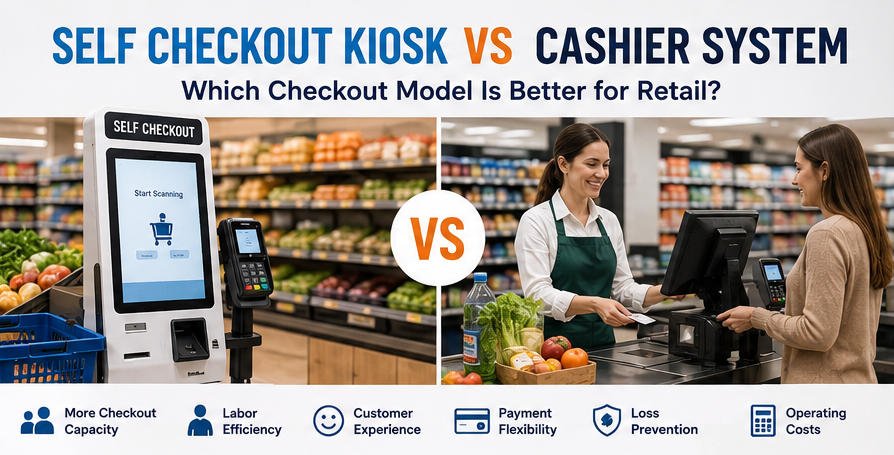
What Is a Self Checkout Kiosk?
A self checkout kiosk is a customer-operated retail terminal that enables shoppers to scan products, review their basket, apply eligible promotions, select a payment method, complete payment, and receive a printed or digital receipt.
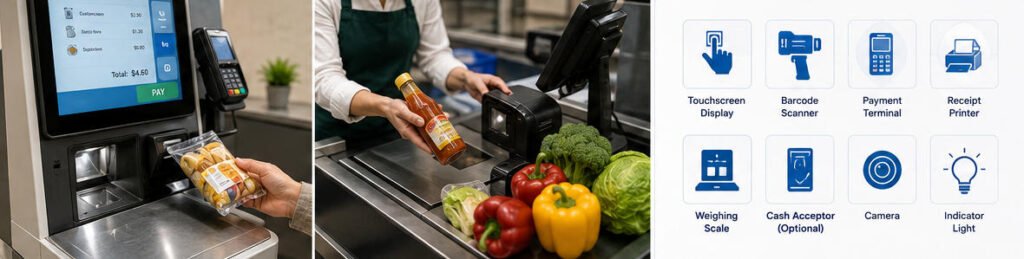
A typical self checkout system may include:
- An industrial touchscreen display
- A 1D or 2D barcode scanner
- A payment terminal
- An NFC or QR-code reader
- A receipt printer
- A customer-facing camera
- A bagging or weighing scale
- A cash acceptance or recycling module
- A service indicator light
- A custom metal enclosure
- An embedded PC or Android-based controller
The kiosk hardware normally connects with the retailer’s existing POS software, inventory database, pricing system, loyalty platform, payment gateway, and loss-prevention infrastructure.
AONKIOSK provides configurable retail and payment kiosk hardware for supermarkets, convenience stores, pharmacies, specialty retailers, and unattended retail projects. Hardware configurations can be adapted around the customer’s software platform and operational workflow.
What Is a Traditional Cashier System?
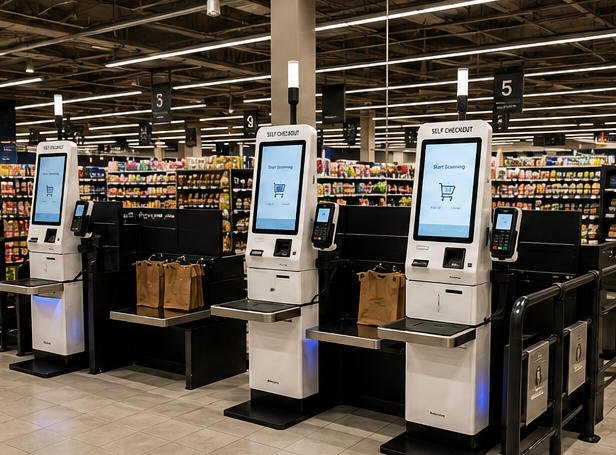
A traditional cashier system is a staff-operated checkout station. The cashier scans products, confirms pricing, processes discounts, accepts payment, handles exceptions, and completes the transaction for the customer.
A manual checkout station normally includes:
- A POS terminal
- A barcode scanner
- A cash drawer
- A payment device
- A receipt printer
- A customer display
- A weighing scale
- A conveyor or checkout counter
- Store POS and inventory software
The defining difference in the kiosk vs cashier comparison is therefore not simply the equipment. It is who controls the transaction.
At a self checkout kiosk, the customer operates the interface. At a cashier station, an employee operates the POS system on the customer’s behalf.
Kiosk vs Cashier: Key Differences
| Comparison Area | Self Checkout Kiosk | Traditional Cashier System |
|---|---|---|
| Primary operator | Customer | Store employee |
| Checkout capacity | Multiple kiosks can be supervised by one employee | Usually one cashier per active lane |
| Customer assistance | Available when requested | Included throughout the transaction |
| Transaction speed | Efficient for simple and small baskets | Often better for large or complicated baskets |
| Labor model | Supervision and exception handling | Continuous cashier operation |
| Service consistency | Standardized digital workflow | Depends partly on employee training and experience |
| Payment options | Commonly optimized for digital payment | Cash, card, vouchers, and complex payments |
| Product scanning | Completed by the customer | Completed by trained staff |
| Accessibility | Requires thoughtful interface and hardware design | Human assistance is immediately available |
| Upfront investment | Higher hardware and integration investment | Lower automation investment but ongoing labor expense |
| Upselling | Automated promotions and recommendations | Depends on cashier behavior and training |
| Loss prevention | Requires monitoring, scales, cameras, or software controls | Cashier directly observes the transaction |
| Operating hours | Can support extended or unattended service | Depends on employee availability |
This comparison shows why self checkout vs manual checkout should be evaluated as an operational strategy rather than a simple equipment purchase.

1. Checkout Speed and Customer Throughput
Checkout speed is often the first factor retailers examine.
A self checkout area can place several compact terminals in the space previously occupied by a smaller number of traditional lanes. During busy periods, this allows more customers to begin transactions simultaneously.
Self checkout is particularly effective for:
- Customers purchasing a small number of items
- Card and mobile-payment transactions
- Convenience-store purchases
- Pharmacy and specialty-retail baskets
- Shoppers already familiar with self-service
- Express checkout areas
However, a kiosk is not automatically faster for every transaction.
Customers with full shopping carts, produce requiring manual lookup, restricted products, multiple coupons, cash payments, or pricing questions may complete checkout faster with an experienced cashier. Slow user interaction or frequent assistance requests can also reduce the expected throughput of a self-service area.
Retailers should therefore compare complete transaction time rather than scanner speed alone. The evaluation should include queue duration, item scanning, payment, exception handling, receipt collection, and the time required to leave the checkout area.
2. Labor Requirements and Staff Allocation
One of the strongest arguments in the kiosk vs cashier discussion is labor flexibility.
A staffed lane generally requires a dedicated cashier whenever it is open. A self checkout area may allow one trained employee to monitor several kiosks, help customers, approve restricted items, respond to errors, and manage exceptions.
This does not mean that kiosks eliminate the need for employees.
A successful self checkout deployment still requires staff for:
- Customer assistance
- Age verification
- Product lookup
- Promotion or coupon issues
- Payment exceptions
- Receipt-printer maintenance
- Security monitoring
- Cleaning and basic equipment checks
- Resolving barcode or weight discrepancies
The more accurate business case is labor reallocation. Instead of spending an entire shift scanning products, employees can support several checkout points or move to higher-value tasks such as customer service, shelf replenishment, online order preparation, and store operations.
Retailers considering automation can review the broader benefits of kiosk systems to understand how self-service changes employee responsibilities across different applications.
3. Customer Experience
Self checkout gives customers direct control over the transaction. Shoppers can scan at their own pace, review prices before payment, select a preferred payment method, and complete routine purchases with limited interaction.
This experience is attractive to customers who value:
- Shorter perceived waiting times
- Independence
- Transaction privacy
- Contactless payment
- A predictable digital process
- Control over basket review
Manual checkout offers a different type of value. A cashier can answer questions, recognize uncertainty, help with packaging, explain promotions, and adapt the process to an individual customer.
This human support is especially important for:
- Older or less digitally confident shoppers
- Customers with accessibility requirements
- Tourists or customers facing language barriers
- Large and complex purchases
- Products requiring verification
- Returns, exchanges, and special payments
The best customer experience often comes from choice. Stores can offer self checkout for customers seeking speed while retaining assisted lanes for customers who prefer personal service.
4. Order Accuracy and Transaction Control
In manual checkout, a trained employee scans the products and manages the transaction. This reduces the amount of work required from the shopper, but scanning, quantity, or communication errors can still occur.
At a self checkout kiosk, customers can see each product, price, quantity, discount, and payment total on the screen. They can identify an incorrect item before confirming the transaction.
Accuracy depends heavily on interface design and system integration. A reliable self checkout workflow should provide:
- Clear product descriptions
- Visible quantities and prices
- Easy item removal
- Simple produce lookup
- Clear discount information
- Immediate error messages
- Accessible assistance controls
- Confirmation before payment
The kiosk must also communicate reliably with the POS, inventory, loyalty, promotion, and payment systems. Hardware alone cannot correct inconsistent product data or poorly designed software workflows.
For a more technical explanation of the interaction between kiosk hardware, software, peripherals, and backend systems, see How Does a Kiosk Work?.
5. Payment Flexibility
Traditional cashier lanes generally provide broad payment flexibility because an employee can guide the customer through cash, card, voucher, gift card, split-payment, refund, and other non-standard transactions.
Self checkout kiosks are commonly optimized around faster digital payment methods, including:
- Credit and debit cards
- NFC contactless cards
- Mobile wallets
- QR-code payments
- Loyalty accounts
- Digital coupons
Cash can also be supported, but it requires additional hardware such as bill acceptors, coin modules, cash recyclers, secure storage, and maintenance access. These modules increase enclosure size, system complexity, security requirements, and maintenance needs.
Before selecting a kiosk configuration, retailers should analyze the actual payment behavior of their customers. A card-only system may be suitable for one store format but exclude an important customer group in another market.
6. Operating Costs and Return on Investment
A manual checkout system generally has a familiar initial cost structure. Retailers purchase POS equipment, construct the counter, and assign employees to operate each lane.
A self checkout project usually requires a larger initial investment in:
- Customer-facing kiosk hardware
- Software integration
- Payment certification
- Network infrastructure
- POS and inventory connectivity
- Store-layout changes
- Installation and testing
- Employee training
- Loss-prevention technology
- Maintenance planning
The financial value of self checkout is normally created over time through increased checkout capacity, more flexible staffing, longer service availability, and standardized transaction workflows.
Retailers should not calculate return on investment using labor savings alone. A complete assessment should consider:
- Transactions processed per hour
- Number of kiosks supervised per employee
- Peak-hour queue reduction
- Store space utilization
- Payment and transaction mix
- Equipment maintenance
- Consumables
- Software licensing
- Downtime
- Theft or scanning losses
- Customer adoption
- Expected equipment lifespan
A high-volume supermarket and a small specialty store will reach very different conclusions even when evaluating the same hardware.
7. Loss Prevention and Security
Loss prevention is one of the most important differences in the self checkout vs manual checkout comparison.
A cashier directly observes product scanning and payment. In self checkout, the retailer must use a combination of operational procedures, hardware, and software to identify missed scans, barcode switching, incorrect produce selection, and other irregularities.
Depending on the store environment, a self checkout system may integrate:
- Bagging-area scales
- Overhead or customer-facing cameras
- Barcode validation
- Item recognition
- Security tags
- Weight comparison
- Transaction monitoring
- Staff approval alerts
- Service indicator lights
- Controlled exit gates
These measures should be designed as part of the complete checkout workflow. Adding a kiosk without suitable supervision and loss-prevention planning can create operational problems that offset efficiency gains.
8. Reliability and Maintenance
Cashier lanes and self checkout kiosks both depend on reliable hardware. The difference is that a kiosk is directly operated by the public, often for long periods and with limited supervision.
Commercial kiosk hardware should therefore be designed for:
- Repeated touchscreen use
- Continuous daily operation
- Easy printer-paper replacement
- Secure access to internal components
- Effective ventilation
- Cable protection
- Peripheral replacement
- Stable mounting
- Resistance to accidental impact
- Simple cleaning and service
Modular construction is especially valuable. Technicians should be able to access the scanner, printer, payment terminal, computer, and power system without dismantling the entire enclosure.
AONKIOSK focuses on configurable self-service hardware rather than providing the retailer’s business software. Its OEM and ODM kiosk manufacturing services support custom enclosure design, peripheral selection, branding, prototyping, small-batch production, and larger-volume manufacturing for software providers, distributors, retailers, and system integrators.
Advantages of Self Checkout Kiosks
A well-planned self checkout deployment can offer several advantages:
Increased Checkout Capacity
Multiple customers can complete transactions simultaneously, helping stores manage peak demand.
More Flexible Staffing
Employees can supervise several kiosks and assist customers rather than remaining at one checkout station.
Standardized User Experience
Every shopper sees the same transaction steps, payment prompts, promotional messages, and confirmation process.
Better Use of Store Space
Compact countertop or floor-standing kiosks may provide more checkout points within a limited area.
Digital Payment Support
Kiosks can be configured for card, NFC, QR-code, and other electronic payment methods.
Extended Service Availability
Self-service terminals can support longer operating hours when appropriate staffing, security, and store systems are in place.
Consistent Promotion Display
The software can display loyalty enrollment, discounts, complementary products, or promotional messages during checkout.
Retailers exploring these capabilities can also review AONKIOSK’s guide to retail self checkout kiosk systems.
Advantages of Traditional Cashier Systems
Manual checkout continues to provide important operational benefits:
Immediate Human Assistance
Customers can ask questions and receive help without leaving the checkout process.
Better Handling of Complex Transactions
Cashiers are generally more efficient when dealing with large baskets, coupons, restricted products, returns, or unusual payment requirements.
Familiar Customer Experience
Manual checkout remains comfortable and accessible for customers who do not want to operate a digital terminal.
Direct Transaction Oversight
A cashier observes the products and payment process, which can simplify loss prevention.
Flexible Problem Solving
Employees can respond to exceptions that may not fit a standardized kiosk workflow.
For these reasons, cashier systems remain valuable even in highly automated stores.
When Is a Self Checkout Kiosk the Better Choice?
A self checkout kiosk may be suitable when:
- The store experiences long queues during predictable peak periods
- A large percentage of customers buy small baskets
- Digital payments are widely used
- The retailer wants to increase checkout capacity
- Staffing is difficult or expensive
- The POS and inventory platforms support integration
- The store can provide trained kiosk supervision
- Suitable loss-prevention controls are available
- Customers are already comfortable with self-service
Common deployment environments include supermarkets, convenience stores, pharmacies, micro markets, campus stores, corporate stores, and specialty retail locations.
When Is a Cashier System the Better Choice?
A traditional cashier system may remain the stronger option when:
- Transactions are highly complex
- Customers frequently purchase restricted goods
- Cash is the dominant payment method
- Personal advice is central to the brand experience
- Average basket sizes are large
- The customer base requires frequent assistance
- Store volume does not justify the automation investment
- Existing software cannot support self-service workflows
- Loss-prevention risks cannot be controlled effectively
In these environments, automation may still support price checking, product lookup, membership registration, or payment without replacing the main cashier workflow.
Why a Hybrid Checkout Model Often Works Best
For many retailers, the most effective answer to kiosk vs cashier is a hybrid checkout model.
A hybrid store may include:
- Self checkout kiosks for small baskets
- Staffed lanes for large purchases
- An accessible assisted checkout
- A service desk for returns and complex transactions
- Mobile POS devices for queue relief
- A trained employee supervising the self checkout area
This arrangement allows customers to choose their preferred checkout method while giving store managers more flexibility during changing traffic conditions.
During quiet periods, fewer staffed lanes may be required. During peak periods, both self checkout kiosks and manual lanes can operate together to maximize capacity.
How to Plan a Self Checkout Deployment
Before purchasing hardware, retailers should complete a structured planning process.
1. Study the Transaction Mix
Review basket size, payment preferences, product categories, peak times, age-verification frequency, coupons, and customer assistance requests.
2. Define the Kiosk Workflow
Document every step from starting the transaction to scanning, payment, receipt delivery, and exit.
3. Confirm Software Compatibility
Verify integration with POS, pricing, inventory, promotions, loyalty accounts, payment gateways, and reporting systems.
4. Select the Required Hardware
Choose the display, scanner, printer, payment device, scale, camera, computer, mounting format, and optional cash modules.
5. Plan Accessibility
Consider screen height, reach range, text size, contrast, audio support, physical controls, wheelchair access, and assisted-service alternatives.
6. Design for Maintenance
Provide secure but convenient access to the printer, computer, payment terminal, power supply, and cables.
7. Run a Pilot Project
Test a limited number of kiosks in a representative store before starting a large rollout.
8. Measure Real Performance
Track adoption, transaction time, assistance frequency, downtime, queue length, shrinkage, customer feedback, and staff utilization.
Choosing the Right Kiosk Hardware Partner
A self checkout kiosk is more than a touchscreen mounted on a stand. Its enclosure and internal structure must accommodate all required peripherals, provide maintenance access, support secure payment installation, and remain stable under continuous public use.
When evaluating a hardware manufacturer, consider:
- Experience with commercial kiosk enclosures
- Scanner and payment-terminal integration
- Receipt-printer accessibility
- Support for floor-standing, countertop, or wall-mounted formats
- Industrial design and metal fabrication
- Prototype capability
- Small-batch production
- Volume manufacturing
- Quality-control procedures
- Packaging and international shipping
- Long-term component availability
- Hardware documentation
AONKIOSK works with retailers, kiosk software companies, POS solution providers, distributors, and system integrators that require customizable kiosk hardware. Projects can be configured around the buyer’s existing software and selected peripheral devices rather than forcing the business into a fixed, one-size-fits-all checkout system.
Frequently Asked Questions
Are self checkout kiosks faster than cashiers?
They can be faster for customers with small baskets and familiar, straightforward transactions. Experienced cashiers may be faster for full carts, cash payments, restricted products, coupons, or transactions requiring frequent assistance.
Do self checkout kiosks completely replace cashiers?
Not usually. Most stores still need employees to supervise the area, assist customers, approve restricted items, correct errors, maintain consumables, and monitor security.
Is self checkout cheaper than manual checkout?
Self checkout requires a higher initial investment in hardware, integration, installation, and security. It can create long-term operational value through increased capacity and more flexible staffing, but the result depends on transaction volume and customer adoption.
Can a self checkout kiosk accept cash?
Yes, provided that the kiosk includes appropriate bill and coin modules or a cash recycler. Cash integration increases hardware size, cost, security requirements, and maintenance complexity.
Can a self checkout kiosk connect to an existing POS system?
Yes, when the POS and kiosk software support the necessary integration. The system may also need connections to inventory, pricing, promotion, loyalty, and payment platforms.
Which stores benefit most from self checkout?
Supermarkets, convenience stores, pharmacies, micro markets, campus stores, and high-volume retail locations with many simple transactions are common candidates.
Conclusion
The kiosk vs cashier decision is not about declaring one checkout method universally superior.
Self checkout kiosks are valuable for increasing capacity, supporting digital payment, standardizing routine transactions, and improving staffing flexibility. Cashier systems remain important for complex purchases, direct customer support, accessibility, cash handling, and relationship-based service.
When evaluating self checkout vs manual checkout, retailers should study their real transaction data, customer behavior, software environment, store layout, payment mix, security risks, and maintenance capabilities.
For many stores, a hybrid strategy provides the strongest result: self checkout for speed and independence, supported by trained employees and traditional cashier lanes for assistance and complex transactions.
With the right planning, integration, and commercial-grade hardware, self checkout can become a practical extension of the retail operation rather than an isolated technology project.






