






Modern businesses face increasing pressure to serve more customers with fewer resources while maintaining a high-quality customer experience. A kiosk system addresses these challenges by allowing customers to complete routine tasks independently, reducing manual workloads and improving operational efficiency.
Unlike promotional articles or market trend blogs, this knowledge base explains the practical advantages of kiosk systems from a technical and operational perspective. Whether you are evaluating self-service technology or planning a new deployment, understanding these benefits will help determine whether a kiosk solution is appropriate for your business.
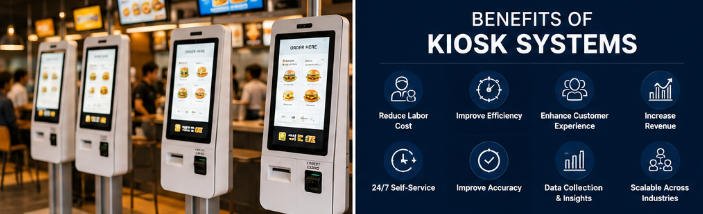
What Is a Kiosk System?
A kiosk system is a self-service hardware platform that enables users to perform transactions or access services without continuous staff assistance.
Depending on the application, a kiosk may include:
- Industrial touchscreen display
- Embedded PC or Android controller
- Barcode or QR scanner
- Receipt printer
- Card reader
- NFC payment terminal
- Camera
- Passport or ID scanner
- RFID reader
- Cash acceptor or dispenser
- Thermal printer
- Metal enclosure designed for public environments
AONKIOSK manufactures customizable kiosk hardware for OEM and ODM projects across multiple industries, supporting different peripherals and installation environments.
Core Benefits of Kiosk Systems
1. Reduce Labor Requirements
One of the most significant benefits of kiosk systems is reducing repetitive manual work.
Instead of assigning employees to handle simple, repetitive transactions, customers can complete many tasks themselves, allowing staff to focus on higher-value responsibilities.
Examples include:
- Restaurant ordering
- Hotel self check-in
- Visitor registration
- Ticket purchasing
- Bill payment
- Information lookup
This improves workforce utilization without replacing human service where personal assistance is still valuable.
2. Increase Operational Efficiency
Kiosk systems automate routine workflows that typically consume employee time.
Customers can:
- Browse information
- Select products
- Customize orders
- Complete payments
- Receive receipts
- Print tickets
- Register arrivals
Because multiple customers can use kiosks simultaneously, queues move faster during busy periods.
Benefits include:
- Faster transaction times
- Reduced waiting lines
- Higher service capacity
- Consistent processing
3. Improve Customer Experience
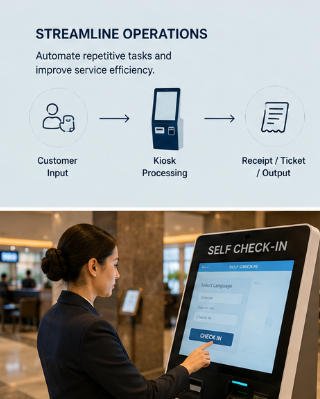
Customers increasingly expect fast, intuitive, and independent service.
A modern kiosk provides:
- Easy touchscreen navigation
- Multiple language support
- Visual product presentation
- Secure payment
- Privacy during transactions
- Shorter waiting times
Many users also prefer self-service for routine purchases because it gives them more control over the transaction.
4. Improve Order Accuracy
Manual order entry introduces the possibility of communication errors.
A kiosk allows customers to review selections before confirming the transaction, significantly reducing mistakes.
This is especially beneficial for:
- Food customization
- Retail product selection
- Appointment registration
- Ticket purchases
Accurate orders improve customer satisfaction while reducing correction costs.
5. Increase Revenue Opportunities
Kiosk systems support visual selling techniques that are difficult to perform consistently through manual service.
Businesses can display:
- Recommended products
- Upgrade options
- Combo packages
- Accessories
- Premium services
- Limited-time promotions
Because recommendations are automated and presented consistently, businesses often experience higher average transaction values.
6. Support 24/7 Self-Service
Unlike staffed service counters, kiosk systems can operate continuously.
Common applications include:
| Industry | Self-Service Function |
|---|---|
| Hotels | Guest check-in |
| Hospitals | Patient registration |
| Transportation | Ticket issuing |
| Government | Information inquiry |
| Retail | Self-checkout |
| Banking | Account services |
Continuous availability improves customer convenience while extending service hours.
7. Standardize Service Quality
Employee experience levels vary.
Kiosk systems provide every customer with the same interface, workflow, and service process.
Benefits include:
- Consistent branding
- Standardized procedures
- Uniform customer experience
- Reduced training requirements
This consistency is especially valuable for businesses operating multiple locations.
8. Collect Valuable Business Data
Modern kiosk systems generate operational data that can help improve business performance.
Examples include:
- Transaction volume
- Popular products
- Peak operating hours
- Payment preferences
- Average transaction value
- Customer interaction time
These insights can support better operational planning and business decision-making.
9. Flexible Hardware Customization
Another major advantage is hardware flexibility.
Depending on project requirements, kiosk systems can integrate:
- Payment terminals
- Barcode scanners
- RFID readers
- Passport readers
- Cameras
- Receipt printers
- Label printers
- Fingerprint modules
- Face recognition cameras
- Cash handling devices
At AONKIOSK, hardware configurations can be customized according to the application without changing the overall kiosk platform.
10. Scalable Across Multiple Industries
A kiosk system is not limited to one industry.
The same hardware architecture can be adapted for many applications.
| Industry | Common Application |
|---|---|
| Restaurants | Self-ordering |
| Retail | Self-checkout |
| Hotels | Check-in terminals |
| Healthcare | Patient registration |
| Transportation | Ticketing |
| Government | Public service kiosks |
| Education | Campus information |
| Manufacturing | Visitor management |
| Banking | Self-service terminals |
This scalability allows businesses to standardize hardware across different service environments.
Industries That Benefit Most from Kiosk Systems
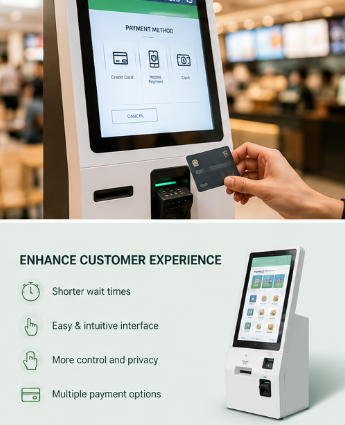
Kiosk systems are widely deployed in:
Quick Service Restaurants (QSR)
- Self-ordering
- Digital menu browsing
- Cashless payment
Retail Stores
- Self-checkout
- Price verification
- Loyalty programs
Hotels
- Guest check-in
- Key card dispensing
- Identity verification
Healthcare
- Patient registration
- Queue management
- Appointment check-in
Transportation
- Ticket sales
- Boarding passes
- Information lookup
Public Services
- Visitor registration
- Government services
- Information terminals
Choosing the Right Kiosk System
Before selecting a kiosk solution, consider the following factors:
Intended Use
Define the primary workflow your kiosk will support.
Hardware Configuration
Choose only the peripherals required for your application.
Indoor or Outdoor Deployment
Outdoor kiosks require weatherproof construction, higher brightness displays, and enhanced environmental protection.
Payment Requirements
Determine whether cash, card, contactless payment, or multiple payment methods are needed.
Integration Compatibility
Ensure the hardware supports integration with your existing software platform, POS, or management system.
Future Expansion
Select a modular hardware design that allows peripherals to be upgraded as business requirements evolve.
Why Choose AONKIOSK?
AONKIOSK specializes in manufacturing self-service kiosk hardware for OEM and ODM customers worldwide.
Our capabilities include:
- Custom kiosk enclosure manufacturing
- Small-batch and mass production support
- Flexible hardware configuration
- Peripheral integration
- Industrial-grade metal fabrication
- Global shipping
- Strict quality inspection
- Competitive factory pricing
We focus exclusively on hardware manufacturing, enabling software providers, system integrators, distributors, and solution partners to deploy reliable kiosk solutions across diverse industries.
Frequently Asked Questions
Do kiosk systems replace employees?
No. Kiosk systems are designed to automate repetitive tasks, allowing employees to focus on customer assistance, problem-solving, and higher-value services.
Can kiosk systems increase sales?
Yes. Many kiosk deployments use visual upselling, product recommendations, and promotional displays that can encourage customers to add items or upgrade purchases.
Are kiosk systems suitable for small businesses?
Yes. Modular hardware configurations and scalable production make kiosk systems suitable for businesses of various sizes, from single-location operations to enterprise chains.
Can kiosk hardware be customized?
Yes. AONKIOSK supports customization of enclosure design, display size, colors, branding, peripheral modules, mounting options, and hardware configurations based on project requirements.
Which industries benefit most from kiosk systems?
Restaurants, retail stores, hotels, hospitals, transportation, government agencies, banks, educational institutions, and many other service-oriented industries can improve efficiency through self-service kiosks.






