If you ask five manufacturers about the price of a self-service terminal, you may receive five different responses.
One supplier may only quote the price of the basic touchscreen terminal, while another may include industrial-grade PCs, receipt printers, barcode scanners, payment terminal brackets, custom housings, branding, testing, and export packaging. The two products can be simply described as “21.5-inch self-service kiosks,” but their actual specifications – and costs – may differ significantly.
That is why there is no meaningful single answer to the question: How much does a custom self-service kiosk cost?
As a general industry reference, pre-engineered commercial self-service kiosks are often discussed in roughly the US$2,000–5,000 range before extensive customization, while transaction kiosks with additional peripherals, outdoor protection, specialized engineering, or complex software can cost considerably more. These figures should be treated only as budgeting references, not as a quotation for a specific project.
For a buyer, the more useful question is:
What exactly determines the kiosk price for my project?
This guide breaks down the main cost factors, explains the difference between unit price and total project cost, and shows what information you should prepare before requesting a custom kiosk quotation.
The Short Answer: What Determines Custom Self Service Kiosk Cost?
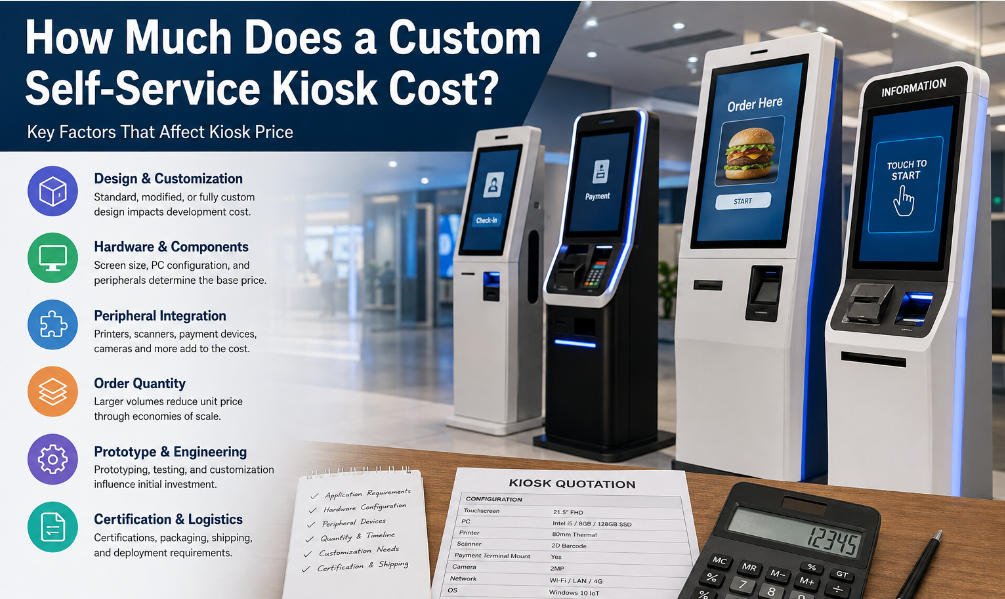
The custom self service kiosk cost is primarily determined by six things:
- Mechanical structure and level of customization
- Touchscreen and computing hardware
- Integrated peripheral devices
- Order quantity
- Prototype and engineering requirements
- Certification, packaging, shipping, and deployment requirements
Software can also become a major part of the total project budget. However, buyers should distinguish carefully between kiosk hardware manufacturing and software development.
For example, AONKIOSK focuses on customizable self-service kiosk hardware, including enclosure design, touch displays, industrial computers, scanners, printers, cameras, payment-device integration, assembly, testing, and manufacturing. Application software can then be integrated by the customer or its software partner.
Separating these scopes makes a kiosk quotation much easier to understand.
1. Standard Kiosk, Modified Platform, or Fully Custom Design?
Before discussing components, determine how much customization the project actually requires.
This decision can have a greater effect on cost than changing the processor or adding a scanner.
Standard or Pre-Engineered Kiosk
A standard kiosk uses an existing mechanical platform.
You may still be able to change:
- CPU
- Memory and storage
- Operating system
- Color
- Logo
- Printer
- Scanner
- Camera
- Payment-terminal bracket
- Connectivity
Because the enclosure has already been engineered and manufactured, development cost is relatively low.
This is often the most economical approach for a pilot project or a deployment where a unique industrial design is not essential.
Modified Standard Platform
Many real projects fall into this category.
The manufacturer begins with an existing enclosure but modifies certain elements—for example:
- Payment-terminal position
- Printer opening
- Scanner angle
- Internal component layout
- Color and branding
- Mounting structure
- Ventilation
- Cable routing
This approach can provide a good balance between customization, development time, and price.
Fully Custom Kiosk
A fully custom project starts with project-specific mechanical requirements or industrial design.
The manufacturer may need to develop a new enclosure, internal structure, service doors, peripheral locations, mounting system, ventilation solution, lighting, or branded exterior.
That means the buyer is paying not only for sheet metal.
The project may involve industrial design, CAD engineering, sample fabrication, assembly evaluation, thermal considerations, cable management, prototype revisions, testing, and production documentation.
AONKIOSK’s OEM/ODM manufacturing process, for example, moves from requirement evaluation and quotation through 3D design, prototyping, testing, production, quality inspection, and shipping.
Full customization therefore makes sense when it solves a genuine operational, integration, accessibility, installation, or branding requirement—not simply because customization is available.
2. The Touchscreen Has a Major Impact on Kiosk Price
Screen size is one of the first specifications buyers normally provide, but size alone does not define display cost.
A 21.5-inch touchscreen can have a very different price depending on its construction and intended environment.
Important variables include:
- LCD panel specification
- Resolution
- Brightness
- PCAP or infrared touch
- Cover-glass thickness
- Anti-glare treatment
- Viewing angle
- Operating temperature
- Commercial operating-life requirements
A standard indoor screen used in a restaurant does not need the same specification as a display installed outdoors in direct sunlight.
Increasing from 21.5 inches to 27 or 32 inches also affects more than the LCD price. A larger screen usually requires a larger enclosure, additional structural support, different packaging, and potentially higher shipping costs.
This is why comparing kiosk price purely by screen size rarely gives procurement teams enough information.
3. Computing Configuration Changes the Price More Than Buyers Expect
Inside most self-service kiosks is either an Android-based computing platform or an industrial PC running Windows or Linux.
The required configuration depends on the application.
A simple information kiosk displaying lightweight content may need relatively modest computing power.
A kiosk simultaneously running payment services, a high-resolution user interface, multiple USB peripherals, cameras, remote-management tools, and background applications may require substantially more performance.
Common cost variables include:
- ARM versus x86 architecture
- Processor family and generation
- RAM capacity
- SSD or eMMC storage
- Wi-Fi and Bluetooth
- Ethernet
- Serial ports
- USB interface quantity
- TPM requirements
- Fanless versus actively cooled design
Avoid requesting only “Intel PC” or “Android motherboard” in an RFQ.
Two suppliers can technically satisfy that description with hardware at very different performance and reliability levels.
The more specific the computing requirement, the more meaningful the resulting custom kiosk quotation will be.
4. Peripheral Devices Can Transform a Simple Kiosk Into a Complex System
Peripherals are one of the biggest reasons two visually similar kiosks can have dramatically different prices.
Consider a basic information kiosk containing:
Touchscreen + computer + enclosure
Now compare it with a transaction kiosk containing:
Touchscreen + industrial PC + 2D scanner + 80 mm receipt printer + NFC reader + camera + speakers + payment-terminal mount + additional USB/serial interfaces
The exterior may still look similar.
The internal BOM is not.
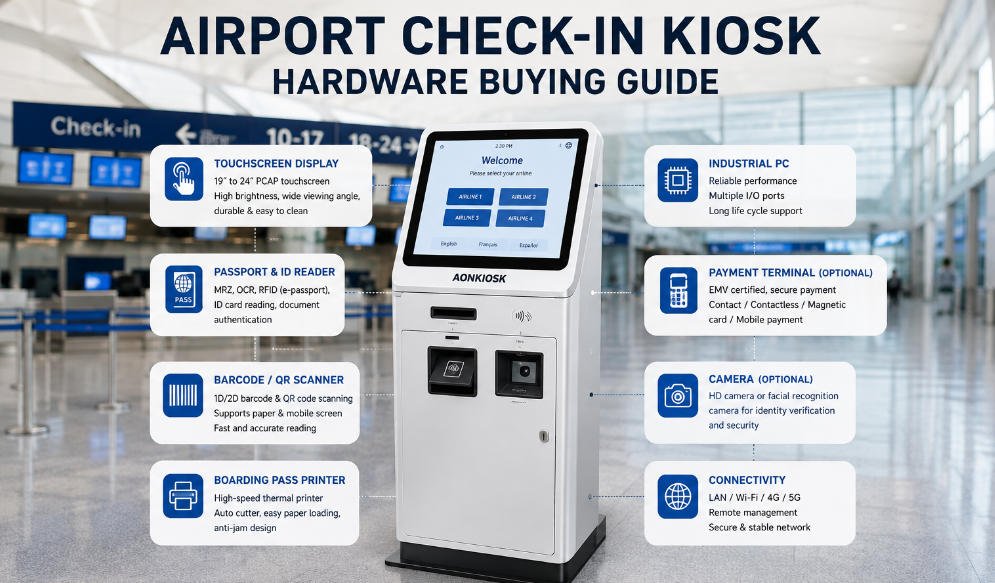
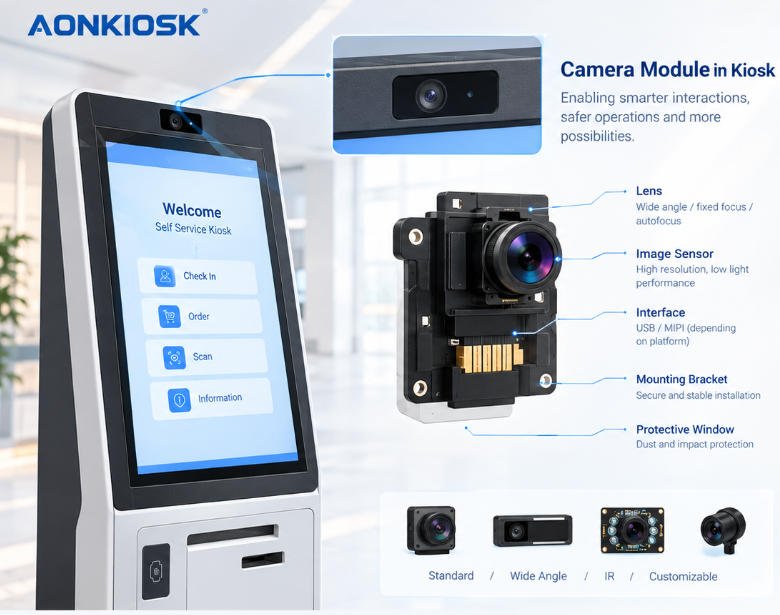
AONKIOSK supports hardware configurations involving printers, QR/barcode scanners, NFC readers, cameras, RFID devices, card dispensers, fingerprint readers, payment terminals and other modules, illustrating how widely kiosk architecture can vary according to the application.
Payment Integration Deserves Special Attention
“Payment kiosk” is not a complete specification.
You need to define whether the manufacturer is supplying:
- Only a mechanical payment-terminal bracket
- A mounting location and cable route
- An integrated card reader
- NFC hardware
- QR-payment scanning
- PIN pad preparation
- A specific locally certified payment device
In many international projects, the payment terminal is supplied locally by the customer or payment provider because certification and acquiring requirements vary by market.
In that case, the kiosk manufacturer needs accurate device dimensions, mounting requirements, connector locations, and cable-routing information.
Getting this right during engineering is usually much cheaper than modifying finished kiosks later.
5. Why Prototype Cost Is Higher Than Mass-Production Unit Cost
A common procurement mistake is taking the prototype price and multiplying it by 100 to estimate a 100-unit order.
Kiosk manufacturing does not normally work that way.
A prototype may carry costs that are distributed across a much larger production quantity later.
These can include:
- Engineering work
- CAD revisions
- One-off sheet-metal fabrication
- Custom fixtures
- Sample finishing
- Manual assembly adjustments
- Component sourcing
- Functional testing
- Packaging development
The first machine is therefore partly a product and partly an engineering exercise.
Once the design has been approved and the production process becomes repeatable, the cost structure changes.
This is one reason AONKIOSK supports projects ranging from single prototypes and pilot quantities to larger production runs rather than treating every order volume as the same manufacturing process.
For procurement teams, prototype cost and mass-production price should always be requested separately.
6. Order Quantity Directly Affects Kiosk Price
Quantity matters because many manufacturing costs do not increase proportionally with unit volume.
Suppose an engineer spends time adapting a printer bracket.
That engineering effort may be required whether the project eventually produces 5 machines or 500.
With larger quantities, development, setup, procurement, assembly, and logistics can often be distributed more efficiently.
Component purchasing may also improve because LCD panels, computers, printers, power supplies, cables, locks, and other parts can be sourced in larger batches.
However, do not assume that every component will automatically become significantly cheaper at higher volume.
Specialized payment devices, certified scanners, high-brightness displays, or proprietary modules may have relatively fixed market pricing.
This is why buyers should give manufacturers realistic quantity information such as:
Prototype: 1–2 units
Pilot batch: 10–30 units
Expected annual demand: 200–500 units
That information is much more useful than simply asking:
“What is your best price?”
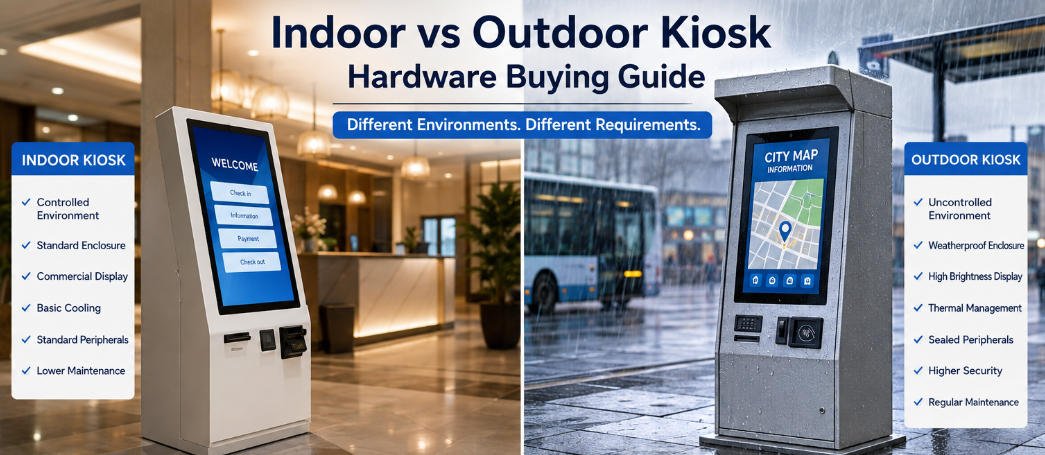
7. Indoor and Outdoor Kiosks Have Very Different Cost Structures
An outdoor kiosk should not simply be an indoor kiosk with a waterproof roof.
Outdoor deployments introduce additional engineering requirements.
Depending on the location, the kiosk may require:
- Higher IP protection
- Water-resistant cabinet construction
- Dust protection
- Sealed doors
- Sunlight-readable display
- Anti-glare glass
- Increased corrosion resistance
- Temperature management
- Heating or cooling
- Improved ventilation design
- More durable locks
- Impact-resistant glass
- Weather-resistant coating
Industry pricing references consequently place outdoor commercial kiosks above comparable indoor platforms because their enclosure, display, environmental protection, and thermal systems are more demanding.
If the deployment is outdoors, state this before requesting the quotation.
Trying to upgrade an indoor design after the mechanical structure has been finalized can create substantial redesign work.
8. Custom Appearance Does Not Always Mean Expensive Custom Engineering
Buyers sometimes assume that branding automatically means a fully custom kiosk.
It does not.
A standard mechanical platform can often be personalized through:
- Custom powder-coating color
- Printed or applied logo
- Graphic panels
- Custom startup screen
- Branded light elements
- Minor exterior trim changes
These modifications are usually very different from designing an entirely new enclosure.
A buyer whose priority is brand consistency rather than structural uniqueness may therefore reduce development cost by starting from an existing platform.
Before requesting a completely new industrial design, ask whether an existing kiosk can be adapted to achieve the same commercial objective.
9. Do Not Confuse Factory Price With Total Deployment Cost
The kiosk hardware invoice is only one part of a deployment budget.
Depending on the project and Incoterms, additional expenses may include:
- Prototype development
- Software
- Operating-system licenses
- Certification
- Spare parts
- Export packaging
- Freight
- Customs duties
- Local transportation
- Installation
- Networking
- Site electrical work
- Payment processing
- Remote device management
- Consumables
- Field maintenance
This distinction is particularly important when comparing manufacturers in different countries.
A low factory price can become an expensive deployment if packaging is inadequate, the kiosk requires frequent maintenance, or components cannot easily be replaced.
For this reason, procurement teams should evaluate total lifecycle cost rather than treating the initial unit price as the only financial metric.
10. How to Get an Accurate Custom Kiosk Quotation
A useful quotation begins with a useful RFQ.
Instead of sending a product photo and asking “How much?”, provide enough information for an engineer to understand the intended system.
At minimum, include:
| Requirement | Information to Provide |
|---|---|
| Application | Ordering, payment, check-in, ticketing, information, etc. |
| Installation | Indoor or outdoor |
| Form factor | Floor-standing, wall-mounted, desktop |
| Screen | Size, orientation, brightness if known |
| Operating system | Android, Windows, Linux |
| Computer | Required CPU/RAM/storage or software requirements |
| Printer | Type, paper width, roll size |
| Scanner | 1D/2D barcode or QR |
| Payment | Terminal model or payment method |
| Other modules | Camera, NFC, RFID, speakers, fingerprint, etc. |
| Branding | Logo, color, finish |
| Quantity | Prototype, pilot and expected production volume |
| Market | Destination country |
| Compliance | Required certifications |
| Timeline | Sample and deployment schedule |
If some specifications are unknown, describe the workflow instead.
An experienced kiosk hardware manufacturer should be able to translate operational requirements into engineering questions.
11. What Should Be Included in a Professional Kiosk Quotation?
A quotation should tell you more than the final number.
It should make clear what you are actually buying.
Look for information covering the main hardware configuration, optional components, customization scope, quantity, unit price, development charges if applicable, lead time, payment conditions, packaging, warranty, and major exclusions.
For larger projects, also confirm whether the quoted configuration can remain consistent during future production.
This matters because a successful pilot can create a much larger problem if the manufacturer cannot reproduce the approved hardware configuration six months later.
Once you receive offers from several suppliers, do not simply arrange them from lowest to highest. Compare the component specification, engineering scope, exclusions, testing, packaging, warranty, and production capability.
12. Is the Cheapest Custom Kiosk Usually the Best Choice?
Sometimes the lowest-cost kiosk is perfectly suitable.
There is no reason to buy unnecessary performance or customization.
The problem begins when lower price is achieved by quietly changing the specification.
For example:
- Lower-grade touchscreen
- Older processor
- Smaller SSD
- Lighter enclosure structure
- Cheaper power supply
- Smaller printer mechanism
- Different scanner
- Limited testing
- Minimal packaging
- No engineering support
None of these automatically means the kiosk is bad.
The issue is whether the specification is appropriate for the deployment and whether the buyer knows what has changed.
A good procurement decision is therefore not:
“Which kiosk is cheapest?”
It is:
“Which configuration delivers the required performance and reliability at the lowest reasonable total cost?”
That is a much more useful way to evaluate kiosk price.
How AONKIOSK Approaches Custom Kiosk Pricing
AONKIOSK manufactures customizable self-service kiosk hardware for software companies, system integrators, distributors, solution providers, and commercial operators.
Rather than applying one fixed price to every project, the hardware configuration can be developed around factors such as:
- Application
- Display size
- Computing platform
- Peripheral modules
- Payment-device requirements
- Mounting method
- Enclosure structure
- Surface finish
- Branding
- Production quantity
The company supports development from prototype and pilot quantities through volume manufacturing, which allows buyers to validate hardware before committing to larger deployments.
This approach is especially useful for projects where the customer already owns the application software and requires a manufacturing partner to build hardware around the software workflow.
Final Thoughts: Focus on Configuration Before Price
So, how much does a custom self-service kiosk cost?
There is no universal standard solution: a relatively simple indoor self-service terminal can be built around a simple touch screen, computing system and shell. Self-service terminals used for transactions may be equipped with payment hardware, scanners, printers, cameras, and customized mechanical structures. Outdoor or highly specialized systems introduce another level of engineering technology.
The most reliable way to control custom self service kiosk cost is therefore not to search for the lowest advertised unit price.
Define the application first.
Then define the hardware.
Separate one-time engineering costs from recurring manufacturing costs.
Estimate pilot and production quantities independently.
Finally, request a custom kiosk quotation based on a clear and consistent specification.
When suppliers are quoting the same requirements, price becomes useful information rather than an approximation.
For buyers developing restaurant ordering, retail payment, check-in, ticketing, information, or other self-service systems, AONKIOSK can configure kiosk hardware around project-specific displays, computers, peripherals, payment-device mounting, branding, and installation requirements—from initial prototype through production deployment.