The camera module is an optional but increasingly practical component in modern self-service terminals. According to the application requirements, it can support authentication, QR code scanning, facial recognition, user interaction, security monitoring, document collection, or other computer vision functions.
Unlike the standard webcam used for desktop computers, the camera module for the self-service terminal must be selected as part of the complete self-service terminal hardware architecture. The position, field of view, interface, lighting conditions, operating system compatibility, shell structure, software SDK, and privacy requirements will all affect the final system.
For system integrators, software developers, kiosk operators, and equipment buyers, the correct camera should therefore be specified before the kiosk enclosure enters production.
1. What Is a Camera Module in a Kiosk?
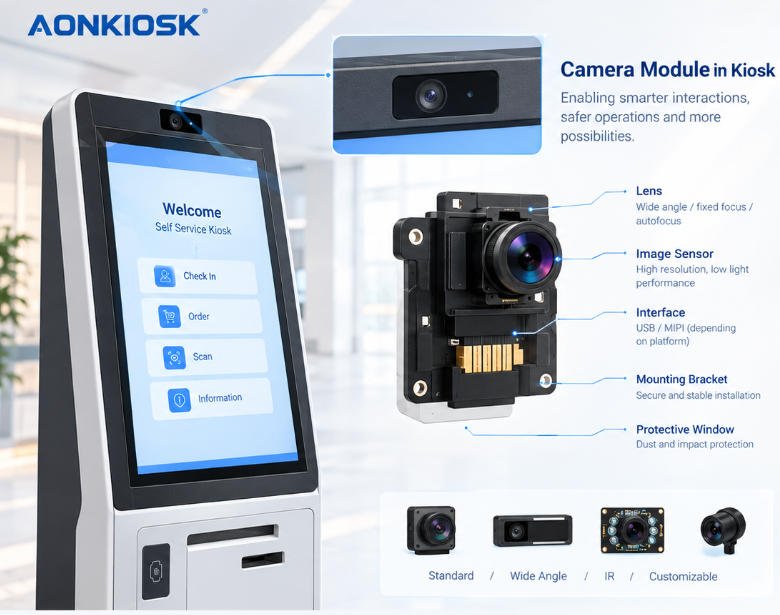
A kiosk camera module is a compact imaging device integrated into a self-service terminal. It normally connects to the kiosk’s industrial PC, embedded computer, or Android mainboard through USB or another supported interface.
A basic configuration may include:
- Camera sensor
- Lens
- USB or other communication interface
- Mounting bracket
- Protective window or opening
- Optional microphone
- Optional IR illumination
- Optional privacy shutter
The camera itself does not determine what the kiosk can do. Its function depends on the software and backend system connected to it.
For example, a camera can capture an image, but facial recognition requires additional software, processing capability, algorithms, and—where applicable—an identity verification service.
In AONKIOSK’s broader self-service kiosk hardware architecture, cameras are treated as optional application modules alongside scanners, printers, payment devices, RFID readers, ID readers, and other peripherals.
AONKIOSK Kiosk Hardware Structure Overview
2. Common Kiosk Camera Applications
The right camera specification depends primarily on the workflow rather than the camera’s resolution alone.
Identity Verification and Facial Recognition
Hotel check-in, healthcare, government, and other identity-sensitive applications may use a camera for facial capture or identity verification.
A camera used for facial recognition may require:
- Stable image quality
- Suitable field of view
- Consistent exposure
- Adequate lighting
- Low image distortion
- Suitable frame rate
- Compatibility with the recognition software
Some systems may also require an IR camera or additional illumination for more controlled image capture.
AONKIOSK’s hotel kiosk case study, for example, includes an HD camera as part of a larger configuration containing a passport/ID scanner, payment terminal, RFID card dispenser, printer, and optional facial-recognition functionality.
QR Code and Barcode Scanning
A camera can also be used to read QR codes or barcodes when the application requires customers to scan mobile tickets, coupons, membership codes, boarding information, or order references.
However, a dedicated barcode or QR scanner may be more appropriate when scanning speed, reading distance, or performance under difficult lighting is critical.
The selection should therefore be based on the actual workflow instead of assuming that a camera can replace every scanner.
Document and ID Capture
Some kiosks use cameras to capture documents or images as part of an identity or registration workflow. In these applications, image quality, focus, positioning, and software compatibility are particularly important.
If the project requires machine-readable passports or government-issued IDs, a dedicated passport or ID scanner may still be required. A camera should not automatically be considered a replacement for a certified document reader.
User Interaction and Computer Vision
Cameras can also support advanced applications such as:
- User presence detection
- Gesture recognition
- Customer counting
- Queue analysis
- Basic computer vision
- Interactive advertising
- Occupancy detection
These functions usually require additional application software and processing resources.
The kiosk manufacturer provides the hardware platform, while the system integrator or software provider normally determines how captured images are processed and used.
3. How to Choose a Kiosk Camera Module
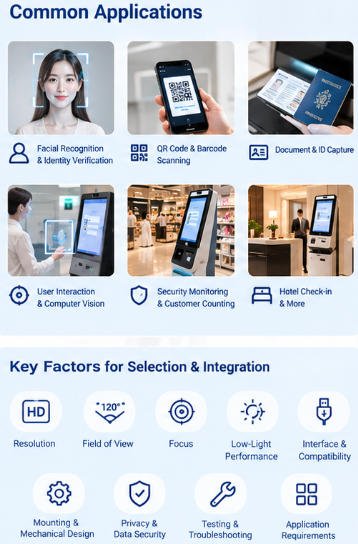
Camera selection should start with the application requirements.
Resolution
Higher resolution does not automatically produce a better kiosk experience.
For basic user presence detection or simple interaction, a lower-resolution camera may be sufficient. Identity verification, document capture, and computer-vision applications may require higher resolution.
The target resolution should therefore be matched to:
- Recognition requirements
- Capture distance
- Display/application requirements
- Available processing power
- USB bandwidth
- Storage requirements
Avoid specifying an unnecessarily high-resolution camera if the software does not use the additional image information.
Field of View
The camera’s field of view determines how much of the user’s face or body appears in the image.
A narrow field of view can provide a more concentrated image but may require more precise positioning. A wide-angle camera provides greater coverage but may introduce more distortion, especially around the edges.
The correct field of view depends on the kiosk’s mounting height, user distance, and expected interaction area.
Focus
Fixed-focus cameras are often sufficient for predictable kiosk environments where the user stands within a defined distance.
Autofocus may be more useful when users can stand at different distances or when the camera must capture documents at varying positions.
The mechanical design should be tested with actual users before mass production.
Low-Light Performance
Kiosks may operate in restaurants, hotel lobbies, shopping malls, transportation facilities, outdoor areas, or other environments with very different lighting conditions.
A camera that performs well in a laboratory may produce poor results when installed behind a dark protective window or exposed to strong backlighting.
For demanding applications, evaluate:
- Exposure control
- White balance
- Dynamic range
- Low-light performance
- IR capability
- Lens distortion
- Reflection from the protective cover
Camera testing should be performed in the actual kiosk enclosure, not only on a test bench.
4. Camera Interface and Mainboard Compatibility
The camera must be compatible with the kiosk’s computing platform.
USB cameras are common because they can be connected to industrial PCs and many Android-based kiosk platforms. However, physical compatibility does not guarantee software compatibility.
Before production, confirm:
- USB interface type
- USB bandwidth
- Driver availability
- Operating-system compatibility
- SDK requirements
- Supported resolution and frame rate
- Power consumption
- Application access permissions
The camera should also be included in the kiosk’s complete I/O planning.
AONKIOSK’s mainboard guidance emphasizes that the computer platform must be selected according to the complete peripheral list, including cameras, scanners, printers, payment devices, and other connected hardware.
Kiosk Mainboard Options: Android vs Windows
A common integration problem occurs when a project confirms the camera only after the mainboard has already been finalized. The result can be insufficient USB ports, unsupported drivers, inadequate processing capacity, or unexpected software compatibility issues.
For this reason, the camera should be included in the hardware interface list during the design stage.
5. Camera Mounting and Mechanical Integration
The camera’s physical installation is just as important as its electronic specification.
The mounting position should provide:
- Correct user viewing angle
- Stable mechanical fixation
- Protection against accidental impact
- Clear lens visibility
- Easy service access
- Adequate ventilation around the module
- Protection from dust and liquid where required
The camera opening should also be designed carefully.
If the camera is installed behind glass or acrylic, reflections can reduce image quality. The opening should not partially block the lens or create unwanted shadows.
For public-facing kiosks, the camera should be difficult for users to rotate or obstruct accidentally.
This is one reason camera integration should be included in the kiosk’s mechanical design rather than added after the enclosure has already been manufactured.
AONKIOSK supports customized kiosk structures and modular peripheral integration, including cameras, scanners, printers, payment modules, and other application-specific hardware.
AONKIOSK OEM & ODM Kiosk Manufacturing
6. Camera Module Selection by Kiosk Application
Different kiosk applications have different camera requirements.
Restaurant Self-Ordering Kiosk
A restaurant kiosk may not require a camera for the core ordering process. However, it can be added for QR-code scanning, loyalty identification, customer interaction, or application-specific functions.
Restaurant Self-Ordering Kiosks
Retail and Self-Checkout Kiosk
Retail kiosks may use cameras for security monitoring, customer interaction, computer vision, or loss-prevention workflows.
Camera requirements should be evaluated together with the barcode scanner, payment terminal, weighing system, receipt printer, and POS software.
Hotel Check-In Kiosk
Hotel applications may require cameras for identity verification or facial recognition. In this case, the camera must work together with passport/ID scanning, PMS integration, payment, and room-card dispensing.
The camera should be tested as part of the complete check-in workflow rather than as an independent device.
Public Service and Healthcare Kiosk
These applications may require identity verification, document capture, or user assistance. Privacy, data handling, and access control become especially important.
Camera use should be limited to the functions actually required by the application.
7. Privacy and Data Security Considerations
A camera changes the privacy profile of a kiosk.
If images or video are captured, the system integrator should determine:
- What information is collected
- Whether images are stored
- Where the data is processed
- How long data is retained
- Who can access the data
- Whether transmission is encrypted
- How temporary files are deleted
- What user notification or consent is required
The hardware manufacturer, software provider, system integrator, and operator may have different responsibilities depending on the deployment.
A camera should therefore not be installed simply because it is technically available. Its purpose, data flow, and retention policy should be defined before deployment.
For public-facing installations, physical security is also important. Unused USB ports and internal camera connections should be protected from unauthorized access where appropriate.
8. Camera Troubleshooting Guide
Camera problems are often caused by integration issues rather than by a defective camera.
Camera Not Detected
Check:
- USB or communication cable connection
- Mainboard port availability
- Operating-system driver
- Device permissions
- USB power
- Camera enumeration after reboot
If the camera works on a desktop computer but not on the kiosk, check operating-system and driver compatibility first.
Black or Blank Image
Check:
- Camera lens obstruction
- Protective window or glass reflection
- Application permissions
- Incorrect camera selection
- Exposure settings
- Driver or SDK configuration
- Cable connection
If the application can detect the camera but displays a black image, the issue may be related to the software configuration rather than the physical module.
Poor Image Quality
Check:
- Lighting conditions
- Lens cleanliness
- Focus distance
- Protective cover
- Camera angle
- Exposure
- Resolution settings
Do not immediately replace the camera. Test the same module in the final enclosure and lighting environment first.
Recognition Is Unstable
For facial recognition or computer vision, unstable results can be caused by:
- Incorrect camera height
- Excessive backlighting
- User distance variation
- Lens distortion
- Low image quality
- Insufficient processing performance
- Software or algorithm configuration
The camera specification and physical installation should be evaluated together.
9. Camera Module Checklist Before Production
Before approving a kiosk camera configuration, confirm the following:
- Application purpose is clearly defined
- Required resolution is confirmed
- Field of view matches user distance
- Focus method is appropriate
- Lighting conditions have been tested
- Camera interface is compatible with the mainboard
- Required drivers or SDKs are available
- USB bandwidth and power are sufficient
- Mechanical mounting is finalized
- Protective window does not interfere with image quality
- Privacy and data-handling requirements are defined
- Camera operation has been tested after kiosk reboot
- Complete kiosk workflow has been tested before mass production
Conclusion
A camera module in a kiosk is not simply an additional USB peripheral. Its performance depends on the camera sensor, lens, mounting position, lighting, computing platform, operating system, application software, and the complete kiosk enclosure.
The best camera specification is therefore determined by the actual workflow.
For basic QR scanning or user detection, a standard USB camera may be sufficient. For facial recognition, identity verification, or computer vision, the project may require higher image quality, controlled positioning, additional illumination, and more capable processing hardware.
AONKIOSK designs and manufactures configurable self-service kiosk hardware with modular integration options for cameras, scanners, payment devices, printers, displays, and other peripherals. Its OEM/ODM approach allows the camera configuration to be considered together with the enclosure, mainboard, I/O, thermal design, and application requirements rather than treated as an isolated component.
For project teams, the most reliable approach is simple: define the camera’s function first, confirm software and hardware compatibility second, validate the physical installation third, and test the complete kiosk workflow before production.