A credit card payment module allows a self-service kiosk to accept bank-card transactions without requiring assistance from a cashier or operator. Depending on the selected payment device and payment service provider, the module may support EMV chip cards, contactless credit and debit cards, mobile wallets, PIN entry, and in some markets magnetic-stripe transactions.
For kiosk projects, however, a credit card payment module should not be treated as a simple card reader. A complete payment solution normally combines certified payment hardware, payment software, a processor or acquiring service, network communication, merchant configuration, and secure integration with the kiosk application.
This distinction is important when specifying a new self-service kiosk. A standard NFC reader may identify cards or tags, but it does not automatically provide the security, certification, payment kernel, encryption, and processor connectivity required to accept bank-card payments.
AONKIOSK designs and manufactures configurable self-service kiosk hardware that can accommodate third-party payment terminals and other transaction peripherals. For a broader overview of configurable kiosk platforms, see the AONKIOSK self-service kiosk solutions.
1. What Is a Credit Card Payment Module?
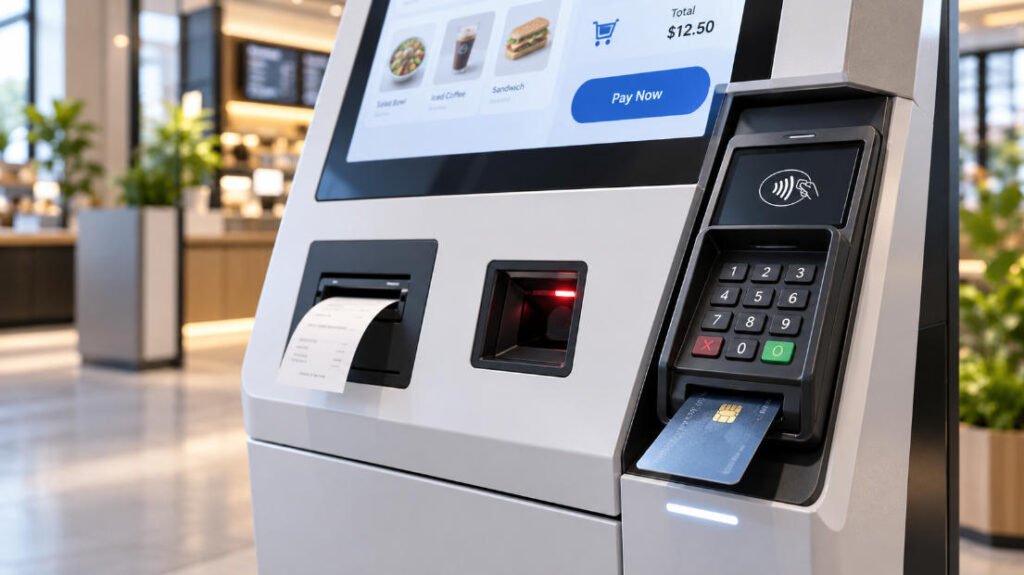
In kiosk applications, the term credit card payment module normally refers to a payment acceptance device installed on or inside the kiosk.
Depending on the terminal design, it can provide several payment interfaces:
EMV contact payment allows the customer to insert a chip card into the terminal. The payment chip communicates with the acceptance device and performs cryptographic operations during the transaction. EMVCo maintains the technical specifications used for interoperable contact-chip payment acceptance.
Contactless payment allows customers to tap a compatible credit card, debit card, smartphone, smartwatch, or other NFC-enabled payment device. EMV Contactless defines requirements for communication between compatible payment products and acceptance terminals.
Some payment terminals also include a secure PIN pad, display, magnetic-stripe reader, QR-code function, or integrated communication module. The exact functionality depends on the terminal model, payment processor, country, card schemes, and merchant requirements.
For kiosks intended primarily for checkout, bill payment, or other transaction workflows, AONKIOSK’s Retail & Payment Kiosks provide examples of hardware platforms designed around payment-related peripherals.
2. Credit Card Payment Terminal vs. Normal Card Reader
One of the most common kiosk specification mistakes is assuming that every card reader can process credit-card payments.
A basic NFC reader may read RFID cards, membership cards, access credentials, transit cards, or compatible smart cards. A USB magnetic-card reader may read track data. These functions do not automatically make either device a complete bank-card payment terminal.
A payment terminal normally contains specialized payment firmware, certified payment kernels, secure cryptographic functions, and interfaces required by the selected payment ecosystem.
This is why the payment device should be confirmed early in a kiosk project.
If the application only needs membership identification, access control, loyalty-card reading, or other non-payment functions, a general-purpose reader may be sufficient. AONKIOSK explains these differences in more detail in the NFC & Card Reader Module guide.
If actual debit- or credit-card transactions are required, the project team should confirm the payment terminal with the payment provider, acquiring bank, processor, or software partner before finalizing the kiosk enclosure.
3. Typical Payment Architecture
A self-service card transaction normally involves several systems rather than one isolated device.
The user first starts a transaction in the kiosk application. The kiosk software sends the required transaction information to a payment application, middleware layer, SDK, API, or payment terminal.
The customer then presents a card or mobile wallet. The payment terminal securely handles the payment interaction and communicates with the relevant payment infrastructure. After authorization or rejection, the result is returned to the kiosk software.
The kiosk application can then complete the order, print a receipt, issue a ticket, activate a service, or request another payment method.
This architecture means the kiosk computer does not necessarily need direct access to sensitive raw payment data. The exact implementation depends on the payment solution selected by the operator.
PCI DSS applies to entities that store, process, or transmit payment card account data or that can affect the security of the cardholder-data environment. Payment terminals themselves can therefore be within PCI DSS scope depending on the architecture and deployment. The PCI Security Standards Council currently lists PCI DSS v4.0.1 in its official document library.
4. Main Hardware Elements to Confirm
Before designing the kiosk enclosure, the exact terminal model should be selected whenever possible.
The project team should confirm the terminal dimensions, mounting method, card insertion direction, contactless reading area, keypad position, display visibility, cable connectors, communication method, operating temperature, power requirements, and maintenance procedure.
A kiosk manufacturer should not design a generic rectangular opening and assume that any future payment terminal will fit.
Two terminals with similar external dimensions may use completely different mounting brackets, rear cable exits, security screws, service clearances, or contactless antenna locations.
AONKIOSK discusses these mechanical considerations in the Kiosk Payment Terminal Integration guide.
5. Communication Between the Payment Module and Kiosk
Payment-terminal communication varies considerably between manufacturers and payment platforms.
Common physical interfaces can include USB, Ethernet, RS-232, Wi-Fi, cellular communication, or proprietary connections. The payment application may communicate through an SDK, local service, middleware, cloud API, or processor-specific protocol.
The operating system must also be considered.
A Windows kiosk may use a vendor driver, Windows service, POS middleware, or application SDK. Android payment integration may depend on the terminal manufacturer’s Android SDK, network API, serial interface, or an externally managed payment application.
For this reason, selecting a terminal based only on its appearance or card-reading capability is insufficient.
Before mass production, the system integrator should verify that the terminal works with the intended operating system, kiosk software, payment processor, merchant account, and regional payment configuration.
6. Mechanical Integration and User Position
Payment hardware is one of the most frequently touched components of a kiosk, so its position affects usability as well as reliability.
The terminal should be installed where users can clearly see the display and payment instructions. The chip-card slot must remain accessible without interference from the enclosure. The NFC tapping area should not be hidden behind thick metal structures or positioned where users naturally tap the wrong surface.
PIN-entry terminals also require attention to viewing angle and user privacy.
Cable routing should allow enough service movement while preventing cables from being pinched by doors, brackets, or sliding maintenance structures.
The terminal should also be removable without dismantling the complete touchscreen assembly whenever practical.
These requirements should be considered together with the enclosure, computing platform, printer, scanner, network equipment, and power system described in the AONKIOSK Kiosk Hardware Structure Overview.
7. Contact, Contactless and Mobile-Wallet Payments
A modern payment kiosk may provide several customer interaction methods through the same payment terminal.
Contact-chip payment requires physical insertion of a compatible EMV chip card. Contactless payment allows compatible cards and NFC-enabled mobile devices to communicate with the terminal without physical insertion. EMVCo states that contactless transactions can be performed using contactless chip cards and NFC-enabled mobile devices, with transaction-specific security mechanisms used during processing.
Apple Pay, Google Pay, and similar wallets usually rely on the supported contactless payment infrastructure and the capabilities of the selected payment terminal and processor.
Support should therefore never be assumed simply because a kiosk contains an NFC antenna.
The processor, acquiring configuration, terminal certification, payment applications, card schemes, country, and merchant setup all influence which payment methods can actually be accepted.
8. Payment Security and Certification
Security responsibilities are shared between multiple parties.
The kiosk enclosure protects the payment device physically. The payment-terminal manufacturer provides the certified hardware and secure payment environment. The payment processor or acquiring partner manages transaction processing and merchant connectivity. The kiosk application controls the customer workflow and transaction state.
AONKIOSK primarily handles the kiosk hardware platform and physical integration rather than acting as a bank-card processor.
The final project owner should verify applicable PCI requirements, terminal approvals, processor certifications, acquiring requirements, regional regulations, and payment-scheme rules before commercial deployment.
EMVCo operates testing and approval processes for relevant EMV acceptance technology, while PCI SSC publishes security standards for payment account data and payment environments.
Certification should therefore be confirmed for the complete intended payment solution rather than inferred from the kiosk enclosure itself.
9. Payment Module Integration in AONKIOSK Hardware
Different kiosk applications require different payment architectures.
A restaurant self-ordering kiosk may use a compact unattended payment terminal mounted beside the touchscreen. A retail self-checkout system may combine a payment terminal with a barcode scanner, receipt printer, weighing equipment, and security devices.
A utility-payment kiosk may require a more complex configuration including EMV card processing, PIN entry, document scanning, QR payment, and receipt printing.
For example, the AONKIOSK APK838 Utility Bill Payment Kiosk can be configured with payment-related modules such as a motorized EMV card reader/writer, encrypted PIN pad, contactless card reader, cheque scanner, QR scanner, and thermal printer, depending on the project requirements.
Because different countries and payment providers use different terminal models, AONKIOSK normally recommends confirming the intended payment device before the final mechanical design.
For projects requiring a non-standard terminal, mounting structure, internal layout, branding, or peripheral combination, the AONKIOSK OEM/ODM service can be used to develop a project-specific configuration.
10. Common Problems and Troubleshooting
| Symptom | Possible Cause | Recommended Check |
|---|---|---|
| Payment terminal has no power | Loose power cable, incorrect voltage, failed adapter or power distribution | Check terminal power specification, connector, internal PSU and fuse |
| Kiosk software cannot detect terminal | Driver, COM port, USB, Ethernet or middleware issue | Verify device manager, network address, communication port and payment service |
| Chip card cannot be read | Contaminated slot, damaged card, reader fault or terminal configuration | Test with another approved card and follow terminal-provider diagnostics |
| Contactless payment does not respond | Unsupported payment configuration, antenna obstruction or terminal issue | Check terminal status, contactless configuration and mounting area |
| Payment is approved but kiosk remains on payment screen | Software callback or transaction-state error | Check middleware logs, response codes and kiosk application integration |
| Payment fails intermittently | Network instability, processor connection or terminal firmware issue | Check LAN/Wi-Fi stability and payment-provider logs |
| Users cannot comfortably enter PIN | Poor mounting height or terminal angle | Review ergonomic position and bracket design |
| Terminal replacement is difficult | Insufficient service clearance or inaccessible cables | Redesign removable bracket or maintenance path |
Payment problems should be divided into three categories before troubleshooting: hardware, communication, and transaction processing.
If the terminal does not power on or is physically damaged, begin with hardware diagnostics.
If the terminal operates normally but the kiosk software cannot communicate with it, check interfaces, drivers, middleware, IP settings, and software configuration.
If the kiosk and terminal communicate normally but transactions are declined or cannot reach the payment service, the payment provider or processor should normally review the transaction logs and merchant configuration.
Avoid opening, modifying, or repairing the internal secure sections of a certified payment terminal unless the terminal manufacturer specifically authorizes the procedure.
11. Information Required Before Ordering a Kiosk
For a kiosk project involving credit-card payments, the most useful approach is to define the payment system before confirming production.
Provide the payment-terminal manufacturer and model, target country, payment provider or acquiring partner, required payment methods, operating system, communication interface, mounting requirements, PIN-entry requirements, network method, kiosk application workflow, and any additional peripherals such as receipt printers or barcode scanners.
If the terminal has not yet been selected, provide the requirements and intended payment provider so that mechanical space and installation options can be evaluated before enclosure production.
This reduces the risk of redesigning sheet-metal openings, mounting brackets, cables, or front panels after prototypes have already been manufactured.
12. Frequently Asked Questions
Can any NFC reader accept credit cards?
No. An NFC reader may be able to communicate with certain contactless cards or tags, but bank-card payment acceptance normally requires an appropriate payment terminal, payment software, processor integration, merchant configuration, and applicable security or certification requirements.
Does AONKIOSK provide payment processing?
AONKIOSK mainly provides kiosk hardware design, manufacturing, and payment-device integration. Payment acquiring, merchant accounts, payment gateways, and transaction processing are normally supplied by the customer’s selected payment provider or financial partner.
Can customers provide their own payment terminal?
Yes. This is common in international kiosk projects. Providing the exact terminal model, drawings, sample unit, or mechanical specifications early in the project helps AONKIOSK design the correct mounting bracket, opening, cable path, and maintenance access.
Can one terminal support chip cards and contactless payment?
Many commercial payment terminals support both EMV contact-chip and contactless transactions, but the exact capabilities depend on the selected terminal, payment application, certification, and processor configuration.
Should the payment terminal be selected before the kiosk cabinet?
Whenever possible, yes. The enclosure should be designed around the real terminal rather than an estimated terminal size. This helps avoid problems with card-slot access, NFC positioning, cable routing, mounting holes, visibility, and service access.
Conclusion
A credit card payment module is a critical part of a transaction-enabled self-service kiosk, but successful integration requires more than installing a card reader into the front panel.
The terminal hardware, payment software, processor, merchant configuration, communication interface, enclosure structure, operating system, network, security requirements, and service access must operate as one system.
For kiosk manufacturers and system integrators, the most important step is to confirm the actual payment terminal and payment architecture early in the project.
AONKIOSK can design kiosk structures around customer-selected payment terminals and integrate supporting hardware such as printers, scanners, NFC readers, cameras, PIN pads, and other application-specific peripherals. Correct planning at the prototype stage reduces mechanical redesign, simplifies software integration, and makes the finished kiosk easier to deploy and maintain.