






A payment-enabled kiosk allows customers to complete a transaction without handing a card, mobile phone, or cash to an employee. The payment step may appear simple on the user interface, but it depends on coordinated operation between the kiosk application, payment terminal, network, payment gateway, business system, printer, and security controls.
For kiosk buyers, software providers, and system integrators, selecting a payment method is therefore not only a question of customer preference. The configuration must match the destination country, transaction value, operating environment, acquiring service, enclosure design, software platform, maintenance capability, and compliance requirements.
AONKIOSK manufactures configurable self-service kiosk hardware for restaurant ordering, retail checkout, ticketing, hotel check-in, bill payment, and other unattended applications. This guide explains the main payment methods used in kiosks, their integration requirements, and practical troubleshooting procedures.
1. How a Kiosk Payment System Works
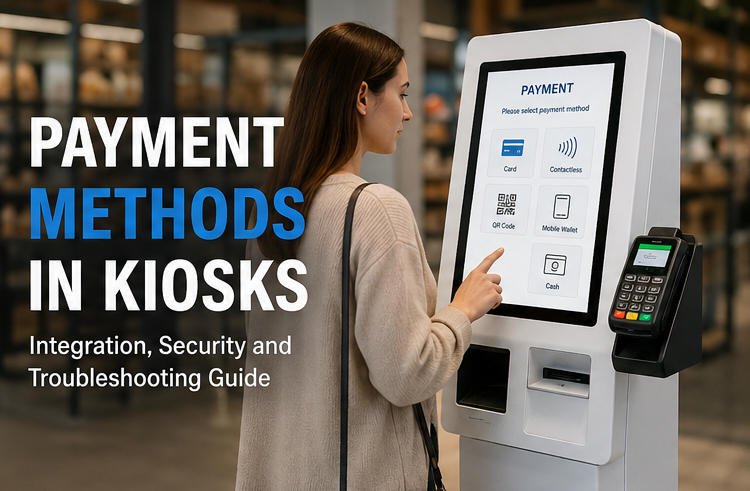
A kiosk normally does not process funds independently. It initiates and manages the transaction through several connected systems.
A typical payment workflow is:
- The customer selects products or services.
- The kiosk application calculates the amount due.
- The customer selects a payment method.
- The application sends the amount and transaction reference to the payment device or service.
- The payment terminal, QR platform, or cash module collects the payment information.
- The acquiring bank or payment gateway authorizes or rejects the transaction.
- The result returns to the kiosk application.
- The kiosk confirms the order, issues a receipt, and updates the POS, ERP, PMS, ticketing, or backend platform.
This architecture is important during troubleshooting. A displayed “payment failed” message does not automatically mean that the payment terminal is defective. The problem may originate from the network, API, merchant account, application timeout, gateway, or backend transaction logic.
For a broader explanation of transactional system architecture, see AONKIOSK’s guide to kiosk and POS system integration.
2. Bank Card Payments
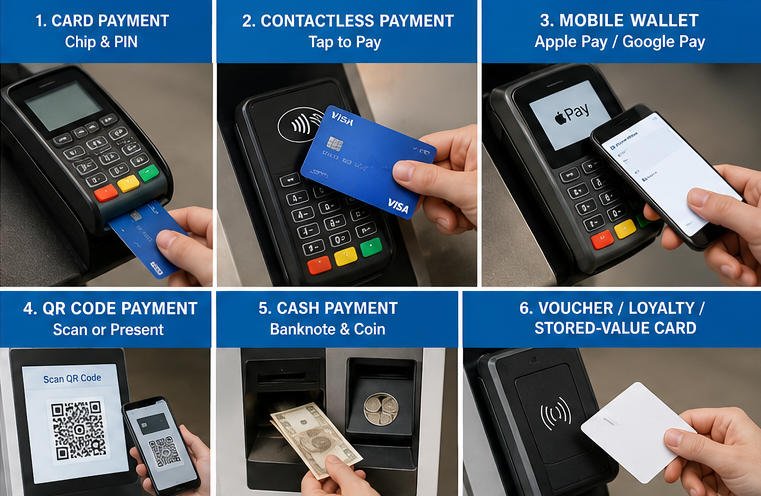
Card payment is commonly used in restaurant, retail, ticketing, hotel, healthcare, and public-service kiosks.
Chip Card Payments
EMV chip cards are inserted into the payment terminal and normally remain in the slot during authorization. The terminal communicates with the chip, performs cardholder verification when required, and sends protected transaction data through the payment network.
An unattended kiosk should use a payment terminal approved for unattended operation in the destination market. A standard IC card reader is not automatically a bank payment terminal. Identification readers, membership-card readers, and certified payment terminals provide different functions and security levels.
Magnetic Stripe Payments
Magnetic stripe payment may still be supported in certain markets or fallback situations. However, it generally provides less protection than chip-based payment. Whether magnetic stripe acceptance should be enabled depends on local acquiring rules and merchant policy.
PIN Entry
A transaction may require PIN verification depending on the card, amount, country, and acquiring configuration.
The PIN pad should be installed at a comfortable operating height while reducing the risk of shoulder surfing. The kiosk bracket must not obstruct the display, privacy shield, card slot, contactless area, or tamper indicators.
For a more detailed explanation of card technologies, review the NFC and card reader module guide.
3. Contactless Card and NFC Payments
Contactless payment allows a customer to tap a compatible card, smartphone, or wearable device near the payment terminal. It reduces transaction steps and avoids repeated card insertion.
Contactless options may include:
- Contactless bank cards
- Mobile wallets
- NFC-enabled watches
- Stored-value cards
- Campus or transport cards
- Membership credentials
Although these methods may use similar radio technology, they do not use the same payment workflow. A kiosk that reads an NFC membership card cannot automatically accept contactless bank payments. Bank payment requires an approved terminal, payment application, merchant account, and acquiring connection.
The enclosure must also provide a clearly marked tap area. Metal panels, thick covers, incorrect mounting depth, and nearby electronic components can reduce NFC reading performance. The payment-terminal supplier’s antenna-clearance and mounting requirements should be followed during enclosure design.
4. QR Code Payments
A QR payment kiosk can support customer-presented or merchant-presented codes.
Customer-Presented QR
The customer displays a payment code from a mobile application. The kiosk scans the code using a barcode or QR scanner and submits the payment information to the corresponding platform.
The scanner must support the required QR format and reliably read codes from mobile screens. Its installation angle should reduce glare while remaining accessible to users of different heights.
Merchant-Presented QR
The kiosk generates and displays a transaction-specific QR code. The customer scans the code with a mobile phone and completes payment through an application.
The kiosk must receive a verified server-side payment result before marking the transaction as paid. A changed screen, customer message, or screenshot should not be treated as confirmation.
The software should also manage:
- Payment timeouts
- Customer cancellation
- Delayed confirmations
- Duplicate notifications
- Duplicate-payment prevention
- Failed backend callbacks
- Transaction-status queries
QR payment platforms vary by country. The project team should confirm the payment provider, API, scanner type, code format, network path, and merchant account before finalizing the kiosk hardware.
5. Mobile Wallet Payments
Mobile wallets may use NFC, QR codes, payment links, or tokenized card credentials.
For NFC wallets, the payment is usually processed through the contactless payment terminal. For QR wallets, the kiosk communicates with the wallet provider or an aggregated payment gateway. For payment-link workflows, the kiosk may display a code that transfers the transaction to the customer’s mobile device.
The selected wallet brands must be supported by the merchant’s acquirer in the destination country. A payment terminal may contain NFC hardware but still require additional certification or account configuration before it can accept a particular wallet.
6. Cash Payments
Cash payment kiosks may include a banknote acceptor, coin acceptor, note recycler, coin hopper, or change dispenser.
Cash support increases enclosure size, hardware cost, security requirements, and maintenance workload.
Cash Acceptance Only
The kiosk accepts exact payment or applies predefined rules when the inserted value exceeds the order amount. This configuration is mechanically simpler but may inconvenience customers who do not have the correct denomination.
Cash with Change
The kiosk accepts cash and returns the required change. The software must track available note and coin denominations, calculate change, detect low levels, and prevent transactions when sufficient change is unavailable.
Cash Recycling
A cash recycler stores eligible accepted notes and reuses them when dispensing change. This can reduce refill frequency, but it requires cassette management, regular cleaning, reconciliation, and trained service procedures.
Cash modules should only be accessible through a locked service compartment. The kiosk should provide reinforced mounting, secure anchoring, protected cable routing, and sufficient clearance for cassette removal.
Operators must also plan:
- Cash collection frequency
- Change-float replenishment
- Accounting reconciliation
- Counterfeit-note handling
- Jam-clearing procedures
- Cash-level monitoring
- Service authorization
For card, cash, or mixed-payment applications, review AONKIOSK’s Retail & Payment Kiosks hardware category.
7. Stored-Value Cards, Vouchers and Account Payments
Some kiosk applications use payment methods beyond standard cards and cash.
Stored-value cards are frequently used in campuses, cafeterias, entertainment venues, transportation systems, and closed membership environments. Gift cards and vouchers may be scanned, swiped, inserted, or entered manually.
Loyalty points may cover all or part of a transaction. Bill-payment kiosks may identify an account through a barcode, QR code, account number, RFID credential, or document scanner before accepting payment.
Biometric verification may confirm the customer’s identity, but it is not normally the source of funds. The actual payment may still come from a linked card, stored-value account, wallet, or customer balance.
8. Hardware Required for Payment Integration
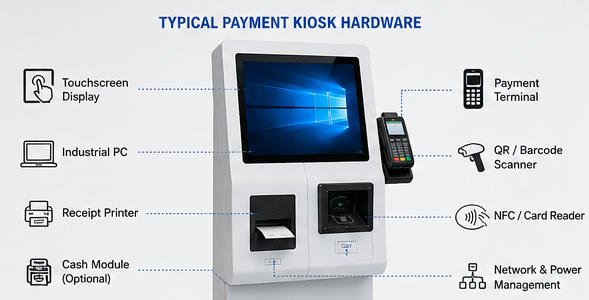
A payment kiosk may contain:
- Touchscreen display
- Industrial PC or Android mainboard
- Certified payment terminal
- Barcode or QR scanner
- Receipt printer
- Banknote and coin modules
- Network router or modem
- Status indicators
- Speakers
- Power-protection module
- Security camera where legally permitted
The kiosk computer must provide enough USB, serial, Ethernet, and video interfaces for all peripherals. Port planning should include service tools and possible future expansion rather than only the initial configuration.
Driver availability, communication protocols, and operating-system compatibility should be confirmed before mass production. A payment terminal that supports Windows does not necessarily provide the same integration method for Android or Linux.
See the AONKIOSK guide to the industrial PC in a kiosk for additional information about ports, drivers, reliability, and peripheral communication.
9. Software and Backend Integration
A payment device may connect through a local SDK, serial protocol, USB service, Android interface, browser integration, payment middleware, or cloud API.
The kiosk software should manage:
- Amount and currency
- Unique transaction reference
- Payment authorization result
- Cancellation and refund rules
- Timeout and retry behavior
- Duplicate-payment prevention
- Receipt information
- Offline behavior
- Network interruption
- Reconciliation records
- Recovery after power failure
An order should not be finalized only because the kiosk sent a payment request. It should be finalized after receiving a confirmed success result.
When communication is lost after authorization, the application should query the existing transaction before asking the customer to pay again. This prevents a successful payment from being repeated because of a temporary network or application failure.
10. Payment Security and Compliance
Payment security is shared across the hardware manufacturer, payment-terminal supplier, kiosk software provider, gateway, acquirer, merchant, installer, and operator.
Important controls include:
- Using approved payment terminals
- Encrypting payment communication
- Protecting internal cables and interfaces
- Restricting administrator access
- Applying security updates
- Monitoring tamper conditions
- Protecting system and transaction logs
- Separating kiosk traffic from other networks
- Avoiding prohibited cardholder-data storage
- Following local payment and privacy regulations
AONKIOSK can develop the enclosure, mounting system, internal layout, and service structure required for secure device installation. Payment certification, merchant onboarding, and acquiring approval must still be coordinated with the selected payment provider.
11. Common Payment Problems and Troubleshooting
Payment Terminal Has No Power
Check the power adapter, DC output, internal connector, fuse, and power distribution board. Confirm that the kiosk power supply can support all peripherals operating simultaneously.
Card or NFC Is Not Detected
Test several supported cards. Inspect the card slot and contactless area. Confirm that metalwork or decorative material is not blocking the NFC antenna. Check whether the terminal is online and running the correct payment application.
Kiosk Does Not Receive the Payment Result
Inspect the USB, serial, or Ethernet connection. Check port assignments, payment-service status, firewall rules, SDK logs, and application timeout settings. Confirm that another program has not occupied the communication port.
QR Code Cannot Be Scanned
Clean the scanner window, increase the mobile-screen brightness, and test the scanning distance. Verify that the scanner supports the required code format. For kiosk-displayed codes, check the QR size, contrast, and screen brightness.
Payment Is Approved but the Order Is Missing
Do not immediately request another payment. Search the payment portal and kiosk logs using the transaction reference. The authorization may have succeeded while the backend order request failed.
The application should provide a controlled order-recovery or refund procedure.
Receipt Does Not Print
First confirm whether the payment succeeded. Then check the paper roll, printer cover, cutter, USB connection, printer queue, and application logs.
Payment confirmation and receipt printing should be treated as separate system events. A digital receipt or controlled reprint function can reduce support problems.
Cash Is Rejected or Jammed
Check the accepted denomination settings, cassette position, note condition, sensor cleanliness, and module error indicators. Follow the cash-module manufacturer’s service procedure. Do not pull or force notes through the transport mechanism.
For project integration or hardware diagnosis, contact AONKIOSK through the technical support page.

12. Payment Method Selection Checklist
Before confirming the kiosk design, define:
- Deployment country and location
- Accepted payment methods
- Currency and transaction range
- Acquirer or payment gateway
- Indoor or outdoor installation
- Printed or digital receipt requirements
- Cash and change policy
- Operating system
- Kiosk application architecture
- Network connection
- Accessibility requirements
- Service and cash-collection procedures
- Pilot testing and certification plan
The payment terminal should ideally be selected before the enclosure reaches final engineering. Terminal dimensions, cable exits, mounting angle, antenna clearance, privacy requirements, service access, and certification conditions can all affect the front-panel design.
For guidance from prototype development through mass production, consult the self-service kiosk buying guide.
Conclusion
Payment methods in kiosks may include chip cards, contactless cards, NFC wallets, QR payments, stored-value accounts, vouchers, banknotes, and coins. The best combination depends on the destination market, customer workflow, transaction value, and maintenance capability rather than the total number of methods offered.
A reliable kiosk payment system requires more than installing a card reader or scanner. The hardware, application, gateway, merchant account, backend platform, receipt process, security controls, and recovery logic must operate as one complete transaction chain.
AONKIOSK supports OEM and ODM projects with configurable kiosk enclosures, industrial computers, touch displays, payment-terminal brackets, scanners, printers, cash modules, networking equipment, and service-oriented internal layouts.
Confirming the payment provider and transaction workflow during the early project stage helps reduce enclosure redesign, software integration delays, certification problems, and deployment risk.






