






Retailers are under constant pressure to serve more customers, control operating costs, reduce checkout congestion, and deliver a consistent shopping experience across every store. Traditional checkout counters remain important, but relying exclusively on cashier-operated lanes can make it difficult to respond efficiently to changing customer traffic, labor shortages, and growing demand for faster payment options.
A retail efficiency kiosk system gives stores an additional service channel through which customers can scan products, check prices, access membership benefits, complete payments, print receipts, or collect online orders with less direct employee assistance.
However, retail efficiency is not created by installing a touchscreen alone. A successful kiosk project requires the right combination of commercial-grade hardware, retail software, payment devices, peripheral modules, store workflows, employee support, and ongoing maintenance.
As a dedicated self-service kiosk hardware manufacturer, AONKIOSK develops customizable kiosk platforms for supermarkets, convenience stores, specialty retailers, shopping malls, pharmacies, and retail technology providers. These systems are designed to support the scanners, printers, payment terminals, cameras, weighing modules, and computing platforms required by different retail applications.
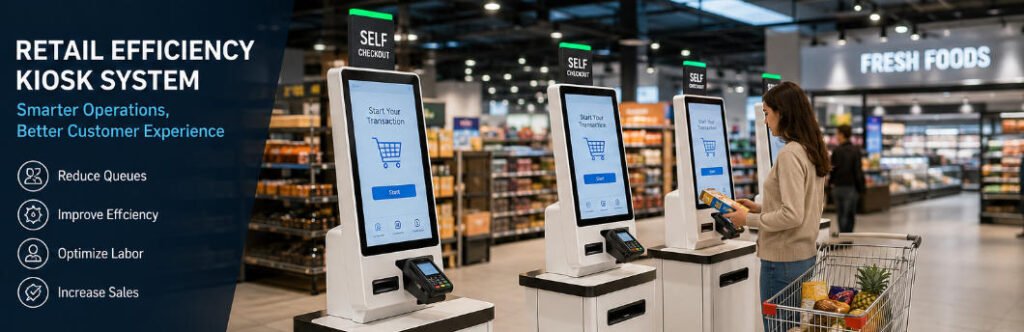
What Is a Retail Efficiency Kiosk System?
A retail efficiency kiosk system is a customer-facing self-service terminal designed to automate selected store processes and increase the number of transactions or service requests that can be handled within a given period.
Depending on the retailer’s business model, the system may support:
- Product scanning and self-checkout
- Card, NFC, mobile wallet, or QR-code payment
- Price checking
- Loyalty account registration
- Membership identification
- Coupon redemption
- Product information lookup
- Endless-aisle ordering
- Buy online, pick up in store services
- Returns or exchange initiation
- Digital and printed receipts
- Queue ticket issuance
- Customer feedback collection
A self-checkout machine is therefore one type of retail efficiency kiosk, but it is not the only possible configuration. Retail kiosks can be adapted to different stages of the customer journey, from product discovery to payment and after-sales service.
Retailers evaluating the difference between general kiosk hardware and checkout-specific equipment can also review the AONKIOSK guide to kiosks versus self-checkout machines.
Why Retail Efficiency Has Become a Strategic Priority
Retail efficiency is the ability to serve customers accurately, quickly, and consistently while making effective use of labor, floor space, inventory, and technology.
This has become increasingly important as retailers manage several operational pressures at the same time:
- Fluctuating customer traffic
- Difficulty recruiting and retaining employees
- Higher labor and property costs
- Growing expectations for contactless service
- Increasing use of digital payments
- Omnichannel order fulfillment
- Pressure to extend operating hours
- The need for consistent service across multiple locations
A well-planned retail efficiency kiosk system does not simply replace a cashier. It redistributes routine tasks between customers, employees, and digital systems so that each resource can be used more effectively.
For example, customers with small baskets can use self-checkout, while employees focus on age verification, customer assistance, online order preparation, shelf replenishment, and exception handling.
This creates a hybrid retail environment in which self-service and staff-assisted service operate together.

1. Increasing Checkout Throughput
One of the most direct benefits of a retail kiosk is the ability to process several transactions simultaneously.
At a conventional checkout station, one cashier usually operates one lane. In a self-checkout area, multiple customers can scan and pay at the same time while one trained employee supervises several kiosks, depending on store policies, transaction complexity, local regulations, and loss-prevention requirements.
This model can be especially effective for:
- Express-basket customers
- Convenience store purchases
- Packaged grocery items
- Pharmacy and personal-care products
- Electronics accessories
- Grab-and-go retail
- High-traffic promotional periods
Installing more checkout points does not automatically guarantee better throughput. The interface must be intuitive, barcode scanning must be responsive, payment processing must be reliable, and staff must be available to resolve exceptions quickly.
The physical layout is equally important. Customers need sufficient space to approach the kiosk, place products, complete payment, and leave without crossing the path of other shoppers.
AONKIOSK’s retail and payment kiosk range includes customizable floor-standing, countertop, and wall-mounted hardware formats that can be adapted to different store footprints.
2. Reducing Queue Pressure During Peak Hours
Retail traffic is rarely distributed evenly throughout the day. Supermarkets may become crowded after work, convenience stores may experience morning and lunchtime peaks, and shopping centers may face heavy weekend or holiday traffic.
Opening additional staffed lanes requires available employees. A kiosk-based checkout area provides stores with flexible transaction capacity that can remain available throughout the operating day.
By giving customers an alternative to waiting at a traditional register, kiosks can help:
- Distribute shoppers across more checkout points
- Reduce the perceived waiting time
- Prevent queues from blocking aisles
- Improve traffic flow near store exits
- Maintain service during staffing gaps
- Support seasonal demand without rebuilding the checkout area
The result is not necessarily the complete elimination of queues. Instead, a retail efficiency kiosk system gives store managers more tools for controlling congestion.
The strongest deployment model is often a combination of staffed checkout lanes, self-checkout kiosks, mobile POS devices, and express payment points.
3. Improving Labor Allocation
Retail kiosks are sometimes described only as labor-reduction tools. In practice, their greater value often comes from labor reallocation.
Many store employees spend a significant part of their shifts performing repetitive tasks such as scanning products, printing receipts, checking prices, or entering membership details. Automating part of this workload allows employees to focus on activities that require judgment, communication, or physical presence.
Employees may be reassigned to:
- Assist customers on the sales floor
- Resolve self-checkout exceptions
- Prepare online orders
- Replenish inventory
- Manage returns
- Verify restricted products
- Support elderly or less digitally confident shoppers
- Maintain store presentation
- Monitor loss-prevention procedures
This is particularly valuable when labor is limited. Rather than operating every transaction manually, employees supervise the retail environment and intervene where human support adds the most value.
Retailers should avoid assuming that kiosks can operate without staff involvement. Customer assistance, cleaning, paper replacement, payment-terminal checks, exception handling, and security monitoring remain necessary.
A realistic staffing plan is therefore an important part of every kiosk deployment.
4. Improving Transaction Accuracy
Manual checkout can be affected by incorrect product entry, missed promotions, communication problems, and inconsistent procedures. A properly integrated kiosk can standardize the steps customers follow during a transaction.
The system can display:
- Product names and prices
- Item quantities
- Applied promotions
- Loyalty discounts
- Tax information
- Payment totals
- Confirmation prompts
- Receipt options
Customers can review their baskets before payment and correct obvious errors. At the same time, the kiosk software can apply the retailer’s predefined pricing and promotional rules consistently.
Accuracy still depends on successful integration with the POS, pricing database, inventory platform, payment gateway, and promotion engine. The hardware must also reliably support the devices used in the workflow, such as barcode scanners, weighing modules, NFC readers, printers, and payment terminals.
AONKIOSK focuses on manufacturing and integrating the kiosk hardware platform. Retailers, POS providers, and system integrators can connect their own software while AONKIOSK configures the enclosure and hardware modules around the required workflow.
5. Making Better Use of Store Space
Store space has a direct operating cost. Large checkout counters, conveyor systems, and cashier workstations can occupy a significant portion of the sales floor.
Compact self-service terminals may allow retailers to install more transaction points within the same checkout zone. The space saved can potentially be used for:
- Additional merchandise
- Promotional displays
- Customer service areas
- Online order collection
- Wider circulation paths
- Accessible checkout routes
- Impulse-purchase displays
The appropriate kiosk format depends on the application.
Floor-Standing Kiosks
Floor-standing units are visible, stable, and suitable for full self-checkout configurations with multiple peripheral devices.
Countertop Kiosks
Countertop models are useful where floor space is limited or where the kiosk is installed on an existing service counter.
Wall-Mounted Kiosks
Wall-mounted systems work well for price checking, membership services, information lookup, and payment applications that require a smaller footprint.
AONKIOSK supports different mounting methods, display sizes, enclosure dimensions, branding options, and peripheral configurations through its OEM and ODM kiosk manufacturing services.
6. Supporting More Payment Methods
Customer payment preferences vary across countries, age groups, and store formats. A modern retail kiosk may need to support several payment technologies, including:
- EMV card payments
- Contactless cards
- NFC mobile wallets
- QR-code payments
- Store-value cards
- Loyalty points
- Gift cards
- Cash acceptance
- Cash recycling
Offering familiar payment methods can reduce transaction abandonment and make self-service more accessible to a wider customer base.
Payment integration must be planned early in the project because each terminal has specific dimensions, cable requirements, mounting angles, certification conditions, and maintenance needs.
The kiosk enclosure should provide secure mounting, organized cable routing, ventilation, service access, and protection against unauthorized removal. Payment-device selection and transaction certification must also comply with the retailer’s payment provider and local regulatory requirements.
7. Connecting Physical Stores with Omnichannel Retail
A retail kiosk does not have to be limited to in-store checkout. It can also connect physical stores with digital commerce channels.
An omnichannel kiosk may allow customers to:
- Search inventory in other locations
- Order products that are unavailable in the store
- Collect online purchases
- Check order status
- Print collection labels
- Initiate a return
- Access loyalty accounts
- Reorder previous purchases
- Request delivery to their home
- Browse an extended digital catalog
This “endless aisle” model can help retailers avoid losing a sale when a particular size, color, or product variation is unavailable locally.
It can also improve employee productivity. Instead of asking staff to leave the sales floor and check multiple systems, customers can begin the search independently and request assistance only when needed.
For larger retail chains, kiosks can become consistent digital access points that connect store locations with centralized inventory, CRM, e-commerce, and loyalty platforms.
8. Creating a More Consistent Customer Experience
Employee experience, training, language ability, and workload can affect the consistency of in-store service. A kiosk provides a standardized interface that follows the same approved workflow at every location.
Retailers can use the interface to present:
- Consistent brand visuals
- Multilingual instructions
- Standard product information
- Approved promotional messages
- Clear payment steps
- Accessibility options
- Digital receipts
- Customer support prompts
This is especially useful for franchised businesses and multi-location retailers that need to maintain similar service standards across different regions.
Consistency should not come at the expense of usability. Buttons must be clearly labeled, text must be readable, instructions must be concise, and customers must be able to cancel or request help easily.
Accessible mounting heights, clear floor space, suitable screen angles, high-contrast content, and support for assistive devices should also be considered during hardware planning.
Essential Hardware in a Retail Efficiency Kiosk System
The exact configuration depends on the intended workflow, but a typical retail kiosk may include the following components.
Commercial Touchscreen
The touchscreen is the primary customer interface. It should provide responsive input, suitable brightness, durable cover glass, and an appropriate viewing angle.
Industrial PC or Android Controller
The computing platform runs the kiosk application and connects peripheral devices. The choice between an x86 PC and an ARM-based platform depends on software compatibility, performance, connectivity, and project budget.
Barcode or QR-Code Scanner
A 1D/2D scanner can identify retail products, coupons, loyalty cards, collection codes, and mobile payment credentials.
Payment Terminal
The card terminal must be securely mounted while remaining accessible for tapping, inserting, or swiping payment cards.
Receipt Printer
Thermal printers provide transaction receipts, order confirmations, collection tickets, and return documents. Easy paper replacement and jam access are essential for daily maintenance.
Weighing Module
Grocery self-checkout systems may require produce scales, bagging-area scales, or both. Mechanical integration must account for accuracy, calibration, vibration, and cleaning.
Camera
Cameras may support security monitoring, remote assistance, transaction review, or computer-vision applications, subject to local privacy laws.
Status Indicator
An LED indicator helps employees identify kiosks that require assistance, paper replacement, payment checks, or maintenance.
Durable Enclosure
The enclosure protects internal components and determines how easily the kiosk can be installed, cleaned, serviced, and upgraded.
AONKIOSK’s retail kiosk hardware is designed to accommodate combinations of barcode scanners, payment terminals, NFC readers, receipt printers, cameras, and weighing devices for different retail projects.
How to Plan an Effective Retail Kiosk Deployment
Define the Operational Problem
The project should begin with a specific objective.
Examples include:
- Reducing queues for small baskets
- Extending service hours
- Improving price-checking access
- Supporting online order collection
- Reducing repetitive cashier tasks
- Increasing transaction capacity
- Introducing cashless checkout
- Improving loyalty enrollment
A clear objective makes it easier to select the correct hardware, software, peripherals, and success metrics.
Map the Complete Customer Workflow
Retailers should document every step from the moment a customer approaches the kiosk until the transaction is complete.
The workflow should include error conditions such as:
- An unreadable barcode
- A declined payment
- A printer without paper
- An unidentified product
- A weight mismatch
- An age-restricted item
- A cancelled transaction
- A network interruption
Planning exception handling before deployment prevents small problems from creating long queues or abandoned transactions.
Confirm System Integration
The kiosk may need to exchange data with:
- POS software
- Inventory management
- ERP platforms
- Pricing databases
- Loyalty programs
- Promotion engines
- Payment gateways
- Order management systems
- Loss-prevention tools
- Remote device management platforms
Hardware selection should not be finalized until software compatibility and connection requirements have been confirmed.
Select the Right Physical Configuration
The enclosure should match the store environment, customer flow, peripheral list, accessibility requirements, and maintenance process.
Important considerations include:
- Screen size and orientation
- Mounting style
- Product placement area
- Payment-terminal position
- Printer access
- Cable routing
- Ventilation
- Locking mechanisms
- Cleaning requirements
- Wheelchair access
- Branding and finish
Begin with a Pilot Deployment
A pilot allows the retailer to observe actual customer behavior before expanding to additional locations.
Useful pilot measurements include:
- Transactions per kiosk
- Average transaction duration
- Customer adoption rate
- Assistance requests
- Payment failures
- Scanner errors
- Printer incidents
- Kiosk uptime
- Queue length
- Customer satisfaction
- Employee feedback
These results can guide hardware, software, interface, and staffing improvements before mass deployment.
AONKIOSK supports prototype development, small-batch production, pilot projects, regional deployment, and larger-volume manufacturing, allowing retail technology providers to scale hardware after the configuration has been validated.
Common Challenges and Practical Solutions
Customers Need Assistance
Not every shopper is familiar with self-service technology.
Practical response: Keep instructions clear, provide a visible assistance button, train employees to intervene quickly, and maintain staffed checkout options.
Hardware Downtime
A single failed scanner, printer, or payment terminal can make the complete kiosk unavailable.
Practical response: Use commercial-grade modules, provide maintenance access, monitor device status, stock replacement consumables, and establish a service procedure.
Retail Shrink
Incorrect scanning, deliberate non-scanning, barcode substitution, and bagging errors can affect self-checkout operations.
Practical response: Combine appropriate software controls with cameras, weighing systems, employee supervision, transaction analytics, and store-specific loss-prevention policies.
Difficult System Integration
A kiosk may need to connect with several legacy platforms.
Practical response: Define API, driver, operating-system, network, and peripheral requirements before manufacturing begins. Test the complete hardware-software configuration during the pilot phase.
Poor Store Layout
Even reliable kiosks can create congestion when entrances, exits, baskets, bagging areas, and staff positions are poorly planned.
Practical response: Conduct a site assessment and map customer movement before deciding kiosk quantities and placement.
Why Hardware Quality Matters
Retail kiosks may operate for long hours in environments where they are touched by hundreds or thousands of customers. They must tolerate repeated use, cleaning, accidental impact, temperature changes, and frequent peripheral operation.
A reliable kiosk enclosure should provide:
- Structural stability
- Secure component mounting
- Effective heat dissipation
- Organized cable management
- Convenient maintenance access
- Replaceable peripheral modules
- Suitable ventilation
- Durable locks and hinges
- A clean, brand-appropriate appearance
Hardware design also affects the total cost of ownership. A kiosk that is difficult to open, repair, clean, or upgrade may create higher service expenses throughout its operating life.
For this reason, retailers and system integrators should evaluate not only the initial purchase price but also maintenance access, component availability, expected service life, upgrade flexibility, and manufacturing consistency.
AONKIOSK as a Retail Kiosk Hardware Partner
AONKIOSK specializes in self-service kiosk hardware rather than developing retail software. This hardware-first model is suitable for POS software providers, payment companies, retail automation developers, system integrators, and retailers that already have an application platform.
Available customization options can include:
- Floor-standing, countertop, or wall-mounted structures
- Custom dimensions and enclosure shapes
- Touchscreen size and orientation
- Intel or ARM computing platforms
- Barcode and QR-code scanners
- NFC readers
- Payment-terminal brackets
- Receipt printers
- Cameras
- Weighing modules
- LED status indicators
- Custom colors, logos, and surface finishes
- Internal cable and component layouts
- Maintenance doors and locking systems
Because every retail project has different software, payment, branding, and deployment requirements, AONKIOSK can support prototypes and small pilot batches before progressing to larger production volumes.
Businesses planning a customized project can explore the company’s retail automation solutions or review AONKIOSK’s broader self-service kiosk manufacturing capabilities.
Conclusion
A retail efficiency kiosk system can help stores increase transaction capacity, reduce queue pressure, improve labor allocation, standardize customer workflows, support omnichannel services, and use floor space more effectively.
The best results come from treating the kiosk as part of a complete retail operating system rather than as a standalone touchscreen.
Retailers should define a measurable objective, map the complete customer journey, confirm POS and payment integration, select suitable commercial hardware, prepare employees for exception handling, and validate the solution through a controlled pilot.
With the right deployment strategy, self-service kiosks can complement traditional checkout lanes and give customers more ways to interact with the store. For software companies, payment providers, and system integrators, AONKIOSK provides a customizable hardware foundation that can be engineered around the project’s application, peripheral, branding, and production requirements.






